Lesson 7: Behavior Trees
A guard that patrols, chases, searches and retreats needs a lot of decisions, and state machines start to buckle under that many transitions. In this lesson you build a behavior tree, the structure behind many modern game NPCs, and make it reactive, so an urgent threat interrupts whatever the character was busy doing.
🎯 Learning Objectives
By the end of this lesson, you will be able to:
- Build condition and action leaves that return SUCCESS, FAILURE or RUNNING and share a dict blackboard.
- Build a Sequence with memory and a reactive Selector that halts the branch it interrupts.
- Explain why a Selector that resumes at its running child can never be interrupted, and debug it by tracing ticks.
- Build Inverter, Repeater and Cooldown decorators that do bounded work per tick and use game time in seconds.
- Compare memory and reactive composites and choose between them for a flee behavior.
Project: Worker Behavior Tree, a gold-gathering worker whose tree is drawn live and who drops everything to escape an enemy.
In This Lesson
🌳 From State Machines to Trees
In the NPC State Machines lesson, every state listed its own exits: "from Patrol, go to Chase if you see the player; from Chase, go to Search if you lose them". That's clear for four states. With twelve, every new state needs exits to and from many others, and a rule like "always flee when badly hurt" has to be copied into all of them.
A behavior tree organizes the same decisions as a to-do list with priorities, the way you might plan a day: "If the house is on fire, get out. Otherwise, if there's work, do it: get the tools, go to the site, work, come home. Otherwise, relax." The tree is ticked from the root every frame, and each node answers with one of three results:
from enum import Enum, auto


class Status(Enum):
    SUCCESS = auto()     # done, and it worked
    FAILURE = auto()     # done, and it didn't (or it can't start)
    RUNNING = auto()     # still working: tick me again next frame
RUNNING is what lets a tree express actions that take many frames, such as walking to a tree or playing an attack animation, without blocking the game loop.
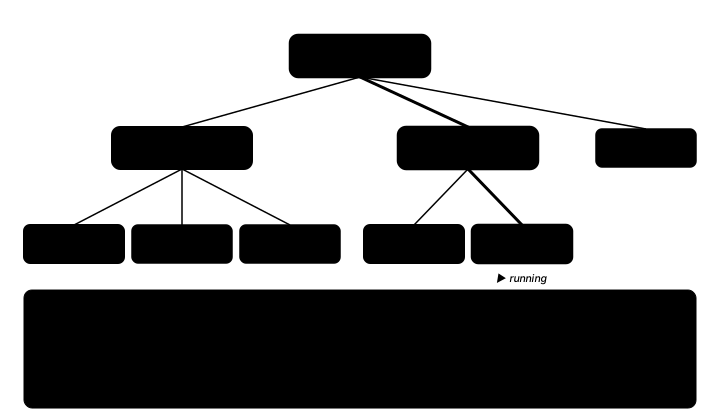
| Node kind | Examples | Job |
|---|---|---|
| Leaf: condition | EnemyNear?, HasGold? | Checks the world; SUCCESS or FAILURE, never RUNNING |
| Leaf: action | MoveToGold, Flee, Deposit | Changes the world; may return RUNNING |
| Composite | Sequence (→), Selector (?) | Decides which children run, and in what order |
| Decorator | Inverter, Repeater, Cooldown | Wraps one child and changes its result or timing |
🍃 Leaves and the Blackboard
Leaves need to know about the world: where the agent is, where the gold is, what time it is. Instead of giving every node its own references, the whole tree shares one blackboard, a notice board that any node can read and write. In Python, a plain dict is a perfect blackboard: bb["pos"], bb.get("target"), "gold" in bb all just work. (If you do wrap it in a class, make it behave like a dict: a class without __getitem__ makes every bb["key"] raise TypeError.)
class Node:
    def __init__(self, name):
        self.name = name
        self.children = []
        self.status = None         # last result, for drawing
        self.last_tick = -1        # which tree tick produced it

    def tick(self, bb, dt):
        self.status = self.update(bb, dt)
        self.last_tick = bb["tick"]
        return self.status

    def update(self, bb, dt):
        raise NotImplementedError

    def halt(self):
        """Forget any in-progress work (called when a higher priority takes over)."""
        for child in self.children:
            child.halt()


class Condition(Node):
    def __init__(self, name, test):
        super().__init__(name)
        self.test = test

    def update(self, bb, dt):
        return Status.SUCCESS if self.test(bb) else Status.FAILURE


class Action(Node):
    def __init__(self, name, act):
        super().__init__(name)
        self.act = act

    def update(self, bb, dt):
        return self.act(bb, dt)
Actions receive dt in seconds, like everything else in the course, so movement inside a leaf is frame-rate independent:
SPEED = 140.0              # px/s
REACH = 6.0                # px


def move_toward(bb, target, dt):
    offset = target - bb["pos"]
    if offset.length() <= REACH:
        return Status.SUCCESS
    bb["pos"] += offset.clamp_magnitude(SPEED * dt)
    return Status.RUNNING
🔀 Sequence and Selector
The two workhorse composites are logical AND and OR:
- Sequence (→) runs its children in order and fails as soon as one fails. It succeeds only if all of them succeed. "Go to the gold, pick it up, go home, drop it off."
- Selector (?) tries its children in order and succeeds as soon as one doesn't fail. "Escape if threatened, else gather, else idle." The child order is the priority list.
Sequence with memory
When a child returns RUNNING, the Sequence remembers its position and resumes there next tick, so it doesn't redo the steps it already finished:
class Sequence(Node):
    """AND, with memory: resumes at the child that was RUNNING last tick."""

    def __init__(self, name, children):
        super().__init__(name)
        self.children = children
        self.index = 0

    def update(self, bb, dt):
        while self.index < len(self.children):
            status = self.children[self.index].tick(bb, dt)
            if status == Status.RUNNING:
                return Status.RUNNING
            if status == Status.FAILURE:
                self.index = 0
                return Status.FAILURE
            self.index += 1
        self.index = 0
        return Status.SUCCESS

    def halt(self):
        super().halt()
        self.index = 0
The Selector must be reactive
It is tempting to give the Selector the same memory, and many tutorials do. It is a classic bug: a Selector that resumes at the RUNNING child never looks at the higher-priority "enemy near?" branch again while the worker walks toward the gold, so the interrupt you designed can never happen.
A reactive Selector starts at child 0 on every tick. Higher priorities get a fresh look each frame. When one of them takes over, the Selector halts every lower child, so an interrupted Sequence starts from its first step next time instead of resuming at a stale one:
class Selector(Node):
    """OR, reactive: starts at child 0 EVERY tick, so a higher priority can interrupt."""

    def __init__(self, name, children):
        super().__init__(name)
        self.children = children
        self.active = None         # index of the child that answered last tick

    def update(self, bb, dt):
        for i, child in enumerate(self.children):
            status = child.tick(bb, dt)
            if status != Status.FAILURE:
                for later in self.children[i + 1:]:
                    later.halt()                 # stop the branch we interrupted
                self.active = i
                return status
        self.active = None
        return Status.FAILURE
The same idea gives a ReactiveSequence: an AND that re-checks every child from the first on every tick, so a guard condition at the front can cancel the action behind it. You'll see it in the warm-up.
| Composite | On RUNNING, next tick starts at… | Use it for |
|---|---|---|
| Sequence (memory) | the running child | Multi-step plans that shouldn't repeat finished steps |
| ReactiveSequence | child 0 | An action guarded by a condition that must stay true |
| Selector (reactive) | child 0 | Priorities: anything more important can interrupt |
✅ Growth Mindset: Trace It on Paper
Behavior trees feel slippery at first because the "current state" is spread across several nodes' memories. If you can't predict what the next tick will do yet, that's normal. Draw the tree, write each composite's index next to it, and step through two or three ticks by hand. Almost everyone who gets comfortable with trees got there by tracing a few ticks slowly.
🎛️ Decorators
A decorator wraps one child and changes its result or its timing, without touching the child's code. Three are enough for most games:
- Inverter swaps SUCCESS and FAILURE (RUNNING passes through): "not HasGold?".
- Repeater runs its child n times. A tempting version loops inside a single tick with
while, and then a child that returns RUNNING freezes the whole game. A correct Repeater does at most one child tick per tree tick and returns RUNNING until the count is reached. - Cooldown fails for a number of seconds after its child succeeds. It reads the game clock from the blackboard (
bb["time"], which the game advances bydt), not the wall clock, so pausing the game also pauses the cooldown.
The decorators below come from the warm-up, which uses a slimmer Node than the one above: its constructor takes the children (Node(name, children)) and each subclass overrides tick() directly, with no status recording for drawing. In the exercise's style you would set self.children = [child] after super().__init__(name) and put the same logic in update().
class Repeater(Node):
    """Run the child `times` times in a row, at most ONE child tick per tree tick."""

    def __init__(self, child, times):
        super().__init__(f"Repeat({times})", [child])
        self.times = times
        self.count = 0

    def tick(self, bb, dt):
        status = self.children[0].tick(bb, dt)
        if status == Status.RUNNING:
            return status
        if status == Status.FAILURE:
            self.count = 0
            return status
        self.count += 1
        if self.count >= self.times:
            self.count = 0
            return Status.SUCCESS
        self.children[0].halt()          # fresh start for the next repetition
        return Status.RUNNING            # more repetitions to go, next tick
The warm-up, bt_toolkit_solution.py, is a console program (no window) that puts all of these side by side. It builds a tiny guard tree, lets an enemy appear one second into a three-second chore, and reports when each selector reacts. Then it traces a Repeater and a Cooldown.
"""Behavior-tree toolkit: Advanced Lesson 7 warm-up (solution).

A console program (no window): it builds small trees from the lesson's node
classes, ticks them with a fake clock, and prints what happened. Compare the
"sticky" selector from older tutorials with the reactive one, then watch a
bounded Repeater and a Cooldown at work.
"""
from enum import Enum, auto

DT = 0.25                  # seconds per tick in this demo


class Status(Enum):
    SUCCESS = auto()
    FAILURE = auto()
    RUNNING = auto()


class Node:
    def __init__(self, name, children=()):
        self.name = name
        self.children = list(children)

    def tick(self, bb, dt):
        raise NotImplementedError

    def halt(self):
        for child in self.children:
            child.halt()


class Condition(Node):
    def __init__(self, name, test):
        super().__init__(name)
        self.test = test

    def tick(self, bb, dt):
        return Status.SUCCESS if self.test(bb) else Status.FAILURE


class Action(Node):
    def __init__(self, name, act):
        super().__init__(name)
        self.act = act

    def tick(self, bb, dt):
        return self.act(bb, dt)


class Sequence(Node):
    """AND with memory: resumes at the child that was RUNNING."""

    def __init__(self, name, children):
        super().__init__(name, children)
        self.index = 0

    def tick(self, bb, dt):
        while self.index < len(self.children):
            status = self.children[self.index].tick(bb, dt)
            if status == Status.RUNNING:
                return status
            if status == Status.FAILURE:
                self.index = 0
                return status
            self.index += 1
        self.index = 0
        return Status.SUCCESS

    def halt(self):
        super().halt()
        self.index = 0


class ReactiveSequence(Node):
    """AND that re-checks every child from the first, every tick."""

    def tick(self, bb, dt):
        for i, child in enumerate(self.children):
            status = child.tick(bb, dt)
            if status != Status.SUCCESS:
                for later in self.children[i + 1:]:
                    later.halt()
                return status
        return Status.SUCCESS


class StickySelector(Node):
    """The OLD, broken pattern: resumes at the RUNNING child, so it never re-checks
    higher priorities while a long action runs. Kept here only for comparison."""

    def __init__(self, name, children):
        super().__init__(name, children)
        self.index = 0

    def tick(self, bb, dt):
        for i in range(self.index, len(self.children)):
            status = self.children[i].tick(bb, dt)
            if status == Status.RUNNING:
                self.index = i
                return status
            if status == Status.SUCCESS:
                self.index = 0
                return status
        self.index = 0
        return Status.FAILURE


class Selector(Node):
    """OR, reactive: always starts at child 0 and halts the branch it interrupts."""

    def tick(self, bb, dt):
        for i, child in enumerate(self.children):
            status = child.tick(bb, dt)
            if status != Status.FAILURE:
                for later in self.children[i + 1:]:
                    later.halt()
                return status
        return Status.FAILURE


class Inverter(Node):
    def __init__(self, child):
        super().__init__(f"Not({child.name})", [child])

    def tick(self, bb, dt):
        status = self.children[0].tick(bb, dt)
        if status == Status.SUCCESS:
            return Status.FAILURE
        if status == Status.FAILURE:
            return Status.SUCCESS
        return Status.RUNNING


class Repeater(Node):
    """Run the child `times` times in a row, at most ONE child tick per tree tick."""

    def __init__(self, child, times):
        super().__init__(f"Repeat({times})", [child])
        self.times = times
        self.count = 0

    def tick(self, bb, dt):
        status = self.children[0].tick(bb, dt)
        if status == Status.RUNNING:
            return status
        if status == Status.FAILURE:
            self.count = 0
            return status
        self.count += 1
        if self.count >= self.times:
            self.count = 0
            return Status.SUCCESS
        self.children[0].halt()          # fresh start for the next repetition
        return Status.RUNNING            # more repetitions to go, next tick

    def halt(self):
        super().halt()
        self.count = 0


class Cooldown(Node):
    """After the child succeeds, answer FAILURE for `seconds` of game time."""

    def __init__(self, child, seconds):
        super().__init__(f"Cooldown({seconds}s)", [child])
        self.seconds = seconds
        self.ready_at = 0.0

    def tick(self, bb, dt):
        if bb["time"] < self.ready_at:
            return Status.FAILURE
        status = self.children[0].tick(bb, dt)
        if status == Status.SUCCESS:
            self.ready_at = bb["time"] + self.seconds
        return status


def long_chore(bb, dt):
    """A 3-second job that reports RUNNING until it is done."""
    bb["chore"] += dt
    if bb["chore"] >= 3.0:
        bb["chore"] = 0.0
        return Status.SUCCESS
    return Status.RUNNING


def flee(bb, dt):
    bb["log"].append(f"t={bb['time']:.2f} flee")
    return Status.SUCCESS


def guard_tree(selector_class):
    danger = Sequence("Danger", [Condition("Enemy?", lambda bb: bb["enemy"]), Action("Flee", flee)])
    return selector_class("Root", [danger, Action("Chore", long_chore)])


def first_reaction(selector_class, enemy_at=1.0, until=4.0):
    """Tick a guard tree; an enemy appears at `enemy_at` seconds. When does it flee?"""
    bb = {"time": 0.0, "enemy": False, "chore": 0.0, "log": []}
    root = guard_tree(selector_class)
    while bb["time"] < until and not bb["log"]:
        bb["enemy"] = bb["time"] >= enemy_at
        root.tick(bb, DT)
        bb["time"] += DT
    return bb["log"][0] if bb["log"] else "never fled"


def repeat_trace(times=3):
    """How many tree ticks does Repeat(times) over a one-tick action take?"""
    bb = {"time": 0.0, "hits": 0}

    def swing(bb, dt):
        bb["hits"] += 1
        return Status.SUCCESS

    node = Repeater(Action("Swing", swing), times)
    results = []
    for _ in range(times):
        results.append(node.tick(bb, DT).name)
    return results, bb["hits"]


def cooldown_trace(seconds=1.0, ticks=10):
    bb = {"time": 0.0}
    node = Cooldown(Action("Shout", lambda bb, dt: Status.SUCCESS), seconds)
    fired = []
    for _ in range(ticks):
        if node.tick(bb, DT) == Status.SUCCESS:
            fired.append(bb["time"])
        bb["time"] += DT
    return fired


def main():
    print("Enemy appears at t=1.00 while a 3-second chore is running.")
    print("  sticky selector:  ", first_reaction(StickySelector))
    print("  reactive selector:", first_reaction(Selector))
    results, hits = repeat_trace(3)
    print(f"Repeat(3): {' '.join(results)} ({hits} swings, one per tick)")
    print("Cooldown(1.0s) fired at t =", ", ".join(f"{t:.2f}" for t in cooldown_trace()))


if __name__ == "__main__":
    main()
Its output shows the difference in one line each:
Enemy appears at t=1.00 while a 3-second chore is running.
  sticky selector:   t=3.00 flee
  reactive selector: t=1.00 flee
Repeat(3): RUNNING RUNNING SUCCESS (3 swings, one per tick)
Cooldown(1.0s) fired at t = 0.00, 1.00, 2.00
🧭 Memory or Reactive? Designing Escape
The exercise's worker has this tree:
NEAR = 120.0               # px: an enemy closer than this is a threat
SAFE = 200.0               # px: Flee succeeds once the enemy is this far away (> NEAR)


def build_tree():
    escape = Sequence("Escape", [Condition("EnemyNear?", enemy_near), Action("Flee", flee)])
    gather = Sequence("Gather", [
        Condition("HasGold?", lambda bb: bool(bb["gold"])),
        Action("MoveToGold", move_to_gold),
        Action("Pickup", pickup),
        Action("MoveHome", move_home),
        Action("Deposit", deposit),
    ])
    return Selector("Worker", [escape, gather, Action("Idle", idle)])
Why is Escape a Sequence with memory, when the root is reactive? Follow a tick. The enemy appears 80 px away: EnemyNear? succeeds, Flee starts and returns RUNNING, and Escape remembers it is on Flee. As the worker runs, the distance passes 120 px. A reactive Escape would re-check EnemyNear? now, fail, and hand control back to Gather, and the worker would turn around and hover at the edge of the danger zone. With memory, Escape keeps ticking Flee until the worker is 200 px away. The gap between NEAR and SAFE is hysteresis: the rule for starting a behavior differs from the rule for stopping it, so the agent doesn't flicker between two choices.
Use one named constant for each distance and derive everything from them. If a comment says "flee until 25 px" while the code checks 60 px, the worker's behavior will match neither description, and nobody will trust the comments again.
💡 Why this matters
Reactive where it matters (the root, so danger always gets a look), committed where it matters (the flee, so it finishes). Almost every behavior-tree design question comes down to that balance, and a tree makes it visible in the structure instead of burying it in flags.
🔍 Seeing the Tree
Trees are much easier to debug when you can see them. The exercise draws the live tree under the map: green SUCCESS, red FAILURE, yellow RUNNING, and gray for nodes that weren't ticked this frame (each node stores the tick number of its last result, so stale colors don't linger).
The layout is a small classic: give every leaf its own evenly spaced slot, left to right, and put each parent halfway between its first and last child. Nothing can overlap, because no two leaves share a slot. The naive alternative, placing children at fixed offsets from their parent, makes sibling subtrees draw on top of each other as soon as the tree grows.
def layout(node, depth=0, next_leaf=None, out=None):
    """Tidy tree: leaves get evenly spaced slots, parents sit over their children."""
    if out is None:
        out, next_leaf = {}, [0]
    if not node.children:
        out[node] = (next_leaf[0], depth)
        next_leaf[0] += 1
    else:
        for child in node.children:
            layout(child, depth + 1, next_leaf, out)
        slots = [out[c][0] for c in node.children]
        out[node] = ((slots[0] + slots[-1]) / 2, depth)
    return out
Try the tree in the browser. Add gold, then press Enemy! while the worker is walking. With the reactive selector, Escape lights up at once. Switch on "Sticky selector" to see the bug: the worker ignores the enemy until its whole gathering trip is done, and once it starts idling it never notices new gold at all, because the Selector keeps resuming at Idle. (The demo's distances are scaled down to fit the smaller map.)
🏋️ Practice Exercise: Worker Behavior Tree
Objective: bring a gold-gathering worker to life with a behavior tree whose reactive root lets an enemy interrupt gathering on the very next frame.
Time: about 45 minutes. Starter file: worker_bt_starter.py (your instructor has it). The node base classes, the leaves (except Flee), the blackboard and the tree drawing are done. The numbered to-do comments (1 to 4) in the file follow steps 2 to 5 below, in order.
- Run the starter and press R a few times: gold appears, but the worker just stands there and the tree stays red. (≈ 2 min)
- Write
Sequence.update()with memory. (≈ 10 min) - Write the reactive
Selector.update(): start at child 0 every tick, halt every later child when one answers, and recordself.active. (≈ 10 min) - Write the
flee()leaf: FAILURE with no enemy, SUCCESS atSAFEdistance, otherwise move away atSPEED * dtand return RUNNING. (≈ 8 min) - Fix the priority order in
build_tree()so Escape comes first. Press R, then E while the worker walks. (≈ 5 min) - Watch the tree view during an interrupt and explain to a partner why Gather turns gray. (≈ 5 min)
You are done when:
- the worker carries each gold nugget home and the score goes up;
- pressing E makes Escape light up on the next frame, even mid-walk, and the HUD's interrupt counter goes up;
- the worker keeps running until it is outside the enemy's red circle by a clear margin, then goes back to work;
- no two boxes in the tree view overlap.
💡 Hint
If E does nothing, check the root's order first, then your Selector: does it start at 0 every tick? If the worker picks up gold it never walked to after an interrupt, the Gather Sequence wasn't halted, so its index is still pointing at Pickup. Print root.active and gather.index each frame while you test.
✅ Example Solution
The lab file has a few extra lines marked lab runtime near the top and and frame_budget() in the loop, so the instructor's checker can run it automatically. They do nothing when you run it yourself, and they are left out here.
"""Worker Behavior Tree: Advanced Lesson 7 practice exercise (solution).

A worker gathers gold and carries it home, driven by a behavior tree whose
root Selector is reactive: press E to drop an enemy next to the worker and the
Escape branch interrupts gathering on the very next tick. R adds gold, SPACE
pauses. The live tree is drawn under the map. Close the window to quit.
"""
import random
from enum import Enum, auto

import pygame


WIDTH, MAP_H, TREE_H = 960, 380, 230
SPEED = 140.0              # px/s
NEAR = 120.0               # px: an enemy closer than this is a threat
SAFE = 200.0               # px: Flee succeeds once the enemy is this far away (> NEAR)
ENEMY_LIFETIME = 4.0       # s: enemies wander off after this long
REACH = 6.0                # px: close enough to count as "there"


class Status(Enum):
    SUCCESS = auto()
    FAILURE = auto()
    RUNNING = auto()


# ---------------------------------------------------------------- tree nodes
class Node:
    def __init__(self, name):
        self.name = name
        self.children = []
        self.status = None         # last result, for drawing
        self.last_tick = -1        # which tree tick produced it

    def tick(self, bb, dt):
        self.status = self.update(bb, dt)
        self.last_tick = bb["tick"]
        return self.status

    def update(self, bb, dt):
        raise NotImplementedError

    def halt(self):
        """Forget any in-progress work (called when a higher priority takes over)."""
        for child in self.children:
            child.halt()


class Condition(Node):
    def __init__(self, name, test):
        super().__init__(name)
        self.test = test

    def update(self, bb, dt):
        return Status.SUCCESS if self.test(bb) else Status.FAILURE


class Action(Node):
    def __init__(self, name, act):
        super().__init__(name)
        self.act = act

    def update(self, bb, dt):
        return self.act(bb, dt)


class Sequence(Node):
    """AND, with memory: resumes at the child that was RUNNING last tick."""

    def __init__(self, name, children):
        super().__init__(name)
        self.children = children
        self.index = 0

    def update(self, bb, dt):
        while self.index < len(self.children):
            status = self.children[self.index].tick(bb, dt)
            if status == Status.RUNNING:
                return Status.RUNNING
            if status == Status.FAILURE:
                self.index = 0
                return Status.FAILURE
            self.index += 1
        self.index = 0
        return Status.SUCCESS

    def halt(self):
        super().halt()
        self.index = 0


class Selector(Node):
    """OR, reactive: starts at child 0 EVERY tick, so a higher priority can interrupt."""

    def __init__(self, name, children):
        super().__init__(name)
        self.children = children
        self.active = None         # index of the child that answered last tick

    def update(self, bb, dt):
        for i, child in enumerate(self.children):
            status = child.tick(bb, dt)
            if status != Status.FAILURE:
                for later in self.children[i + 1:]:
                    later.halt()                 # stop the branch we interrupted
                self.active = i
                return status
        self.active = None
        return Status.FAILURE


# ---------------------------------------------------------------- leaf behaviors
def nearest_enemy(bb):
    enemies = bb["enemies"]
    if not enemies:
        return None
    return min(enemies, key=lambda e: e["pos"].distance_to(bb["pos"]))


def enemy_near(bb):
    enemy = nearest_enemy(bb)
    return enemy is not None and enemy["pos"].distance_to(bb["pos"]) < NEAR


def move_toward(bb, target, dt):
    offset = target - bb["pos"]
    if offset.length() <= REACH:
        return Status.SUCCESS
    bb["pos"] += offset.clamp_magnitude(SPEED * dt)
    return Status.RUNNING


def flee(bb, dt):
    enemy = nearest_enemy(bb)
    if enemy is None:
        return Status.FAILURE
    away = bb["pos"] - enemy["pos"]
    if away.length() >= SAFE:
        return Status.SUCCESS
    if away.length_squared() == 0:
        away = pygame.Vector2(1, 0)
    bb["pos"] += away.normalize() * SPEED * dt
    bb["pos"].x = max(10, min(WIDTH - 10, bb["pos"].x))
    bb["pos"].y = max(10, min(MAP_H - 10, bb["pos"].y))
    return Status.RUNNING


def move_to_gold(bb, dt):
    if not bb["gold"]:
        return Status.FAILURE
    return move_toward(bb, bb["gold"][0], dt)


def pickup(bb, dt):
    if bb["gold"] and bb["gold"][0].distance_to(bb["pos"]) <= REACH:
        bb["gold"].pop(0)
        bb["carrying"] = True
        return Status.SUCCESS
    return Status.FAILURE


def move_home(bb, dt):
    return move_toward(bb, bb["home"], dt)


def deposit(bb, dt):
    if bb["carrying"]:
        bb["carrying"] = False
        bb["score"] += 1
        return Status.SUCCESS
    return Status.FAILURE


def idle(bb, dt):
    return Status.RUNNING           # wait for something to do


def build_tree():
    """The child order of the root IS the worker's priority list."""
    # Escape is a Sequence WITH memory: once Flee starts, it keeps running until the
    # worker is SAFE px away, even after the enemy is farther than NEAR (hysteresis).
    escape = Sequence("Escape", [Condition("EnemyNear?", enemy_near), Action("Flee", flee)])
    gather = Sequence("Gather", [
        Condition("HasGold?", lambda bb: bool(bb["gold"])),
        Action("MoveToGold", move_to_gold),
        Action("Pickup", pickup),
        Action("MoveHome", move_home),
        Action("Deposit", deposit),
    ])
    return Selector("Worker", [escape, gather, Action("Idle", idle)])


def new_blackboard():
    home = pygame.Vector2(80, MAP_H / 2)
    return {"tick": 0, "pos": home.copy(), "home": home, "gold": [], "enemies": [],
            "carrying": False, "score": 0}


# ---------------------------------------------------------------- drawing
def layout(node, depth=0, next_leaf=None, out=None):
    """Tidy tree: leaves get evenly spaced slots, parents sit over their children."""
    if out is None:
        out, next_leaf = {}, [0]
    if not node.children:
        out[node] = (next_leaf[0], depth)
        next_leaf[0] += 1
    else:
        for child in node.children:
            layout(child, depth + 1, next_leaf, out)
        slots = [out[c][0] for c in node.children]
        out[node] = ((slots[0] + slots[-1]) / 2, depth)
    return out


STATUS_COLORS = {Status.SUCCESS: (34, 197, 94), Status.FAILURE: (239, 68, 68),
                 Status.RUNNING: (250, 204, 21)}


def draw_tree(surface, root, font, tick, top):
    spots = layout(root)
    leaves = sum(1 for n in spots if not n.children)
    slot_w = WIDTH / leaves
    box_w, box_h, row_h = min(112, slot_w - 6), 24, 62

    def center(node):
        slot, depth = spots[node]
        return pygame.Vector2(slot_w * (slot + 0.5), top + 20 + depth * row_h)

    for node in spots:
        for child in node.children:
            pygame.draw.line(surface, (100, 116, 139), center(node), center(child), 2)
    for node in spots:
        rect = pygame.Rect(0, 0, box_w, box_h)
        rect.center = center(node)
        fresh = node.last_tick == tick
        color = STATUS_COLORS[node.status] if fresh else (71, 85, 105)
        pygame.draw.rect(surface, color, rect, border_radius=5)
        label = font.render(node.name, True, (15, 23, 42) if fresh else (203, 213, 225))
        surface.blit(label, label.get_rect(center=rect.center))


def main():
    pygame.init()
    screen = pygame.display.set_mode((WIDTH, MAP_H + TREE_H))
    pygame.display.set_caption("Worker Behavior Tree (R gold, E enemy, SPACE pause)")
    clock = pygame.time.Clock()
    font = pygame.font.Font(None, 20)
    hud_font = pygame.font.Font(None, 24)
    rng = random.Random(5)

    bb = new_blackboard()
    root = build_tree()
    paused = False
    interrupts = 0
    last_active = None

    running = True
    while running:
        dt = min(clock.tick(60) / 1000, 0.05)
        for event in pygame.event.get():
            if event.type == pygame.QUIT:
                running = False
            elif event.type == pygame.KEYDOWN:
                if event.key == pygame.K_r:
                    bb["gold"].append(pygame.Vector2(rng.uniform(300, WIDTH - 40), rng.uniform(40, MAP_H - 40)))
                elif event.key == pygame.K_e:
                    spot = bb["pos"] + pygame.Vector2(80, 0).rotate(rng.uniform(0, 360))
                    bb["enemies"].append({"pos": spot, "age": 0.0})
                elif event.key == pygame.K_SPACE:
                    paused = not paused

        if not paused:
            for enemy in bb["enemies"]:
                enemy["age"] += dt
            bb["enemies"] = [e for e in bb["enemies"] if e["age"] < ENEMY_LIFETIME]
            bb["tick"] += 1
            root.tick(bb, dt)
            if last_active == 1 and root.active == 0:
                interrupts += 1
                print(f"tick {bb['tick']}: Escape interrupted Gather")
            last_active = root.active

        screen.fill((15, 23, 42))
        pygame.draw.rect(screen, (30, 41, 59), (0, 0, WIDTH, MAP_H))
        pygame.draw.rect(screen, (146, 64, 14), (bb["home"].x - 14, bb["home"].y - 14, 28, 28))
        for gold in bb["gold"]:
            pygame.draw.circle(screen, (250, 204, 21), gold, 7)
        for enemy in bb["enemies"]:
            pygame.draw.circle(screen, (90, 40, 40), enemy["pos"], NEAR, 1)
            pygame.draw.circle(screen, (239, 68, 68), enemy["pos"], 10)
        pygame.draw.circle(screen, (96, 165, 250), bb["pos"], 11)
        if bb["carrying"]:
            pygame.draw.circle(screen, (250, 204, 21), bb["pos"], 4)
        hud = f"score {bb['score']}   gold left {len(bb['gold'])}   interrupts {interrupts}" + \
              ("   PAUSED" if paused else "")
        screen.blit(hud_font.render(hud, True, (226, 232, 240)), (10, 8))
        draw_tree(screen, root, font, bb["tick"], MAP_H)
        pygame.display.flip()

    pygame.quit()
    print(f"score {bb['score']}, interrupts {interrupts}")


if __name__ == "__main__":
    main()
✅ Growth Mindset: A Frozen Worker Is Information
When the worker won't move, the tree view is telling you where to look: the first red node on the path from the root is where the decision died. You're not stuck; you have a clue. Read the colors from the top down before you change any code.
📓 Learning Journal
Take five minutes to write in your learning journal (a notebook or a plain text file works). Jot down:
- Key concepts you learned today
- Techniques that clicked (and the ones that haven't, yet)
- Questions or confusion to bring to the next session
- Ideas to try in your own game
- Progress and feelings: how did this lesson go for you?
✍️ This lesson's prompts:
- Sketch a behavior tree for an NPC in a game you like (a shopkeeper, a guard, a pet). Which branches need to interrupt others?
- In your own words, explain the difference between a Sequence with memory and a reactive Selector. When would each be wrong?
- The state machine from the NPC State Machines lesson or a behavior tree: which would you pick for your capstone's enemies, and why?
📝 Summary
A behavior tree is a priority list the game ticks every frame. Leaves check or change the world through a shared dict blackboard and answer SUCCESS, FAILURE or RUNNING. Sequences chain steps and remember where they are; the Selector at the root must be reactive, starting from its first child every tick and halting whatever it interrupts, or urgent branches never get a look. Decorators change a child's result or timing, and they must do bounded work per tick and use game time. Mixing reactive and committed composites, plus a gap between the "start" and "stop" distances, gives behavior that reacts quickly without flickering.
🎓 Key Takeaways
- Three results: SUCCESS, FAILURE, RUNNING. RUNNING lets actions span many frames.
- Sequence = AND with memory; Selector = OR, and at the root it must be reactive.
- When a higher priority takes over, halt the lower branches so they restart cleanly.
- Decorators never loop inside one tick; cooldowns use the game clock in seconds.
- The blackboard can simply be a dict; one constant per tuning distance keeps behavior and description in sync.
- Draw the tree live: the first red node from the top is where a decision failed.
🔭 Looking Ahead
A behavior tree's priorities are fixed by its layout: Escape always beats Gather. In the next lesson, Utility AI, options compete by score instead, so the same character can choose differently as hunger, health and danger change.
❓ Common Questions
Why tick the whole tree every frame? Isn't that slow?
Most trees are small, and ticking from the root is what makes them reactive. If a tree grows large, you can tick it less often (say 10 times a second) while movement still updates every frame. Measure before you optimize, as in the Profiling & Performance lesson.
Should actions be able to fail?
Yes. MoveToGold fails if the gold has vanished, Pickup fails if you're not close enough. A failing action makes its Sequence fail, and the Selector moves on to the next option. That's how trees recover from surprises without special cases.
What does "halt" have to do in an action?
Whatever cleanup the action needs: stop an animation, release a reserved target, clear a timer. In this lesson's leaves, the progress lives in the blackboard (the worker's position), so halting the composites is enough.
Are behavior trees better than state machines?
They're different tools. State machines are great for small, well-defined modes (a door, a menu, a boss's phases). Behavior trees scale better when there are many behaviors with priorities. Many games use both: a tree whose leaves run little state machines.
Where's the Parallel node?
A Parallel ticks several children in the same frame, for example "move to the target" while "aim at the player". It's useful, but its success and failure rules vary between engines. Build it as a stretch goal once Sequence and Selector feel natural.
🎯 Quick Quiz
Question 1: A Sequence with memory has three children. This tick, the first returns SUCCESS and the second returns RUNNING. What happens?
Question 2: With the demo's Sticky selector switched on, an enemy appears while the worker walks to the gold, but it only flees after the walk ends. Why?
Question 3: Repeater(child, 3) ticks its child, which succeeds for the first time. What should the Repeater do in this tick?
Question 4: Why does the reactive Selector call halt() on lower-priority children when a higher one answers?
Question 5: Escape is a Sequence with memory, not a ReactiveSequence. What does that buy the worker?
🌟 Going Further
- Cooldown in the worker: wrap Escape's Flee in the warm-up's
Cooldownso a worker that just escaped is "brave" for 3 seconds. What goes wrong if the enemy is still close? - Parallel: build a Parallel node that ticks all children and succeeds when N of them succeed. Use it to make the worker glance at the enemy while fleeing.
- Data-driven trees: describe the worker tree in JSON (node type, name, children) and build it with a small factory function, so designers can edit it without touching Python.
- Read more: Colledanchise and Ögren's book Behavior Trees in Robotics and AI (free on arXiv) covers reactive trees in depth.