State Machines
Managing Game Flow with State Machines
State machines are the backbone of game architecture! They manage everything from menu systems to character behavior, providing clean, organized ways to handle complex game logic. Let's master this essential pattern! 🎮🔄
Understanding State Machines
🎭 The Theater Play Analogy
Think of a state machine like scenes in a play:
- States: Different scenes (Menu, Gameplay, Pause, Game Over)
- Transitions: Moving between scenes (Start Game, Pause, Resume)
- Current State: The active scene being performed
- Events: Cues that trigger scene changes
- Actions: What happens during each scene
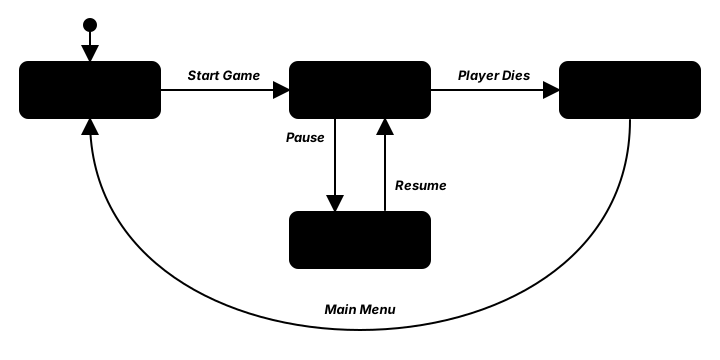
Interactive State Machine Visualizer
Click buttons to trigger state transitions!
Current State: MainMenu
State History: MainMenu
Time in State: 0.0s
Basic State Machine Implementation
import pygame
from enum import Enum, auto

class GameState(Enum):
    """Enumeration of game states"""
    MENU = auto()
    PLAYING = auto()
    PAUSED = auto()
    GAME_OVER = auto()
    LOADING = auto()
    SETTINGS = auto()

class State:
    """Base class for game states"""
    def __init__(self, state_manager: 'StateManager') -> None:
        self.state_manager: 'StateManager' = state_manager
        self.game = state_manager.game

    def enter(self) -> None:
        """Called when entering this state"""
        pass

    def exit(self) -> None:
        """Called when leaving this state"""
        pass

    def update(self, dt: float) -> None:
        """Update state logic"""
        pass

    def draw(self, screen: pygame.Surface) -> None:
        """Draw state visuals"""
        pass

    def handle_event(self, event: pygame.event.Event) -> None:
        """Handle input events"""
        pass

class StateManager:
    """Manages game states and transitions"""
    def __init__(self, game) -> None:
        self.game = game
        self.states: dict[GameState, 'State'] = {}
        self.current_state: 'State | None' = None
        self.previous_state: 'State | None' = None
        self.state_stack: list['State'] = []

    def register_state(self, state_enum: GameState, state_class) -> None:
        """Register a state with the manager"""
        self.states[state_enum] = state_class(self)

    def change_state(self, new_state_enum: GameState) -> None:
        """Change to a new state"""
        if self.current_state:
            self.current_state.exit()
            self.previous_state = self.current_state

        self.current_state = self.states[new_state_enum]
        self.current_state.enter()

        print(f"State changed to: {new_state_enum.name}")
Key Takeaways
- 🔄 State machines organize complex game flow
- 📦 Each state encapsulates specific functionality
- ➡️ Transitions define how states connect
- 🎮 Clean architecture makes games maintainable
- 🐛 Easier debugging with clear state boundaries
- 🔧 Extensible design for adding new states
🏋️♂️ Practice Exercise
🏋️♂️ Exercise 1: Two-Layer Transition Gate + Strict Enter/Exit Ordering in One Pygame Window
Objective: Build a single-process pygame demo (~85 lines) that exercises three pillar formal-FSM patterns from this lesson in one runnable program: the explicit transition table (addTransition(event, target, condition) registers each allowed transition; events absent from the table are silently rejected with no fallback), the two-layer transition gate (Layer 1: is the event registered in the current state's table at all? Layer 2: does the optional condition(context) function return True given the current runtime context?), and strict enter/exit hook ordering (previous.on_exit() MUST complete before current.on_enter() starts so per-state resources allocated in on_enter are released in on_exit before the next state allocates its own). Three states (MENU / PLAYING / PAUSED) with the MENU→PLAYING transition condition-gated on has_save_data — key D toggles the flag so the same S keypress is sometimes allowed (gate passes) and sometimes blocked (gate rejects) at runtime even though it is always allowed in the table. Generalizes the networking_lobby's ad-hoc can_start() state machine to the FORMAL pattern that prevents ad-hoc state from collapsing into spaghetti as N grows.
Instructions:
- Define a
Stateclass holdingname,color, atransitionsdict (event → (target, condition)), andon_enter/on_exitcallables. Implementadd_transition(event, target, condition=None)andcan_transition(event, context)returning a (bool, payload) tuple where payload is either the target state on success or a reason string on failure. - Define a
StateMachineclass holdingcurrentand acontextdict. Implementtransition(event)in this strict order: callcan_transitionon the current state; on success, callcurrent.on_exit(context)first, THEN re-assignself.current, THEN callnew_current.on_enter(context). The exit-before-enter ordering is non-negotiable. - Create three states (MENU blue, PLAYING green, PAUSED gold) and register transitions:
MENU --[START]--> PLAYINGwithcondition=lambda ctx: ctx['has_save_data'];PLAYING --[PAUSE]--> PAUSED;PAUSED --[RESUME]--> PLAYING;PAUSED --[QUIT]--> MENU. NoteMENU --[PAUSE]-->andPLAYING --[QUIT]-->are NOT registered — pressing those keys in those states must fall through to the table-membership check and be silently rejected (logged as BLOCKED). - Wire
on_enter/on_exithooks to log per-state lifecycle events intocontext['logs']: PLAYING.on_enter resetscontext['score']=0; PLAYING.on_exit logs the final score. Per-frame in the main loop, when current is PLAYING, incrementcontext['score'] += dt * 10. - Render the screen filled with the current state's color (visual confirmation of transitions); HUD shows current state name +
has_save_databool + score + key bindings + the last 8 transition log lines. Wire keys:S=START,P=PAUSE,R=RESUME,Q=QUIT,D=toggle has_save_data. Verify by pressingSwhilehas_save_data=False: the log showsBLOCKED MENU -[START]-> ? (runtime condition denied); pressDto flip the flag, thenSsucceeds. PressingSwhile in PLAYING is also blocked but with a DIFFERENT reason (event not in transition table) — the two layers fail with distinguishable messages.
💡 Hint
The two-layer gate is two short conditionals in can_transition: if event not in self.transitions: return False, 'event not in transition table' (Layer 1: design-time table membership), then if condition and not condition(context): return False, 'runtime condition denied' (Layer 2: runtime context check). Layer 1 catches typos and design errors at trigger-time; Layer 2 catches gameplay-state violations like "you can't start a game without save data." In StateMachine.transition, the canonical order is on_exit —> reassign current —> on_enter; reversing this leaks per-state resources because on_enter would allocate before on_exit could free.
✅ Example Solution
import pygame
from enum import Enum, auto

class GameState(Enum):
    MENU = auto()
    PLAYING = auto()
    PAUSED = auto()

class State:
    def __init__(self, name, color):
        self.name = name
        self.color = color
        self.transitions = {}
        self.on_enter = None
        self.on_exit = None

    def add_transition(self, event, target, condition=None):
        self.transitions[event] = (target, condition)

    def can_transition(self, event, context):
        if event not in self.transitions:
            return False, 'event not in transition table'
        target, condition = self.transitions[event]
        if condition and not condition(context):
            return False, 'runtime condition denied'
        return True, target

class StateMachine:
    def __init__(self, initial):
        self.current = initial
        self.context = {'has_save_data': False, 'score': 0, 'logs': []}
        if initial.on_enter:
            initial.on_enter(self.context)

    def transition(self, event):
        ok, payload = self.current.can_transition(event, self.context)
        if not ok:
            self.context['logs'].append(f'BLOCKED {self.current.name} -[{event}]-> ? ({payload})')
            return False
        target = payload
        if self.current.on_exit:
            self.current.on_exit(self.context)
        self.context['logs'].append(f'{self.current.name} -[{event}]-> {target.name}')
        self.current = target
        if target.on_enter:
            target.on_enter(self.context)
        return True

menu = State('MENU', (60, 110, 200))
playing = State('PLAYING', (60, 180, 80))
paused = State('PAUSED', (220, 180, 40))

menu.add_transition('START', playing, condition=lambda ctx: ctx['has_save_data'])
playing.add_transition('PAUSE', paused)
paused.add_transition('RESUME', playing)
paused.add_transition('QUIT', menu)

def menu_enter(ctx): ctx['logs'].append('ENTER MENU')
def menu_exit(ctx):  ctx['logs'].append('EXIT MENU')
def playing_enter(ctx): ctx['score'] = 0; ctx['logs'].append('ENTER PLAYING (reset score)')
def playing_exit(ctx):  ctx['logs'].append(f"EXIT PLAYING (score={ctx['score']:.0f})")
def paused_enter(ctx): ctx['logs'].append('ENTER PAUSED')
def paused_exit(ctx):  ctx['logs'].append('EXIT PAUSED')

menu.on_enter = menu_enter; menu.on_exit = menu_exit
playing.on_enter = playing_enter; playing.on_exit = playing_exit
paused.on_enter = paused_enter; paused.on_exit = paused_exit

pygame.init()
screen = pygame.display.set_mode((640, 400))
clock = pygame.time.Clock()
font = pygame.font.SysFont(None, 20)
sm = StateMachine(menu)

running = True
while running:
    dt = clock.tick(60) / 1000.0
    for ev in pygame.event.get():
        if ev.type == pygame.QUIT:
            running = False
        elif ev.type == pygame.KEYDOWN:
            if ev.key == pygame.K_s: sm.transition('START')
            elif ev.key == pygame.K_p: sm.transition('PAUSE')
            elif ev.key == pygame.K_r: sm.transition('RESUME')
            elif ev.key == pygame.K_q: sm.transition('QUIT')
            elif ev.key == pygame.K_d:
                sm.context['has_save_data'] = not sm.context['has_save_data']
                sm.context['logs'].append(f"toggled has_save_data={sm.context['has_save_data']}")
    if sm.current is playing:
        sm.context['score'] += dt * 10

    screen.fill(sm.current.color)
    screen.blit(font.render(f"State: {sm.current.name}", True, (255, 255, 255)), (20, 20))
    screen.blit(font.render(f"has_save_data={sm.context['has_save_data']}", True, (255, 255, 255)), (20, 50))
    screen.blit(font.render(f"score={sm.context['score']:.1f}", True, (255, 255, 255)), (20, 80))
    screen.blit(font.render("Keys: S=start  P=pause  R=resume  Q=quit  D=toggle save_data", True, (255, 255, 255)), (20, 110))
    screen.blit(font.render("Recent transitions:", True, (255, 255, 255)), (20, 150))
    for i, line in enumerate(sm.context['logs'][-8:]):
        screen.blit(font.render(line, True, (240, 240, 200)), (20, 180 + i * 22))
    pygame.display.flip()
pygame.quit()
🎯 Quick Quiz
Question 1: The lesson's State.addTransition(event, targetState, condition) registers transitions in an explicit this.transitions Map keyed by event. Why does the lesson model the FSM's allowed transitions as a centralized data-structure lookup instead of using ad-hoc if-elif chains scattered across input handlers and update methods?
Question 2: In the lesson's StateMachine.transition(event), the order of operations on a successful transition is strictly this.currentState.exit() —> reassign this.currentState = nextState —> this.currentState.enter(). Why is reversing this ordering (calling enter() on the new state before exit() on the old state) a bug?
Question 3: The lesson's State.canTransition(event, context) implements a TWO-LAYER gate: first checks if the event is registered in the transitions Map at all, and only then evaluates the optional condition(context) function. Why are these two layers separated rather than collapsed into a single check?
What's Next?
Now that you understand state machines, next we'll explore scene management - how to organize and transition between different game scenes and levels!