Lesson 9: Game States & Scenes
Every finished game has more than one screen: a title menu, the game itself, a pause menu and a game-over screen. In this lesson you give each screen its own scene class and stack them, so pausing freezes the game instead of resetting it and every change of screen fades smoothly through black.
🎯 Learning Objectives
By the end of this lesson, you will be able to:
- Build a finite state machine with an
Enumand a transition table instead of a pile of true/false flags. - Build scene classes that share the same
handle_event,updateanddrawmethods, plusenterandexithooks. - Explain the difference between changing scenes and pushing one on a stack, and use a stack for a pause overlay.
- Build a fade transition that swaps scenes at its darkest moment, and describe how a slide transition draws two scenes at once.
- Share fonts between scenes with a small asset cache that loads each one only once.
Project: Coin Dash, a 20-second coin-grab game with a menu, a pause overlay, a game-over screen and fades between them.
In This Lesson
🎭 One Mode at a Time: State Machines
Think of a stage play. The audience sees one scene at a time: the castle, then the forest, then the castle again. Cues from the script ("the king enters") move the play from one scene to the next, and some cues only make sense in certain scenes. A game works the same way. It is always in exactly one mode, such as the title menu, playing or paused, and events like "Enter was pressed" or "the timer ran out" move it to another.
The first version of most games tracks the mode with a handful of flags, and it quickly turns into this:
if in_menu and not paused and not game_over:
    draw_menu()
elif not in_menu and not paused and not game_over:
    update_game(dt)
elif paused and not game_over:          # can paused and in_menu both be True? who knows
    draw_pause()
Three booleans allow eight combinations, but only four of them are real modes. Forget to reset one flag and the game ends up "paused on the menu" or "playing while game over". A finite state machine (FSM) fixes this by storing a single value, the current state, and a list of the allowed transitions: from this state, on this event, go to that state.
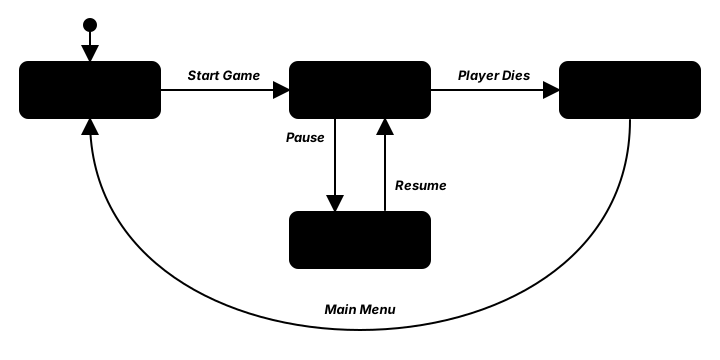
To name the states, Python has a tool made for exactly this job.
Here is the whole state machine as a complete program. The transition table is a dictionary whose keys are (state, event) pairs. Save it as game_states.py and try every key in every state:
from enum import Enum, auto

import pygame


class GameState(Enum):
    MENU = auto()
    PLAYING = auto()
    PAUSED = auto()
    GAME_OVER = auto()


# (current state, event) -> next state. Anything not listed is simply ignored.
TRANSITIONS = {
    (GameState.MENU, "start"): GameState.PLAYING,
    (GameState.PLAYING, "pause"): GameState.PAUSED,
    (GameState.PAUSED, "resume"): GameState.PLAYING,
    (GameState.PAUSED, "quit"): GameState.MENU,
    (GameState.PLAYING, "die"): GameState.GAME_OVER,
    (GameState.GAME_OVER, "retry"): GameState.PLAYING,
    (GameState.GAME_OVER, "menu"): GameState.MENU,
}
KEY_EVENTS = {pygame.K_RETURN: "start", pygame.K_p: "pause", pygame.K_r: "resume",
              pygame.K_q: "quit", pygame.K_d: "die", pygame.K_t: "retry", pygame.K_m: "menu"}
COLORS = {GameState.MENU: (40, 60, 120), GameState.PLAYING: (40, 120, 70),
          GameState.PAUSED: (150, 120, 30), GameState.GAME_OVER: (130, 40, 50)}


def next_state(state, event):
    return TRANSITIONS.get((state, event), state)


pygame.init()
screen = pygame.display.set_mode((640, 360))
pygame.display.set_caption("Game States")
clock = pygame.time.Clock()
font = pygame.font.Font(None, 32)            # fonts are created once, before the loop
state = GameState.MENU
last = "Keys: Enter P R Q D T M"

running = True
while running:
    clock.tick(60)
    for event in pygame.event.get():
        if event.type == pygame.QUIT:
            running = False
        elif event.type == pygame.KEYDOWN and event.key in KEY_EVENTS:
            name = KEY_EVENTS[event.key]
            new = next_state(state, name)
            last = f"{name}: {state.name} -> {new.name}" if new is not state else f"{name}: ignored in {state.name}"
            state = new

    screen.fill(COLORS[state])
    screen.blit(font.render(f"State: {state.name}", True, (255, 255, 255)), (20, 20))
    screen.blit(font.render(last, True, (230, 230, 230)), (20, 60))
    pygame.display.flip()

pygame.quit()
🔮 Predict, then run
In the menu, what will pressing P do? What about pressing R while playing? Predict first, then try it. The table says neither transition exists, so the state does not change, and the program tells you the event was ignored. That is the point of a transition table: an impossible transition is not a bug you have to remember to prevent; it simply is not in the table.
💡 Why this matters
The table is the whole design of your game's flow in one place. When a teammate asks "can you quit to the menu from the game-over screen?", you read one dictionary instead of hunting through every if in the program.
🎬 Scenes: Each Screen Gets a Class
The state machine decides which mode you are in, but the menu, the game and the game-over screen still need their own variables, input and drawing. If they all live in one loop, the loop becomes a long if state is ... chain again. The fix is to give every mode its own class, called a scene, with the same set of methods:
class Scene:
    """Base class. Every hook does nothing unless a scene overrides it."""
    is_overlay = False     # True: the scene below stays visible (but frozen)

    def __init__(self, manager):
        self.manager = manager

    def enter(self):
        pass               # the scene becomes active: reset or load what it needs

    def exit(self):
        pass               # the scene is removed: release what it loaded

    def pause(self):
        pass               # another scene was pushed on top of this one

    def resume(self):
        pass               # the scene on top was popped: this one is active again

    def handle_event(self, event):
        pass

    def update(self, dt):
        pass

    def draw(self, surface):
        pass
A menu scene then only has to fill in the methods it needs:
class MenuScene(Scene):
    def handle_event(self, event):
        if event.type == pygame.KEYDOWN and event.key == pygame.K_RETURN:
            self.manager.change(SceneId.PLAY)

    def draw(self, surface):
        surface.fill((25, 30, 60))
        title = self.manager.assets.font(80).render("COIN DASH", True, (255, 215, 90))
        surface.blit(title, title.get_rect(center=(400, 220)))
The game loop no longer knows anything about menus or coins. It hands every event, the dt and the screen to a scene manager, and the manager passes them on to the active scene:
while running:
    dt = min(clock.tick(60) / 1000, 0.05)      # seconds, capped after a long stall
    for event in pygame.event.get():
        if event.type == pygame.QUIT:
            running = False
        else:
            manager.handle_event(event)
    manager.update(dt)
    manager.draw(screen)
    pygame.display.flip()
Scenes are registered once under an Enum id (SceneId.MENU, SceneId.PLAY and so on), so the rest of the code asks for "the play scene" by name instead of creating a new object every time. A scene object stays alive for the whole game; its enter hook decides what to reset when it becomes active again.
💡 Why this matters
Each scene is small enough to read in one sitting, and you can add a Settings or Shop scene without touching the others. Game engines use the same split under names such as "scenes", "screens" or "rooms".
📚 The Scene Stack: Pause Without Losing Your Place
Pausing is where a plain state machine lets you down. If "paused" simply replaces "playing", the playing scene is exited and its round is gone when you come back. What you want is a pause menu drawn on top of the frozen game, like a sheet of tracing paper laid over a drawing. A stack does exactly that: the top scene is active, and the ones beneath it wait.
| Operation | What happens | Hooks called | Use it for |
|---|---|---|---|
push(id) | Put a scene on top; the old top waits underneath | old top: pause, new: enter | Pause menu, inventory, dialog box |
pop() | Remove the top scene; the one below carries on | top: exit, new top: resume | Closing an overlay |
change(id) | Empty the stack, then push one scene | every scene: exit, new: enter | Menu to game, game to game over |
def push(self, scene_id):
    """Put a scene on top. The one below is paused, not exited."""
    if self.top is not None:
        self._call(self.top, "pause")
    scene = self.scenes[scene_id]
    self.stack.append(scene)
    self._call(scene, "enter")

def pop(self):
    """Remove the top scene and resume the one below. Never empties the stack."""
    if len(self.stack) < 2:
        return False
    self._call(self.stack.pop(), "exit")
    self._call(self.top, "resume")
return True(self.top is the top scene, self.stack[-1], or None when the stack is empty. In the full program it is written as a method marked @property, which lets you read a method like a plain attribute: self.top, with no parentheses. _call runs a hook by name and writes it to a log, so you can watch the lifecycle happen.) Only the top scene receives events and update, which is what freezes the game underneath. Drawing is different: an overlay scene sets is_overlay = True, and the manager draws from the highest non-overlay scene upward, so the frozen game shows through the pause menu's dark tint.
def draw(self, surface):
    start = len(self.stack) - 1
    while start > 0 and self.stack[start].is_overlay:
        start -= 1
    for scene in self.stack[start:]:
        scene.draw(surface)
Try it before you build it. Start the game, pause and resume, and watch the stack and the lifecycle log on the right:
✅ Growth Mindset: "My Score Reset When I Unpaused"
Almost everyone's first pause menu wipes the game, because it uses change where it needed push, or resets the round in resume instead of enter. That is not a sign you are bad at architecture; it is the exact bug this pattern exists to prevent, and you haven't met it enough times yet. The debugging habit that gets you through: print the lifecycle log. If you see exit PLAY when you only meant to pause, you have found your bug in one line.
🌗 Transitions: Fade and Slide
A hard cut from one scene to the next works, but it feels abrupt. A fade darkens the screen to black, swaps the scenes while nobody can see them, then brightens again. The trick is when to swap: exactly halfway, when the black cover is fully opaque. Swap any later and the player sees a frame of the new scene flash through the fading cover.
FADE_TIME = 0.5            # seconds for the whole fade: out to black, then back in

def fade_alpha(elapsed, duration):
    """0 at the start, 255 exactly halfway, 0 again at the end (clamped)."""
    progress = elapsed / duration
    alpha = 255 * (1 - abs(2 * progress - 1))
    return max(0, min(255, int(alpha)))
The manager keeps the fade's clock and the scene it is waiting to switch to. change() only starts the fade; update() does the switch at the midpoint and ignores scene updates and input until the fade is over, so nobody can press Enter twice mid-fade:
def update(self, dt):
    if self.fade_elapsed is not None:
        self.fade_elapsed += dt
        if self.pending is not None and self.fade_elapsed >= FADE_TIME / 2:
            self._switch(self.pending)          # the screen is fully black now
            self.pending = None
        if self.fade_elapsed >= FADE_TIME:
            self.fade_elapsed = None
        return                                  # the world waits during a fade
    if self.top is not None:
        self.top.update(dt)
To draw it, the manager builds one black, screen-sized Surface in its __init__, and each frame calls self.black.set_alpha(fade_alpha(...)) and blits it over the scene. set_alpha makes a whole ordinary Surface see-through, so no SRCALPHA surface is needed for a plain color. fade_alpha clamps its own result, so it always returns a whole number from 0 to 255, even for a time past the end of the fade. set_alpha would quietly clamp a bad value itself, but the same number used as the alpha of a color, as in (0, 0, 0, alpha) on an SRCALPHA surface, raises a ValueError if it is outside 0–255.
A slide transition
A slide is different: both scenes are visible at once, the old one moving out to the left while the new one moves in from the right. That means both must be drawn every frame, each onto its own screen-sized Surface, and then blitted side by side. The new scene must already be entered (it has to be ready to draw), and the old one is exited when the slide ends.
def draw_slide(surface, old_scene, new_scene, progress, old_view, new_view):
    """Old scene slides out to the left while the new one slides in from the right.
    old_view and new_view are screen-sized Surfaces created once, before the loop."""
    t = progress * progress * (3 - 2 * progress)     # smoothstep: ease in and out
    offset = t * surface.get_width()
    old_scene.draw(old_view)
    new_scene.draw(new_view)
    surface.blit(old_view, (-offset, 0))
    surface.blit(new_view, (surface.get_width() - offset, 0))
The t line is the smoothstep curve from Interpolation & Easing: the slide starts gently, speeds up and settles gently instead of moving at one constant speed.
💡 Why this matters
Transitions are also a good place to hide work. Anything slow that happens during a scene change, such as building a level, happens at the fade's midpoint, behind a black screen, where a short hitch goes unnoticed.
🗃️ Share Assets with a Cache
Loading an image or creating a font reads files and does real work, and in this course you do it once, never inside the game loop. With several scenes, the same font is needed by the menu, the HUD and the game-over screen. Rather than loading it three times, keep one shared cache: a dictionary that loads each asset on first request and hands back the same object afterward.
class Assets:
    """Load each font or image once and share it between scenes."""

    def __init__(self, folder):
        self.folder = folder          # for example Path(__file__).parent / "assets"
        self.fonts = {}
        self.images = {}

    def font(self, size):
        if size not in self.fonts:
            self.fonts[size] = pygame.font.Font(None, size)
        return self.fonts[size]

    def image(self, name):
        if name not in self.images:
            self.images[name] = pygame.image.load(self.folder / name).convert_alpha()
        return self.images[name]

    def clear(self):
        """Forget everything, for example between levels that use different art."""
        self.fonts.clear()
        self.images.clear()
Every scene reaches the cache through its manager (self.manager.assets.font(32)), so the first scene to ask pays the loading cost and everyone after that gets the stored object. This simple cache keeps everything until you call clear(). That is the right choice for small games; a cache that throws away the least recently used items when memory runs low is a bigger project. If one scene loads something large that nobody else needs, such as a boss level's music, load it in that scene's enter and let go of it in exit.
🏋️ Practice Exercise: Coin Dash
Objective: finish a small coin-grab game whose menu, game, pause overlay and game-over screen are scenes on a stack, with a fade between them.
Time: about 70 minutes. Starter file: coin_dash_starter.py (your instructor has it). It already has the four scenes and the asset cache. Enter starts the game with a hard cut, and nothing else works yet. Its numbered TODOs match the steps below.
- Run the starter. Press Enter: the game appears instantly. Press P: nothing happens. (≈ 3 min)
- Finish
push()(pause the old top scene) andpop()(exit the top, resume the one below, never empty the stack). (≈ 15 min) - In
PlayScene.handle_event, push the pause scene on P or Escape. InPauseScene.handle_event, pop on P or Escape and change to the menu on M. (≈ 10 min) - Make overlays show the scene below: in the manager's
draw, walk down past overlay scenes and draw from there to the top. (≈ 10 min) - Add the fade: write
fade_alpha, makechange()start a fade instead of switching at once, and switch at the midpoint inupdate. (≈ 20 min) - When the timer reaches zero, store the score in
manager.sharedand change to the game-over scene. Check that R starts a fresh round and M goes to the menu. (≈ 10 min)
You are done when:
- P pauses with the game visible under a dark tint, and pressing P again continues with the same score and time left;
- every change of scene fades to black and back, and the swap is never visible;
- the game-over screen shows your score, R retries with a fresh 20 seconds, and M returns to the menu;
- closing the window prints the lifecycle log, with
pause PLAYandresume PLAY(notexit PLAY) around each pause.
💡 Hint
If unpausing restarts the round, look at which hook resets the game: it must be enter, and pausing must call pause, not exit. If the game disappears behind the pause menu, your draw is starting at the top of the stack; the loop should move start down while self.stack[start].is_overlay is true. If the fade flashes the new scene, check that the switch happens at FADE_TIME / 2.
✅ Example Solution
If your instructor hands you the lab file, you will see a few extra lines marked lab runtime near the top, plus an extra and frame_budget() condition on the main loop. They let the instructor's checker run the program automatically; when you run it yourself they do nothing.
"""Coin Dash: Intermediate Lesson 9 practice exercise (solution).

A tiny coin-grab game organized as scenes on a stack.
Menu: Enter starts. Play: arrow keys move, P or Esc pauses.
Pause: the game stays visible underneath; P or Esc resumes, M quits to the menu.
Game Over: R retries, M returns to the menu. Scene changes fade through black.
"""
import random
from enum import Enum, auto

import pygame


WIDTH, HEIGHT = 800, 600
FADE_TIME = 0.5            # seconds for a whole fade: out to black, then back in
ROUND_TIME = 20.0          # seconds per round
PLAYER_SPEED = 300         # pixels per second
COIN_COUNT = 5


class SceneId(Enum):
    MENU = auto()
    PLAY = auto()
    PAUSE = auto()
    GAME_OVER = auto()


class Assets:
    """Load each font once and share it between scenes."""

    def __init__(self):
        self.fonts = {}

    def font(self, size):
        if size not in self.fonts:
            self.fonts[size] = pygame.font.Font(None, size)
        return self.fonts[size]


def fade_alpha(elapsed, duration):
    """0 at the start, 255 exactly halfway, 0 again at the end (clamped)."""
    progress = elapsed / duration
    alpha = 255 * (1 - abs(2 * progress - 1))
    return max(0, min(255, int(alpha)))


def draw_centered(surface, font, text, color, y):
    image = font.render(text, True, color)
    surface.blit(image, image.get_rect(center=(WIDTH / 2, y)))


class Scene:
    """Base class. Every hook does nothing unless a scene overrides it."""
    is_overlay = False     # True: the scene below stays visible (but frozen)

    def __init__(self, manager):
        self.manager = manager

    def enter(self):
        pass

    def exit(self):
        pass

    def pause(self):
        pass

    def resume(self):
        pass

    def handle_event(self, event):
        pass

    def update(self, dt):
        pass

    def draw(self, surface):
        pass


class SceneManager:
    """A stack of scenes with enter/exit/pause/resume and a fade for change()."""

    def __init__(self, assets):
        self.assets = assets
        self.scenes = {}           # SceneId -> Scene
        self.stack = []            # the top of the stack is the active scene
        self.log = []              # lifecycle calls, newest last
        self.shared = {"score": 0}
        self.fade_elapsed = None   # None = no fade running
        self.pending = None        # SceneId to switch to at the fade's midpoint
        self.black = pygame.Surface((WIDTH, HEIGHT))   # built once, reused every fade

    def register(self, scene_id, scene):
        scene.name = scene_id.name
        self.scenes[scene_id] = scene

    @property
    def top(self):
        return self.stack[-1] if self.stack else None

    def _call(self, scene, hook):
        self.log.append(f"{hook} {scene.name}")
        getattr(scene, hook)()

    def push(self, scene_id):
        """Put a scene on top. The one below is paused, not exited."""
        if self.top is not None:
            self._call(self.top, "pause")
        scene = self.scenes[scene_id]
        self.stack.append(scene)
        self._call(scene, "enter")

    def pop(self):
        """Remove the top scene and resume the one below. Never empties the stack."""
        if len(self.stack) < 2:
            return False
        self._call(self.stack.pop(), "exit")
        self._call(self.top, "resume")
        return True

    def change(self, scene_id, fade=True):
        """Replace the whole stack with one scene, hidden behind a fade."""
        if self.fade_elapsed is not None:
            return                     # ignore a second change while fading
        if fade:
            self.pending = scene_id
            self.fade_elapsed = 0.0
        else:
            self._switch(scene_id)

    def _switch(self, scene_id):
        while self.stack:
            self._call(self.stack.pop(), "exit")
        self.push(scene_id)

    def handle_event(self, event):
        if self.fade_elapsed is None and self.top is not None:
            self.top.handle_event(event)

    def update(self, dt):
        if self.fade_elapsed is not None:
            self.fade_elapsed += dt
            if self.pending is not None and self.fade_elapsed >= FADE_TIME / 2:
                self._switch(self.pending)          # the screen is fully black now
                self.pending = None
            if self.fade_elapsed >= FADE_TIME:
                self.fade_elapsed = None
            return                                  # the world waits during a fade
        if self.top is not None:
            self.top.update(dt)

    def draw(self, surface):
        # Draw from the highest non-overlay scene upward, so overlays show what is below.
        start = len(self.stack) - 1
        while start > 0 and self.stack[start].is_overlay:
            start -= 1
        for scene in self.stack[start:]:
            scene.draw(surface)
        if self.fade_elapsed is not None:
            self.black.set_alpha(fade_alpha(self.fade_elapsed, FADE_TIME))
            surface.blit(self.black, (0, 0))


class MenuScene(Scene):
    def handle_event(self, event):
        if event.type == pygame.KEYDOWN and event.key in (pygame.K_RETURN, pygame.K_KP_ENTER):
            self.manager.change(SceneId.PLAY)

    def draw(self, surface):
        surface.fill((25, 30, 60))
        draw_centered(surface, self.manager.assets.font(80), "COIN DASH", (255, 215, 90), 220)
        draw_centered(surface, self.manager.assets.font(36), "Press Enter to play", (230, 230, 240), 330)


class PlayScene(Scene):
    def __init__(self, manager, seed=None):
        super().__init__(manager)
        self.rng = random.Random(seed)
        self.player = pygame.FRect(0, 0, 36, 36)
        self.coins = []
        self.score = 0
        self.time_left = ROUND_TIME

    def enter(self):
        # A fresh round every time the scene is entered (resume keeps the old one).
        self.player.center = (WIDTH / 2, HEIGHT / 2)
        self.coins = [self.random_coin() for _ in range(COIN_COUNT)]
        self.score = 0
        self.time_left = ROUND_TIME

    def random_coin(self):
        return pygame.FRect(self.rng.uniform(40, WIDTH - 60), self.rng.uniform(80, HEIGHT - 60), 20, 20)

    def handle_event(self, event):
        if event.type == pygame.KEYDOWN and event.key in (pygame.K_p, pygame.K_ESCAPE):
            self.manager.push(SceneId.PAUSE)

    def update(self, dt):
        keys = pygame.key.get_pressed()
        direction = pygame.Vector2(keys[pygame.K_RIGHT] - keys[pygame.K_LEFT],
                                   keys[pygame.K_DOWN] - keys[pygame.K_UP])
        if direction.length_squared() > 0:
            direction = direction.normalize()
        self.player.center += direction * PLAYER_SPEED * dt
        self.player.clamp_ip(pygame.FRect(0, 0, WIDTH, HEIGHT))

        for i, coin in enumerate(self.coins):
            if self.player.colliderect(coin):
                self.score += 1
                self.coins[i] = self.random_coin()

        self.time_left -= dt
        if self.time_left <= 0:
            self.time_left = 0
            self.manager.shared["score"] = self.score
            self.manager.change(SceneId.GAME_OVER)

    def draw(self, surface):
        surface.fill((20, 60, 40))
        for coin in self.coins:
            pygame.draw.ellipse(surface, (255, 215, 60), coin)
        pygame.draw.rect(surface, (120, 200, 255), self.player, border_radius=6)
        hud = self.manager.assets.font(32).render(
            f"Score: {self.score}    Time: {self.time_left:4.1f}    P = pause", True, (240, 240, 240))
        surface.blit(hud, (16, 12))


class PauseScene(Scene):
    is_overlay = True

    def __init__(self, manager):
        super().__init__(manager)
        self.shade = pygame.Surface((WIDTH, HEIGHT), pygame.SRCALPHA)   # built once
        self.shade.fill((0, 0, 0, 150))

    def handle_event(self, event):
        if event.type == pygame.KEYDOWN:
            if event.key in (pygame.K_p, pygame.K_ESCAPE):
                self.manager.pop()
            elif event.key == pygame.K_m:
                self.manager.change(SceneId.MENU)

    def draw(self, surface):
        surface.blit(self.shade, (0, 0))
        draw_centered(surface, self.manager.assets.font(72), "PAUSED", (255, 255, 255), 250)
        draw_centered(surface, self.manager.assets.font(32), "P: resume    M: menu", (220, 220, 220), 320)


class GameOverScene(Scene):
    def handle_event(self, event):
        if event.type == pygame.KEYDOWN:
            if event.key == pygame.K_r:
                self.manager.change(SceneId.PLAY)
            elif event.key == pygame.K_m:
                self.manager.change(SceneId.MENU)

    def draw(self, surface):
        surface.fill((60, 20, 30))
        draw_centered(surface, self.manager.assets.font(72), "TIME'S UP!", (255, 120, 120), 220)
        draw_centered(surface, self.manager.assets.font(40),
                      f"Score: {self.manager.shared['score']}", (255, 255, 255), 300)
        draw_centered(surface, self.manager.assets.font(32), "R: retry    M: menu", (220, 220, 220), 370)


def build_manager(seed=None):
    manager = SceneManager(Assets())
    manager.register(SceneId.MENU, MenuScene(manager))
    manager.register(SceneId.PLAY, PlayScene(manager, seed))
    manager.register(SceneId.PAUSE, PauseScene(manager))
    manager.register(SceneId.GAME_OVER, GameOverScene(manager))
    return manager


def main():
    pygame.init()
    screen = pygame.display.set_mode((WIDTH, HEIGHT))
    pygame.display.set_caption("Coin Dash")
    clock = pygame.time.Clock()
    manager = build_manager()
    manager.change(SceneId.MENU, fade=False)

    running = True
    while running:
        dt = min(clock.tick(60) / 1000, 0.05)      # seconds, capped after a long stall
        for event in pygame.event.get():
            if event.type == pygame.QUIT:
                running = False
            else:
                manager.handle_event(event)
        manager.update(dt)
        manager.draw(screen)
        pygame.display.flip()

    pygame.quit()
    print("Lifecycle:", ", ".join(manager.log))
    print("Final scene:", manager.top.name)


if __name__ == "__main__":
    main()
📓 Learning Journal
Take five minutes to write in your learning journal (a notebook or a plain text file works). Jot down:
- Key concepts you learned today
- Techniques that clicked (and the ones that haven't, yet)
- Questions or confusion to bring to the next session
- Ideas to try in your own game
- Progress and feelings: how did this lesson go for you?
✍️ This lesson's prompts:
- Draw the state diagram of a game you love (menus, levels, cutscenes, shops). Which screens would be pushed on a stack, and which would replace everything with a change?
- Explain in your own words why the fade swaps scenes at the halfway point.
- Your capstone will need a title screen and a game-over screen. Which scenes will it have, and what will each one's
enterreset?
📝 Summary
You replaced a tangle of true/false flags with one state and a table of allowed transitions, named with an Enum. Then you gave each mode its own scene class with the same methods, so the game loop only talks to a scene manager. A stack let a pause menu sit on top of a frozen game, with pause and resume keeping the round intact, while change swapped whole screens behind a fade that switches at its darkest moment. Finally, a small cache made sure every scene shares the same fonts instead of loading its own.
🎓 Key Takeaways
- A state machine stores one current state; a
(state, event)table lists every allowed transition, and anything missing is ignored. Enummembers give states names that fail loudly when mistyped.- Scenes share one interface (
handle_event,update,draw) plus lifecycle hooks (enter,exit,pause,resume). push/poppause and resume the scene underneath;changeexits everything and enters one new scene.- A fade swaps scenes at its midpoint, when the black cover is fully opaque; clamp the alpha to 0–255.
- Load fonts and images once, in a shared cache, and release scene-only assets in
exit.
🔭 Looking Ahead
Your scenes forget everything when the program closes. In the next lesson, Saving & Loading, you save progress to JSON files with save slots, protect them from crashes and damage, and upgrade old saves when your game changes.
❓ Common Questions
Should I create a new scene object every time I change scenes?
You can, but this lesson registers one object per scene and reuses it, with enter resetting what needs resetting. That keeps expensive setup (building surfaces, loading level data) in __init__, where it runs once. If a scene is cheap and you prefer a clean slate, creating a new one in change is fine too; just be consistent.
Why does only the top scene get update(dt)?
Because that is what "paused" means: the game underneath must not move. If you ever want something underneath to keep going (animated water behind a dialog box, say), give that scene a flag and update it on purpose, rather than updating every scene by default.
Is the scene manager itself a state machine?
Yes, with one extra power. The current top of the stack is the state, and change is an ordinary transition. The stack adds memory: after a pop, the machine returns to the state it came from. That is sometimes called a pushdown automaton.
What if a scene needs to pass data to the next one, such as the final score?
Put it somewhere both can reach. This lesson uses a small manager.shared dictionary: the play scene writes shared["score"] before it changes to game over, and the game-over scene reads it. For bigger games you might give the manager a proper game-session object instead.
My fade looks jerky on a slow computer. Is the fade broken?
No. It advances by dt, so it always takes the same number of seconds, but a slow machine shows fewer frames of it. The min(..., 0.05) cap on dt also stops one long stall (such as dragging the window) from skipping the whole fade in a single frame.
🎯 Quick Quiz
Question 1: The play scene is on top of the stack and you push the pause scene. What happens to the play scene?
Question 2: Why does the fade switch scenes at FADE_TIME / 2 instead of at the end?
Question 3: Your code says state = GameState.PAUSD, a typo for PAUSED. What happens?
Question 4: With the transition table from this lesson, what does next_state(GameState.MENU, "pause") return?
Question 5: What is the main job of the Assets cache in this lesson?
🌟 Going Further
- Settings scene: add a Settings scene you can push from both the menu and the pause menu, with a volume value you change with the arrow keys. Popping it must return to whichever scene opened it.
- Slide instead of fade: give
change()astyleargument and usedraw_slidefor the menu-to-game transition. Remember to enter the new scene when the slide starts and exit the old one when it ends. - Transition table for scenes: write a
SCENE_TRANSITIONStable like the one in the first section and makechange()refuse (and log) any change that is not listed. - Read the docs: the Python enum module, and pygame-ce's Surface.set_alpha.
- Coming up in Game Dev III: Advanced: Entity-Component-System and Event Systems show how larger games organize the objects inside each scene.