Lesson 21: Screen Shake, Tweens & Juice
Two games can have identical rules and still feel completely different: in one, hitting an enemy is a number going down; in the other, the screen jolts, time catches for a split second and the enemy squashes and springs back. In this lesson you build that second version, the layer of feedback game designers call juice, with screen shake, hit stop, flashes and tweens you can switch off for players who need calmer visuals.
🎯 Learning Objectives
By the end of this lesson, you will be able to:
- Build a trauma-based screen shake where hits stack, trauma drains in seconds and the visible shake grows with trauma squared.
- Apply shake as an extra camera offset so every world-space draw shakes together, in five different shake modes.
- Freeze the game for a few hundredths of a second with hit stop, while the camera and flashes keep running on real time.
- Build a tween manager that animates any attribute over time with the easing functions from the Interpolation & Easing lesson, including a correct yoyo.
- Add a reduce-motion setting and explain why juice needs restraint as well as polish.
Project: Juicy Hit, a training dummy that shakes the screen, freezes time, flashes, squashes and bursts into particles when you hit it.
In This Lesson
🍋 What Is Juice?
Think about a pinball machine. When the ball hits a bumper, it doesn't just bounce: lights flash, a bell rings and the score rattles up. None of that changes the physics, but it tells you, instantly and in your gut, that something good happened. Game designers call this extra feedback juice. A juicy game answers every action with a reaction you can see, hear and feel.
The best way to understand juice is to feel it. Hit the dummy below with the effects switched off, then switch them on one at a time.
A single hit in a juicy game usually fires several small effects at once. Each one is cheap and simple; together they sell the impact.
You already know two of these. Particles come from the Particle Effects lesson, and sound comes from the Sound & Music lesson in Game Dev I (the next lesson, Audio Mixing & Spatial Sound, goes further). This lesson adds the rest: shake, hit stop, flashes and tweens.
💡 Why this matters
Juice is how a game communicates without words. A heavier shake says "that was a big hit", a freeze frame says "this moment matters", a squash says "this thing has weight". Designers tune these effects as carefully as damage numbers, because players notice when they are missing even if they can't say what is missing.
📳 Trauma Screen Shake
The simplest shake picks a random offset every frame for a fixed time. It works, but a small hit and a huge explosion feel the same, and two hits in a row don't add up. A popular fix, presented by game designer Squirrel Eiserloh in a GDC talk on camera juice, is to track trauma, one number from 0 to 1:
- Hits add trauma, capped at 1:
trauma = min(1.0, trauma + amount). Two quick hits stack. - Trauma drains in seconds, in a straight line:
trauma = max(0.0, trauma - decay_rate * dt). - The visible shake is trauma squared:
shake = trauma * trauma, multiplied by the largest offset you allow in pixels.
Squaring is the clever part. Small trauma becomes tiny shake (0.3 squared is 0.09, barely a jitter), while big trauma stays big (0.9 squared is 0.81). It also makes the shake die away faster than the trauma itself, so the end of a big hit settles smoothly instead of stopping dead.
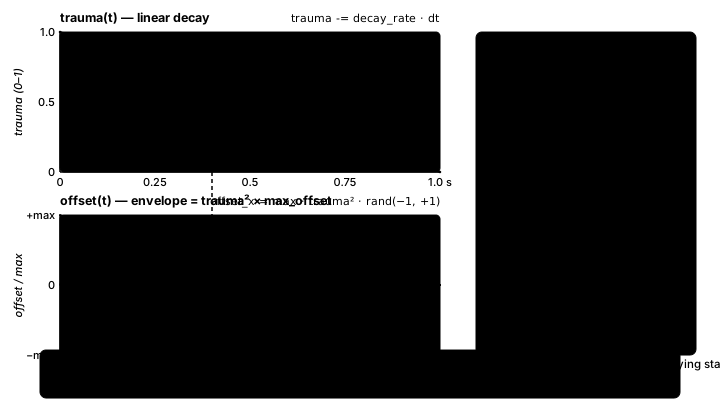
Where does the offset go? In the Cameras lesson you drew every world object at world_position - camera. Shake is just one more term in that same sum: screen = world - camera + shake. Because everything drawn in world space goes through that one line, the background, the player and every enemy shake together. The HUD is drawn in screen space, so it stays still and readable.
Here is a complete program. Walk with the arrow keys and press 1, 2 or 3 for a small, medium or big hit. Press 2 twice quickly and watch the trauma stack.
"""Trauma Shake: Intermediate Lesson 21 worked example.

Walk along a world wider than the window (arrow keys). Press 1, 2 or 3 for a
small, medium or big impact. The shake is added to the camera offset, so
everything drawn in world space shakes together.
"""
import random

import pygame


WIDTH, HEIGHT = 800, 400
WORLD_W = 1600
MAX_OFFSET = 18        # pixels of shake at trauma 1.0
DECAY_RATE = 0.8       # trauma lost per second: 1.0 drains in 1.25 s
SPEED = 280            # player speed, px/s
HITS = {pygame.K_1: 0.2, pygame.K_2: 0.5, pygame.K_3: 0.9}   # trauma per impact


def main():
    pygame.init()
    screen = pygame.display.set_mode((WIDTH, HEIGHT))
    pygame.display.set_caption("Trauma Shake")
    clock = pygame.time.Clock()
    font = pygame.font.Font(None, 26)
    rng = random.Random()

    world = pygame.Surface((WORLD_W, HEIGHT))            # drawn once, reused every frame
    world.fill((40, 40, 70))
    for x in range(0, WORLD_W, 80):
        pygame.draw.rect(world, (60, 110, 60), (x, 300, 78, 100))
    for x in range(0, WORLD_W, 220):
        pygame.draw.rect(world, (140, 90, 60), (x + 40, 230, 80, 70))

    player = pygame.FRect(WIDTH / 2, 252, 32, 48)        # float position
    trauma = 0.0
    held = {pygame.K_LEFT: False, pygame.K_RIGHT: False}

    running = True
    while running:
        dt = clock.tick(60) / 1000
        for event in pygame.event.get():
            if event.type == pygame.QUIT:
                running = False
            elif event.type in (pygame.KEYDOWN, pygame.KEYUP) and event.key in held:
                held[event.key] = event.type == pygame.KEYDOWN
            elif event.type == pygame.KEYDOWN and event.key in HITS:
                trauma = min(1.0, trauma + HITS[event.key])   # hits stack, capped at 1

        player.x += (held[pygame.K_RIGHT] - held[pygame.K_LEFT]) * SPEED * dt
        player.x = max(0, min(WORLD_W - player.width, player.x))
        camera_x = max(0, min(WORLD_W - WIDTH, player.centerx - WIDTH / 2))

        trauma = max(0.0, trauma - DECAY_RATE * dt)       # linear decay
        shake = trauma * trauma                            # the visible amount: trauma squared
        shake_x = MAX_OFFSET * shake * rng.uniform(-1, 1)
        shake_y = MAX_OFFSET * shake * rng.uniform(-1, 1)

        # screen = world - camera + shake, for every world-space draw
        screen.fill((20, 20, 40))
        screen.blit(world, (-camera_x + shake_x, shake_y))
        pygame.draw.rect(screen, (220, 80, 80),
                         player.move(-camera_x + shake_x, shake_y))
        hud = f"trauma {trauma:.2f}   shake {shake:.2f}   1/2/3 = hit, arrows = walk"
        screen.blit(font.render(hud, True, (240, 240, 240)), (12, 12))
        pygame.display.flip()

    pygame.quit()
    print(f"Final trauma: {trauma:.2f}")


if __name__ == "__main__":
    main()
🔮 Predict, then run
Before you run it, predict: after a big hit (trauma 0.9), how long until the shake stops? Use DECAY_RATE = 0.8. Then run it and count. (Trauma needs 0.9 / 0.8 ≈ 1.1 seconds to drain, but the shake looks finished well before that, because 0.3 squared is already under 0.1.)
✅ Growth Mindset: "My Shake Feels Wrong" Is Normal
Almost nobody gets shake right on the first try. It's either invisible or it makes you seasick. That's not a sign you did it wrong; it's the tuning step every designer goes through. Change one number at a time (MAX_OFFSET, DECAY_RATE, the trauma per hit), play for ten seconds, and write down how it felt. You aren't there yet, and "yet" is exactly what tuning is for.
🎛️ Shake Modes with an Enum
Random jitter is only one flavor of shake. A heavy landing feels right as a vertical bounce, a sideways punch as a horizontal one, and a recoil as a kick back and forth along the direction of the hit. You met Enum in the Game States & Scenes lesson; it is a clean way to name the modes, and a typo like ShakeMode.RANDMO raises an AttributeError as soon as that line runs instead of silently doing nothing.
This ScreenShake class wraps the trauma logic from the last section and implements all five modes. The wave modes use sin of a steadily growing phase, so they wobble smoothly instead of jumping randomly.
class ShakeMode(Enum):
    RANDOM = "random"
    HORIZONTAL = "horizontal"
    VERTICAL = "vertical"
    CIRCULAR = "circular"
    DIRECTIONAL = "directional"


class ScreenShake:
    """Trauma-based shake: hits add trauma, trauma drains, offset grows with trauma squared."""

    def __init__(self, max_offset=18.0, decay_rate=1.2, frequency=18.0, seed=None):
        self.trauma = 0.0                   # 0 = calm, 1 = maximum shake
        self.max_offset = max_offset        # pixels at trauma 1.0
        self.decay_rate = decay_rate        # trauma lost per second
        self.frequency = frequency          # wobbles per second for the wave modes
        self.strength = 1.0                 # accessibility setting: 0 turns shake off
        self.mode = ShakeMode.RANDOM
        self.direction = pygame.Vector2(1, 0)
        self.time = 0.0
        self.offset = pygame.Vector2()
        self.rng = random.Random(seed)

    def add_trauma(self, amount, mode=ShakeMode.RANDOM, direction=None):
        self.trauma = min(1.0, self.trauma + amount)
        self.mode = mode
        if direction is not None and direction.length_squared() > 0:
            self.direction = direction.normalize()

    def update(self, dt):
        self.time += dt
        self.trauma = max(0.0, self.trauma - self.decay_rate * dt)
        amount = self.trauma * self.trauma * self.max_offset * self.strength
        phase = self.time * self.frequency * 2 * math.pi
        if self.mode is ShakeMode.RANDOM:
            self.offset.update(self.rng.uniform(-1, 1) * amount, self.rng.uniform(-1, 1) * amount)
        elif self.mode is ShakeMode.HORIZONTAL:
            self.offset.update(math.sin(phase) * amount, 0)
        elif self.mode is ShakeMode.VERTICAL:
            self.offset.update(0, math.sin(phase) * amount)
        elif self.mode is ShakeMode.CIRCULAR:
            self.offset.update(math.cos(phase) * amount, math.sin(phase) * amount)
        else:                               # DIRECTIONAL: back and forth along the hit
            self.offset = self.direction * (math.sin(phase) * amount)
Three details are worth a second look:
direction is not None, notif direction:. A zeroVector2is falsy, andnormalize()on a zero vector raises an error, so the code checks both.- The shake has its own
random.Random(seed). Pass a seed and the shake is repeatable, which makes it testable. strengthmultiplies everything. Setting it to 0.3 gives players a gentler game without touching any other code (see Juice Responsibly below).
🧭 What about rotating the screen?
Some games also rotate the camera a degree or two during a shake. In pygame that means rotating the whole frame with pygame.transform.rotate, and a rotated rectangle no longer covers the window: the corners show black triangles. The fix is to render a slightly larger frame and crop it, which costs a full-screen rotate every frame. This lesson leaves rotation out; offset shake gives most of the feel for a fraction of the work.
⏸️ Hit Stop and Flashes
Hit stop (also called a freeze frame or hit pause) stops the game for a few hundredths of a second at the moment of impact. It is common in fighting and action games, where it gives a blow a sense of weight. The trick is to separate two clocks:
- Real time (
real_dt), which always ticks. Shake, flashes and the hit-stop timer itself use it. - Game time (
game_dt), which is 0 during a freeze. Movement, tweens and particles use it.
class HitStop:
    """Freeze the game for a moment. update() turns real dt into game dt."""

    def __init__(self):
        self.timer = 0.0

    def trigger(self, seconds):
        self.timer = max(self.timer, seconds)   # a new hit never shortens a freeze

    def update(self, real_dt):
        if self.timer > 0:
            self.timer = max(0.0, self.timer - real_dt)
            return 0.0
        return real_dt


# In the game loop:
real_dt = min(clock.tick(60) / 1000, 0.05)
game_dt = hitstop.update(real_dt)     # 0 while frozen
shake.update(real_dt)                 # the camera keeps shaking during a freeze
tweens.update(game_dt)                # the world holds still
Durations are in seconds, like every timer in this course: 0.05 for a light hit, around 0.1 to 0.15 for a heavy one. Longer than that and the game starts to feel like it stuttered.
A flash is a colored layer over the screen that fades out. The overlay Surface is created once, filled once per trigger, and faded with set_alpha(), so nothing is allocated inside the loop:
class Flash:
    """A full-screen color flash that fades out. The surface is made once."""

    def __init__(self, size):
        self.surface = pygame.Surface(size)
        self.timer = 0.0
        self.duration = 0.1

    def trigger(self, color, seconds):
        self.surface.fill(color)
        self.timer = self.duration = seconds

    def update(self, dt):
        self.timer = max(0.0, self.timer - dt)

    def draw(self, screen):
        if self.timer > 0:
            self.surface.set_alpha(clamp_color(160 * self.timer / self.duration))
            screen.blit(self.surface, (0, 0))
set_alpha() gives the whole Surface one transparency, which works on an ordinary Surface; you don't need SRCALPHA here. clamp_color() here is a one-number version of the helper from Game Dev I: max(0, min(255, int(value))) keeps the alpha between 0 and 255. For a flash on a single sprite, a common trick is to draw it all white for a couple of frames, which is what the exercise does with a white_timer.
🎞️ Tweens: Easing Over Time
In the Interpolation & Easing lesson you wrote easing functions: each takes a progress t from 0 to 1 and returns a reshaped value, and start + (end - start) * eased turns it into a position, a scale or a color. A tween (short for "in-between") packages that idea into an object that runs by itself: "move this attribute to that value over 0.4 seconds with this easing". A tween manager updates all running tweens once per frame. The Tween in easing.py animates one number that you read back each frame; the version below goes a step further and writes straight into any attribute of any object, and adds yoyo and chaining. The curves themselves come straight from easing.py, so copy that file next to your game rather than writing them again.
# The easing library from the Interpolation & Easing lesson, copied unchanged
# next to this file. Don't write the curves again: import them.
from easing import ease_out_back, ease_out_quad


class Tween:
    """Move one attribute of an object from its current value to `end` over `duration` seconds."""

    def __init__(self, target, attr, end, duration, easing=ease_out_quad,
                 yoyo=False, repeat=0, on_complete=None):
        self.target, self.attr, self.end = target, attr, end
        self.duration = max(duration, 1e-6)
        self.easing = easing
        self.yoyo = yoyo
        self.repeat = repeat                # extra legs to play; -1 = forever
        self.on_complete = on_complete
        self.start = getattr(target, attr)
        self.elapsed = 0.0
        self.leg = 0                        # which leg we are on (odd legs run backward with yoyo)
        self.done = False

    def update(self, dt):
        self.elapsed += dt
        while self.elapsed >= self.duration and not self.done:
            if self.repeat == 0:
                self.elapsed = self.duration
                self.done = True
            else:
                self.elapsed -= self.duration
                self.leg += 1
                if self.repeat > 0:
                    self.repeat -= 1
        eased = self.easing(self.elapsed / self.duration)
        a, b = self.start, self.end
        if self.yoyo and self.leg % 2 == 1:
            a, b = b, a                     # backward leg: swap the ends, keep the same easing
        setattr(self.target, self.attr, a + (b - a) * eased)
        if self.done and self.on_complete is not None:
            self.on_complete()
        return not self.done
getattr(obj, "scale_x") reads an attribute by name and setattr(obj, "scale_x", value) writes one, so one Tween class can animate any number on any object. A few design choices keep it correct:
- Seconds everywhere.
elapsedgrows bydt, so a 0.4-second tween takes 0.4 seconds at any frame rate. - A yoyo swaps the ends, once. On a backward leg the tween runs from
endtostartwith the same easing. Swapping the ends and flipping the eased value would cancel out and send it forward again, a classic bug. - It lands exactly on the end value. The last update clamps
elapsedtoduration, so the final value isend, not "almost end". - Leftover time carries over. When a repeating leg ends partway through a frame,
elapsed -= durationkeeps the remainder instead of resetting to 0, so loops don't drift.
class TweenManager:
    def __init__(self):
        self.tweens = []

    def to(self, target, attr, end, duration, **options):
        # A new tween on the same attribute replaces the old one instead of fighting it.
        self.tweens = [t for t in self.tweens if not (t.target is target and t.attr == attr)]
        tween = Tween(target, attr, end, duration, **options)
        self.tweens.append(tween)
        return tween

    def update(self, dt):
        for tween in list(self.tweens):     # a callback may add new tweens
            if not tween.update(dt) and tween in self.tweens:
                self.tweens.remove(tween)
Squash and stretch is an animation principle from hand-drawn cartoons: a thing that is hit or lands flattens, then springs back, which makes it look soft and heavy at the same time. With tweens it is two lines: set the scale to squashed right away, then tween it back to 1 with ease_out_back, whose small overshoot gives the spring. To chain tweens (knock the dummy sideways, then ease it back), pass a method as on_complete:
d = self.dummy
d.scale_x, d.scale_y = 1.45, 0.6                            # squash right away...
self.tweens.to(d, "scale_x", 1.0, 0.4, easing=ease_out_back)  # ...then spring back
self.tweens.to(d, "scale_y", 1.0, 0.4, easing=ease_out_back)
self.tweens.to(d, "nudge", 24.0, 0.06, on_complete=self.spring_back)

def spring_back(self):                                       # a method of the same class
    self.tweens.to(self.dummy, "nudge", 0.0, 0.25, easing=ease_out_quad)
✅ Growth Mindset: Print the Numbers
Tweens fail quietly: nothing crashes, the thing just doesn't move, or jumps, or wanders off. When that happens, print the tween's elapsed, its eased value and the attribute every frame for a second. You'll usually spot the problem in the first few lines, such as a duration in milliseconds (400 instead of 0.4) or two tweens fighting over one attribute. Reading your own numbers is the skill that turns "it's broken" into "it's fixed".
♿ Juice Responsibly
Juice is powerful, and that means it can also hurt. Strong screen shake can cause motion sickness, and bright full-screen flashes can be dangerous for people with photosensitive epilepsy. Many games now offer a "reduce screen shake" or "reduce flashing" option, and adding one is easy when every effect already has a single strength knob:
def toggle_reduce_motion(self):
    self.reduce_motion = not self.reduce_motion
    self.shake.strength = 0.3 if self.reduce_motion else 1.0


# ...and when a big hit lands:
if big and not self.reduce_motion:
    self.flash.trigger((255, 255, 255), 0.15)
A few rules of thumb designers use:
- Scale the effect to the event. A footstep gets nothing, a sword hit gets a little, a boss explosion gets a lot. If everything shakes, nothing feels special.
- Keep flashes rare and short. The web accessibility guideline WCAG 2.3.1 says content should not flash more than three times in any one second; it's a sensible limit for games too.
- Never shake the HUD. Health and score must stay readable, which is why they're drawn in screen space.
- Offer the option early. Put the setting in your options menu, and remember it with the save system from the Saving & Loading lesson.
🏋️ Practice Exercise: Juicy Hit
Objective: make a training dummy feel great to hit: pressing SPACE or B shakes the screen, freezes time for a moment, flashes, squashes the dummy and throws particles, and R turns the motion down.
Time: about 45 minutes. Files: juicy_hit_starter.py (your instructor has it) and easing.py (from Interpolation & Easing) in the same folder. It already draws the dummy, the particles and the HUD; hits currently do almost nothing. Each step below names what to change, and the starter marks each spot with a numbered to-do comment (the numbers are labels, not step numbers).
- Run the starter and press SPACE and B. Particles appear, but nothing shakes or freezes, and the dummy snaps back instead of springing. (≈ 2 min)
- In
add_trauma(), add the amount and clamp trauma at 1.0. (≈ 3 min) - In
ScreenShake.update(), drain trauma linearly withdecay_rate * dtand setamountto trauma squared ×max_offset×strength. The RANDOM mode now shakes. (≈ 7 min) - Fill in the other four modes. Press M to cycle through them and check each one. (≈ 8 min)
- Make
HitStop.update()count its timer down and return 0.0 while it runs. Big hits should now freeze the particles for a moment. (≈ 5 min) - Finish
Tween.update(): ease the progress, swap the ends on a yoyo's backward leg, and set the attribute withsetattr(). The dummy now squashes and springs back. (≈ 10 min) - Fade the flash in
Flash.draw(), then make R set the shake strength to 0.3. (≈ 5 min) - Tune: change one number (trauma per hit,
max_offset, a tween duration) and write down how the feel changed. (≈ 5 min)
You are done when:
- a light hit gives a small shake and a big hit a large one, and two quick hits stack;
- all five shake modes look different, and DIRECTIONAL moves along one line;
- a big hit visibly freezes the particles for a moment while the camera keeps shaking;
- the dummy squashes and springs back to exactly its normal size;
- with R on, the shake is gentler and big hits no longer flash.
💡 Hint
If the shake never stops, check that trauma is clamped with max(0.0, ...) as it drains. If the dummy shoots off or grows forever, print self.elapsed / self.duration inside Tween.update(): it must run from 0 to 1. For the yoyo, swap a and b when self.yoyo and self.leg % 2 == 1, and do nothing else to the eased value.
✅ Example Solution
If your instructor hands you the lab file, you will see a few extra lines marked lab runtime near the top, plus an extra and frame_budget() condition on the main loop. They let the instructor's checker run the program automatically; when you run it yourself they do nothing.
"""Juicy Hit: Intermediate Lesson 21 practice exercise (solution).

Hit the training dummy and feel it: trauma screen shake, a short hit stop,
a white flash, a squash-and-stretch tween and a burst of particles.
SPACE = light hit, B = big hit, M = next shake mode, R = reduce motion.
"""
import math
import random
from enum import Enum

import pygame

from easing import ease_out_back, ease_out_quad   # copied unchanged from Interpolation & Easing


WIDTH, HEIGHT = 800, 450
BG_COLOR = (18, 22, 34)
GRID_COLOR = (40, 48, 70)
DUMMY_COLOR = (240, 170, 60)
TEXT_COLOR = (230, 230, 230)
DUMMY_FEET = pygame.Vector2(400, 330)       # world position of the dummy's feet
CAMERA = pygame.Vector2(0, 0)               # a fixed camera keeps the example short


def clamp_color(value):
    return max(0, min(255, int(value)))


class ShakeMode(Enum):
    RANDOM = "random"
    HORIZONTAL = "horizontal"
    VERTICAL = "vertical"
    CIRCULAR = "circular"
    DIRECTIONAL = "directional"


class ScreenShake:
    """Trauma-based shake: hits add trauma, trauma drains, offset grows with trauma squared."""

    def __init__(self, max_offset=18.0, decay_rate=1.2, frequency=18.0, seed=None):
        self.trauma = 0.0                   # 0 = calm, 1 = maximum shake
        self.max_offset = max_offset        # pixels at trauma 1.0
        self.decay_rate = decay_rate        # trauma lost per second
        self.frequency = frequency          # wobbles per second for the wave modes
        self.strength = 1.0                 # accessibility setting: 0 turns shake off
        self.mode = ShakeMode.RANDOM
        self.direction = pygame.Vector2(1, 0)
        self.time = 0.0
        self.offset = pygame.Vector2()
        self.rng = random.Random(seed)

    def add_trauma(self, amount, mode=ShakeMode.RANDOM, direction=None):
        self.trauma = min(1.0, self.trauma + amount)
        self.mode = mode
        if direction is not None and direction.length_squared() > 0:
            self.direction = direction.normalize()

    def update(self, dt):
        self.time += dt
        self.trauma = max(0.0, self.trauma - self.decay_rate * dt)
        amount = self.trauma * self.trauma * self.max_offset * self.strength
        phase = self.time * self.frequency * 2 * math.pi
        if self.mode is ShakeMode.RANDOM:
            self.offset.update(self.rng.uniform(-1, 1) * amount, self.rng.uniform(-1, 1) * amount)
        elif self.mode is ShakeMode.HORIZONTAL:
            self.offset.update(math.sin(phase) * amount, 0)
        elif self.mode is ShakeMode.VERTICAL:
            self.offset.update(0, math.sin(phase) * amount)
        elif self.mode is ShakeMode.CIRCULAR:
            self.offset.update(math.cos(phase) * amount, math.sin(phase) * amount)
        else:                               # DIRECTIONAL: back and forth along the hit
            self.offset = self.direction * (math.sin(phase) * amount)


class HitStop:
    """Freeze the game for a moment. update() turns real dt into game dt."""

    def __init__(self):
        self.timer = 0.0

    def trigger(self, seconds):
        self.timer = max(self.timer, seconds)   # a new hit never shortens a freeze

    def update(self, real_dt):
        if self.timer > 0:
            self.timer = max(0.0, self.timer - real_dt)
            return 0.0
        return real_dt


class Tween:
    """Move one attribute of an object from its current value to `end` over `duration` seconds."""

    def __init__(self, target, attr, end, duration, easing=ease_out_quad,
                 yoyo=False, repeat=0, on_complete=None):
        self.target, self.attr, self.end = target, attr, end
        self.duration = max(duration, 1e-6)
        self.easing = easing
        self.yoyo = yoyo
        self.repeat = repeat                # extra legs to play; -1 = forever
        self.on_complete = on_complete
        self.start = getattr(target, attr)
        self.elapsed = 0.0
        self.leg = 0                        # which leg we are on (odd legs run backward with yoyo)
        self.done = False

    def update(self, dt):
        self.elapsed += dt
        while self.elapsed >= self.duration and not self.done:
            if self.repeat == 0:
                self.elapsed = self.duration
                self.done = True
            else:
                self.elapsed -= self.duration
                self.leg += 1
                if self.repeat > 0:
                    self.repeat -= 1
        eased = self.easing(self.elapsed / self.duration)
        a, b = self.start, self.end
        if self.yoyo and self.leg % 2 == 1:
            a, b = b, a                     # backward leg: swap the ends, keep the same easing
        setattr(self.target, self.attr, a + (b - a) * eased)
        if self.done and self.on_complete is not None:
            self.on_complete()
        return not self.done


class TweenManager:
    def __init__(self):
        self.tweens = []

    def to(self, target, attr, end, duration, **options):
        # A new tween on the same attribute replaces the old one instead of fighting it.
        self.tweens = [t for t in self.tweens if not (t.target is target and t.attr == attr)]
        tween = Tween(target, attr, end, duration, **options)
        self.tweens.append(tween)
        return tween

    def update(self, dt):
        for tween in list(self.tweens):     # a callback may add new tweens
            if not tween.update(dt) and tween in self.tweens:
                self.tweens.remove(tween)


class Flash:
    """A full-screen color flash that fades out. The surface is made once."""

    def __init__(self, size):
        self.surface = pygame.Surface(size)
        self.timer = 0.0
        self.duration = 0.1

    def trigger(self, color, seconds):
        self.surface.fill(color)
        self.timer = self.duration = seconds

    def update(self, dt):
        self.timer = max(0.0, self.timer - dt)

    def draw(self, screen):
        if self.timer > 0:
            self.surface.set_alpha(clamp_color(160 * self.timer / self.duration))
            screen.blit(self.surface, (0, 0))


class Dummy:
    def __init__(self):
        self.scale_x = 1.0
        self.scale_y = 1.0
        self.nudge = 0.0                    # sideways knockback in pixels
        self.white_timer = 0.0              # seconds left of the white hit flash


def spawn_burst(particles, pos, count, rng, color):
    for _ in range(count):
        angle = rng.uniform(0, math.tau)
        speed = rng.uniform(120, 420)
        life = rng.uniform(0.3, 0.7)
        particles.append({"pos": pygame.Vector2(pos),
                          "vel": pygame.Vector2(math.cos(angle), math.sin(angle)) * speed,
                          "life": life, "max_life": life, "color": color})


def update_particles(particles, dt):
    for p in particles:
        p["vel"].y += 900 * dt              # gravity, px/s^2
        p["pos"] += p["vel"] * dt
        p["life"] -= dt
    particles[:] = [p for p in particles if p["life"] > 0]


class Arena:
    """Everything the hit needs to touch, so hit() and its callback can reach it."""

    def __init__(self):
        self.shake = ScreenShake(seed=1)
        self.hitstop = HitStop()
        self.tweens = TweenManager()
        self.flash = Flash((WIDTH, HEIGHT))
        self.dummy = Dummy()
        self.particles = []
        self.rng = random.Random(2)
        self.modes = list(ShakeMode)
        self.mode_index = 0
        self.reduce_motion = False
        self.hits = 0

    def hit(self, big):
        self.hits += 1
        mode = self.modes[self.mode_index]
        self.shake.add_trauma(0.8 if big else 0.35, mode, pygame.Vector2(1, -0.3))
        self.hitstop.trigger(0.12 if big else 0.05)
        d = self.dummy
        d.white_timer = 0.08
        d.scale_x, d.scale_y = (1.45, 0.6) if big else (1.2, 0.8)     # squash...
        self.tweens.to(d, "scale_x", 1.0, 0.4, easing=ease_out_back)  # ...then spring back
        self.tweens.to(d, "scale_y", 1.0, 0.4, easing=ease_out_back)
        self.tweens.to(d, "nudge", 24.0 if big else 10.0, 0.06, on_complete=self.spring_back)
        spawn_burst(self.particles, DUMMY_FEET - (0, 60), 40 if big else 14, self.rng,
                    (255, 120, 60) if big else (255, 230, 150))
        if big and not self.reduce_motion:
            self.flash.trigger((255, 255, 255), 0.15)

    def spring_back(self):
        self.tweens.to(self.dummy, "nudge", 0.0, 0.25, easing=ease_out_quad)

    def toggle_reduce_motion(self):
        self.reduce_motion = not self.reduce_motion
        self.shake.strength = 0.3 if self.reduce_motion else 1.0

    def update(self, real_dt):
        game_dt = self.hitstop.update(real_dt)   # 0 while frozen
        self.shake.update(real_dt)               # the camera keeps shaking during a freeze
        self.flash.update(real_dt)
        self.tweens.update(game_dt)
        update_particles(self.particles, game_dt)
        self.dummy.white_timer = max(0.0, self.dummy.white_timer - real_dt)

    def draw(self, screen, font):
        # Every world-space draw goes through the same camera + shake offset.
        view = CAMERA - self.shake.offset
        screen.fill(BG_COLOR)
        for x in range(-40, WIDTH + 80, 40):
            pygame.draw.line(screen, GRID_COLOR, (x - view.x, -40), (x - view.x, HEIGHT + 40))
        for y in range(-40, HEIGHT + 80, 40):
            pygame.draw.line(screen, GRID_COLOR, (-40, y - view.y), (WIDTH + 40, y - view.y))
        d = self.dummy
        body = pygame.FRect(0, 0, 60 * d.scale_x, 120 * d.scale_y)
        body.midbottom = (DUMMY_FEET.x + d.nudge - view.x, DUMMY_FEET.y - view.y)
        color = (255, 255, 255) if d.white_timer > 0 else DUMMY_COLOR
        pygame.draw.rect(screen, color, body, border_radius=10)
        for p in self.particles:
            fade = p["life"] / p["max_life"]
            c = tuple(clamp_color(ch * fade + 30) for ch in p["color"])
            pygame.draw.circle(screen, c, p["pos"] - view, max(1, 5 * fade))
        self.flash.draw(screen)

        mode = self.modes[self.mode_index].value
        lines = [f"trauma {self.shake.trauma:.2f}   shake {self.shake.trauma ** 2:.2f}   mode {mode}",
                 f"hit stop {'ON' if self.hitstop.timer > 0 else 'off'}   "
                 f"reduce motion {'ON' if self.reduce_motion else 'off'}",
                 "SPACE light hit   B big hit   M shake mode   R reduce motion"]
        for i, text in enumerate(lines):
            screen.blit(font.render(text, True, TEXT_COLOR), (12, 10 + i * 24))


def main():
    pygame.init()
    screen = pygame.display.set_mode((WIDTH, HEIGHT))
    pygame.display.set_caption("Juicy Hit")
    clock = pygame.time.Clock()
    font = pygame.font.Font(None, 26)       # fonts are made once, before the loop
    arena = Arena()

    running = True
    while running:
        real_dt = min(clock.tick(60) / 1000, 0.05)
        for event in pygame.event.get():
            if event.type == pygame.QUIT:
                running = False
            elif event.type == pygame.KEYDOWN:
                if event.key == pygame.K_SPACE:
                    arena.hit(big=False)
                elif event.key == pygame.K_b:
                    arena.hit(big=True)
                elif event.key == pygame.K_m:
                    arena.mode_index = (arena.mode_index + 1) % len(arena.modes)
                elif event.key == pygame.K_r:
                    arena.toggle_reduce_motion()
        arena.update(real_dt)
        arena.draw(screen, font)
        pygame.display.flip()

    pygame.quit()
    print(f"Hits landed: {arena.hits}. Last shake mode: {arena.modes[arena.mode_index].value}.")


if __name__ == "__main__":
    main()
📓 Learning Journal
Take five minutes to write in your learning journal (a notebook or a plain text file works). Jot down:
- Key concepts you learned today
- Techniques that clicked (and the ones that haven't, yet)
- Questions or confusion to bring to the next session
- Ideas to try in your own game
- Progress and feelings: how did this lesson go for you?
✍️ This lesson's prompts:
- Pick a game you love. List three moments where it uses juice (shake, freeze, flash, squash, particles, sound). Which one would you miss most if it were removed?
- In your own words, why does the shake use trauma squared instead of trauma?
- Which effect in the exercise was hardest to tune until it felt right, and what number did you change to get there?
📝 Summary
You turned a flat hit into a satisfying one. Trauma gave you a shake that stacks, drains in seconds and scales with trauma squared, and adding it to the camera offset made the whole world shake while the HUD stayed still. An Enum named five shake modes. Hit stop split time into real time and game time, a cached overlay gave you fading flashes, and a tween manager, built on your easing functions, animated squash and stretch with a correct yoyo and chained steps. Finally, one strength knob and a reduce-motion setting made the juice kind to every player.
🎓 Key Takeaways
- Trauma is 0 to 1: hits add to it (capped at 1), it drains linearly with
decay_rate * dt, and the visible shake is trauma squared. - Shake is an extra camera offset:
screen = world - camera + shake. The HUD is drawn without it. - Hit stop returns a game
dtof 0 for a few hundredths of a second while effects keep using realdt. - A tween animates any attribute in seconds with an easing function; a yoyo swaps the ends once, and a new tween replaces an old one on the same attribute.
- Scale effects to the event, keep flashes rare, never shake the HUD, and give players a reduce-motion option.
🔭 Looking Ahead
Juice isn't only visual. In the next lesson, Audio Mixing & Spatial Sound, you organize your sounds into volume buses, pan them left and right based on where they happen in the world, and crossfade music smoothly between two tracks.
❓ Common Questions
Why does my whole window show a black edge when it shakes?
The offset moves your drawing away from one edge, revealing whatever is behind it. Fill the screen with a background color first (as the examples do), draw a world that is larger than the window, or keep max_offset small. Around 10 to 20 pixels is plenty for most games.
Should shake use random numbers or smooth noise?
Random offsets each frame give a sharp, rattly shake, which suits hits and explosions. Smooth noise (like the value noise from the Noise Terrain & Biomes lesson) gives a rolling, handheld-camera feel. The wave modes in this lesson are a middle ground. Try them and pick what suits your game.
Does hit stop freeze the input too?
No. Events are still read every frame, so the game stays responsive and the window never looks frozen to the operating system. Only the things you update with game_dt hold still. Some fighting games buffer the button presses made during a freeze and apply them afterwards.
Why do the tween durations look so short?
Because good feedback is fast. Most UI and impact tweens in this lesson run for 0.06 to 0.4 seconds. Longer animations start to feel sluggish because the player has to wait for them. Try doubling a duration in the exercise and notice how the hit feels softer and slower.
Can two tweens change the same attribute?
They can, but they fight: each one overwrites the other's value every frame, and whichever runs last wins. That's why TweenManager.to() removes any existing tween on the same object and attribute before adding the new one.
Where do I call all these update() methods?
Once per frame, in the update step of your loop, before drawing: hit stop first (to get game_dt), then the things that run on real time, then the things that run on game time. The exercise's Arena.update() shows the order.
🎯 Quick Quiz
Question 1: Trauma is 0.5. How big is the visible shake, as a fraction of max_offset?
Question 2: Trauma is 0.6 when a hit adds 0.7. What is trauma right after the hit?
Question 3: During hit stop, which of these should keep using the real dt?
Question 4: A tween with yoyo=True, repeat=1 runs from 0 to 10. Where does it end?
Question 5: Why is the shake offset added to the camera offset instead of to each sprite?
🌟 Going Further
- Smooth shake: replace the random offsets with values from the smooth noise function in the Noise Terrain & Biomes lesson, sampled at
time * frequency. Compare the feel with RANDOM. - Safe rotation: render the world to a Surface 10% larger than the window, rotate it by up to 2 degrees × trauma squared, and blit its center, so the corners never show.
- A pulse: make a "Press SPACE" label breathe with a tween that has
yoyo=True, repeat=-1on its scale. - Juice your capstone: add shake, hit stop and a squash to the main action of your Game Dev I capstone, then play it with and without them.
- Read the docs: Surface.set_alpha and setattr / getattr.
- Coming up in Game Dev III: Advanced: Post-processing adds GPU effects such as chromatic aberration and bloom, which make great juice for big moments.