Lesson 27: Launch & Live Ops
You will put your game on itch.io, get a store page and a launch plan ready, and set up a simple way to ship updates and seasonal events. A launch is not the end of a game's life but the start of it, and a few habits decide whether players stay after day one.
🎯 Learning Objectives
By the end of this lesson, you will be able to:
- Compare itch.io and Steam for a first release and explain what each one costs and asks of you.
- Upload builds to itch.io channels with butler, with a version number on every push.
- Prepare a store page, a press kit and a launch-week checklist.
- Choose the next semantic version from a list of changes and write player-facing patch notes.
- Build a live event that switches on by date from data, without shipping a new build.
Project: Release Day, a launch screen that computes its own version, shows patch notes and today's event, and prints the butler command for the upload.
In This Lesson
🚀 Where to Launch
A store is a trade: it takes some money or effort, and in return it puts your game in front of players. For a first game, two PC stores matter most.
| itch.io | Steam | |
|---|---|---|
| Cost to publish | Free | A $100 Steam Direct fee per game, not refundable, paid back to you once the game earns $1,000 in adjusted gross revenue |
| Store's share of sales | You choose it ("open revenue sharing"); itch.io's announcement set the default at 10% | 30% is Steam's standard share |
| Free games | Yes, and pay-what-you-want pricing | Yes |
| Web games | Yes: upload a pygbag build and mark the page as HTML | No |
| Getting started | Make a page and upload today | Partner sign-up, tax and bank details, and a review of your store page and build before release |
| Players arrive by | Browsing, game jams, and links you share | Store traffic and wishlists, which Steam uses to notify players on release |
Payment processing fees are separate from the store's share, and every store changes its terms from time to time, so read the current terms before you set a price. Other stores (for example the Epic Games Store and GOG) have their own submission rules. A common path for a first game is: itch.io first, for a free or pay-what-you-want release and honest feedback, then Steam once you know people want the game.
Steam-only features such as achievements and cloud saves come from the Steamworks SDK, a C++ library; Python games reach it through third-party wrappers. You don't need any of it to sell or give away a game on Steam, so this course leaves it out.
🟥 Hands-on: itch.io and butler
You can upload a zip on your game's itch.io page with the browser. butler, itch.io's command-line uploader, is better for updates: it uploads only what changed, and players using the itch.io app get your update as a small patch. Set up once:
- Create the project on itch.io (Upload new project). Choose Downloadable for a PyInstaller build, or HTML for a pygbag web build.
- Download butler from itch.io's butler page, put it on your
PATH, and check it withbutler version. - Run
butler loginonce; it opens your browser to connect butler to your account.
Then every release is one command per build:
# butler push FOLDER-OR-ZIP  user/game:channel  --userversion VERSION
butler push dist/StarCatcher yourname/star-catcher:windows --userversion 1.1.0
butler push dist/StarCatcher yourname/star-catcher:linux   --userversion 1.1.0
butler push build/web yourname/star-catcher:html5 --userversion 1.1.0- The folder is what you upload; it can also be a
.zip. Build each system's version on that system (as in Building Executables); you can then push the folders from any computer. user/gameis your page's address, all lower-case:yourname.itch.io/star-catcherbecomesyourname/star-catcher.- The channel is a slot on the page. Its name matters: a channel containing
windowsorwin,linux, ormac/osxis tagged for that system automatically. A browser build still has to be marked "playable in browser" on the Edit game page after its first push. --userversionattaches your version number to the build, so players and bug reports can name it. Without it, itch.io numbers builds itself.
After a push, the channel's build list on your Edit game page shows each build and whether it has finished processing.
✅ Growth Mindset: Publishing Is a Skill You Practice
The first release feels enormous: the page looks empty, the screenshots feel wrong, you notice a typo right after pushing. Every developer who has shipped anything has felt that. The fix is repetition: publish something small (even a game-jam game or this course's capstone) so your tenth release, not your first, is the one with a lot riding on it. You can edit the page and push a new build at any time, and that is exactly what updates are for.
🏪 Store Page and Press Kit
Most visitors decide in a few seconds, from the images, before they read a word. Build the page in this order:
- Cover image and title: readable at thumbnail size, showing what you do in the game.
- Screenshots and a short GIF or trailer: real gameplay, not menus. Put the most exciting one first. (Steam, for example, requires screenshots of at least 1920 × 1080 at a 16:9 ratio; check each store's current image rules.)
- A one-sentence pitch at the top: "Build towers, stop six waves, don't let anyone reach the gate." Then three to five short feature bullets.
- Controls, system requirements and the version, so players know it will run and how to play.
- Tags and genre, chosen the way players search ("tower defense", "strategy"), not clever ones.
- Credits, including asset packs such as Kenney's.
A press kit is one page (or a folder in the page's downloads) that gives writers and streamers everything they need without asking you:
- a fact sheet: developer, release date, platforms, price, and a contact email;
- a short and a long description;
- a logo, key art and several screenshots at full resolution;
- the trailer link;
- if you send download keys before launch, the date coverage may be published (the "embargo"), set to your launch time or earlier.
📣 Getting Noticed
Nobody can play a game they have never heard of. Start sharing when you have your first moving GIF, not the week before launch: short clips of something that looks fun, devlog posts on your itch.io page about what you changed and why, and posts in communities where you already take part (not just drop links). One honest post with a good GIF usually beats many posts with none.
Marketing works like a funnel: many people see the page, fewer download, fewer still play for a while. Each step keeps only part of the step before, so the useful question is not "how many downloads?" but "which step loses the most people?" A little code keeps you honest about it:
def funnel_rates(stages):
    """For (name, count) stages, return (name, count, percent of the stage before)."""
    rows = []
    previous = None
    for name, count in stages:
        if previous is not None and count > previous:
            raise ValueError(f"{name} ({count}) can't be bigger than the stage before it")
        percent = None if previous is None else (100 * count / previous if previous else 0.0)
        rows.append((name, count, percent))
        previous = count
    return rows


# Made-up numbers for one week of an itch.io page:
week = [("Saw the page", 2000), ("Downloaded", 300), ("Played 10 minutes", 120)]
for name, count, percent in funnel_rates(week):
    note = "" if percent is None else f"  ({percent:.0f}% of the step before)"
    print(f"{name:18} {count:5}{note}")
Two rules make funnel numbers meaningful. Every stage must be a subset of the one before (people who played are people who downloaded), and a stage can never be bigger than the one before it; if yours is, you are mixing two different groups (for example, community members who never visited the page), and funnel_rates() refuses it. Also remember that small numbers wobble: 3 plays out of 10 downloads one week and 5 out of 10 the next is not proof that anything changed.
💡 Why this matters
If 15% of visitors download but only a few percent of downloaders play for ten minutes, better screenshots won't help; the first minute of the game needs work. The funnel tells you where to spend your next weekend.
📅 Launch Week
Launch week goes smoothly when most of the work is done before it. Copy this checklist into your notes and adjust it:
| When | Do |
|---|---|
| Two weeks before | Page finished (can be restricted or unlisted until launch); press kit ready; builds tested on a clean machine for each system you ship |
| One week before | Final builds pushed to their channels; keys or early builds sent to the writers and streamers who asked, with the embargo date; launch posts drafted |
| Launch day | Make the page public; post your announcement and trailer; be around to answer comments and bug reports all day |
| First week | Fix crashes first (a hotfix within a day or two if you can); thank everyone who covered or shared the game; read every review; write down what to change next |
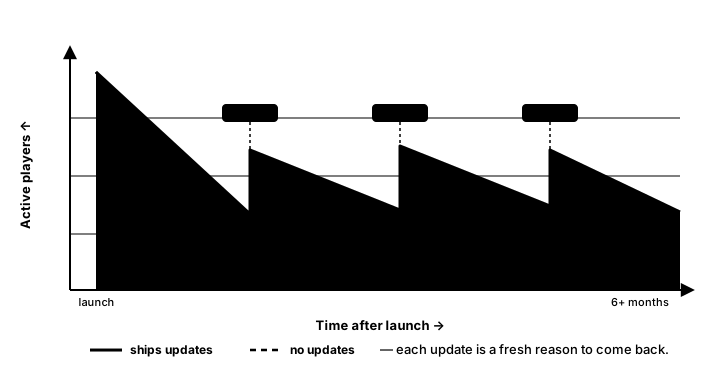
🔢 Versions, Patches and Saves
Semantic versioning gives a version three numbers, MAJOR.MINOR.PATCH. For a game, a sensible reading is: patch for fixes (1.0.0 → 1.0.1), minor for new content that keeps everything compatible (1.0.1 → 1.1.0), and major for changes that break compatibility, such as old saves no longer loading or a rebuilt game (1.1.0 → 2.0.0). Bumping a number resets the numbers to its right. Let code pick the bump from what changed:
BUMP_FOR = {"fix": "patch", "feature": "minor", "breaking": "major"}
RANK = {"patch": 0, "minor": 1, "major": 2}


def bump_version(version, part):
    """Return the next semantic version: bump_version("1.4.2", "minor") -> "1.5.0"."""
    major, minor, patch = (int(n) for n in version.split("."))
    if part == "major":
        return f"{major + 1}.0.0"
    if part == "minor":
        return f"{major}.{minor + 1}.0"
    if part == "patch":
        return f"{major}.{minor}.{patch + 1}"
    raise ValueError(f"unknown version part: {part!r}")


def next_version(version, changes):
    """Pick the biggest bump any change needs. No changes means no release."""
    if not changes:
        return version
    part = max((BUMP_FOR[kind] for kind, _ in changes), key=RANK.get)
    return bump_version(version, part)


changes = [("fix", "Basket no longer sticks to the wall"), ("feature", "Golden stars")]
print(next_version("1.0.0", changes))                    # 1.1.0
print(next_version("1.1.0", [("fix", "Typo in the menu")]))   # 1.1.1
print(bump_version("1.9.0", "minor"))                     # 1.10.0, not 2.0.0
Note the last line: versions are three numbers, so after 1.9 comes 1.10. Compare them as tuples of ints, never as strings ("1.10.0" < "1.9.0" is true for strings).
Players read patch notes, not your code, so write them in their words: what is new, what is fixed. Keep the list of changes as data while you work, and generate the notes from it:
def patch_notes(version, changes):
    """Player-facing notes: new things first, then fixes."""
    lines = [f"Version {version}"]
    for heading, kinds in (("New", ("breaking", "feature")), ("Fixed", ("fix",))):
        items = [text for kind, text in changes if kind in kinds]
        if items:
            lines.append(f"{heading}:")
            lines.extend(f"- {text}" for text in items)
    return lines
A typical rhythm after launch is a hotfix as soon as a crash is confirmed, small patches bundled every week or two, and content updates when they are ready. Downloadable content (DLC) is a separate product with its own version; releasing it does not bump the base game to 2.0.0. The base game gets a normal minor or patch release if its own code changed to support the DLC.
Updates must not break saves
A player who installs 1.1.0 still has saves from 1.0.0. Keep two separate numbers in every save: the game version that wrote it (useful in bug reports) and the save format version, which changes only when the save's layout changes. When it does, add a migration step to the chain you built in Saving & Loading, and test it against a real save file from the previous release before you push.
GAME_VERSION = "1.1.0"      # changes with every release
SAVE_VERSION = 3            # changes only when the save file's layout changes

save = {"save_version": SAVE_VERSION, "game_version": GAME_VERSION,
        "high_score": 21, "unlocked": ["golden_stars"]}
🎪 Live Ops: Events from Data
"Live ops" means changing what players experience after launch without shipping a new build: a winter festival, a double-points weekend, a daily challenge. The trick is to ship the feature in a build and control when it is on with data. The game reads a list of events with start and end dates and turns on whichever one covers today:
from datetime import date


def active_events(events, today):
    """Live-ops events whose date window (inclusive) contains today."""
    return [e for e in events
            if date.fromisoformat(e["start"]) <= today <= date.fromisoformat(e["end"])]


events = [
    {"name": "Launch Week", "start": "2026-10-01", "end": "2026-10-08",
     "message": "Every star is golden!"},
    {"name": "Winter Festival", "start": "2026-12-15", "end": "2027-01-05",
     "message": "Snowflakes fall with the stars"},
]
for day in (date(2026, 10, 8), date(2026, 11, 1), date(2027, 1, 1)):
    names = [e["name"] for e in active_events(events, day)]
    print(day, names or "no event")
Both end days are included, so "until January 5" means players still get the festival on January 5. The list lives in an events.json file shipped with the game:
{
  "events": [
    {"name": "Winter Festival", "start": "2026-12-15", "end": "2027-01-05",
     "message": "Snowflakes fall with the stars"}
  ]
}
To add or move an event without a new build, host the same file on your own website and have the game try to download it at startup, falling back to the bundled copy when the player is offline or the download fails:
import json
import urllib.request

EVENTS_URL = "https://example.com/starcatcher/events.json"   # a file on your own website


def fetch_events(bundled_path):
    """Try the website first; fall back to the copy shipped with the game."""
    try:
        with urllib.request.urlopen(EVENTS_URL, timeout=3) as response:
            return json.load(response)["events"]
    except (OSError, ValueError, KeyError, TypeError):
        return load_events(bundled_path)
Keep a few rules. Put a short timeout on the download so a slow network never freezes the title screen. Treat downloaded data as untrusted: only accept the fields you expect, never code. And tell players when the game goes online; a note on the store page is enough for a file like this.
🏋️ Practice Exercise: Release Day
Objective: finish a launch screen that works out the next version from a list of changes, shows patch notes and today's event, and prints the butler command to upload the build.
Time: about 40 minutes. Starter file: release_day_starter.py and events.json (your instructor has them). The numbered comments in the starter match steps 2 to 6.
- Run the starter. It shows version 1.0.0, a title with no notes, and "No event running today". (≈ 2 min)
- Write
bump_version(), raisingValueErrorfor an unknown part. (≈ 8 min) - Write
next_version()so the biggest change decides the bump. The screen should now say 1.1.0. (≈ 5 min) - Write
patch_notes()with "New:" before "Fixed:". (≈ 8 min) - Write
active_events(). Add an event toevents.jsonthat covers today and watch the banner appear. (≈ 7 min) - Write
funnel_rates()and try it on made-up numbers, including one that should raiseValueError. (≈ 5 min) - Change
ITCH_PROJECTto your own itch.io name. If you have an itch.io account and butler, push your Star Catcher build with the printed command. (≈ 5 min)
You are done when:
- the screen shows version 1.1.0 with the feature listed under "New:" and both fixes under "Fixed:";
- an event whose dates include today appears in the banner, and one that ended yesterday does not;
- adding a
("breaking", "...")change makes the release 2.0.0; - closing the window prints the release, the notes, today's events and a line starting
Upload with: butler push.
💡 Hint
major, minor, patch = (int(n) for n in version.split(".")) unpacks the three numbers. In next_version(), max(parts, key=RANK.get) picks the part with the highest rank. For the events, date.fromisoformat("2026-12-15") gives a date you can compare with <=, and Python lets you chain comparisons: start <= today <= end.
✅ Example Solution
If your instructor hands you the lab file, you will see a few extra lines marked lab runtime near the top, plus an extra and frame_budget() condition on the main loop. They let the instructor's checker run the program automatically; when you run it yourself they do nothing. The program reads events.json from its own folder.
"""Release Day: Intermediate Lesson 27 practice exercise (solution).

A launch screen for Star Catcher that works out the next version from a
list of changes, shows the patch notes, shows today's live-ops event from
events.json, and prints the butler command that uploads the build.
Esc or the close button quits.
"""
import json
from datetime import date
from pathlib import Path

import pygame


GAME = "Star Catcher"
ITCH_PROJECT = "yourname/star-catcher"     # itch.io user/game, all lower-case
CURRENT_VERSION = "1.0.0"                   # the version players have now
WIDTH, HEIGHT = 720, 480
HERE = Path(__file__).resolve().parent

# Everything that changed since CURRENT_VERSION: (kind, description).
# kind is "fix", "feature" or "breaking".
CHANGES = [
    ("feature", "Golden stars are worth 3 points"),
    ("fix", "The high score now saves when you quit mid-round"),
    ("fix", "The basket no longer sticks to the right wall"),
]

BUMP_FOR = {"fix": "patch", "feature": "minor", "breaking": "major"}
RANK = {"patch": 0, "minor": 1, "major": 2}


def bump_version(version, part):
    """Return the next semantic version: bump_version("1.4.2", "minor") -> "1.5.0"."""
    major, minor, patch = (int(n) for n in version.split("."))
    if part == "major":
        return f"{major + 1}.0.0"
    if part == "minor":
        return f"{major}.{minor + 1}.0"
    if part == "patch":
        return f"{major}.{minor}.{patch + 1}"
    raise ValueError(f"unknown version part: {part!r}")


def next_version(version, changes):
    """Pick the biggest bump any change needs. No changes means no release."""
    if not changes:
        return version
    part = max((BUMP_FOR[kind] for kind, _ in changes), key=RANK.get)
    return bump_version(version, part)


def patch_notes(version, changes):
    """Player-facing notes: new things first, then fixes."""
    lines = [f"Version {version}"]
    for heading, kinds in (("New", ("breaking", "feature")), ("Fixed", ("fix",))):
        items = [text for kind, text in changes if kind in kinds]
        if items:
            lines.append(f"{heading}:")
            lines.extend(f"- {text}" for text in items)
    return lines


def butler_command(folder, project, channel, version):
    """The butler push command for one build, as a list of arguments."""
    return ["butler", "push", str(folder), f"{project}:{channel}", "--userversion", version]


def active_events(events, today):
    """Live-ops events whose date window (inclusive) contains today."""
    return [e for e in events
            if date.fromisoformat(e["start"]) <= today <= date.fromisoformat(e["end"])]


def load_events(path):
    """Read the events file; a missing or broken file just means no events."""
    try:
        return json.loads(path.read_text(encoding="utf-8"))["events"]
    except (OSError, ValueError, KeyError):
        return []


def funnel_rates(stages):
    """For (name, count) stages, return (name, count, percent of the stage before)."""
    rows = []
    previous = None
    for name, count in stages:
        if previous is not None and count > previous:
            raise ValueError(f"{name} ({count}) can't be bigger than the stage before it")
        percent = None if previous is None else (100 * count / previous if previous else 0.0)
        rows.append((name, count, percent))
        previous = count
    return rows


def main():
    release = next_version(CURRENT_VERSION, CHANGES)
    notes = patch_notes(release, CHANGES)
    events = active_events(load_events(HERE / "events.json"), date.today())
    command = butler_command("dist/StarCatcher", ITCH_PROJECT, "windows", release)

    pygame.init()
    screen = pygame.display.set_mode((WIDTH, HEIGHT))
    pygame.display.set_caption(f"{GAME} {release}")
    clock = pygame.time.Clock()
    title_font = pygame.font.Font(None, 64)
    font = pygame.font.Font(None, 28)
    small = pygame.font.Font(None, 22)
    twinkle = 0.0

    running = True
    while running:
        dt = clock.tick(60) / 1000
        for event in pygame.event.get():
            if event.type == pygame.QUIT:
                running = False
            elif event.type == pygame.KEYDOWN and event.key == pygame.K_ESCAPE:
                running = False
        twinkle = (twinkle + dt) % 2.0

        screen.fill((16, 20, 40))
        glow = max(0, min(255, int(200 + 55 * abs(1 - twinkle))))   # 200..255 and back
        title = title_font.render(GAME, True, (255, glow, 90))
        screen.blit(title, title.get_rect(midtop=(WIDTH / 2, 30)))
        version = small.render(f"v{release}", True, (150, 160, 190))
        screen.blit(version, version.get_rect(topright=(WIDTH - 16, 16)))

        panel = pygame.Rect(40, 110, WIDTH - 80, 200)
        pygame.draw.rect(screen, (30, 36, 64), panel, border_radius=10)
        y = panel.y + 14
        for i, line in enumerate(notes):
            color = (255, 220, 120) if i == 0 else (225, 230, 240)
            screen.blit(font.render(line, True, color), (panel.x + 18, y))
            y += 28

        if events:
            banner = pygame.Rect(40, 330, WIDTH - 80, 56)
            pygame.draw.rect(screen, (90, 50, 120), banner, border_radius=10)
            text = f"{events[0]['name']}: {events[0]['message']}"
            label = font.render(text, True, (255, 240, 255))
            screen.blit(label, label.get_rect(center=banner.center))
        else:
            label = small.render("No event running today.", True, (140, 150, 180))
            screen.blit(label, label.get_rect(center=(WIDTH / 2, 358)))

        shell = small.render("$ " + " ".join(command), True, (140, 220, 160))
        screen.blit(shell, (40, HEIGHT - 60))
        pygame.display.flip()

    pygame.quit()
    print(f"Release {release}")
    for line in notes:
        print(line)
    print("Events today:", ", ".join(e["name"] for e in events) or "none")
    print("Upload with:", " ".join(command))


if __name__ == "__main__":
    main()
📓 Learning Journal
Take five minutes to write in your learning journal (a notebook or a plain text file works). Jot down:
- Key concepts you learned today
- Techniques that clicked (and the ones that haven't, yet)
- Questions or confusion to bring to the next session
- Ideas to try in your own game
- Progress and feelings: how did this lesson go for you?
✍️ This lesson's prompts:
- Write the one-sentence pitch for your Tower Defense capstone. Read it to someone who hasn't seen the game: what did they picture?
- List three changes you would make to your capstone after launch, and give each one the version number it would ship in.
- Which live event would suit your game, and what would players see on its first day?
📝 Summary
You compared itch.io and Steam and learned what each asks of a new developer, then set up butler so every build goes to the right channel with a version number attached. You planned a store page, a press kit and a launch week, and used a funnel to find where players drop off. After launch, semantic versioning turns a list of changes into the next version and player-facing patch notes, save-format versions keep old saves loading, and date-window events in a data file let you run a festival without shipping a new build.
🎓 Key Takeaways
- itch.io is free and lets you choose its share; Steam charges a recoupable $100 per game and takes a standard 30%. Read the current terms.
butler push folder user/game:channel --userversion X.Y.Zuploads a build; channel names tag the system.- Images sell the page; a press kit answers every question a writer would ask; most launch work happens before launch week.
- Measure each step of the funnel as a share of the step before, and never let a stage be bigger than its parent.
- Patch for fixes, minor for compatible content, major for breaking changes; keep save-format versions separate from game versions.
- Ship features in the build and switch them on with dated data for live events.
🔭 Looking Ahead
This is the last lesson of Game Dev II: you have built, frozen and launched a complete game. The next course, Game Dev III: Advanced, opens with Entity-Component-System, a different way to organize the objects in a bigger game.
❓ Common Questions
Should my first game be free or paid?
Either is fine. Free or pay-what-you-want on itch.io gets more people playing and gives you feedback; that is often worth more than the money for a first game. If you charge, look at similar games on the same store and price close to them.
Do I need a trailer?
It helps a lot, but a 20-second clip of real gameplay is better than no trailer, and better than an ambitious trailer you never finish. Record your screen while you play, cut the best moments, and put the game's name at the end.
Can I push a web build and a desktop build to the same page?
Yes. Push them to different channels (for example html5 and windows). On the Edit game page, mark the web channel as playable in the browser; players can then play in the page or download.
What if I find a bad bug right after launch?
Fix it, bump the patch number, push the new build with butler, and post a short note saying what was fixed. Fast, honest fixes after a rough launch make many players more forgiving, not less.
My game is offline. Can it still have live events?
Yes: ship the events in events.json with the build, as the exercise does. They switch on by date even with no internet. Downloading the file from your website only adds the ability to change the schedule later.
🎯 Quick Quiz
Question 1: Since version 1.4.2 you made two fixes and added one new feature. What is the next version?
Question 2: In butler push dist/StarCatcher me/star-catcher:linux --userversion 1.2.0, what is linux?
Question 3: A winter event should start on December 15, but your next build won't be ready until December 20. What is the best approach?
Question 4: 2,000 people saw your page, 300 downloaded and 120 played for ten minutes. What share of downloaders played for ten minutes?
Question 5: You release a paid expansion (DLC) for your game. What happens to the base game's version number?
🌟 Going Further
- Ship your capstone: freeze Tower Defense, push it to an itch.io page (it can stay restricted until you are ready), and share the link with three people.
- Release script: combine
build_game.pyfrom Building Executables withnext_version()andbutler_command()so one script builds, zips, writes the patch notes to a file and prints the push commands. - Daily challenge: use
random.Random(date.today().toordinal())to pick the same challenge for every player on the same day, with no server at all. - Read the docs: butler documentation, itch.io creator FAQ, Steam Direct and Semantic Versioning.
- Coming up in Game Dev III: Advanced: Robust Saves: Integrity, Versioning, Security and Playtesting & Telemetry build on this lesson's save versions and funnels.