Multiplayer Implementation (continued)
Additional Implementation Details
    def interpolate_entities(self, dt: float):
        """Interpolate remote entities"""
        # Simple linear interpolation
        lerp_speed = 5.0

        for player_id, player in self.players.items():
            if player_id == self.player_id:
                continue  # Skip local player

            # Find latest state from buffer
            if self.state_buffer:
                latest_state = self.state_buffer[-1]
                for player_data in latest_state['players']:
                    if player_data['id'] == player_id:
                        # Interpolate position
                        target_x = player_data['x']
                        target_y = player_data['y']

                        player.x += (target_x - player.x) * lerp_speed * dt
                        player.y += (target_y - player.y) * lerp_speed * dt
                        break

    async def send_ping(self):
        """Send ping to server"""
        if self.websocket and self.connected:
            await self.websocket.send(json.dumps({
                'type': 'ping',
                'time': time.time()
            }))

    def render(self):
        """Render game"""
        self.screen.fill((20, 20, 40))

        # Draw grid
        for x in range(0, 800, 50):
            pygame.draw.line(self.screen, (30, 30, 50), (x, 0), (x, 600))
        for y in range(0, 600, 50):
            pygame.draw.line(self.screen, (30, 30, 50), (0, y), (800, y))

        # Draw projectiles
        for projectile in self.projectiles:
            color = (255, 100, 100) if projectile.team == 'red' else (100, 100, 255)
            pygame.draw.circle(self.screen, color,
                             (int(projectile.x), int(projectile.y)),
                             int(projectile.radius))

        # Draw players
        for player in self.players.values():
            # Player color
            if player.id == self.player_id:
                color = (100, 255, 100)  # Green for local player
            elif player.team == 'red':
                color = (255, 100, 100)
            else:
                color = (100, 100, 255)

            # Draw player
            pygame.draw.circle(self.screen, color,
                             (int(player.x), int(player.y)),
                             int(player.radius))

            # Draw health bar
            bar_width = 40
            bar_height = 4
            bar_x = player.x - bar_width // 2
            bar_y = player.y - player.radius - 10

            pygame.draw.rect(self.screen, (50, 50, 50),
                           (bar_x, bar_y, bar_width, bar_height))

            health_width = bar_width * (player.health / player.max_health)
            health_color = (100, 255, 100) if player.health > 50 else (255, 100, 100)
            pygame.draw.rect(self.screen, health_color,
                           (bar_x, bar_y, health_width, bar_height))

            # Draw name
            font = pygame.font.Font(None, 12)
            name_text = font.render(player.id[:8], True, (255, 255, 255))
            name_rect = name_text.get_rect(center=(player.x, player.y - player.radius - 15))
            self.screen.blit(name_text, name_rect)

        # Draw UI
        self.draw_ui()

        pygame.display.flip()

    def draw_ui(self):
        """Draw UI elements"""
        font = pygame.font.Font(None, 24)

        # Connection status
        status = "Connected" if self.connected else "Disconnected"
        color = (100, 255, 100) if self.connected else (255, 100, 100)
        text = font.render(f"Status: {status}", True, color)
        self.screen.blit(text, (10, 10))

        # Ping
        text = font.render(f"Ping: {int(self.ping)}ms", True, (255, 255, 255))
        self.screen.blit(text, (10, 40))

        # Score
        if self.local_player:
            text = font.render(f"Score: {self.local_player.score}", True, (255, 255, 255))
            self.screen.blit(text, (10, 70))

            text = font.render(f"Health: {self.local_player.health}", True, (255, 255, 255))
            self.screen.blit(text, (10, 100))

# Main execution
async def main():
    # Start server
    server = GameServer()
    server_task = asyncio.create_task(server.start())

    # Wait a bit for server to start
    await asyncio.sleep(1)

    # Start client
    client = GameClient()
    await client.connect("ws://localhost:8765")
    await client.game_loop()

if __name__ == "__main__":
    asyncio.run(main())
Best Practices
⚡ Multiplayer Best Practices
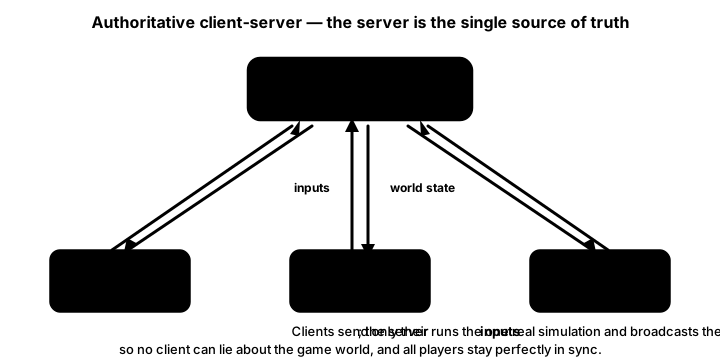
- Server Authority: Never trust the client
- Client Prediction: Hide latency with local simulation
- Interpolation: Smooth visual updates between snapshots
- State Compression: Send only what changes
- Input Validation: Prevent cheating and exploits
- Graceful Degradation: Handle poor connections
- Regional Servers: Minimize latency
- Rollback: Correct prediction errors smoothly
Key Takeaways
- 🖥️ Server is the source of truth
- 🔮 Prediction hides latency
- 🔄 Reconciliation corrects errors
- 📊 Interpolation smooths movement
- ⏱️ Lag compensation improves fairness
- 📦 State snapshots enable time travel
- 🎯 Input buffering handles jitter
- 🛡️ Validation prevents cheating
🏋️♂️ Practice Exercise
🏋️♂️ Exercise 1: Authoritative Server + Predict + Reconcile in One Pygame Window
Objective: Build a single-process pygame demo (~90 lines) that exercises three pillar client-server patterns from this lesson — the authoritative-server / dumb-client split (server holds canonical state, client sends INPUTS and receives STATE snapshots), client-side prediction (local player applies its own input immediately to hide the input-to-server one-way latency), and server reconciliation (when a snapshot arrives, snap predicted position to server's authoritative position then re-apply any unacked inputs that arrived AFTER the server's last-acknowledged input sequence number) — all running in one window with the server simulated as a daemon thread, a synthetic 50 ms one-way latency on both directions, and the predicted (local-rendered) position drawn alongside the server-known position so the offset between them is the smoking-gun visualization of latency-being-hidden-by-prediction.
Instructions:
- Set up two thread-safe
queue.Queuechannels:inputs_to_servercarries(seq, dx, dy)input tuples,snapshots_to_clientcarries(server_x, server_y, last_acked_seq)snapshots. The synthetic one-way latency usesthreading.Timer(0.050, lambda: queue.put(...))on each direction so a 100 ms RTT is visible on screen without an actual network. - Spawn the server thread (
daemon=True): drain all pendinginputs_to_servermessages, mutate the canonicalserver_statedict (under athreading.Lock), then push a snapshot at ~30 Hz tickrate via the latency-Timer (Best Practice "Server Authority: Never trust the client" — the server is the SINGLE place gameplay state mutates; clients send inputs, NOT positions). - In the pygame main loop, on every WASD/arrow input compute
(dx, dy), then do BOTH things in the same frame: (a) apply the input topredicted_x, predicted_yimmediately (this is the prediction — the green circle moves the frame the key is pressed, with zero wait for a server roundtrip), and (b) incrementseqand append(seq, dx, dy)to theunacked_inputslist, then schedule the latency-Timer to deliver it to the server. Best Practice "Client Prediction: Hide latency with local simulation". - Each frame, drain all pending
snapshots_to_client. For every snapshot(server_x, server_y, server_acked_seq), reconcile: setpredicted_x, predicted_y = server_x, server_y(snap to authoritative), filterunacked_inputsto keep only entries withseq > server_acked_seq(the server has already integrated everything <= its acked seq), then re-apply each surviving unacked input topredicted_x, predicted_y. Without the re-apply step, prediction would snap backwards every snapshot arrival; the re-apply step is what keeps the predicted position ahead of the server-known position by exactly the in-flight inputs (Best Practice "Rollback: Correct prediction errors smoothly"). - Render two circles every frame: the GREEN circle at
(predicted_x, predicted_y)is what the player sees as their character; the RED hollow circle at the server's last-known position is the authoritative truth, drawn ~100 ms behind on screen (50 ms outbound latency + 50 ms snapshot return). HUD shows predicted coords + server coords + length ofunacked_inputs+ currentseq. Press WASD or arrows: green moves instantly, red follows ~100 ms behind — the visible offset IS the latency that prediction is hiding from the player.
💡 Hint
The reconcile step is the subtle one. The server snapshot tells you "as of input seq=N, my authoritative position is (sx, sy)". You snap predicted to (sx, sy), but you've already sent inputs N+1, N+2, N+3 that the server hasn't seen yet — they're still in flight. Filter unacked_inputs to keep only those with seq > N (the server hasn't acked them), then re-apply them to predicted. The lesson's interpolate_entities example shows a related but distinct pattern: REMOTE players (other people in the match) get smoothed via lerp toward the latest snapshot position (no prediction, no inputs to re-apply); only the LOCAL player runs the predict-and-reconcile loop. The asymmetry — local = predict, remote = interpolate — is canonical (Best Practice "Interpolation: Smooth visual updates between snapshots" + Key Takeaway "Interpolation smooths movement").
✅ Example Solution
import pygame, queue, threading, time, sys

WIDTH, HEIGHT, FPS = 800, 480, 60
LATENCY_S = 0.050  # 50 ms one-way (100 ms RTT)

server_state = {'x': 400.0, 'y': 240.0, 'last_seq': 0}
state_lock = threading.Lock()
inputs_to_server = queue.Queue()
snapshots_to_client = queue.Queue()

def server_loop():
    while True:
        try:
            while True:
                s, dx, dy = inputs_to_server.get_nowait()
                with state_lock:
                    server_state['x'] = max(0, min(WIDTH, server_state['x'] + dx))
                    server_state['y'] = max(0, min(HEIGHT, server_state['y'] + dy))
                    server_state['last_seq'] = s
        except queue.Empty:
            pass
        with state_lock:
            snap = (server_state['x'], server_state['y'], server_state['last_seq'])
        threading.Timer(LATENCY_S, snapshots_to_client.put, args=(snap,)).start()
        time.sleep(1.0 / 30.0)

predicted_x, predicted_y = 400.0, 240.0
unacked_inputs = []
seq = 0

def send_input(dx, dy):
    global seq
    seq += 1
    unacked_inputs.append((seq, dx, dy))
    threading.Timer(LATENCY_S, inputs_to_server.put,
                    args=((seq, dx, dy),)).start()

def reconcile(sx, sy, sseq):
    global predicted_x, predicted_y, unacked_inputs
    predicted_x, predicted_y = sx, sy
    unacked_inputs = [u for u in unacked_inputs if u[0] > sseq]
    for (_, dx, dy) in unacked_inputs:
        predicted_x += dx
        predicted_y += dy

pygame.init()
screen = pygame.display.set_mode((WIDTH, HEIGHT))
clock = pygame.time.Clock()
font = pygame.font.SysFont(None, 18)
threading.Thread(target=server_loop, daemon=True).start()

SPEED = 4
running = True
while running:
    clock.tick(FPS)
    for e in pygame.event.get():
        if e.type == pygame.QUIT: running = False
    keys = pygame.key.get_pressed()
    dx, dy = 0, 0
    if keys[pygame.K_LEFT] or keys[pygame.K_a]: dx -= SPEED
    if keys[pygame.K_RIGHT] or keys[pygame.K_d]: dx += SPEED
    if keys[pygame.K_UP] or keys[pygame.K_w]: dy -= SPEED
    if keys[pygame.K_DOWN] or keys[pygame.K_s]: dy += SPEED
    if dx or dy:
        predicted_x += dx
        predicted_y += dy
        send_input(dx, dy)
    try:
        while True:
            sx, sy, sseq = snapshots_to_client.get_nowait()
            reconcile(sx, sy, sseq)
    except queue.Empty:
        pass
    screen.fill((20, 20, 40))
    pygame.draw.circle(screen, (100, 255, 100),
                       (int(predicted_x), int(predicted_y)), 12)
    with state_lock:
        sx, sy = server_state['x'], server_state['y']
    pygame.draw.circle(screen, (255, 100, 100),
                       (int(sx), int(sy)), 12, 2)
    hud = [f"Predicted (green): ({int(predicted_x)}, {int(predicted_y)})",
           f"Server (red, 100ms RTT): ({int(sx)}, {int(sy)})",
           f"Unacked: {len(unacked_inputs)}  seq={seq}",
           "WASD/arrows to move"]
    for i, line in enumerate(hud):
        screen.blit(font.render(line, True, (220, 220, 220)),
                    (10, 10 + i * 18))
    pygame.display.flip()
pygame.quit()
sys.exit()
🎯 Quick Quiz
Question 1: The lesson's Best Practice "Server Authority: Never trust the client" + Key Takeaway "Server is the source of truth" prescribes that clients send INPUTS to the server and receive STATE snapshots back, NEVER the other way around (clients should not send their position; server should not just relay client claims). What concrete failure mode does the alternative — letting clients update their own position and broadcast it to others through the server — cause?
Question 2: Why does the lesson's Best Practice "Client Prediction: Hide latency with local simulation" + Key Takeaway "Prediction hides latency" prescribe that the LOCAL player applies its own input immediately (without waiting for server confirmation), even though the server is supposed to be the source of truth?
Question 3: When a server snapshot arrives saying "as of input seq=N, the authoritative position is (sx, sy)", the client snaps predicted_x, predicted_y = sx, sy. But the client has already sent inputs seq=N+1, N+2, N+3 that are still in flight (haven't reached the server yet). What's the correct reconciliation behavior, and why does omitting the re-apply step break the predict-and-reconcile loop?
What's Next?
Now that you've built a multiplayer game, next we'll learn about lobby systems and matchmaking!