Lesson 2: Event Systems
When the player picks up a coin, the score, the sound, the particles and the achievements all need to know, but the coin shouldn't have to know about any of them. In this lesson you build an event bus that lets game systems announce what happened and react to it without ever holding a reference to each other.
🎯 Learning Objectives
By the end of this lesson, you will be able to:
- Explain how publish-subscribe removes direct dependencies between game systems.
- Build an event bus with typed events, subscribe and unsubscribe, and listener errors that are caught and reported.
- Compare queued and immediate dispatch, and choose the right one for a given event.
- Order queued events by priority with
heapqwithout crashing on ties. - Debug event flow with a logging listener, and avoid the classic traps: listeners that never unsubscribe and events that trigger each other forever.
Project: Event Bus Playground, a pygame-ce window where five independent systems react to hits, kills, score changes and prioritized pings.
In This Lesson
📻 The Coupling Problem
Here is how a player's death often starts out:
def die(self):
    self.hud.show_game_over()
    self.audio.play("gameover.ogg")
    self.achievements.record_death()
    self.analytics.log("death", self.pos)
    self.save_system.autosave()
Five systems, five references. The player now can't be tested without all five existing, adding a sixth reaction means editing the player again, and a crash inside audio.play means the save never happens. The player knows too much.
A radio station doesn't phone each listener. It broadcasts on a frequency, and any radio tuned to that frequency hears it. An event bus works the same way: a publisher emits an event of some type, the bus delivers it to every subscriber that registered for that type, and neither side holds a reference to the other.
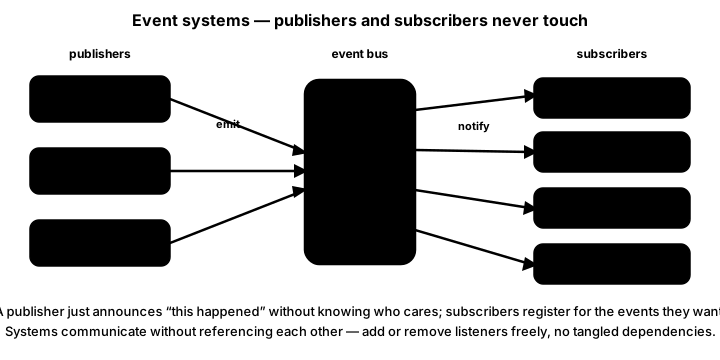
💡 Why this matters
Event buses (also called message buses or the observer pattern) show up across game engines: Godot's signals and Unity's UnityEvent are both built on the same publish-subscribe idea. The same shape shows up again whenever one part of a program must react to another without depending on it, from user interfaces to network messages.
🏷️ Event Types and Events
Event types are a fixed set of names, which is exactly what Enum is for (you met it in the Game States & Scenes lesson). An event is a small dataclass: its type, a dictionary of details, and a priority for later.
from dataclasses import dataclass, field
from enum import Enum, auto


class EventType(Enum):
    PLAYER_HIT = auto()
    ENEMY_KILLED = auto()
    SCORE_CHANGED = auto()
    ACHIEVEMENT_UNLOCKED = auto()
    PING = auto()


@dataclass
class Event:
    type: EventType
    data: dict = field(default_factory=dict)   # a new dict per event, never a shared one
    priority: int = 5                          # lower numbers are handled first
Every event type the game emits must be a member of the enum. If code mentions EventType.GAME_SAVED and nobody added GAME_SAVED to the class, Python raises AttributeError when that line runs, not when the file is imported. That's why a missing member can hide for weeks inside a rarely used code path. A type checker such as mypy, or a quick test that emits every event once, catches it early.
🧭 What goes in data?
Only what listeners need, as plain values: {"damage": 10, "pos": (400, 300)}. Avoid passing whole game objects; a listener that receives the Player can start calling its methods, and the coupling you just removed creeps back in. Write each event's keys down next to its enum member so publishers and listeners agree.
🚌 A Minimal Event Bus
The bus is a dictionary from event type to a list of callbacks. Here is a complete program you can run in a terminal (no window needed). Watch what happens when one listener has a bug:
from dataclasses import dataclass, field
from enum import Enum, auto


class EventType(Enum):
    PLAYER_DIED = auto()
    COIN_COLLECTED = auto()


@dataclass
class Event:
    type: EventType
    data: dict = field(default_factory=dict)


class EventBus:
    def __init__(self):
        self.listeners = {}                     # EventType -> [callback, ...]

    def subscribe(self, event_type, callback):
        callbacks = self.listeners.setdefault(event_type, [])
        if callback not in callbacks:
            callbacks.append(callback)

    def unsubscribe(self, event_type, callback):
        callbacks = self.listeners.get(event_type, [])
        if callback in callbacks:
            callbacks.remove(callback)

    def emit_immediate(self, event):
        for callback in list(self.listeners.get(event.type, ())):   # copy: safe to unsubscribe
            try:
                callback(event)
            except Exception as exc:            # one broken listener can't stop the rest
                print(f"[bus] {callback.__qualname__} failed: {exc!r}")


class Hud:
    def __init__(self, bus):
        self.coins = 0
        bus.subscribe(EventType.COIN_COLLECTED, self.on_coin)

    def on_coin(self, event):
        self.coins += event.data["value"]
        print(f"[hud] coins: {self.coins}")


class Audio:
    def __init__(self, bus):
        bus.subscribe(EventType.COIN_COLLECTED, self.on_coin)
        bus.subscribe(EventType.PLAYER_DIED, self.on_died)

    def on_coin(self, event):
        print("[audio] play coin.ogg")

    def on_died(self, event):
        raise FileNotFoundError("gameover.ogg")    # a bug in one listener...


class Analytics:
    def __init__(self, bus):
        bus.subscribe(EventType.PLAYER_DIED, self.on_died)

    def on_died(self, event):
        print(f"[analytics] died at {event.data['where']}")   # ...doesn't stop this one


bus = EventBus()
hud, audio, analytics = Hud(bus), Audio(bus), Analytics(bus)
bus.emit_immediate(Event(EventType.COIN_COLLECTED, {"value": 5}))
bus.emit_immediate(Event(EventType.PLAYER_DIED, {"where": "level 2"}))
It prints:
[hud] coins: 5
[audio] play coin.ogg
[bus] Audio.on_died failed: FileNotFoundError('gameover.ogg')
[analytics] died at level 2
Three details carry the whole design:
- Systems subscribe themselves. The main program creates
Hud(bus)and never touches it again; the bus holds the only link. - Each listener call is wrapped in
try/except. Without it, theFileNotFoundErrorwould end the loop and Analytics would never hear about the death. The bus reports the error instead of hiding it. - The loop walks a copy of the list. A listener may unsubscribe itself (or another listener) while the event is being delivered. Removing items from a list you are looping over skips elements; looping over
list(...)avoids that.
⏳ Queued or Immediate?
emit_immediate() runs every listener before it returns. A second method, emit(), just puts the event in a queue, and the game loop calls process_events() once per frame, at the top, to deliver everything that was queued:
def emit(self, event):
    self.queue.append(event)


def process_events(self):
    batch, self.queue = self.queue, []       # take this frame's events...
    for event in batch:
        self.emit_immediate(event)           # ...anything emitted now waits for next frame
    return len(batch)
Try both modes in the demo. In Queued mode the bus holds events until its next process_events(), which the demo runs every two seconds so you can see the wait (a real game does it every frame). Switch a subscriber off and notice that the publishers never change.
emit() + process_events() | emit_immediate() | |
|---|---|---|
| When listeners run | At the top of the next frame, in one batch | Right now, before the call returns |
| Listener emits another event | It waits for the next frame, so chains can't spiral inside one frame | It runs in the middle of the first delivery (re-entrant) |
| Good for | Most game events: score, sounds, achievements, UI | Reactions the publisher's very next line depends on |
| Watch out for | A one-frame delay; the world may have changed by delivery time | Listeners changing state the publisher is still using |
The batch swap in process_events() is what keeps the queued mode safe. If it looped "while the queue is not empty", a listener that emits in response to its own event type would keep the loop going forever and freeze the frame. With the swap, each frame delivers a fixed batch, and the worst a runaway chain can do is show up in your logs one frame at a time.
🥇 Priorities Without Crashes
Some events should jump the queue: a PLAYER_DIED ought to be handled before a pile of routine score updates from the same frame. A heap keeps the queue ordered by priority, and you've used heapq since the A* Pathfinding lesson. The obvious version has a trap:
heapq.heappush(queue, (event.priority, event))   # two events at priority 5 ...
# TypeError: '<' not supported between instances of 'Event' and 'Event'
Tuples compare item by item. When two priorities are equal, Python moves on to compare the events themselves, and a dataclass has no ordering, so the push crashes, but only on the day two events share a priority. Adding a timestamp in the middle doesn't truly fix it: two events created within the same clock tick tie again. The reliable fix is a counter that never repeats:
import heapq
import itertools


class EventBus:
    def __init__(self):
        self.listeners = {}
        self.queue = []                     # heap of (priority, order, event)
        self.order = itertools.count()      # 0, 1, 2, ... never equal, so events are never compared
        self.errors = []

    def emit(self, event):
        heapq.heappush(self.queue, (event.priority, next(self.order), event))

    def process_events(self):
        batch, self.queue = self.queue, []
        delivered = 0
        while batch:
            _, _, event = heapq.heappop(batch)
            self._dispatch(event)
            delivered += 1
        return delivered
The counter does two jobs: it guarantees the comparison never reaches the Event, and it keeps events with equal priority in the order they were emitted (first in, first out). Priority only changes order within a batch; a priority-1 event emitted with emit() still waits for the next process_events().
🧯 Living With Events
Unsubscribe when you're done. The bus stores bound methods such as enemy.on_hit, and a bound method keeps its object alive. An enemy removed from the level but still subscribed keeps reacting to events, as a ghost. Give objects that subscribe a cleanup step that calls bus.unsubscribe(...) for each subscription, and call it when they leave the game.
Log the traffic. Because nothing calls anything directly, "why did the score change?" can't be answered by reading one function. Subscribe a debug logger to every type:
class DebugLogger:
    def __init__(self, bus):
        for event_type in EventType:        # iterating an Enum gives every member
            bus.subscribe(event_type, self.on_any)

    def on_any(self, event):
        print(f"[log] {event.type.name} p{event.priority} {event.data}")
Beware of cycles. If SCORE_CHANGED makes the HUD emit UI_UPDATED, and UI_UPDATED makes something change the score, you have a loop. With queued dispatch it shows up as the same events every frame in your log; with immediate dispatch it is a RecursionError. Draw your events and listeners on paper when a new one creates events of its own.
pygame has an event queue too. pygame.event.custom_type() gives you a new event id, and pygame.event.post() puts it on the same queue as keyboard and mouse input; pygame.time.set_timer() posts one on a schedule (its interval is in milliseconds, because that is the pygame API). That queue is great for input-like events and timers. Your own bus adds what game logic needs: typed data, priorities, per-listener error handling, and delivery to objects instead of one big if chain in the main loop.
✅ Growth Mindset: Events Feel Like Magic at First
The first time a sound plays and you can't find the line that plays it, events feel like spooky action at a distance. That feeling is normal, and it fades once you build the habit that experienced developers use: turn on the logger, reproduce the action, and read the event trail from top to bottom. You're not bad at tracing code; you're learning a new kind of tracing, and it gets easier with every bug you follow through the log.
🏋️ Practice Exercise: Event Bus Playground
Objective: finish an event bus that queues events by priority, delivers them at the top of each frame, survives a broken listener, and lets five independent systems react without referencing each other.
Time: about 45 minutes. Starter file: event_bus_starter.py (your instructor has it). Its bus delivers everything immediately and crashes on the first listener error. Its numbered TODOs match these steps.
- Run the starter and press 1 and 3: the "queued" counter never leaves 0, because nothing is queued yet. (≈ 3 min)
- Make
emit()push(priority, next(self.order), event)onto the heap. (≈ 5 min) - Write
process_events()with the batch swap, delivering in priority order. Press P and check that the log shows urgent, normal, low. (≈ 10 min) - Wrap each listener call in
_dispatch()withtry/except, record the message inself.errors, and loop over a copy of the list. Press F, then 3: the game keeps running. (≈ 10 min) - In
AchievementSystem.on_kill, emitACHIEVEMENT_UNLOCKEDat priority 1 on the third kill, then unsubscribe. Press 2 three times. (≈ 10 min)
You are done when:
- pressing 1 or 3 shows "queued for next frame: 1" and the HUD updates one frame later, while 2 spawns particles at once;
- P prints the three pings as urgent, normal, low;
- with the fault on, 3 prints a
[bus] HUDSystem.on_score failedline, the HUD score stops changing, and the achievements' best score still updates; - the third kill shows "Achievement unlocked: Hat Trick" exactly once.
💡 Hint
For process_events(), write the swap first: batch, self.queue = self.queue, []. Then loop while batch: and heappop(batch), which returns the whole tuple, so unpack it as _, _, event. If P crashes with a TypeError about comparing Events, your heap entries are missing the counter.
✅ Example Solution
Your instructor's lab file also has a few lines marked lab runtime and and frame_budget() in the loop, so a checker can run it automatically. You don't need them.
"""Event Bus Playground: Advanced Lesson 2 practice exercise (solution).

The game code only talks to an EventBus. Five systems subscribe to the
events they care about and never reference each other.
    1  PLAYER_HIT     queued (handled at the top of the next frame)
    2  ENEMY_KILLED   immediate (handled before emit_immediate returns)
    3  SCORE_CHANGED  queued
    P  three PINGs at priorities 9, 1 and 5 (watch the order they arrive in)
    F  make the HUD's score listener raise an error (the others keep working)
Every dispatched event is also printed by the DebugLogger. Close the window to quit.
"""
import heapq
import itertools
from collections import deque
from dataclasses import dataclass, field
from enum import Enum, auto

import pygame


WIDTH, HEIGHT = 820, 500
BG_COLOR = (17, 20, 32)
TEXT_COLOR = (224, 230, 240)
DIM_COLOR = (148, 163, 184)


class EventType(Enum):
    PLAYER_HIT = auto()
    ENEMY_KILLED = auto()
    SCORE_CHANGED = auto()
    ACHIEVEMENT_UNLOCKED = auto()
    PING = auto()


@dataclass
class Event:
    type: EventType
    data: dict = field(default_factory=dict)
    priority: int = 5                   # lower numbers are handled first


class EventBus:
    def __init__(self):
        self.listeners = {}             # EventType -> [callback, ...]
        self.queue = []                 # heap of (priority, order, event)
        self.order = itertools.count()  # tie-breaker: equal priorities stay first-in, first-out
        self.errors = []

    def subscribe(self, event_type, callback):
        callbacks = self.listeners.setdefault(event_type, [])
        if callback not in callbacks:
            callbacks.append(callback)

    def unsubscribe(self, event_type, callback):
        callbacks = self.listeners.get(event_type, [])
        if callback in callbacks:
            callbacks.remove(callback)

    def emit(self, event):
        """Queue the event; process_events() delivers it later."""
        heapq.heappush(self.queue, (event.priority, next(self.order), event))

    def emit_immediate(self, event):
        """Deliver the event now, before this call returns."""
        self._dispatch(event)

    def process_events(self):
        """Deliver everything queued so far. Events emitted meanwhile wait for the next call."""
        batch, self.queue = self.queue, []
        delivered = 0
        while batch:
            _, _, event = heapq.heappop(batch)
            self._dispatch(event)
            delivered += 1
        return delivered

    def _dispatch(self, event):
        for callback in list(self.listeners.get(event.type, ())):   # a copy: listeners may unsubscribe
            try:
                callback(event)
            except Exception as exc:    # one broken listener must not stop the others
                message = f"{callback.__qualname__} failed on {event.type.name}: {exc!r}"
                self.errors.append(message)
                print("[bus]", message)


# --- subscribers: each one only knows the bus -----------------------------------------
class DebugLogger:
    def __init__(self, bus):
        self.lines = deque(maxlen=7)
        for event_type in EventType:
            bus.subscribe(event_type, self.on_any)

    def on_any(self, event):
        line = f"{event.type.name} p{event.priority} {event.data}"
        self.lines.append(line)
        print("[log]", line)


class AudioSystem:
    """Stands in for pygame.mixer calls: it records which sound it would play."""

    def __init__(self, bus):
        self.last_sound = "-"
        bus.subscribe(EventType.PLAYER_HIT, self.on_hit)
        bus.subscribe(EventType.ENEMY_KILLED, self.on_kill)

    def on_hit(self, event):
        self.last_sound = "hurt.ogg"

    def on_kill(self, event):
        self.last_sound = "pop.ogg"


class HUDSystem:
    def __init__(self, bus):
        self.hp, self.score, self.toast, self.fault = 100, 0, "", False
        bus.subscribe(EventType.PLAYER_HIT, self.on_hit)
        bus.subscribe(EventType.SCORE_CHANGED, self.on_score)
        bus.subscribe(EventType.ACHIEVEMENT_UNLOCKED, self.on_achievement)

    def on_hit(self, event):
        self.hp = max(0, self.hp - event.data.get("damage", 10))

    def on_score(self, event):
        if self.fault:
            raise ValueError("injected fault")
        self.score = event.data["score"]

    def on_achievement(self, event):
        self.toast = f"Achievement unlocked: {event.data['name']}"
        print(self.toast)


class ParticleSystem:
    def __init__(self, bus):
        self.particles = []             # [pos, vel, seconds_left]
        bus.subscribe(EventType.ENEMY_KILLED, self.on_kill)

    def on_kill(self, event):
        x, y = event.data.get("pos", (WIDTH / 2, HEIGHT / 2))
        for i in range(12):
            vel = pygame.Vector2(150, 0).rotate(i * 30)                 # px/s
            self.particles.append([pygame.Vector2(x, y), vel, 0.6])

    def update(self, dt):
        for p in self.particles:
            p[0] += p[1] * dt
            p[2] -= dt
        self.particles = [p for p in self.particles if p[2] > 0]


class AchievementSystem:
    def __init__(self, bus):
        self.bus = bus
        self.kills, self.best_score = 0, 0
        bus.subscribe(EventType.ENEMY_KILLED, self.on_kill)
        bus.subscribe(EventType.SCORE_CHANGED, self.on_score)

    def on_kill(self, event):
        self.kills += 1
        if self.kills == 3:
            # Emitting from inside a listener is safe: it waits for the next process_events().
            self.bus.emit(Event(EventType.ACHIEVEMENT_UNLOCKED, {"name": "Hat Trick"}, priority=1))
            self.bus.unsubscribe(EventType.ENEMY_KILLED, self.on_kill)     # done listening

    def on_score(self, event):
        self.best_score = max(self.best_score, event.data["score"])


def main():
    pygame.init()
    screen = pygame.display.set_mode((WIDTH, HEIGHT))
    pygame.display.set_caption("Event Bus Playground")
    clock = pygame.time.Clock()
    font = pygame.font.Font(None, 22)

    bus = EventBus()
    logger = DebugLogger(bus)
    audio = AudioSystem(bus)
    hud = HUDSystem(bus)
    particles = ParticleSystem(bus)
    achievements = AchievementSystem(bus)
    score = 0

    running = True
    while running:
        dt = clock.tick(60) / 1000
        bus.process_events()            # deliver last frame's queued events first

        for event in pygame.event.get():
            if event.type == pygame.QUIT:
                running = False
            elif event.type == pygame.KEYDOWN:
                if event.key == pygame.K_1:
                    bus.emit(Event(EventType.PLAYER_HIT, {"damage": 10}))
                elif event.key == pygame.K_2:
                    bus.emit_immediate(Event(EventType.ENEMY_KILLED, {"pos": (WIDTH / 2, 300)}))
                elif event.key == pygame.K_3:
                    score += 100
                    bus.emit(Event(EventType.SCORE_CHANGED, {"score": score}))
                elif event.key == pygame.K_p:
                    for label, priority in (("low", 9), ("urgent", 1), ("normal", 5)):
                        bus.emit(Event(EventType.PING, {"label": label}, priority))
                elif event.key == pygame.K_f:
                    hud.fault = not hud.fault

        particles.update(dt)

        screen.fill(BG_COLOR)
        for pos, _, seconds in particles.particles:
            pygame.draw.circle(screen, (250, 204, 21), pos, max(1, seconds * 8))
        lines = [
            f"queued for next frame: {len(bus.queue)}    last sound: {audio.last_sound}",
            f"HUD  hp {hud.hp}  score {hud.score}  fault {'ON' if hud.fault else 'off'}",
            f"achievements  kills {achievements.kills}  best score {achievements.best_score}",
            f"particles {len(particles.particles)}   errors caught {len(bus.errors)}",
            hud.toast,
            "1 hit (queued)  2 kill (immediate)  3 score (queued)  P priorities  F fault",
        ]
        for n, line in enumerate(lines):
            screen.blit(font.render(line, True, TEXT_COLOR), (12, 10 + n * 22))
        for n, line in enumerate(logger.lines):
            screen.blit(font.render(line, True, DIM_COLOR), (12, 170 + n * 20))
        pygame.display.flip()

    pygame.quit()
    print(f"kills={achievements.kills} best_score={achievements.best_score} errors={len(bus.errors)}")


if __name__ == "__main__":
    main()
📓 Learning Journal
Take five minutes to write in your learning journal (a notebook or a plain text file works). Jot down:
- Key concepts you learned today
- Techniques that clicked (and the ones that haven't, yet)
- Questions or confusion to bring to the next session
- Ideas to try in your own game
- Progress and feelings: how did this lesson go for you?
✍️ This lesson's prompts:
- List the events your capstone or favorite game would need. For each one, which systems would listen, and should it be queued or immediate?
- Describe a bug you've had (in any program) that came from one part of the code knowing too much about another. Would an event have prevented it?
- How did it feel to debug with the event log instead of stepping through calls?
📝 Summary
Direct calls between systems tie them together, so every new reaction means editing the publisher. An event bus breaks that tie: publishers emit typed events, subscribers register for the types they care about, and the bus delivers them, catching and reporting any listener that fails. Queued dispatch delivers a fixed batch at the top of each frame, which keeps event chains from spiraling, while immediate dispatch is for reactions the publisher needs right away. A priority heap with a counter orders each batch without ever comparing two events.
🎓 Key Takeaways
- Publishers and subscribers share only the bus and an
EventType; neither holds a reference to the other. - Wrap each listener call in
try/exceptand loop over a copy of the listener list. - Queue most events and deliver them with a batch swap once per frame; use immediate dispatch only when the result is needed on the next line.
- Heap entries are
(priority, counter, event)so ties never compare events and equal priorities stay in order. - Unsubscribe objects that leave the game, and keep a logging listener handy for tracing.
🔭 Looking Ahead
You now have a clean architecture; next you'll find out whether it is fast enough. In Profiling & Performance, you'll measure where a frame's milliseconds really go with perf_counter and cProfile, and fix only what the numbers point at.
❓ Common Questions
Should the event bus be a global variable?
It's tempting, and small games do it. Passing the bus into each system's constructor, as this lesson does, makes dependencies visible and lets tests create a fresh bus per test. If you do use a global, still create it in one place and pass it where you can.
Isn't catching every exception bad practice?
Swallowing exceptions silently is. The bus catches, records and prints the error, and keeps the other listeners running. During development you can add a "strict" flag that re-raises instead, so bugs stop the game at once.
Why not use queue.PriorityQueue?
It is designed for passing items between threads and does locking you don't need in a single-threaded game loop. It also has the same tie problem: it compares the items you put in. heapq on a plain list plus a counter is simpler.
How is this different from the ECS systems in the last lesson?
They work together. Systems choose which entities to process with component queries; events carry what happened between systems. A CombatSystem that destroys an entity can emit ENEMY_KILLED, and the audio, score and particle systems react without CombatSystem knowing they exist.
Can a listener stop other listeners from hearing an event?
Not in this bus, and that is deliberate: every subscriber hears every event of its type. Some UI toolkits let a handler mark an event "consumed"; you can add a handled field to Event and break out of the loop when it's set, but use it sparingly because it makes listener order matter.
🎯 Quick Quiz
Question 1: What is the main benefit of the player emitting PLAYER_DIED instead of calling the HUD, audio and save systems itself?
Question 2: Three listeners subscribe to SCORE_CHANGED, and the second one raises ValueError. With the lesson's _dispatch(), what happens?
Question 3: Why does the queue store (priority, next(self.order), event) rather than (priority, event)?
Question 4: During process_events(), a listener calls bus.emit(...). When is that new event delivered?
Question 5: An enemy object subscribed self.on_hit to PLAYER_HIT and was then removed from the level. What problem remains?
🌟 Going Further
- Filtered subscriptions: add
subscribe(event_type, callback, where=None), wherewhereis a function the bus calls first, so a boss-music listener can hear onlyENEMY_KILLEDevents whose data says"boss": True. - Event history and replay: keep the last 100 delivered events in a
collections.deque(maxlen=100), and add a debug key that prints them. Replaying a saved list of events into a fresh game is how some games build replays and bug reports. - Channels: give the bus named channels ("audio", "ui") that can be muted as a group, for example while a menu is open.
- ECS meets events: make the Component Arena's
CombatSystememitENEMY_KILLED, and move its particle burst into a listener. - Read the docs: heapq (see "Priority Queue Implementation Notes") and pygame.event for
custom_type()andpost().