Interpolation and Easing
Making Movement Smooth and Natural
Interpolation and easing are the secret ingredients that make games feel polished and professional. They transform robotic movements into smooth animations, harsh transitions into gentle flows, and static UIs into dynamic experiences. Let's master the art of smooth motion! 🎬✨
What is Interpolation?
🚂 The Train Journey Analogy
Think of interpolation like a train journey:
- Start Station: Your beginning value (0%)
- End Station: Your target value (100%)
- Journey Progress: The interpolation factor (t)
- Speed Profile: The easing function (how you accelerate/decelerate)
- Current Position: The interpolated value
Interactive Easing Visualizer
Watch different easing functions in action!
Current: Linear
Linear Interpolation (Lerp)
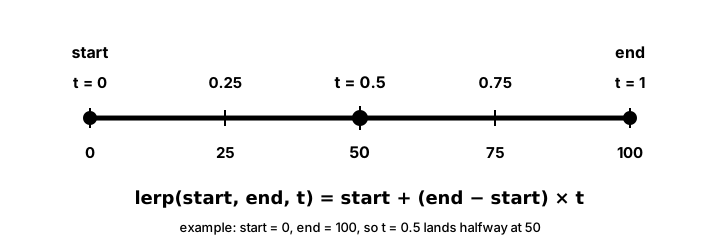
t is a dial from 0 (all start) to 1 (all end); at t = 0.5 you get the exact midpoint. The same one-line formula blends anything you can subtract and add — positions, angles, colours, volumes — which is why lerp is the single most reused function in this whole lesson.def lerp(start, end, t):
"""Linear interpolation between start and end by factor t (0 to 1)"""
return start + (end - start) * t
# Examples
position = lerp(0, 100, 0.5) # Returns 50 (halfway)
color = lerp(0, 255, 0.25) # Returns 63.75 (quarter way)
angle = lerp(0, 360, 0.75) # Returns 270 (three quarters)
# Lerp for 2D points
def lerp_point(start_pos, end_pos, t):
x = lerp(start_pos[0], end_pos[0], t)
y = lerp(start_pos[1], end_pos[1], t)
return (x, y)
# Lerp for colors (RGB)
def lerp_color(color1, color2, t):
r = int(lerp(color1[0], color2[0], t))
g = int(lerp(color1[1], color2[1], t))
b = int(lerp(color1[2], color2[2], t))
return (r, g, b)
# Smooth movement over time
class SmoothMover:
def __init__(self, start_pos):
self.current_pos = start_pos
self.target_pos = start_pos
self.move_time = 0
self.move_duration = 1.0 # 1 second
self.start_pos = start_pos
def move_to(self, target, duration=1.0):
self.start_pos = self.current_pos
self.target_pos = target
self.move_time = 0
self.move_duration = duration
def update(self, dt):
if self.move_time < self.move_duration:
self.move_time += dt
t = min(self.move_time / self.move_duration, 1.0)
self.current_pos = lerp_point(self.start_pos, self.target_pos, t)Common Easing Functions
t before you lerp with it — same start and end, different feel. "Out" curves front-load the motion for a snappy, responsive feel; "In" curves build anticipation; "InOut" does both. Notice how elastic and back push above 1 before settling: that overshoot is what makes a UI element feel alive rather than mechanical.import math
class Easing:
@staticmethod
def linear(t):
return t
@staticmethod
def ease_in_quad(t):
"""Slow start, fast end"""
return t * t
@staticmethod
def ease_out_quad(t):
"""Fast start, slow end"""
return 1 - (1 - t) * (1 - t)
@staticmethod
def ease_in_out_quad(t):
"""Slow start and end"""
if t < 0.5:
return 2 * t * t
else:
return 1 - pow(-2 * t + 2, 2) / 2
@staticmethod
def ease_in_cubic(t):
return t * t * t
@staticmethod
def ease_out_cubic(t):
return 1 - pow(1 - t, 3)
@staticmethod
def ease_in_out_cubic(t):
if t < 0.5:
return 4 * t * t * t
else:
return 1 - pow(-2 * t + 2, 3) / 2
@staticmethod
def ease_in_sine(t):
return 1 - math.cos((t * math.pi) / 2)
@staticmethod
def ease_out_sine(t):
return math.sin((t * math.pi) / 2)
@staticmethod
def ease_in_out_sine(t):
return -(math.cos(math.pi * t) - 1) / 2
@staticmethod
def ease_in_expo(t):
return 0 if t == 0 else pow(2, 10 * t - 10)
@staticmethod
def ease_out_expo(t):
return 1 if t == 1 else 1 - pow(2, -10 * t)
@staticmethod
def ease_in_out_expo(t):
if t == 0:
return 0
if t == 1:
return 1
if t < 0.5:
return pow(2, 20 * t - 10) / 2
else:
return (2 - pow(2, -20 * t + 10)) / 2
@staticmethod
def ease_in_elastic(t):
if t == 0:
return 0
if t == 1:
return 1
c4 = (2 * math.pi) / 3
return -pow(2, 10 * t - 10) * math.sin((t * 10 - 10.75) * c4)
@staticmethod
def ease_out_elastic(t):
if t == 0:
return 0
if t == 1:
return 1
c4 = (2 * math.pi) / 3
return pow(2, -10 * t) * math.sin((t * 10 - 0.75) * c4) + 1
@staticmethod
def ease_out_bounce(t):
n1 = 7.5625
d1 = 2.75
if t < 1 / d1:
return n1 * t * t
elif t < 2 / d1:
t -= 1.5 / d1
return n1 * t * t + 0.75
elif t < 2.5 / d1:
t -= 2.25 / d1
return n1 * t * t + 0.9375
else:
t -= 2.625 / d1
return n1 * t * t + 0.984375
@staticmethod
def ease_in_bounce(t):
return 1 - Easing.ease_out_bounce(1 - t)
@staticmethod
def ease_in_back(t):
c1 = 1.70158
c3 = c1 + 1
return c3 * t * t * t - c1 * t * t
@staticmethod
def ease_out_back(t):
c1 = 1.70158
c3 = c1 + 1
return 1 + c3 * pow(t - 1, 3) + c1 * pow(t - 1, 2)Smooth Following (Lerp Smoothing)
class Camera:
    def __init__(self, x, y):
        self.x = x
        self.y = y
        self.smoothness = 0.1  # Lower = smoother/slower

    def follow(self, target_x, target_y):
        """Smoothly follow a target using lerp"""
        self.x = lerp(self.x, target_x, self.smoothness)
        self.y = lerp(self.y, target_y, self.smoothness)

    def follow_with_offset(self, target_x, target_y, offset_x=0, offset_y=0):
        """Follow with look-ahead offset"""
        goal_x = target_x + offset_x
        goal_y = target_y + offset_y
        self.x = lerp(self.x, goal_x, self.smoothness)
        self.y = lerp(self.y, goal_y, self.smoothness)

# Smooth value changes
class SmoothValue:
    def __init__(self, initial_value, smoothing=0.1):
        self.current = initial_value
        self.target = initial_value
        self.smoothing = smoothing

    def set_target(self, value):
        self.target = value

    def update(self):
        self.current = lerp(self.current, self.target, self.smoothing)

    def snap_to(self, value):
        """Instantly set value without smoothing"""
        self.current = value
        self.target = value

# Example: Smooth health bar
class HealthBar:
    def __init__(self, max_health):
        self.max_health = max_health
        self.actual_health = max_health
        self.display_health = SmoothValue(max_health, 0.1)

    def take_damage(self, amount):
        self.actual_health = max(0, self.actual_health - amount)
        self.display_health.set_target(self.actual_health)

    def update(self):
        self.display_health.update()

    def draw(self, screen, x, y, width, height):
        # Background
        pygame.draw.rect(screen, (50, 50, 50), (x, y, width, height))

        # Smooth animated health bar
        health_width = (self.display_health.current / self.max_health) * width
        pygame.draw.rect(screen, (255, 0, 0), (x, y, health_width, height))
Animation System with Easing
class Animation:
    def __init__(self, start_value, end_value, duration, easing_func=None):
        self.start_value = start_value
        self.end_value = end_value
        self.duration = duration
        self.elapsed = 0
        self.easing_func = easing_func or Easing.linear
        self.finished = False
        self.current_value = start_value

    def update(self, dt):
        if self.finished:
            return

        self.elapsed += dt

        if self.elapsed >= self.duration:
            self.elapsed = self.duration
            self.finished = True

        # Calculate t (0 to 1)
        t = self.elapsed / self.duration

        # Apply easing
        eased_t = self.easing_func(t)

        # Interpolate
        self.current_value = lerp(self.start_value, self.end_value, eased_t)

    def reset(self):
        self.elapsed = 0
        self.finished = False
        self.current_value = self.start_value

    def reverse(self):
        """Swap start and end values"""
        self.start_value, self.end_value = self.end_value, self.start_value
        self.reset()

# Animation sequence
class AnimationSequence:
    def __init__(self):
        self.animations = []
        self.current_index = 0

    def add(self, animation):
        self.animations.append(animation)
        return self

    def update(self, dt):
        if self.current_index < len(self.animations):
            current = self.animations[self.current_index]
            current.update(dt)

            if current.finished:
                self.current_index += 1

    def reset(self):
        self.current_index = 0
        for anim in self.animations:
            anim.reset()

    def is_finished(self):
        return self.current_index >= len(self.animations)
Bezier Curves
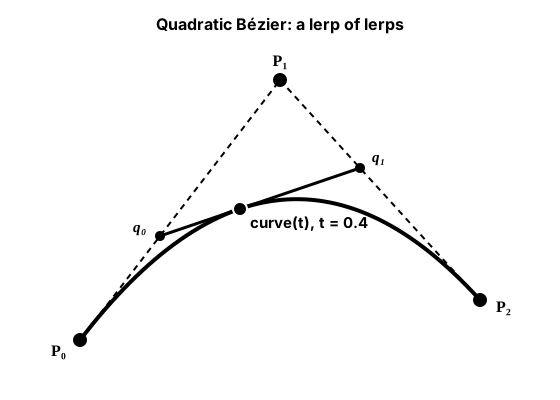
lerp stacked on itself. Slide q₀ along P₀→P₁ and q₁ along P₁→P₂ by the same t, then lerp between those two — that final point traces the curve. This is the de Casteljau construction the code does line for line; a cubic curve simply adds one more layer of the same idea. The control points pull the path toward them without ever lying on it.def bezier_quadratic(p0, p1, p2, t):
"""Quadratic Bezier curve with 3 control points"""
# Linear interpolations
q0 = lerp_point(p0, p1, t)
q1 = lerp_point(p1, p2, t)
# Final interpolation
return lerp_point(q0, q1, t)
def bezier_cubic(p0, p1, p2, p3, t):
"""Cubic Bezier curve with 4 control points"""
# First level interpolations
q0 = lerp_point(p0, p1, t)
q1 = lerp_point(p1, p2, t)
q2 = lerp_point(p2, p3, t)
# Second level interpolations
r0 = lerp_point(q0, q1, t)
r1 = lerp_point(q1, q2, t)
# Final interpolation
return lerp_point(r0, r1, t)
class BezierPath:
def __init__(self, points):
"""Create a Bezier path from control points"""
self.points = points
self.length = self.calculate_length()
def calculate_length(self, samples=100):
"""Approximate the length of the curve"""
total_length = 0
prev_point = self.get_point(0)
for i in range(1, samples + 1):
t = i / samples
current_point = self.get_point(t)
dx = current_point[0] - prev_point[0]
dy = current_point[1] - prev_point[1]
total_length += math.sqrt(dx * dx + dy * dy)
prev_point = current_point
return total_length
def get_point(self, t):
"""Get point on curve at parameter t (0 to 1)"""
if len(self.points) == 3:
return bezier_quadratic(self.points[0], self.points[1],
self.points[2], t)
elif len(self.points) == 4:
return bezier_cubic(self.points[0], self.points[1],
self.points[2], self.points[3], t)
else:
# Fallback to linear
return lerp_point(self.points[0], self.points[-1], t)
def get_point_at_distance(self, distance):
"""Get point at specific distance along curve"""
if distance <= 0:
return self.points[0]
if distance >= self.length:
return self.points[-1]
# Binary search for correct t value
low, high = 0.0, 1.0
epsilon = 0.001
while high - low > epsilon:
mid = (low + high) / 2
mid_length = self.calculate_length_to_t(mid)
if mid_length < distance:
low = mid
else:
high = mid
return self.get_point((low + high) / 2)
def calculate_length_to_t(self, t, samples=20):
"""Calculate length from start to parameter t"""
total_length = 0
prev_point = self.get_point(0)
for i in range(1, samples + 1):
sample_t = (i / samples) * t
current_point = self.get_point(sample_t)
dx = current_point[0] - prev_point[0]
dy = current_point[1] - prev_point[1]
total_length += math.sqrt(dx * dx + dy * dy)
prev_point = current_point
return total_lengthSpring Physics
class Spring:
    def __init__(self, target, stiffness=0.1, damping=0.9):
        self.target = target
        self.current = target
        self.velocity = 0
        self.stiffness = stiffness  # Spring constant
        self.damping = damping      # Friction

    def update(self, target=None):
        if target is not None:
            self.target = target

        # Calculate spring force
        displacement = self.target - self.current
        spring_force = displacement * self.stiffness

        # Apply force to velocity
        self.velocity += spring_force

        # Apply damping
        self.velocity *= self.damping

        # Update position
        self.current += self.velocity

    def set_target(self, target):
        self.target = target

    def snap_to(self, value):
        self.current = value
        self.target = value
        self.velocity = 0

# 2D Spring
class Spring2D:
    def __init__(self, x, y, stiffness=0.1, damping=0.9):
        self.spring_x = Spring(x, stiffness, damping)
        self.spring_y = Spring(y, stiffness, damping)

    def update(self, target_x=None, target_y=None):
        self.spring_x.update(target_x)
        self.spring_y.update(target_y)

    def set_target(self, x, y):
        self.spring_x.set_target(x)
        self.spring_y.set_target(y)

    def get_position(self):
        return (self.spring_x.current, self.spring_y.current)

# Example: Springy camera
class SpringCamera:
    def __init__(self, x, y):
        self.spring = Spring2D(x, y, stiffness=0.05, damping=0.85)

    def follow(self, target_x, target_y):
        self.spring.set_target(target_x, target_y)
        self.spring.update()
        return self.spring.get_position()
Complete Interpolation Demo Game
import pygame
import math

class InterpolationDemo:
    def __init__(self):
        pygame.init()
        self.screen = pygame.display.set_mode((800, 600))
        pygame.display.set_caption("Interpolation and Easing Demo")
        self.clock = pygame.time.Clock()

        # Create different moving objects with different easing
        self.objects = [
            {
                'name': 'Linear',
                'x': 100, 'y': 100,
                'start_x': 100, 'end_x': 700,
                'time': 0, 'duration': 2,
                'easing': Easing.linear,
                'color': (255, 100, 100)
            },
            {
                'name': 'Ease In Out',
                'x': 100, 'y': 150,
                'start_x': 100, 'end_x': 700,
                'time': 0, 'duration': 2,
                'easing': Easing.ease_in_out_cubic,
                'color': (100, 255, 100)
            },
            {
                'name': 'Bounce',
                'x': 100, 'y': 200,
                'start_x': 100, 'end_x': 700,
                'time': 0, 'duration': 2,
                'easing': Easing.ease_out_bounce,
                'color': (100, 100, 255)
            },
            {
                'name': 'Elastic',
                'x': 100, 'y': 250,
                'start_x': 100, 'end_x': 700,
                'time': 0, 'duration': 2,
                'easing': Easing.ease_out_elastic,
                'color': (255, 255, 100)
            },
            {
                'name': 'Back',
                'x': 100, 'y': 300,
                'start_x': 100, 'end_x': 700,
                'time': 0, 'duration': 2,
                'easing': Easing.ease_out_back,
                'color': (255, 100, 255)
            }
        ]

        # Spring follower
        self.mouse_follower = Spring2D(400, 400, stiffness=0.05, damping=0.8)

        # Bezier path
        self.bezier_points = [
            (100, 500),
            (300, 400),
            (500, 400),
            (700, 500)
        ]
        self.bezier_path = BezierPath(self.bezier_points)
        self.bezier_t = 0

        # UI animations
        self.ui_scale = Animation(0, 1, 0.5, Easing.ease_out_back)
        self.ui_alpha = Animation(0, 255, 1, Easing.ease_out_cubic)

        # Smooth camera
        self.camera = Camera(0, 0)
        self.camera.smoothness = 0.1

        # Color lerping
        self.color_time = 0
        self.color1 = (255, 0, 0)
        self.color2 = (0, 0, 255)

    def handle_events(self):
        for event in pygame.event.get():
            if event.type == pygame.QUIT:
                return False
            elif event.type == pygame.KEYDOWN:
                if event.key == pygame.K_SPACE:
                    # Reset all animations
                    for obj in self.objects:
                        obj['time'] = 0
                    self.ui_scale.reset()
                    self.ui_alpha.reset()
        return True

    def update(self, dt):
        # Update moving objects
        for obj in self.objects:
            obj['time'] += dt
            if obj['time'] >= obj['duration']:
                # Reverse direction
                obj['start_x'], obj['end_x'] = obj['end_x'], obj['start_x']
                obj['time'] = 0

            t = obj['time'] / obj['duration']
            eased_t = obj['easing'](t)
            obj['x'] = lerp(obj['start_x'], obj['end_x'], eased_t)

        # Update spring follower
        mouse_x, mouse_y = pygame.mouse.get_pos()
        self.mouse_follower.set_target(mouse_x, mouse_y)
        self.mouse_follower.update()

        # Update Bezier animation
        self.bezier_t += dt * 0.2
        if self.bezier_t > 1:
            self.bezier_t = 0

        # Update UI animations
        self.ui_scale.update(dt)
        self.ui_alpha.update(dt)

        # Update color lerping
        self.color_time += dt

    def draw(self):
        self.screen.fill((30, 30, 30))

        # Draw moving objects
        font = pygame.font.Font(None, 24)
        for obj in self.objects:
            pygame.draw.circle(self.screen, obj['color'],
                             (int(obj['x']), int(obj['y'])), 15)

            # Draw trail
            for i in range(5):
                trail_t = max(0, obj['time'] / obj['duration'] - i * 0.05)
                trail_eased = obj['easing'](trail_t)
                trail_x = lerp(obj['start_x'], obj['end_x'], trail_eased)
                alpha = 255 - i * 50
                trail_color = (*obj['color'], alpha)
                pygame.draw.circle(self.screen, obj['color'],
                                 (int(trail_x), int(obj['y'])),
                                 15 - i * 2, 1)

            # Label
            label = font.render(obj['name'], True, (255, 255, 255))
            self.screen.blit(label, (10, obj['y'] - 10))

        # Draw spring follower
        spring_pos = self.mouse_follower.get_position()
        pygame.draw.circle(self.screen, (100, 255, 255),
                         (int(spring_pos[0]), int(spring_pos[1])), 20)
        pygame.draw.line(self.screen, (100, 255, 255),
                        (mouse_x, mouse_y), spring_pos, 2)

        # Draw Bezier curve
        # Draw control points
        for i, point in enumerate(self.bezier_points):
            pygame.draw.circle(self.screen, (100, 100, 100),
                             (int(point[0]), int(point[1])), 5)
            if i > 0:
                pygame.draw.line(self.screen, (50, 50, 50),
                               self.bezier_points[i-1], point, 1)

        # Draw curve
        prev_point = self.bezier_path.get_point(0)
        for i in range(1, 51):
            t = i / 50
            current_point = self.bezier_path.get_point(t)
            pygame.draw.line(self.screen, (255, 200, 100),
                           prev_point, current_point, 2)
            prev_point = current_point

        # Draw object on Bezier curve
        bezier_pos = self.bezier_path.get_point(self.bezier_t)
        pygame.draw.circle(self.screen, (255, 255, 0),
                         (int(bezier_pos[0]), int(bezier_pos[1])), 10)

        # Draw animated UI element
        if self.ui_scale.current_value > 0:
            size = int(50 * self.ui_scale.current_value)
            alpha = int(self.ui_alpha.current_value)
            ui_surf = pygame.Surface((size * 2, size * 2), pygame.SRCALPHA)
            pygame.draw.circle(ui_surf, (*[200, 100, 255], alpha),
                             (size, size), size)
            self.screen.blit(ui_surf, (650 - size, 450 - size))

        # Draw color lerping example
        t = (math.sin(self.color_time) + 1) / 2  # Oscillate between 0 and 1
        current_color = lerp_color(self.color1, self.color2, t)
        pygame.draw.rect(self.screen, current_color, (650, 50, 100, 100))

        # Instructions
        instructions = [
            "Space: Reset animations",
            "Move mouse for spring effect"
        ]
        for i, text in enumerate(instructions):
            rendered = font.render(text, True, (150, 150, 150))
            self.screen.blit(rendered, (10, 550 + i * 25))

    def run(self):
        running = True
        dt = 0

        while running:
            running = self.handle_events()
            self.update(dt)
            self.draw()
            pygame.display.flip()
            dt = self.clock.tick(60) / 1000.0

        pygame.quit()

if __name__ == "__main__":
    # Include Easing class definition here
    demo = InterpolationDemo()
    demo.run()
Performance Considerations
⚡ Optimization Tips
- Pre-calculate: Store easing values in lookup tables
- Simplify: Use simpler easing for many objects
- LOD: Use linear for distant/small objects
- Frame Independence: Always use delta time
- Batch Updates: Update similar animations together
Practice Exercises
🎯 Interpolation Challenges!
- UI Animation System: Sliding menus with different easings
- Camera Controller: Smooth camera with deadzone and lookahead
- Particle Trail: Particles that follow Bezier curves
- Morphing Shapes: Interpolate between different polygon shapes
- Time Control: Game with slow-motion and speed-up effects
- Procedural Animation: Character that moves with spring physics
Key Takeaways
- 📈 Linear interpolation (lerp) is the foundation
- 🎢 Easing functions add personality to movement
- 🎯 Different easings for different feels
- 🌊 Springs create natural, responsive motion
- 📐 Bezier curves enable complex paths
- ⏱️ Always use delta time for consistency
- ✨ Smooth animation makes games feel professional
🏋️♂️ Practice Exercise: Three Boxes, Same Distance, Different Feels
🏋️♂️ Exercise 1: Lerp Drift — Three Eased Animations on a Shared Clock
Objective: Build a side-by-side comparison demo where three boxes race across the screen over the SAME duration but with DIFFERENT easing functions — proving by visible drift that easing functions transform the parameter t, not the endpoints. Box A uses linear (constant speed); Box B uses ease-out quadratic (fast then slow); Box C uses ease-in quadratic (slow then fast). All three call lerp(start_x, end_x, easing(t)) with the SAME start_x, the SAME end_x, and the SAME t = elapsed / duration; only the easing function differs. The boxes arrive at the same finish line at the same wall-clock moment but visibly drift apart mid-flight — the moneyshot of the lesson. Press SPACE to restart the animation and watch the drift again from t=0.
Instructions:
- Open an 800×600 window and start a clean
clock.tick(60)game loop. Usedt = clock.tick(60) / 1000.0soelapsedis in seconds (matches the lesson's Performance Tips Frame Independence rule). - Define
lerp(a, b, t) = a + (b - a) * tas a tiny helper; this is the foundation the lesson opens with. - Define two easing helpers:
ease_out(t) = 1 - (1 - t) * (1 - t)(fast then slow);ease_in(t) = t * t(slow then fast). Both take t in [0, 1] and return a transformed value also roughly in [0, 1]. - Set
DURATION = 2.0seconds,START_X = 50,END_X = 750; box Y positions at three horizontal lanes (e.g. 200 / 300 / 400). - Each frame, advance
elapsedbydtand computet = min(elapsed / DURATION, 1.0)— themin()CLAMP is critical; without ittwalks past 1.0 and the boxes shoot off the right edge. - For each box, compute its X via the SAME
lerp(START_X, END_X, easing(t))call structure; only theeasingfunction differs (linear is justtitself, no transform). Draw the three boxes at their three lanes. - On
KEYDOWNforK_SPACE, resetelapsed = 0.0to restart the animation. Render a small label per lane ("Linear" / "Ease Out" / "Ease In") so the visual drift is unambiguous.
💡 Hint
The order of operations is the conceptual key. Easing transforms t BEFORE lerp uses it: lerp(a, b, easing(t)), NOT easing(lerp(a, b, t)). The first form is what the lesson teaches and what every game engine ships; the second form would warp the endpoints which is meaningless. Mid-flight at t=0.5: linear gives 0.5, ease-out gives 0.75 (Box B is already 75% across), ease-in gives 0.25 (Box C is only 25% across). All three reach 1.0 at exactly t=1.0 and end at END_X at exactly the same wall-clock moment — same start, same end, same duration, different mid-flight position. If your boxes shoot past the right edge, you forgot to clamp t.
✅ Example Solution
import pygame

pygame.init()
WIDTH, HEIGHT = 800, 600
screen = pygame.display.set_mode((WIDTH, HEIGHT))
pygame.display.set_caption("Lerp Drift")
font = pygame.font.SysFont(None, 24)
clock = pygame.time.Clock()

DURATION = 2.0
START_X, END_X = 50, 750
BOX_W, BOX_H = 40, 40

def lerp(a, b, t):
    return a + (b - a) * t

def ease_out(t):
    return 1 - (1 - t) * (1 - t)

def ease_in(t):
    return t * t

elapsed = 0.0
running = True
while running:
    for event in pygame.event.get():
        if event.type == pygame.QUIT:
            running = False
        elif event.type == pygame.KEYDOWN and event.key == pygame.K_SPACE:
            elapsed = 0.0   # restart

    t = min(elapsed / DURATION, 1.0)   # CLAMP so boxes don't shoot past END_X

    screen.fill((30, 30, 30))
    for label, easing, lane_y, color in [
        ("Linear",   lambda x: x,   200, (200, 200, 200)),
        ("Ease Out", ease_out,      300, (60, 200, 60)),
        ("Ease In",  ease_in,       400, (220, 90, 90)),
    ]:
        x = lerp(START_X, END_X, easing(t))   # easing transforms t BEFORE lerp
        pygame.draw.rect(screen, color, (x, lane_y, BOX_W, BOX_H))
        screen.blit(font.render(label, True, color), (10, lane_y + 10))

    screen.blit(font.render(f"t = {t:.2f}   (SPACE to restart)", True, (240, 240, 240)), (10, 20))
    pygame.display.flip()
    elapsed += clock.tick(60) / 1000.0

pygame.quit()
🎯 Quick Quiz
Question 1: What is the linear-interpolation formula `lerp(a, b, t)` and what does it return when t=0, t=1, and t=0.5?
Question 2: In a 2-second tween, what does the parameter `t` represent and what is its valid range?
Question 3: An easing function like `ease_out` is applied to a tween. What does it actually transform, and where in the call chain?
What's Next?
Now that you've mastered smooth motion, next we'll explore random generation for games - creating variety, procedural content, and controlled randomness!