Basic Trigonometry for Games
The Mathematics of Rotation and Waves
Trigonometry is the secret sauce behind smooth rotations, realistic physics, wave effects, and circular motion in games. From aiming cannons to creating ocean waves, trig functions power countless game mechanics. Let's unlock these mathematical superpowers! 🎯📐
Understanding Sine, Cosine, and Tangent
🎡 The Ferris Wheel Analogy
Think of trigonometry like riding a Ferris wheel:
- Angle: How far around you've rotated
- Sine: Your height above/below center
- Cosine: Your distance left/right from center
- Radius: How big the Ferris wheel is
- Period: One complete rotation
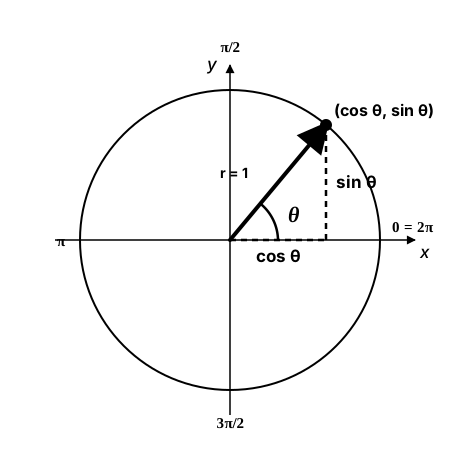
cos(θ), your vertical position is sin(θ). That is the Ferris-wheel analogy made literal — cosine is how far across, sine is how high. Angles run counter-clockwise in radians, where a full turn is 2π (not 360). Scale by any radius r and you get (r·cosθ, r·sinθ), the formula behind every orbit, spin, and wave below.Angles and Radians
📐 Degrees vs Radians
Games often use radians internally but display degrees to players:
- 360 degrees = 2π radians (full circle)
- 180 degrees = π radians (half circle)
- 90 degrees = π/2 radians (quarter circle)
- 1 radian ≈ 57.3 degrees
import math

# Conversion functions
def degrees_to_radians(degrees):
    return degrees * (math.pi / 180)

def radians_to_degrees(radians):
    return radians * (180 / math.pi)

# Python also has built-in functions
angle_deg = 45
angle_rad = math.radians(angle_deg)  # Convert to radians
back_to_deg = math.degrees(angle_rad)  # Convert back to degrees

# Common angles in radians
QUARTER_TURN = math.pi / 2    # 90°
HALF_TURN = math.pi           # 180°
FULL_TURN = math.pi * 2       # 360°

# Normalize angle to 0-360 degrees
def normalize_angle(angle_deg):
    return angle_deg % 360

# Normalize to -180 to 180 (for smallest rotation)
def normalize_angle_signed(angle_deg):
    angle = angle_deg % 360
    if angle > 180:
        angle -= 360
    return angle
Rotation in Games
class RotatingObject:
    def __init__(self, x, y, image):
        self.x = x
        self.y = y
        self.angle = 0  # In radians
        self.original_image = image
        self.image = image
        self.rect = image.get_rect(center=(x, y))

    def rotate(self, angle_delta):
        """Rotate by angle_delta radians"""
        self.angle += angle_delta

        # Keep angle in reasonable range
        self.angle = self.angle % (math.pi * 2)

        # Rotate image
        angle_degrees = math.degrees(self.angle)
        self.image = pygame.transform.rotate(self.original_image, -angle_degrees)
        self.rect = self.image.get_rect(center=(self.x, self.y))

    def point_at(self, target_x, target_y):
        """Rotate to point at target"""
        dx = target_x - self.x
        dy = target_y - self.y
        self.angle = math.atan2(dy, dx)

        # Update image
        angle_degrees = math.degrees(self.angle)
        self.image = pygame.transform.rotate(self.original_image, -angle_degrees)
        self.rect = self.image.get_rect(center=(self.x, self.y))

    def get_facing_vector(self):
        """Get unit vector of facing direction"""
        return (math.cos(self.angle), math.sin(self.angle))
Circular and Elliptical Motion
# Circular motion
class OrbitingObject:
    def __init__(self, center_x, center_y, radius, speed):
        self.center_x = center_x
        self.center_y = center_y
        self.radius = radius
        self.angle = 0
        self.speed = speed  # Radians per second

    def update(self, dt):
        self.angle += self.speed * dt

    def get_position(self):
        x = self.center_x + self.radius * math.cos(self.angle)
        y = self.center_y + self.radius * math.sin(self.angle)
        return (x, y)

# Elliptical motion
class EllipticalOrbit:
    def __init__(self, center_x, center_y, radius_x, radius_y, speed):
        self.center_x = center_x
        self.center_y = center_y
        self.radius_x = radius_x  # Horizontal radius
        self.radius_y = radius_y  # Vertical radius
        self.angle = 0
        self.speed = speed

    def update(self, dt):
        self.angle += self.speed * dt

    def get_position(self):
        x = self.center_x + self.radius_x * math.cos(self.angle)
        y = self.center_y + self.radius_y * math.sin(self.angle)
        return (x, y)

# Spiral motion
class SpiralMotion:
    def __init__(self, center_x, center_y, growth_rate):
        self.center_x = center_x
        self.center_y = center_y
        self.angle = 0
        self.radius = 10
        self.growth_rate = growth_rate

    def update(self, dt):
        self.angle += dt * 2
        self.radius += self.growth_rate * dt

    def get_position(self):
        x = self.center_x + self.radius * math.cos(self.angle)
        y = self.center_y + self.radius * math.sin(self.angle)
        return (x, y)
Wave Functions
# Create wave effects
class WaveEffect:
    def __init__(self):
        self.time = 0

    def update(self, dt):
        self.time += dt

    def sine_wave(self, frequency=1, amplitude=1, phase=0):
        """Basic sine wave"""
        return amplitude * math.sin(frequency * self.time + phase)

    def square_wave(self, frequency=1, amplitude=1):
        """Square wave (alternates between -amplitude and +amplitude)"""
        return amplitude if math.sin(frequency * self.time) >= 0 else -amplitude

    def sawtooth_wave(self, frequency=1, amplitude=1):
        """Sawtooth wave (linear rise, instant drop)"""
        phase = (frequency * self.time) % (2 * math.pi)
        return amplitude * (phase / math.pi - 1)

    def triangle_wave(self, frequency=1, amplitude=1):
        """Triangle wave (linear rise and fall)"""
        phase = (frequency * self.time) % (2 * math.pi)
        if phase < math.pi:
            return amplitude * (2 * phase / math.pi - 1)
        else:
            return amplitude * (3 - 2 * phase / math.pi)

    def perlin_style_wave(self, octaves=3):
        """Multiple sine waves combined for natural movement"""
        result = 0
        amplitude = 1
        frequency = 1

        for _ in range(octaves):
            result += amplitude * math.sin(frequency * self.time)
            amplitude *= 0.5
            frequency *= 2

        return result

# Practical uses of waves
class FloatingObject:
    def __init__(self, x, y):
        self.base_x = x
        self.base_y = y
        self.wave = WaveEffect()

    def update(self, dt):
        self.wave.update(dt)

        # Float up and down
        self.y = self.base_y + self.wave.sine_wave(
            frequency=2,
            amplitude=20
        )

        # Slight side-to-side movement
        self.x = self.base_x + self.wave.sine_wave(
            frequency=0.7,
            amplitude=5,
            phase=math.pi/2
        )
Aiming and Line of Sight
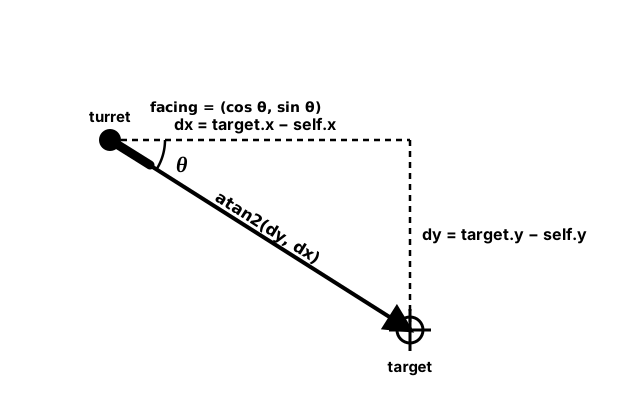
atan2(dy, dx) turns a direction into an angle. Take the gap to your target — dx across, dy down — and atan2 hands you the exact facing angle, correct in all four quadrants (that is why it beats plain atan). Feed that angle back through (cosθ, sinθ) and you have a unit vector to move or shoot along.class Turret:
def __init__(self, x, y):
self.x = x
self.y = y
self.angle = 0
self.rotation_speed = 2 # Radians per second
def aim_at(self, target_x, target_y, dt):
"""Smoothly rotate towards target"""
# Calculate target angle
dx = target_x - self.x
dy = target_y - self.y
target_angle = math.atan2(dy, dx)
# Calculate angle difference
angle_diff = target_angle - self.angle
# Normalize to -pi to pi
while angle_diff > math.pi:
angle_diff -= 2 * math.pi
while angle_diff < -math.pi:
angle_diff += 2 * math.pi
# Rotate towards target
if abs(angle_diff) < self.rotation_speed * dt:
self.angle = target_angle
else:
if angle_diff > 0:
self.angle += self.rotation_speed * dt
else:
self.angle -= self.rotation_speed * dt
def can_see(self, target_x, target_y, fov_angle=math.pi/4):
"""Check if target is within field of view"""
# Direction to target
dx = target_x - self.x
dy = target_y - self.y
angle_to_target = math.atan2(dy, dx)
# Angle difference
angle_diff = abs(angle_to_target - self.angle)
# Normalize
if angle_diff > math.pi:
angle_diff = 2 * math.pi - angle_diff
# Check if within FOV
return angle_diff <= fov_angle / 2
def fire_projectile(self, speed):
"""Fire in current direction"""
vx = speed * math.cos(self.angle)
vy = speed * math.sin(self.angle)
return Projectile(self.x, self.y, vx, vy)Pendulum Physics
class Pendulum:
    def __init__(self, x, y, length, start_angle=math.pi/4):
        self.anchor_x = x
        self.anchor_y = y
        self.length = length
        self.angle = start_angle
        self.angular_velocity = 0
        self.gravity = 9.8
        self.damping = 0.99  # Energy loss

    def update(self, dt):
        # Pendulum physics
        # Angular acceleration = -g/L * sin(angle)
        angular_acceleration = -(self.gravity / self.length) * math.sin(self.angle)

        # Update velocity and position
        self.angular_velocity += angular_acceleration * dt
        self.angular_velocity *= self.damping  # Apply damping
        self.angle += self.angular_velocity * dt

    def get_bob_position(self):
        """Get position of pendulum bob"""
        x = self.anchor_x + self.length * math.sin(self.angle)
        y = self.anchor_y + self.length * math.cos(self.angle)
        return (x, y)

    def apply_force(self, force):
        """Push the pendulum"""
        self.angular_velocity += force
Trigonometric Optimization
⚡ Performance Tips
- Lookup Tables: Pre-calculate common angles
- Approximations: Use Taylor series for small angles
- Cache Results: Store frequently used trig values
- CORDIC Algorithm: Hardware-friendly trig calculations
# Optimization techniques
class TrigCache:
    def __init__(self, resolution=360):
        self.resolution = resolution
        self.sin_table = []
        self.cos_table = []

        # Pre-calculate values
        for i in range(resolution):
            angle = (i / resolution) * math.pi * 2
            self.sin_table.append(math.sin(angle))
            self.cos_table.append(math.cos(angle))

    def fast_sin(self, angle):
        """Fast sine using lookup table"""
        # Normalize angle to 0-2π
        normalized = angle % (math.pi * 2)
        # Convert to table index
        index = int((normalized / (math.pi * 2)) * self.resolution)
        return self.sin_table[index % self.resolution]

    def fast_cos(self, angle):
        """Fast cosine using lookup table"""
        normalized = angle % (math.pi * 2)
        index = int((normalized / (math.pi * 2)) * self.resolution)
        return self.cos_table[index % self.resolution]

# Small angle approximations
def small_angle_sin(angle):
    """For small angles, sin(x) ≈ x"""
    if abs(angle) < 0.1:
        return angle
    return math.sin(angle)

def small_angle_cos(angle):
    """For small angles, cos(x) ≈ 1 - x²/2"""
    if abs(angle) < 0.1:
        return 1 - (angle * angle) / 2
    return math.cos(angle)
Practice Exercises
🎯 Trigonometry Challenges!
- Radar Scanner: Create a rotating radar that detects objects
- Sine Wave Runner: Platform game with wavy terrain
- Clock Simulator: Analog clock with moving hands
- Cannon Game: Calculate trajectory angles for targets
- Planet Orbit System: Multiple planets with elliptical orbits
- Wave Pool: Simulate water with multiple sine waves
Common Trigonometry Problems
⚠️ Watch Out For These Issues!
- Degree/Radian Confusion: Always know which unit you're using
- atan vs atan2: Use atan2 for full 360° range
- Angle Wrapping: Keep angles normalized to avoid overflow
- Gimbal Lock: Can occur with multiple rotations
- Precision Loss: Small angles need special handling
- Performance: Trig functions are expensive - cache when possible
Key Takeaways
- 📐 Sine and cosine create circular motion
- 🔄 Angles in games are usually in radians
- 🎯 atan2 is perfect for aiming and direction
- 🌊 Sine waves create natural oscillation
- 🎡 Combine trig functions for complex motion
- ⚡ Optimize with lookup tables for performance
- 🎮 Trig powers rotation, orbits, and waves
🏋️♂️ Practice Exercise: Turret Tracker — atan2 + Parametric Circle in One Loop
🏋️♂️ Exercise 1: Aim, Orbit, and Fire — Three Trig Patterns Together
Objective: Build a small Pygame demo that exercises three pillar trig patterns from this lesson in one program: (1) atan2 for aiming — a turret at screen center rotates to point at the mouse, computing its facing each frame as angle = math.atan2(my - cy, mx - cx) (the lesson's Common Problems #2 'atan vs atan2: Use atan2 for full 360° range' made concrete, and the same pattern as RotatingObject.point_at); (2) parametric-circle orbits — three planets orbit the turret at different radii and speeds, each computing its position via x = cx + r*cos(θ); y = cy + r*sin(θ) and advancing θ by speed * dt per frame (the lesson's OrbitingObject.get_position pattern); (3) facing-vector forward motion — pressing SPACE spawns a bullet at the turret tip with velocity (BULLET_SPEED * cos(angle), BULLET_SPEED * sin(angle)), sending it cleanly along whatever direction the turret was pointing at fire-time. The visual: the turret swivels smoothly to track the cursor; three planets sweep around it on circles of different sizes and rates; bullets streak outward at exactly the angle the turret had at SPACE-press.
Instructions:
- Open an 800×600 window with center
(CX, CY) = (400, 300); start a clean game loop withdt = clock.tick(60) / 1000.0so all motion is frame-rate independent (lesson tail's Performance Tips 'Frame Independence: Use delta time'). - Each frame, read
pygame.mouse.get_pos()as(mx, my)and compute the turret's facing asangle = math.atan2(my - CY, mx - CX). Note the argument order:(dy, dx), NOT(dx, dy)— atan2 takes Y first. If your turret aims 90° off, you've swapped the arguments. - Draw the turret as a circle at center, plus a barrel line from
(CX, CY)to(CX + 40 * cos(angle), CY + 40 * sin(angle))— same parametric-circle math, just at radius 40 instead of orbit radius. The turret tip and the orbit positions all use the same formula. - Define three planets with
(radius, speed_rad_per_sec, color): e.g.(80, 1.5, blue),(140, 0.8, green),(200, 0.4, orange). Maintain each planet's orbit anglethetaas a float; advance byspeed * dteach frame — NOT a fixed step per frame, or orbit speed gets tied to your frame rate. - Draw each planet at
(CX + r * cos(theta), CY + r * sin(theta))as an 8 px circle. - On
KEYDOWNforK_SPACE: append a bullet dict to a bullets list with starting position at the turret tip(CX + 40 * cos(angle), CY + 40 * sin(angle))and velocity(BULLET_SPEED * cos(angle), BULLET_SPEED * sin(angle))withBULLET_SPEED = 400px/sec. The samecos(angle)/sin(angle)pair that placed the tip also gives the unit facing vector; the bullet velocity is just that unit vector scaled by speed. - Each frame, advance every bullet by
(vx * dt, vy * dt)and draw as a small white circle. Cull bullets that leave the screen so the list stays bounded. - Render a HUD showing the turret's current angle in degrees (
math.degrees(angle):+6.1f) so the wrap from −180° (pointing left), through 0° (pointing right), back up to +180° (pointing left again) is visible as you swing the mouse around — this is the full 360° range that atan2 returns and atan does not.
💡 Hint
Three places this commonly breaks: (1) atan2(dy, dx) takes Y FIRST. Swapping the arguments rotates the result by 90° — the turret will aim perpendicular to the mouse instead of at it. (2) For orbits, advance theta by speed * dt, not by a fixed step per frame. Without dt, a 30 FPS machine and a 60 FPS machine orbit at different speeds. (3) The bullet's velocity vector and the turret's barrel-tip offset are computed from the SAME (cos(angle), sin(angle)) pair, just scaled differently — tip uses radius 40, velocity uses speed 400. If you accidentally compute these with a stale angle (e.g. you read the mouse twice and use a fresh angle for the tip but a frame-old one for the velocity), the bullet visibly drifts away from the barrel direction. Capture angle ONCE per SPACE-press and use it for both.
✅ Example Solution
import pygame, math

pygame.init()
WIDTH, HEIGHT = 800, 600
CX, CY = WIDTH // 2, HEIGHT // 2
screen = pygame.display.set_mode((WIDTH, HEIGHT))
pygame.display.set_caption("Turret Tracker")
font = pygame.font.SysFont(None, 24)
clock = pygame.time.Clock()

PLANETS = [
    {"r":  80, "speed": 1.5, "theta": 0.0, "color": (60, 120, 230)},
    {"r": 140, "speed": 0.8, "theta": 0.0, "color": (60, 200, 60)},
    {"r": 200, "speed": 0.4, "theta": 0.0, "color": (220, 150, 60)},
]
BULLET_SPEED = 400
bullets = []

running = True
while running:
    dt = clock.tick(60) / 1000.0
    for event in pygame.event.get():
        if event.type == pygame.QUIT:
            running = False
        elif event.type == pygame.KEYDOWN and event.key == pygame.K_SPACE:
            mx, my = pygame.mouse.get_pos()
            angle = math.atan2(my - CY, mx - CX)        # Y FIRST
            bullets.append({
                "x":  CX + 40 * math.cos(angle),         # turret tip
                "y":  CY + 40 * math.sin(angle),
                "vx": BULLET_SPEED * math.cos(angle),    # facing vector × speed
                "vy": BULLET_SPEED * math.sin(angle),
            })

    mx, my = pygame.mouse.get_pos()
    angle = math.atan2(my - CY, mx - CX)                # facing this frame

    for p in PLANETS:                                   # advance orbits
        p["theta"] += p["speed"] * dt                   # speed × dt, not fixed step
    for b in bullets:                                   # advance bullets
        b["x"] += b["vx"] * dt
        b["y"] += b["vy"] * dt
    bullets = [b for b in bullets
               if 0 <= b["x"] <= WIDTH and 0 <= b["y"] <= HEIGHT]

    screen.fill((20, 20, 35))
    # planets — parametric circle: (cx + r*cos(θ), cy + r*sin(θ))
    for p in PLANETS:
        px = CX + p["r"] * math.cos(p["theta"])
        py = CY + p["r"] * math.sin(p["theta"])
        pygame.draw.circle(screen, p["color"], (int(px), int(py)), 8)
    # turret — barrel uses same parametric circle at radius 40
    pygame.draw.circle(screen, (200, 200, 200), (CX, CY), 18)
    tip = (CX + 40 * math.cos(angle), CY + 40 * math.sin(angle))
    pygame.draw.line(screen, (240, 240, 240), (CX, CY), tip, 4)
    for b in bullets:
        pygame.draw.circle(screen, (255, 255, 255), (int(b["x"]), int(b["y"])), 3)
    hud = font.render(
        f"Aim: {math.degrees(angle):+6.1f}°    SPACE to fire    Bullets: {len(bullets)}",
        True, (240, 240, 240))
    screen.blit(hud, (10, 10))
    pygame.display.flip()

pygame.quit()
🎯 Quick Quiz
Question 1: A turret needs to aim at any point around it (full 360° range). Given the displacement (dx, dy) from the turret to the target, which Python math function gives the correct angle?
Question 2: A planet orbits a sun at center (400, 300) with orbit radius 100. The planet is currently at orbit angle θ radians. What is the planet's screen position?
Question 3: The lesson's RotatingObject calls pygame.transform.rotate(self.original_image, -angle_degrees) with a NEGATIVE sign on the angle. Why?
What's Next?
Now that you understand trigonometry in games, next we'll explore interpolation and easing functions - the tools that make movement smooth and animations feel natural!