Vector Operations
The Language of Movement and Physics
Vectors are the mathematical foundation of game movement, physics, and spatial relationships. They represent both position and direction, making them essential for everything from character movement to projectile physics. Let's unlock the power of vectors! 🚀📐
What is a Vector?
🏹 The Arrow Analogy
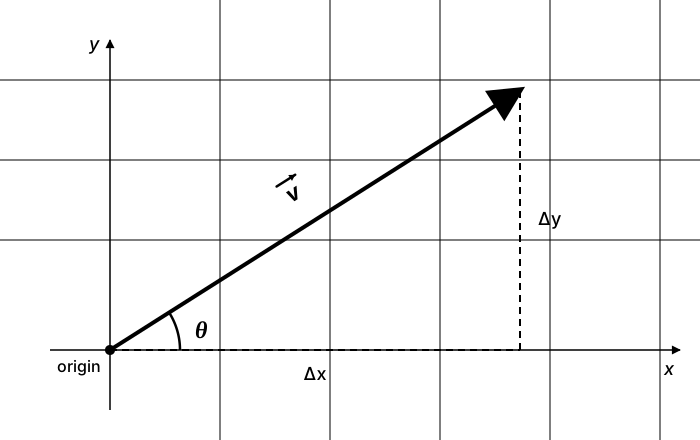
Think of vectors like arrows:
- Magnitude: The length of the arrow (how far)
- Direction: Where the arrow points (which way)
- Components: How much the arrow goes in X and Y
- Operations: You can add arrows tip-to-tail, scale them, or find angles between them
Basic Vector Class
from __future__ import annotations
import math

class Vector2:
    def __init__(self, x: float = 0, y: float = 0) -> None:
        self.x = x
        self.y = y

    def __repr__(self) -> str:
        return f"Vector2({self.x}, {self.y})"

    def __add__(self, other: Vector2) -> Vector2:
        """Vector addition"""
        return Vector2(self.x + other.x, self.y + other.y)

    def __sub__(self, other: Vector2) -> Vector2:
        """Vector subtraction"""
        return Vector2(self.x - other.x, self.y - other.y)

    def __mul__(self, scalar: float) -> Vector2:
        """Scalar multiplication"""
        return Vector2(self.x * scalar, self.y * scalar)

    def __truediv__(self, scalar: float) -> Vector2:
        """Scalar division"""
        return Vector2(self.x / scalar, self.y / scalar)

    def magnitude(self) -> float:
        """Get the length of the vector"""
        return math.sqrt(self.x * self.x + self.y * self.y)

    def normalize(self) -> Vector2:
        """Return a unit vector (length 1) in the same direction"""
        mag = self.magnitude()
        if mag == 0:
            return Vector2(0, 0)
        return self / mag

    def dot(self, other: Vector2) -> float:
        """Dot product - useful for angles and projections"""
        return self.x * other.x + self.y * other.y

    def angle(self) -> float:
        """Get angle in radians"""
        return math.atan2(self.y, self.x)

    def rotate(self, angle: float) -> Vector2:
        """Rotate vector by angle (in radians)"""
        cos_a = math.cos(angle)
        sin_a = math.sin(angle)
        new_x = self.x * cos_a - self.y * sin_a
        new_y = self.x * sin_a + self.y * cos_a
        return Vector2(new_x, new_y)

    def distance_to(self, other: Vector2) -> float:
        """Distance to another vector/point"""
        return (other - self).magnitude()

    def to_tuple(self) -> tuple[int, int]:
        """Convert to tuple for Pygame"""
        return (int(self.x), int(self.y))
Interactive Vector Playground
Click and drag to create vectors! See operations in real-time.
Mode: Create Vectors
Vector Addition and Subtraction
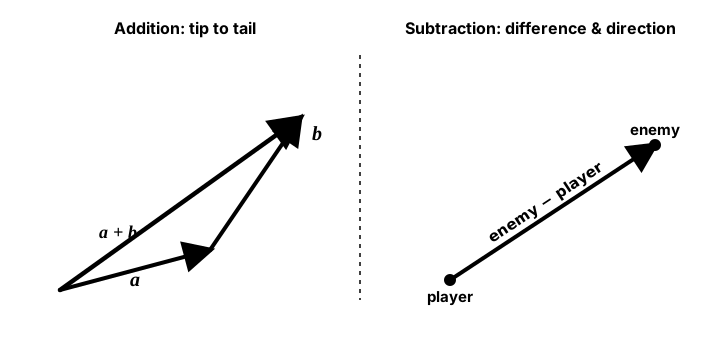
enemy − player is the arrow pointing from the player to the enemy. Normalize that arrow and you have a ready-made chase direction.# Vector addition - combine movements/forces
position = Vector2(100, 100)
velocity = Vector2(5, -3)
position = position + velocity # New position after movement
# Vector subtraction - find difference/direction
player = Vector2(400, 300)
enemy = Vector2(600, 200)
direction_to_enemy = enemy - player # Vector pointing from player to enemy
# Multiple forces
gravity = Vector2(0, 9.8)
wind = Vector2(2, 0)
thrust = Vector2(0, -15)
total_force = gravity + wind + thrustVector Normalization and Scaling
📏 Normalization
Normalizing a vector gives you a "unit vector" - same direction, but length of 1. Perfect for:
- Setting consistent movement speeds
- Getting pure direction without magnitude
- Calculating facing directions
# Normalize for consistent speed
def move_towards_target(position: "Vector2", target: "Vector2", speed: float) -> "Vector2":
    # Get direction vector
    direction = target - position

    # Normalize to get pure direction
    if direction.magnitude() > 0:
        direction = direction.normalize()

    # Scale by desired speed
    velocity = direction * speed

    # Update position
    return position + velocity

# Example: Enemy chasing player
class Enemy:
    def __init__(self, x: float, y: float) -> None:
        self.position = Vector2(x, y)
        self.speed = 3

    def update(self, player_position: "Vector2") -> None:
        # Calculate direction to player
        direction = (player_position - self.position).normalize()

        # Move towards player
        self.position += direction * self.speed
Dot Product and Projections
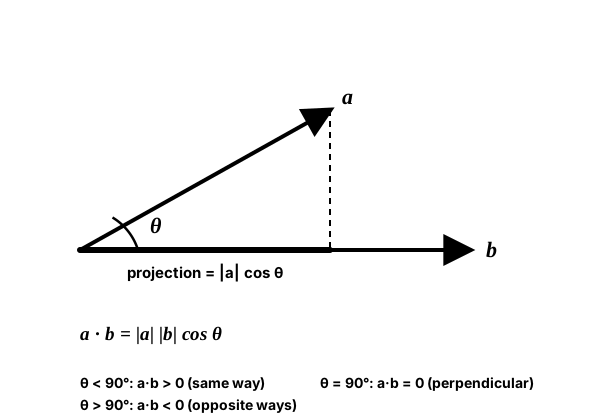
|a| cosθ. You rarely need the angle itself — the sign is the fast answer games lean on. Positive means "roughly the same way" (target ahead of me), zero means perpendicular, negative means "opposite ways" (behind me). That single comparison powers field-of-view checks, wall sliding, and AI vision.def angle_between(v1: "Vector2", v2: "Vector2") -> float:
"""Calculate angle between two vectors in radians"""
# Normalize vectors
v1_norm = v1.normalize()
v2_norm = v2.normalize()
# Dot product gives cos(angle)
dot = v1_norm.dot(v2_norm)
# Clamp to avoid floating point errors with acos
dot = max(-1, min(1, dot))
return math.acos(dot)
def is_in_front(observer_pos: "Vector2", observer_facing: "Vector2", target_pos: "Vector2") -> bool:
"""Check if target is in front of observer"""
to_target = target_pos - observer_pos
# Positive dot product means in front
return observer_facing.dot(to_target) > 0
def project_onto(vector: "Vector2", onto: "Vector2") -> "Vector2":
"""Project vector onto another vector"""
onto_norm = onto.normalize()
projection_length = vector.dot(onto_norm)
return onto_norm * projection_length
# Example: Sliding along walls
def slide_along_wall(velocity: "Vector2", wall_normal: "Vector2") -> "Vector2":
"""Calculate sliding velocity when hitting a wall"""
# Remove the component going into the wall
into_wall = project_onto(velocity, wall_normal)
slide_velocity = velocity - into_wall
return slide_velocityPractical Vector Applications
1. Steering Behaviors
class SteeringEntity:
    def __init__(self, x: float, y: float) -> None:
        self.position = Vector2(x, y)
        self.velocity = Vector2(0, 0)
        self.acceleration = Vector2(0, 0)
        self.max_speed = 5
        self.max_force = 0.2

    def seek(self, target: "Vector2") -> "Vector2":
        """Steer towards a target"""
        desired = (target - self.position).normalize() * self.max_speed
        steer = desired - self.velocity

        # Limit steering force
        if steer.magnitude() > self.max_force:
            steer = steer.normalize() * self.max_force

        return steer

    def flee(self, threat: "Vector2") -> "Vector2":
        """Steer away from a threat"""
        return -self.seek(threat)

    def arrive(self, target: "Vector2", slow_radius: float = 100) -> "Vector2":
        """Slow down when approaching target"""
        to_target = target - self.position
        distance = to_target.magnitude()

        if distance > 0:
            # Calculate desired speed based on distance
            if distance < slow_radius:
                desired_speed = self.max_speed * (distance / slow_radius)
            else:
                desired_speed = self.max_speed

            # Calculate steering
            desired = to_target.normalize() * desired_speed
            steer = desired - self.velocity

            # Limit force
            if steer.magnitude() > self.max_force:
                steer = steer.normalize() * self.max_force

            return steer

        return Vector2(0, 0)

    def update(self) -> None:
        # Update physics
        self.velocity += self.acceleration

        # Limit speed
        if self.velocity.magnitude() > self.max_speed:
            self.velocity = self.velocity.normalize() * self.max_speed

        self.position += self.velocity
        self.acceleration = Vector2(0, 0)  # Reset acceleration
2. Projectile Motion
class Projectile:
    def __init__(self, start_pos: tuple[float, float], target_pos: tuple[float, float], speed: float) -> None:
        self.position = Vector2(start_pos[0], start_pos[1])

        # Calculate launch angle for projectile
        direction = Vector2(target_pos[0], target_pos[1]) - self.position

        # Simple direct shot
        self.velocity = direction.normalize() * speed

        # For arc trajectory (with gravity)
        # Calculate angle for desired arc
        distance = direction.magnitude()
        gravity = 9.8

        # Physics formula for projectile angle (flat-ground range equation).
        # Clamp to 1.0: if the target is out of range, asin's argument would
        # exceed 1 and raise ValueError, so we fall back to the 45 degree
        # max-range launch instead of crashing.
        angle = 0.5 * math.asin(min(1.0, (gravity * distance) / (speed * speed)))

        # Set velocity components. Screen Y points DOWN, so negate the vertical
        # component to launch UPWARD into an arc. This uses the flat-ground range
        # equation (assumes the target is at the same height), so only the
        # horizontal direction (direction.x) steers the shot - direction.y is
        # intentionally not used here.
        self.velocity = Vector2(
            speed * math.cos(angle) * (direction.x / distance),
            -speed * math.sin(angle)
        )

        self.gravity = Vector2(0, gravity)

    def update(self, dt: float) -> bool:
        # Apply gravity
        self.velocity += self.gravity * dt

        # Update position
        self.position += self.velocity * dt

        return self.position.y > 0  # Still in air
3. Collision Response
def reflect_vector(incident: "Vector2", normal: "Vector2") -> "Vector2":
    """Reflect a vector off a surface"""
    # Formula: R = I - 2 * (I · N) * N
    return incident - normal * (2 * incident.dot(normal))

def bounce_off_wall(ball_velocity: "Vector2", wall_normal: "Vector2", restitution: float = 0.8) -> "Vector2":
    """Calculate bounce velocity with energy loss"""
    reflected = reflect_vector(ball_velocity, wall_normal)
    return reflected * restitution  # Lose some energy

class Ball:
    def __init__(self, x: float, y: float) -> None:
        self.position = Vector2(x, y)
        self.velocity = Vector2(5, 3)
        self.radius = 10

    def check_wall_collision(self, screen_width: int, screen_height: int) -> None:
        # Check boundaries and bounce
        if self.position.x - self.radius <= 0:
            self.velocity = bounce_off_wall(self.velocity, Vector2(1, 0))
            self.position.x = self.radius

        if self.position.x + self.radius >= screen_width:
            self.velocity = bounce_off_wall(self.velocity, Vector2(-1, 0))
            self.position.x = screen_width - self.radius

        if self.position.y - self.radius <= 0:
            self.velocity = bounce_off_wall(self.velocity, Vector2(0, 1))
            self.position.y = self.radius

        if self.position.y + self.radius >= screen_height:
            self.velocity = bounce_off_wall(self.velocity, Vector2(0, -1))
            self.position.y = screen_height - self.radius
Complete Vector-Based Game
import pygame
import math
import random

# Import our Vector2 class from earlier
class Vector2:
    # ... (full implementation from above)
    pass

class Particle:
    def __init__(self, position, velocity, color, lifetime=1.0):
        self.position = position
        self.velocity = velocity
        self.color = color
        self.lifetime = lifetime
        self.max_lifetime = lifetime

    def update(self, dt):
        self.position += self.velocity * dt
        self.velocity *= 0.98  # Drag
        self.lifetime -= dt

    def draw(self, screen):
        if self.lifetime > 0:
            alpha = self.lifetime / self.max_lifetime
            size = int(5 * alpha)
            if size > 0:
                pygame.draw.circle(screen, self.color,
                                 self.position.to_tuple(), size)

class VectorGame:
    def __init__(self):
        pygame.init()
        self.screen = pygame.display.set_mode((800, 600))
        pygame.display.set_caption("Vector Operations Game")
        self.clock = pygame.time.Clock()

        # Player
        self.player_pos = Vector2(400, 300)
        self.player_vel = Vector2(0, 0)
        self.player_facing = Vector2(1, 0)

        # Enemies that use seeking behavior
        self.enemies = []
        for _ in range(3):
            pos = Vector2(
                random.randint(50, 750),
                random.randint(50, 550)
            )
            self.enemies.append({
                'position': pos,
                'velocity': Vector2(0, 0),
                'speed': random.uniform(1, 3)
            })

        # Collectibles that orbit
        self.orbitals = []
        for i in range(5):
            angle = (math.pi * 2 / 5) * i
            self.orbitals.append({
                'angle': angle,
                'radius': 150,
                'speed': 1,
                'collected': False
            })

        # Projectiles
        self.projectiles = []

        # Particles for effects
        self.particles = []

        # Score
        self.score = 0

    def handle_input(self):
        keys = pygame.key.get_pressed()

        # Player movement with vector operations
        move_vector = Vector2(0, 0)

        if keys[pygame.K_LEFT] or keys[pygame.K_a]:
            move_vector.x -= 1
        if keys[pygame.K_RIGHT] or keys[pygame.K_d]:
            move_vector.x += 1
        if keys[pygame.K_UP] or keys[pygame.K_w]:
            move_vector.y -= 1
        if keys[pygame.K_DOWN] or keys[pygame.K_s]:
            move_vector.y += 1

        # Normalize diagonal movement
        if move_vector.magnitude() > 0:
            move_vector = move_vector.normalize()
            self.player_vel = move_vector * 5
            self.player_facing = move_vector

    def handle_events(self):
        for event in pygame.event.get():
            if event.type == pygame.QUIT:
                return False
            elif event.type == pygame.MOUSEBUTTONDOWN:
                if event.button == 1:  # Left click
                    # Shoot projectile towards mouse
                    mouse_pos = Vector2(*pygame.mouse.get_pos())
                    direction = (mouse_pos - self.player_pos).normalize()

                    self.projectiles.append({
                        'position': Vector2(self.player_pos.x, self.player_pos.y),
                        'velocity': direction * 10,
                        'lifetime': 2.0
                    })

                    # Recoil effect
                    self.player_vel -= direction * 3

        return True

    def update(self, dt):
        # Update player
        self.player_pos += self.player_vel * dt * 60
        self.player_vel *= 0.9  # Friction

        # Keep player on screen
        self.player_pos.x = max(20, min(780, self.player_pos.x))
        self.player_pos.y = max(20, min(580, self.player_pos.y))

        # Update enemies with seeking behavior
        for enemy in self.enemies:
            # Calculate steering towards player
            to_player = self.player_pos - enemy['position']
            distance = to_player.magnitude()

            if distance > 0:
                # Seek player
                desired = to_player.normalize() * enemy['speed']
                steering = desired - enemy['velocity']

                # Apply steering
                enemy['velocity'] += steering * dt * 10

                # Limit velocity
                if enemy['velocity'].magnitude() > enemy['speed']:
                    enemy['velocity'] = enemy['velocity'].normalize() * enemy['speed']

                # Update position
                enemy['position'] += enemy['velocity'] * dt * 60

                # Check collision with player
                if distance < 30:
                    # Push player away
                    push = to_player.normalize() * 5
                    self.player_vel += push

                    # Create explosion particles
                    for _ in range(10):
                        vel = Vector2(
                            random.uniform(-5, 5),
                            random.uniform(-5, 5)
                        )
                        self.particles.append(
                            Particle(Vector2(enemy['position'].x, enemy['position'].y),
                                   vel, (255, 100, 100), 0.5)
                        )

        # Update orbitals
        for orbital in self.orbitals:
            if not orbital['collected']:
                orbital['angle'] += orbital['speed'] * dt

                # Check collection
                orbital_pos = Vector2(
                    self.player_pos.x + orbital['radius'] * math.cos(orbital['angle']),
                    self.player_pos.y + orbital['radius'] * math.sin(orbital['angle'])
                )

                # Simple distance check
                if (orbital_pos - self.player_pos).magnitude() < 30:
                    orbital['collected'] = True
                    self.score += 100

                    # Create collection particles
                    for _ in range(20):
                        vel = Vector2(
                            random.uniform(-3, 3),
                            random.uniform(-3, 3)
                        )
                        self.particles.append(
                            Particle(orbital_pos, vel, (255, 215, 0), 1.0)
                        )

        # Update projectiles
        for proj in self.projectiles[:]:
            proj['position'] += proj['velocity'] * dt * 60
            proj['lifetime'] -= dt

            if proj['lifetime'] <= 0:
                self.projectiles.remove(proj)
                continue

            # Check collision with enemies
            for enemy in self.enemies:
                if (proj['position'] - enemy['position']).magnitude() < 20:
                    # Hit enemy - push it back
                    enemy['velocity'] = proj['velocity'].normalize() * 10
                    self.projectiles.remove(proj)
                    self.score += 50
                    break

        # Update particles
        for particle in self.particles[:]:
            particle.update(dt)
            if particle.lifetime <= 0:
                self.particles.remove(particle)

    def draw_vector_info(self):
        """Draw vector visualization"""
        font = pygame.font.Font(None, 20)

        # Player velocity vector
        if self.player_vel.magnitude() > 0.1:
            end_pos = self.player_pos + self.player_vel * 10
            pygame.draw.line(self.screen, (0, 255, 0),
                           self.player_pos.to_tuple(),
                           end_pos.to_tuple(), 2)

        # Show vector info
        texts = [
            f"Player Vel: ({self.player_vel.x:.1f}, {self.player_vel.y:.1f})",
            f"Magnitude: {self.player_vel.magnitude():.1f}",
            f"Score: {self.score}"
        ]

        for i, text in enumerate(texts):
            rendered = font.render(text, True, (255, 255, 255))
            self.screen.blit(rendered, (10, 10 + i * 25))

    def draw(self):
        self.screen.fill((20, 20, 30))

        # Draw orbit paths
        for orbital in self.orbitals:
            if not orbital['collected']:
                pygame.draw.circle(self.screen, (50, 50, 50),
                                 self.player_pos.to_tuple(),
                                 orbital['radius'], 1)

        # Draw enemies
        for enemy in self.enemies:
            pygame.draw.circle(self.screen, (255, 0, 0),
                             enemy['position'].to_tuple(), 15)

            # Draw velocity vector
            if enemy['velocity'].magnitude() > 0.1:
                end = enemy['position'] + enemy['velocity'] * 20
                pygame.draw.line(self.screen, (150, 0, 0),
                               enemy['position'].to_tuple(),
                               end.to_tuple(), 1)

        # Draw orbitals
        for orbital in self.orbitals:
            if not orbital['collected']:
                pos = Vector2(
                    self.player_pos.x + orbital['radius'] * math.cos(orbital['angle']),
                    self.player_pos.y + orbital['radius'] * math.sin(orbital['angle'])
                )
                pygame.draw.circle(self.screen, (255, 215, 0),
                                 pos.to_tuple(), 10)

        # Draw projectiles
        for proj in self.projectiles:
            pygame.draw.circle(self.screen, (100, 200, 255),
                             proj['position'].to_tuple(), 5)

        # Draw particles
        for particle in self.particles:
            particle.draw(self.screen)

        # Draw player
        pygame.draw.circle(self.screen, (0, 100, 255),
                         self.player_pos.to_tuple(), 20)

        # Draw facing direction
        face_end = self.player_pos + self.player_facing * 30
        pygame.draw.line(self.screen, (0, 150, 255),
                       self.player_pos.to_tuple(),
                       face_end.to_tuple(), 3)

        # Draw vector info
        self.draw_vector_info()

        # Instructions
        font = pygame.font.Font(None, 20)
        instructions = [
            "WASD/Arrows: Move",
            "Click: Shoot",
            "Collect yellow orbs!"
        ]
        for i, text in enumerate(instructions):
            rendered = font.render(text, True, (200, 200, 200))
            self.screen.blit(rendered, (650, 550 - i * 25))

    def run(self):
        running = True
        dt = 0

        while running:
            running = self.handle_events()
            self.handle_input()
            self.update(dt)
            self.draw()

            pygame.display.flip()
            dt = self.clock.tick(60) / 1000.0

        pygame.quit()

if __name__ == "__main__":
    game = VectorGame()
    game.run()
Vector Performance Tips
⚡ Optimization Strategies
- Cache Magnitudes: Don't recalculate if vector hasn't changed
- Use Squared Distance: Avoid sqrt when just comparing distances
- Batch Operations: Process multiple vectors together
- Approximate Normalization: Fast inverse square root for non-critical cases
- Pool Vectors: Reuse vector objects to reduce allocation
# Performance optimizations
def distance_squared(v1: "Vector2", v2: "Vector2") -> float:
    """Faster than actual distance for comparisons"""
    dx = v2.x - v1.x
    dy = v2.y - v1.y
    return dx * dx + dy * dy

# Use squared distance for comparisons
if distance_squared(player, enemy) < 100 * 100:  # Instead of distance < 100
    # In range...

# Fast approximate normalize (good enough for many cases)
def fast_normalize(x: float, y: float) -> tuple[float, float]:
    mag_sq = x * x + y * y
    if mag_sq == 0:
        return (0, 0)
    # Fast inverse square root approximation
    inv_mag = 1.0 / math.sqrt(mag_sq)  # Can optimize further
    return (x * inv_mag, y * inv_mag)
Practice Exercises
🎯 Vector Challenges!
- Homing Missile: Create projectiles that track targets using vectors
- Flocking Simulation: Implement boids with separation, alignment, cohesion
- Elastic Collision: Realistic ball physics with vector math
- Line of Sight: Check visibility using dot products
- Force Field: Push/pull objects with vector fields
- Path Following: Make entities follow curved paths using vectors
Key Takeaways
- ➡️ Vectors represent both position and direction
- ➕ Addition combines movements/forces
- ➖ Subtraction finds direction between points
- 📏 Normalization gives pure direction (length 1)
- • Dot product reveals angle relationships
- 🔄 Vectors enable smooth movement and physics
- ⚡ Optimize with squared distances and caching
🏋️♂️ Practice Exercise: Predator and Prey — Normalize, Dot, and Squared Distance
🏋️♂️ Exercise 1: Three Vector-Math Pillars in One Chase Loop
Objective: Build a small Pygame chase demo that exercises three pillar vector patterns from this lesson in one program: (1) normalize for constant speed — three predator enemies seek the WASD-controlled prey by computing direction = prey_pos - enemy_pos, NORMALIZING to a unit vector, then scaling by max_speed to get a velocity that doesn't depend on distance — without the normalize, distant predators rocket toward you while close ones crawl, the lesson's move_towards_target / Enemy.update pattern; (2) dot product as vision check — each predator has a facing unit vector (its current movement direction) and 'sees' the prey only when (prey_pos - enemy_pos).dot(facing) > 0 (target in the front 180° hemisphere); predators with the prey behind them turn yellow and wander randomly instead of chasing, exactly the lesson's is_in_front function; (3) squared distance for catch detection — collision-with-prey uses dx*dx + dy*dy < CATCH_R * CATCH_R instead of math.sqrt(dx*dx + dy*dy) < CATCH_R, the lesson's Performance Tips rule 'Use Squared Distance: Avoid sqrt when just comparing distances' — same correctness, 5–20× faster per check.
Instructions:
- Open an 800×600 window and start a clean game loop with
dt = clock.tick(60) / 1000.0. - Plain 2-element lists or tuples for vectors are fine for this demo; define small
normalize(v)anddot(a, b)helpers (the lesson teaches a Vector2 class but raw lists with explicit math also exercise the same concepts). - Player (prey): position vector starting at center, controlled by WASD via
pygame.key.get_pressed(). Build a movement vector from the keys, NORMALIZE it (so diagonals don't move √2 faster than cardinals — same normalize-for-consistent-speed rule), scale by 200 px/sec, and apply overdt. - Predators (3 of them): each has
pos, afacingunit vector starting at(1, 0), and awander_timer. Each frame computeto_prey = prey_pos - posthend = dot(to_prey, facing)to decide vision. - If
d > 0(prey in front 180° hemisphere): chase by computingdirection = normalize(to_prey)thenvel = direction * MAX_SPEED— canonical normalize-then-scale. Updatefacing = directionso vision-check uses the latest direction next frame. Render predator in red. - If
d <= 0(prey behind or perpendicular): wander randomly. Tickwander_timerdown; when it hits zero, roll a new randomfacingviarandom.uniform(0, 2*pi)then(cos, sin)and reset the timer. Render predator in yellow as a 'blind' indicator. - Catch detection: every frame, for each predator compute
dx = predator.pos[0] - prey[0]anddy = predator.pos[1] - prey[1], then checkdx*dx + dy*dy < CATCH_R * CATCH_RwithCATCH_R = 25. NOmath.sqrtcall. If caught, reset prey to center and increment a counter. - Render a facing-line from each predator (length 30 px) so the front-vs-behind classification is visible — when the prey is on the long side of the line, predator is red and chasing; on the short side, predator is yellow and wandering blindly.
💡 Hint
Three traps: (1) Forgetting to normalize before scaling. vel = (prey - enemy) * MAX_SPEED * dt (no normalize) gives a chase speed PROPORTIONAL to distance — far ones rocket in, close ones crawl. .normalize() extracts pure direction (unit vector); multiplying that by MAX_SPEED gives a velocity whose magnitude is exactly MAX_SPEED regardless of how far the prey is. (2) The dot-product vision check works WITHOUT normalizing to_prey because we only care about the SIGN, not the value — (non-unit a).dot(b) > 0 and a.normalize().dot(b) > 0 always agree, since normalize only scales by a positive number (the magnitude), and that can't flip a sign. The lesson's is_in_front deliberately skips the normalize for this reason. (3) For squared-distance comparisons, square the THRESHOLD too: dx*dx + dy*dy < CATCH_R * CATCH_R, NOT < CATCH_R. Forgetting the squared threshold gives a much smaller effective radius (CATCH_R = 25 → effective radius ≈ 5).
✅ Example Solution
import pygame, math, random

pygame.init()
WIDTH, HEIGHT = 800, 600
screen = pygame.display.set_mode((WIDTH, HEIGHT))
pygame.display.set_caption("Predator and Prey")
font = pygame.font.SysFont(None, 22)
clock = pygame.time.Clock()

PLAYER_SPEED = 200
PRED_SPEED = 140
CATCH_R = 25
CATCH_R_SQ = CATCH_R * CATCH_R                  # square once, reuse forever

prey = [WIDTH / 2, HEIGHT / 2]
predators = []
for _ in range(3):
    predators.append({
        "pos": [random.uniform(60, WIDTH - 60), random.uniform(60, HEIGHT - 60)],
        "facing": [1.0, 0.0],
        "wander_t": 0.0,
        "seeing": False,
    })
catches = 0

def normalize(v: list[float]) -> list[float]:
    m = math.hypot(v[0], v[1])
    return [v[0] / m, v[1] / m] if m else [0.0, 0.0]

def dot(a: list[float], b: list[float]) -> float:
    return a[0] * b[0] + a[1] * b[1]

running = True
while running:
    dt = clock.tick(60) / 1000.0
    for event in pygame.event.get():
        if event.type == pygame.QUIT:
            running = False

    # --- prey input ---
    keys = pygame.key.get_pressed()
    move = [0.0, 0.0]
    if keys[pygame.K_w]: move[1] -= 1
    if keys[pygame.K_s]: move[1] += 1
    if keys[pygame.K_a]: move[0] -= 1
    if keys[pygame.K_d]: move[0] += 1
    if move != [0.0, 0.0]:
        move = normalize(move)                  # diagonals don't go √2 faster
        prey[0] += move[0] * PLAYER_SPEED * dt
        prey[1] += move[1] * PLAYER_SPEED * dt

    # --- predators ---
    for p in predators:
        to_prey = [prey[0] - p["pos"][0], prey[1] - p["pos"][1]]
        # Vision: dot-product SIGN tells front (>0) vs behind (<=0).
        # to_prey doesn't need to be normalized — magnitude can't flip a sign.
        p["seeing"] = dot(to_prey, p["facing"]) > 0
        if p["seeing"]:
            direction = normalize(to_prey)      # unit vector — strips distance
            p["pos"][0] += direction[0] * PRED_SPEED * dt
            p["pos"][1] += direction[1] * PRED_SPEED * dt
            p["facing"] = direction             # facing tracks current chase
        else:
            p["wander_t"] -= dt
            if p["wander_t"] <= 0:
                a = random.uniform(0, 2 * math.pi)
                p["facing"] = [math.cos(a), math.sin(a)]
                p["wander_t"] = random.uniform(0.5, 1.5)
            p["pos"][0] += p["facing"][0] * (PRED_SPEED * 0.4) * dt
            p["pos"][1] += p["facing"][1] * (PRED_SPEED * 0.4) * dt

        # Catch detection — squared distance, NO sqrt.
        dx = p["pos"][0] - prey[0]
        dy = p["pos"][1] - prey[1]
        if dx * dx + dy * dy < CATCH_R_SQ:
            prey[0], prey[1] = WIDTH / 2, HEIGHT / 2
            catches += 1

    # --- draw ---
    screen.fill((20, 25, 35))
    pygame.draw.circle(screen, (60, 180, 240), (int(prey[0]), int(prey[1])), 14)
    for p in predators:
        color = (220, 60, 60) if p["seeing"] else (220, 200, 60)
        pygame.draw.circle(screen, color, (int(p["pos"][0]), int(p["pos"][1])), 12)
        tip = (p["pos"][0] + p["facing"][0] * 30, p["pos"][1] + p["facing"][1] * 30)
        pygame.draw.line(screen, color, p["pos"], tip, 2)
    hud = font.render(
        f"Catches: {catches}    Red = chasing (sees you), Yellow = wandering",
        True, (240, 240, 240))
    screen.blit(hud, (10, 10))
    pygame.display.flip()

pygame.quit()
🎯 Quick Quiz
Question 1: An enemy chases the player with velocity = (player_pos - enemy_pos) * 0.05. The enemy crawls when close to the player but rockets when far away. What's the canonical fix?
Question 2: An observer at position O has facing direction F (a unit vector pointing where it's looking). The lesson uses (T - O).dot(F) > 0 to check if a target T is in the front 180° hemisphere. What does the SIGN of the dot product tell us, and why does the check work even when (T - O) is NOT a unit vector?
Question 3: The lesson's Performance Tips include 'Use Squared Distance: Avoid sqrt when just comparing distances.' Why is dx*dx + dy*dy < 30*30 faster than math.sqrt(dx*dx + dy*dy) < 30, and is it equally correct?
What's Next?
Now that you've mastered vectors, next we'll explore trigonometry in games - using sine, cosine, and angles to create rotations, waves, and circular motion!