Lesson 3: Interpolation & Easing
The difference between a stiff prototype and a game that feels good is often not what moves but how it moves: a menu that snaps in with a tiny overshoot, a camera that glides, a turret that turns the short way. In this lesson you build one small easing library, easing.py, that the rest of the course reuses, and learn the one smoothing formula that behaves the same at 30, 60 or 144 frames per second.
🎯 Learning Objectives
By the end of this lesson, you will be able to:
- Use
lerp,inverse_lerpandremapto blend numbers,Vector2positions and clamped colors. - Choose an easing curve for a motion and apply it with a
Tweenthat runs for a set number of seconds. - Explain why
lerp(x, target, 0.1)every frame depends on the frame rate, and replace it withdamp(), which uses1 - exp(-k * dt). - Turn toward an angle the short way around with
lerp_angle. - Move an object along a Bézier curve built from nested lerps.
Project: an Easing Playground: racing boxes with four easings, a ball that glides after your clicks, and a turret that never spins the long way.
In This Lesson
🚂 Lerp: The One-Line Blend
A train leaves one station for the next. Halfway through the trip it is halfway between them; a quarter of the way through, a quarter of the way. Linear interpolation, or lerp, is that idea as one line of code: give it a start, an end and a progress value t from 0 to 1, and it returns the point that far along.
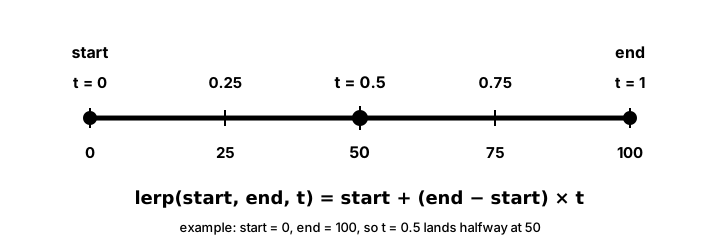
t = 0 gives the start, t = 1 the end, and t = 0.5 the exact middle.def lerp(a, b, t):
return a + (b - a) * t
lerp(0, 100, 0.25) # 25.0
lerp(pygame.Vector2(0, 0), pygame.Vector2(200, 100), 0.5) # Vector2(100, 50): works on vectors too
def inverse_lerp(a, b, value): # the opposite question: how far along is value?
return (value - a) / (b - a)
inverse_lerp(0, 200, 50) # 0.25
remap(75, 0, 100, 0, 255) # 191.25: health 75/100 as a 0..255 brightnessColors blend the same way, one channel at a time, with one extra rule from the Intro course: clamp every channel to 0..255 and make it a whole number. That matters here, because some easing curves you will meet in a moment push t past 1, and an unclamped channel of 262 crashes pygame.draw.
def lerp_color(c1, c2, t):
    """Blend two RGB colors; every channel is clamped to 0..255 (t may overshoot)."""
    return tuple(max(0, min(255, int(lerp(a, b, t)))) for a, b in zip(c1, c2))
🎢 Easing Curves: Same Trip, Different Feel
Real things don't move at a constant speed. A car speeds up, cruises and brakes; a ball dropped on a table bounces a few times before it rests. An easing function reshapes t before you lerp with it. The start and the end stay the same; only the feel of the trip changes.
t = elapsed / duration                    # plain progress, 0..1
x = lerp(start_x, end_x, ease_out_quad(t))  # same trip, fast start and soft landing
Pick a curve and watch the box. Every one of them starts at the left mark and ends at the right mark in the same time.
| Curve | Feels like | Good for |
|---|---|---|
linear | A conveyor belt | Progress bars, timers, testing |
ease_out_quad / _cubic | Quick, then settles | Most UI motion, pickups flying to the HUD |
ease_in_quad | Slow start, speeding up | Things leaving the screen, falling |
ease_in_out_cubic / _sine | Smooth at both ends | Camera moves, panels sliding across |
ease_out_back | Overshoots a little, snaps back | Buttons and menus popping in |
ease_out_elastic / _bounce | Wobbly / bouncy | Playful rewards, landing items (use sparingly) |
✅ Growth Mindset: You Don't Have to Derive the Formulas
The elastic and bounce formulas look like magic spells, and that's fine. Game developers copy them from references all the time; the skill is knowing which feel you want and checking the curve with your eyes. Two things you can always check yourself: every easing must give 0 at t = 0 and 1 at t = 1. If the math still feels foreign, that's a "not yet", and plotting a curve (as the exercise's racers do) is how it becomes familiar.
📦 The Course Easing Library
Here is the whole library in one file. Save it as easing.py; the exercise imports it, and so do later lessons in this course, so there is exactly one copy of each formula to trust and to fix. Every function is short enough to read in a few seconds.
"""easing.py: the course's one easing library (Interpolation & Easing lesson).

Save this file next to your game and import what you need:
    from easing import lerp, damp, ease_out_quad, Tween
Every time value is in SECONDS. t values run from 0 to 1.
"""
import math


# --- Blending two values ------------------------------------------------------
def clamp(value, low=0.0, high=1.0):
    return max(low, min(high, value))


def lerp(a, b, t):
    """The value t of the way from a to b (t = 0 gives a, t = 1 gives b).
    Works for numbers and for pygame.Vector2."""
    return a + (b - a) * t


def inverse_lerp(a, b, value):
    """How far value is between a and b, as t (the opposite of lerp)."""
    if a == b:
        return 0.0
    return (value - a) / (b - a)


def remap(value, in_a, in_b, out_a, out_b):
    """Map value from the range in_a..in_b onto out_a..out_b."""
    return lerp(out_a, out_b, inverse_lerp(in_a, in_b, value))


def lerp_color(c1, c2, t):
    """Blend two RGB colors; every channel is clamped to 0..255 (t may overshoot)."""
    return tuple(max(0, min(255, int(lerp(a, b, t)))) for a, b in zip(c1, c2))


def lerp_angle(a, b, t):
    """Blend two angles in degrees the SHORT way around the circle."""
    diff = (b - a + 180) % 360 - 180      # always between -180 and 180
    return (a + diff * t) % 360


def damp(current, target, sharpness, dt):
    """Move current toward target, frame-rate independently.
    sharpness is per second: higher = snappier. Same result at any FPS."""
    return lerp(current, target, 1 - math.exp(-sharpness * dt))


# --- Easing curves: reshape t (0..1) before you lerp -------------------------
def linear(t):
    return t


def ease_in_quad(t):
    return t * t


def ease_out_quad(t):
    return 1 - (1 - t) * (1 - t)


def ease_in_out_quad(t):
    return 2 * t * t if t < 0.5 else 1 - (-2 * t + 2) ** 2 / 2


def ease_in_cubic(t):
    return t * t * t


def ease_out_cubic(t):
    return 1 - (1 - t) ** 3


def ease_in_out_cubic(t):
    return 4 * t * t * t if t < 0.5 else 1 - (-2 * t + 2) ** 3 / 2


def ease_in_out_sine(t):
    return -(math.cos(math.pi * t) - 1) / 2


def ease_out_back(t):
    """Overshoots past 1 a little, then settles."""
    c1 = 1.70158
    c3 = c1 + 1
    return 1 + c3 * (t - 1) ** 3 + c1 * (t - 1) ** 2


def ease_out_elastic(t):
    """Overshoots and wobbles before settling."""
    if t in (0, 1):
        return t
    return 2 ** (-10 * t) * math.sin((t * 10 - 0.75) * (2 * math.pi / 3)) + 1


def ease_out_bounce(t):
    """Lands with a few shrinking bounces."""
    n1, d1 = 7.5625, 2.75
    if t < 1 / d1:
        return n1 * t * t
    if t < 2 / d1:
        t -= 1.5 / d1
        return n1 * t * t + 0.75
    if t < 2.5 / d1:
        t -= 2.25 / d1
        return n1 * t * t + 0.9375
    t -= 2.625 / d1
    return n1 * t * t + 0.984375


EASINGS = {
    "linear": linear,
    "in_quad": ease_in_quad, "out_quad": ease_out_quad, "in_out_quad": ease_in_out_quad,
    "in_cubic": ease_in_cubic, "out_cubic": ease_out_cubic, "in_out_cubic": ease_in_out_cubic,
    "in_out_sine": ease_in_out_sine, "out_back": ease_out_back,
    "out_elastic": ease_out_elastic, "out_bounce": ease_out_bounce,
}


# --- Curves -------------------------------------------------------------------
def bezier_quadratic(p0, p1, p2, t):
    """A point on a quadratic Bezier curve: a lerp of lerps. Points are Vector2."""
    return lerp(lerp(p0, p1, t), lerp(p1, p2, t), t)


def bezier_cubic(p0, p1, p2, p3, t):
    return lerp(bezier_quadratic(p0, p1, p2, t), bezier_quadratic(p1, p2, p3, t), t)


# --- A tween: one value moving from start to end over a duration -------------
class Tween:
    def __init__(self, start, end, duration, ease=linear):
        self.start = start
        self.end = end
        self.duration = duration          # seconds
        self.ease = ease
        self.elapsed = 0.0
        self.value = start
        self.done = False

    def update(self, dt):
        """Advance by dt seconds and return the current value."""
        self.elapsed = min(self.duration, self.elapsed + dt)
        t = self.elapsed / self.duration if self.duration > 0 else 1.0
        self.value = lerp(self.start, self.end, self.ease(t))
        self.done = self.elapsed >= self.duration
        return self.value
A few design choices worth noticing: easings are plain functions of t, so any of them can be passed to Tween; the EASINGS dict lets you pick one by name (handy for menus and data files); and lerp works on numbers and Vector2 alike, which is why the Bézier functions are only two lines each.
⏱️ Tweens: Animating Over Time
A tween (from "in-between") is one value traveling from a start to an end over a set time with a chosen easing. The Tween class in easing.py keeps the elapsed time in seconds, so every call to update(dt) works out t = elapsed / duration, eases it and lerps. When the time is up, done becomes True and the value sits exactly on the end, never one frame short or past it.
import pygame
from easing import Tween, ease_out_back, ease_in_quad

WIDTH, HEIGHT = 640, 400
SHOWN_X, HIDDEN_X = 380, WIDTH + 10        # panel's left edge when shown / hidden

pygame.init()
screen = pygame.display.set_mode((WIDTH, HEIGHT))
pygame.display.set_caption("Tween: press SPACE to slide the panel")
clock = pygame.time.Clock()
font = pygame.font.Font(None, 32)
title = font.render("INVENTORY", True, (20, 24, 36))

panel_x = HIDDEN_X
tween = None                               # no animation running yet
showing = False

running = True
while running:
    dt = clock.tick(60) / 1000
    for event in pygame.event.get():
        if event.type == pygame.QUIT:
            running = False
        elif event.type == pygame.KEYDOWN and event.key == pygame.K_SPACE:
            showing = not showing
            if showing:                    # slide in with a little overshoot
                tween = Tween(panel_x, SHOWN_X, 0.45, ease_out_back)
            else:                          # slide out, speeding up as it leaves
                tween = Tween(panel_x, HIDDEN_X, 0.30, ease_in_quad)

    if tween is not None:
        panel_x = tween.update(dt)
        if tween.done:
            tween = None

    screen.fill((30, 34, 52))
    panel = pygame.FRect(panel_x, 40, 240, 320)
    pygame.draw.rect(screen, (235, 225, 200), panel, border_radius=12)
    screen.blit(title, (panel.x + 20, panel.y + 20))
    pygame.display.flip()

pygame.quit()
Press Space quickly twice. The new tween starts from wherever the panel is (panel_x), not from where it was supposed to be, so reversing mid-slide never jumps. That habit, "start the next tween from the current value", fixes most tween glitches.
🧲 Smooth Following at Any Frame Rate
A tween needs a fixed end and a fixed time. A camera that follows a player, or a health bar catching up with damage, has a target that keeps changing. The popular shortcut is to move a fraction of the remaining distance every frame:
x = lerp(x, target, 0.1) # 10% of the remaining distance... per FRAMEIt looks smooth, but it breaks the course rule that speed must not depend on the frame rate. Each frame keeps 90% of the remaining distance. After one second at 60 FPS that is 0.960 ≈ 0.0018 of the distance left; at 30 FPS it is 0.930 ≈ 0.042, more than twenty times as much. The same game feels sluggish on a slow laptop and twitchy on a fast one. Try it:
The fix is to decide how fast the gap should shrink per second and turn that into a per-frame fraction using dt:
def damp(current, target, sharpness, dt):
    return lerp(current, target, 1 - math.exp(-sharpness * dt))

camera_pos = damp(camera_pos, player.pos, 6, dt)   # sharpness 6: snappy; 2: floaty
Why does this work? After one frame, the fraction of the gap that remains is exp(-sharpness * dt). Two frames of dt leave exp(-sharpness * dt) * exp(-sharpness * dt) = exp(-sharpness * 2 * dt), exactly what one frame of 2 * dt leaves. So however you slice a second into frames, the same fraction remains at the end of it. The exercise's test checks exactly this: 60 steps of 1/60 s and 30 steps of 1/30 s land in the same place.
The same trick fixes any "multiply every frame" rule. velocity *= 0.98 every frame is drag that depends on the frame rate; velocity *= math.exp(-drag * dt) is not.
✅ Growth Mindset: "It Works on My Machine" Is a Clue
Frame-rate bugs are sneaky because the game looks perfect on the computer you wrote it on. Now you have a test: change clock.tick(60) to clock.tick(20) and play. If anything feels different except smoothness, a per-frame rule is hiding somewhere. Finding one isn't a failure; it's the checking habit working.
🧭 Angles the Short Way
A turret faces 350° and its target is at 10°. A plain lerp goes from 350 down through 180 to 10: a 340° spin instead of a 20° nudge. Angles wrap around, so blend the difference, after squeezing it into −180..180:
def lerp_angle(a, b, t):
    diff = (b - a + 180) % 360 - 180      # 350 -> 10 gives +20, not -340
    return (a + diff * t) % 360

lerp(350, 10, 0.5)          # 180.0: the long way, pointing backward
lerp_angle(350, 10, 0.5)    # 0.0: the short way

turret_angle = lerp_angle(turret_angle, wanted, 1 - math.exp(-8 * dt))   # smooth AND short
The last line combines both ideas of this lesson: lerp_angle picks the direction and the 1 - exp(-k * dt) fraction keeps the turning speed the same at any frame rate.
〰️ Bézier Curves and Optional Extras
A Bézier curve is lerp stacked on itself. With three points, slide one point along P0→P1 and another along P1→P2 by the same t, then lerp between those two. The middle points (the "control points") pull the curve toward them without the curve passing through them.
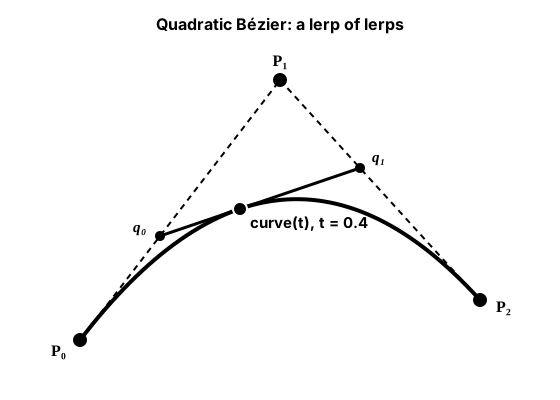
lerp(lerp(p0, p1, t), lerp(p1, p2, t), t). A cubic curve (four points) adds one more layer of the same idea.import pygame
from easing import bezier_cubic, ease_in_out_sine
pygame.init()
screen = pygame.display.set_mode((640, 400))
pygame.display.set_caption("Bezier: a coin flies along a curve")
clock = pygame.time.Clock()
p0 = pygame.Vector2(60, 340) # start
p1 = pygame.Vector2(160, 40) # control points pull the curve toward them
p2 = pygame.Vector2(480, 40)
p3 = pygame.Vector2(580, 340) # end
curve = [bezier_cubic(p0, p1, p2, p3, i / 40) for i in range(41)] # sampled once
elapsed = 0.0
FLIGHT = 1.6 # seconds from start to end
running = True
while running:
dt = clock.tick(60) / 1000
for event in pygame.event.get():
if event.type == pygame.QUIT:
running = False
elapsed = (elapsed + dt) % FLIGHT
t = ease_in_out_sine(elapsed / FLIGHT)
coin = bezier_cubic(p0, p1, p2, p3, t)
screen.fill((20, 22, 34))
pygame.draw.lines(screen, (70, 80, 110), False, [p0, p1, p2, p3]) # control polygon
pygame.draw.lines(screen, (120, 220, 140), False, curve, 3)
for p in (p0, p1, p2, p3):
pygame.draw.circle(screen, (150, 160, 190), p, 6)
pygame.draw.circle(screen, (255, 210, 80), coin, 12)
pygame.display.flip()
pygame.quit()Note that the curve is sampled once, before the loop, and that the coin's timing uses an easing on top of the curve. Equal steps of t are not equal distances along a Bézier curve, which is usually fine for coins, projectiles and swooping enemies.
Optional: springs (bouncy following with momentum)
A spring pulls toward its target with a force proportional to the distance and loses some speed to damping. Unlike damp(), it can overshoot and wobble. Written with dt in seconds:
STIFFNESS = 120      # how hard the spring pulls (per second squared)
DAMPING = 10         # how quickly the wobble dies out (per second)

velocity += (target - position) * STIFFNESS * dt
velocity *= math.exp(-DAMPING * dt)      # frame-rate independent damping
position += velocity * dt
Try it on a health bar or a UI icon. Very stiff springs with large dt values can become unstable; keep dt small.
Optional: cross-fading two animation frames
When a character switches animations (say idle to run), a very short cross-fade can hide the jump. Draw the old frame fully opaque, then the new frame on top with its opacity rising from 0 to 255:
def crossfade(old_frame, new_frame, t):
    """Blend two same-size frames. t = 0 shows old, t = 1 shows new."""
    blended = old_frame.copy()
    top = new_frame.copy()
    top.set_alpha(int(255 * max(0.0, min(1.0, t))))
    blended.blit(top, (0, 0))
    return blended
An earlier version of this course also faded the old frame out on the finished image. Halfway through, both halves were at about 50%, so the sprite turned half see-through: on a black background its brightest pixels dropped to about a quarter of their brightness. Keeping the old frame opaque underneath avoids that. The function makes two new Surfaces per call, so use it only during the brief blend (about 0.1 to 0.2 seconds), not every frame of the game.
🏋️ Practice Exercise: Easing Playground
Objective: make four boxes race with four different easings, a ball glide after your mouse clicks at the same pace at any frame rate, and a turret turn toward the ball the short way.
Time: about 40 minutes. Files: easing_playground_starter.py and easing.py in the same folder (your instructor has both, or save easing.py from this lesson). Its numbered TODOs match the steps below.
- Advance every tween by
dteach frame. The boxes start racing, all with the same feel. (≈ 5 min) - In
make_tweens, give each racer its own easing fromRACERS. Press Space to race back and compare the feels. (≈ 5 min) - Replace the per-frame lerp in
follow()withdamp(pos, target, FOLLOW_SHARPNESS, dt). Changeclock.tick(60)toclock.tick(20)and back to check the pace. (≈ 10 min) - Make
turn_toward()uselerp_angle. Click to the left and right of the turret's "up" direction and watch it take the short way. (≈ 10 min) - Fill the background with
lerp_color(COOL, WARM, progress)so it warms up during each race. (≈ 5 min)
You are done when:
- all four boxes leave and arrive at the same moments but move differently, and the
out_backbox overshoots the finish line and settles; - the ball reaches a clicked point in about the same time at 20 and at 60 FPS;
- the turret never swings through the bottom of its circle to reach a nearby angle;
- closing the window after a finished race prints
All racers finished: True.
💡 Hint
If the turret still spins the long way, print (wanted - turret_angle + 180) % 360 - 180: it must always be between −180 and 180. If the ball's speed changes with the frame rate, search for a number like 0.1 that multiplies a distance without any dt near it.
✅ Example Solution
If your instructor hands you the lab file, you will see a few extra lines marked lab runtime near the top, plus an extra and frame_budget() condition on the main loop. They let the instructor's checker run the program automatically for a fixed number of frames; when you run it yourself they do nothing. You never need to write them. It needs easing.py in the same folder.
"""Easing Playground: Intermediate Lesson 3 practice exercise (solution).

Four boxes race the same distance with four different easings, a ball
glides after your clicks with frame-rate-independent smoothing, and a
turret turns toward the ball the short way around.
SPACE races again, click to move the target. Needs easing.py next to it.
"""
import math
import pygame
from easing import Tween, damp, lerp_angle, lerp_color
from easing import linear, ease_out_quad, ease_in_out_cubic, ease_out_back


WIDTH, HEIGHT = 800, 600
LEFT_X, RIGHT_X = 170, 740
RACE_TIME = 1.2            # seconds
FOLLOW_SHARPNESS = 6.0     # per second: higher = snappier
TURN_SHARPNESS = 8.0
RACERS = [("linear", linear, (150, 160, 180)),
          ("out_quad", ease_out_quad, (90, 200, 250)),
          ("in_out_cubic", ease_in_out_cubic, (120, 230, 140)),
          ("out_back", ease_out_back, (250, 170, 80))]
COOL, WARM = (24, 30, 52), (60, 28, 40)


def make_tweens(start_x, end_x):
    return [Tween(start_x, end_x, RACE_TIME, ease) for _, ease, _ in RACERS]


def follow(pos, target, dt):
    """One frame of smooth following. pos and target are Vector2."""
    return damp(pos, target, FOLLOW_SHARPNESS, dt)


def turn_toward(angle, target_angle, dt):
    """One frame of smooth turning, always the short way around (degrees)."""
    return lerp_angle(angle, target_angle, 1 - math.exp(-TURN_SHARPNESS * dt))


def main():
    pygame.init()
    screen = pygame.display.set_mode((WIDTH, HEIGHT))
    pygame.display.set_caption("Easing Playground")
    clock = pygame.time.Clock()
    font = pygame.font.Font(None, 26)                        # created once
    labels = [font.render(name, True, (220, 220, 220)) for name, _, _ in RACERS]

    tweens = make_tweens(LEFT_X, RIGHT_X)
    ball = pygame.Vector2(WIDTH / 2, 420)
    target = pygame.Vector2(ball)
    turret_pos = pygame.Vector2(WIDTH / 2, HEIGHT - 40)
    turret_angle = 270.0                                     # degrees, pointing up the screen

    running = True
    while running:
        dt = clock.tick(60) / 1000
        for event in pygame.event.get():
            if event.type == pygame.QUIT:
                running = False
            elif event.type == pygame.KEYDOWN and event.key == pygame.K_SPACE:
                end = tweens[0].end                          # race back the other way
                tweens = make_tweens(end, LEFT_X if end == RIGHT_X else RIGHT_X)
            elif event.type == pygame.MOUSEBUTTONDOWN and event.button == 1:
                target = pygame.Vector2(event.pos)

        for tween in tweens:
            tween.update(dt)
        ball = follow(ball, target, dt)
        to_ball = ball - turret_pos
        if to_ball.length_squared() > 0:
            wanted = math.degrees(math.atan2(to_ball.y, to_ball.x)) % 360
            turret_angle = turn_toward(turret_angle, wanted, dt)

        progress = tweens[0].elapsed / RACE_TIME             # 0..1, linear time
        screen.fill(lerp_color(COOL, WARM, progress))
        for i, tween in enumerate(tweens):
            y = 70 + i * 60
            screen.blit(labels[i], (15, y - 8))
            pygame.draw.line(screen, (70, 80, 110), (LEFT_X, y), (RIGHT_X, y))
            box = pygame.FRect(0, 0, 30, 30)
            box.center = (tween.value, y)
            pygame.draw.rect(screen, RACERS[i][2], box, border_radius=6)

        pygame.draw.circle(screen, (255, 230, 120), target, 5, 1)
        pygame.draw.circle(screen, (255, 230, 120), ball, 14)
        tip = turret_pos + pygame.Vector2(50, 0).rotate(turret_angle)
        pygame.draw.line(screen, (200, 200, 220), turret_pos, tip, 8)
        pygame.draw.circle(screen, (140, 150, 180), turret_pos, 22)
        pygame.display.flip()

    pygame.quit()
    print("All racers finished:", all(t.done for t in tweens))
    print("Racer end positions:", sorted({round(t.value) for t in tweens}))


if __name__ == "__main__":
    main()
📓 Learning Journal
Take five minutes to write in your learning journal (a notebook or a plain text file works). Jot down:
- Key concepts you learned today
- Techniques that clicked (and the ones that haven't, yet)
- Questions or confusion to bring to the next session
- Ideas to try in your own game
- Progress and feelings: how did this lesson go for you?
✍️ This lesson's prompts:
- Pick three motions from a game you like (a menu, a jump, a pickup). Which easing curve do you think each one uses, and why?
- Explain to a friend, without code, why "move 10% closer every frame" is unfair to players with slower computers.
- Where in your own game would a tween help, and where would
damp()fit better?
📝 Summary
Everything in this lesson grows from one line, a + (b - a) * t. Easing curves reshape t to give the same trip a different feel, and a Tween runs that trip over a set number of seconds, ending exactly on its target. For targets that keep moving, damp() uses 1 - exp(-k * dt) so the follow speed is the same at any frame rate, lerp_angle turns the short way, and nested lerps trace Bézier curves. All of it lives in one file, easing.py, that the rest of the course reuses.
🎓 Key Takeaways
lerp(a, b, t)blends numbers andVector2s; colors need a clampedlerp_color.- An easing reshapes
t: same start and end, different feel. Every easing gives 0 att = 0and 1 att = 1. - A
Tweencounts elapsed seconds and clamps at the end; start the next tween from the current value. - Per-frame fractions depend on the frame rate. Use
lerp(x, target, 1 - exp(-k * dt))andv *= exp(-k * dt). lerp_anglewraps the difference into −180..180 so turns take the short way.- Keep one easing library and import it, instead of copying formulas into every game.
🔭 Looking Ahead
In the next lesson, Particle Effects, you use lerp_color, easing and exp(-k * dt) drag to make hundreds of tiny particles fade, shrink and swirl into fountains, fire and fireworks.
❓ Common Questions
When should I use a tween, and when damp()?
Use a tween when you know the end and the duration: a menu sliding in, a door opening in 0.5 seconds. Use damp() when the target keeps moving or you only care about "get there smoothly": cameras, health bars, a pet following the player.
How do I pick a sharpness value for damp()?
Think of it as "how many times per second the gap shrinks by about 63%" (that's what 1 − e−1 is). Values around 4 to 10 feel responsive; 1 to 3 feel floaty. Try a few and trust your eyes.
Does damp() ever actually reach the target?
Mathematically it keeps getting closer forever; in practice it gets within a fraction of a pixel very quickly. If you need an exact finish (for example, to switch state), snap to the target once the distance is below a small threshold.
Why does ease_out_back go past 1? Isn't that a bug?
It is on purpose: the overshoot is the "springy" feel. It is also why lerp_color clamps channels. If a value must never leave its range (an alpha, a volume), clamp it after easing.
My tween ends one frame early or late. Why?
If you count frames instead of seconds, or stop the tween before applying the last update, the final value can miss the end. Tween.update clamps elapsed to the duration, so the last update always lands exactly on end.
🎯 Quick Quiz
Question 1: What does lerp(20, 60, 0.25) return?
Question 2: What is wrong with x = lerp(x, target, 0.1) every frame?
Question 3: Which t makes smoothing frame-rate independent?
Question 4: What does lerp_angle(350, 10, 0.5) return?
Question 5: A button should pop in, go slightly past its spot and settle. Which easing fits?
🌟 Going Further
- Tween sequences: keep a list of tweens and start the next one when the current one is
done, so a panel can slide in, pause and fade. - Yo-yo: when a tween finishes, start a new one from
endback tostartfor a floating pickup that bobs forever. - Choose by name: use the
EASINGSdict to cycle through every easing with a key press in the Playground. - Read more: the math.exp docs, and pygame-ce's pygame.math page, which lists
Vector2.lerpandVector2.slerp. - Coming up in Game Dev II: Intermediate: Screen Shake, Tweens & Juice reuses these easing functions in a tween manager to add squash, stretch and shake to a whole game.