Lesson 4: Particle Effects
Sparks when a sword hits, dust when a hero lands, smoke curling from a chimney: particles turn plain actions into moments players feel. In this lesson you build a particle system from a handful of numbers per particle, give it fountains, fire and fireworks, and keep it predictable with a fixed-size pool.
🎯 Learning Objectives
By the end of this lesson, you will be able to:
- Build a particle that moves with
dt, feels gravity andexp(-k * dt)drag, and reports when it has died. - Change a particle's color and size over its life with
lerp_colorand easing, keeping every channel in 0..255 and every hue wrapped with% 360. - Write emitters for steady streams (a rate that is the same at any frame rate) and one-shot bursts.
- Keep a fixed-size particle pool whose dead particles go back to be reused.
- Compare fading into the background with additive glow, and draw glow from a small cache instead of making a new Surface per particle.
Project: a Fireworks Fountain: a steady fountain plus firework bursts, all from one pool of particles.
In This Lesson
🎆 What a Particle Is
A firework is one launch, hundreds of sparks, and each spark's short life: it flies out, falls, dims and vanishes. A particle system copies that. An emitter creates particles; each particle is just a few numbers (position, velocity, age, color, size); every frame you nudge the numbers; and when a particle's time is up, it is gone.
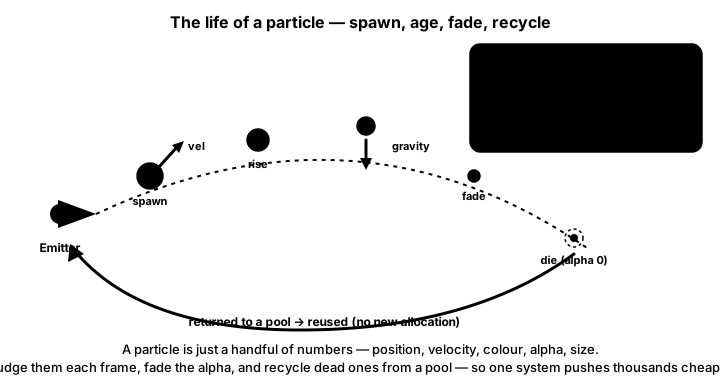
dt (pos += vel * dt, vel.y += gravity * dt), and fading comes from the particle's age.Play first. Toggle the fountain and the fire, launch bursts, and switch on glow. The readout shows the pool you will build in this lesson: a fixed number of particles, some active, the rest waiting to be reused.
Why not make every particle a Sprite? You could for a few dozen. But particles don't need what a Sprite brings (an image, a rect, group membership) and a plain object with a few attributes in a list keeps the code short. The FPS counter in your own program is the judge of when a count is too high.
🧪 A First Particle System
Here is the smallest useful system: click (or press Space) for a burst of 80 sparks.
import random
import pygame

WIDTH, HEIGHT = 640, 400
BG = (14, 14, 26)
GRAVITY = 600                       # px/s², positive = down the screen


class Particle:
    def __init__(self, pos, rng):
        self.pos = pygame.Vector2(pos)
        self.vel = pygame.Vector2(rng.uniform(80, 260), 0).rotate(rng.uniform(0, 360))
        self.life = self.max_life = rng.uniform(0.6, 1.2)    # seconds
        self.color = (255, rng.randint(140, 230), 60)

    def update(self, dt):
        """Move for dt seconds; return False once dead."""
        self.vel.y += GRAVITY * dt
        self.pos += self.vel * dt
        self.life -= dt
        return self.life > 0

    def draw(self, surface):
        fade = max(0.0, self.life) / self.max_life          # 1 when born, 0 when dead
        # No alpha needed: blend toward the background color as the particle ages.
        color = tuple(max(0, min(255, int(bg + (c - bg) * fade))) for c, bg in zip(self.color, BG))
        pygame.draw.circle(surface, color, self.pos, 2 + 3 * fade)


pygame.init()
screen = pygame.display.set_mode((WIDTH, HEIGHT))
pygame.display.set_caption("Particles: click (or press SPACE) for a burst")
clock = pygame.time.Clock()
font = pygame.font.Font(None, 28)
rng = random.Random()
particles = []

running = True
while running:
    dt = clock.tick(60) / 1000
    for event in pygame.event.get():
        if event.type == pygame.QUIT:
            running = False
        elif event.type == pygame.MOUSEBUTTONDOWN:
            particles += [Particle(event.pos, rng) for _ in range(80)]
        elif event.type == pygame.KEYDOWN and event.key == pygame.K_SPACE:
            particles += [Particle((WIDTH / 2, HEIGHT / 2), rng) for _ in range(80)]

    # Update and remove the dead in one pass: keep only particles whose update returned True.
    particles = [p for p in particles if p.update(dt)]

    screen.fill(BG)
    for p in particles:
        p.draw(screen)
    screen.blit(font.render(f"particles: {len(particles)}", True, (220, 220, 220)), (10, 10))
    pygame.display.flip()

pygame.quit()
Four details carry the whole lesson:
- dt everywhere. Speeds are in px/s, gravity in px/s² and
lifein seconds, so the burst looks the same at any frame rate. - Down is positive. Screen y grows downward, so positive gravity pulls sparks down and negative gravity (fire, smoke) makes them rise.
update()answers "still alive?". The list comprehension[p for p in particles if p.update(dt)]updates every particle and keeps only the survivors, in one pass, without removing items from a list while looping over it.- Fading without alpha. The display surface has no alpha channel, so an RGBA color drawn on it is simply opaque. Instead, each spark's color is blended toward the background color as it ages. On a plain background that looks exactly like fading out, and it costs nothing extra.
🎨 Color and Size Over a Lifetime
Every particle needs to know how far through its life it is. life counts down, and each particle gets a different random lifespan, so keep the starting value too:
self.life = self.max_life = rng.uniform(0.8, 1.4)   # both set at spawn

t = 1 - max(0.0, self.life) / self.max_life          # 0 at birth, 1 at death, for EVERY particle
color = lerp_color(START_COLOR, END_COLOR, ease_out_quad(t))   # from easing.py
radius = max(1, round(lerp(size_start, size_end, t)))
Easing makes the change feel natural: ease_out_quad shifts the color quickly at first (a spark cools fast), and ease_in_quad is good for the fade, which stays bright and then drops away at the end.
Two color bugs crashed earlier versions of this course, and both raise a ValueError in pygame-ce:
- A channel outside 0..255.
int(255 * life)is fine only whilelifestays at or below 1 second; a 1.4 second particle asks for red 357.lerp_colorfromeasing.pyclamps every channel, so anyt, even an overshooting one, gives a valid color. - A negative hue. Rainbow effects pick a hue in degrees, and "base hue minus a random 30" can go below 0. Setting
pygame.Color.hsvawith a hue of −30 raises an error. A hue is an angle, so wrap it:hue % 360turns −30 into 330, and 725 into 5.
def hue_color(hue):
    """A bright color for any hue in degrees; % 360 keeps negative hues valid."""
    color = pygame.Color(0)
    color.hsva = (hue % 360, 90, 100, 100)     # hue, saturation %, value %, alpha %
    return (color.r, color.g, color.b)
✅ Growth Mindset: A Crash on the Tenth Burst Is Still Progress
Color bugs love to hide: the first nine bursts work, and the tenth crashes with ValueError: invalid color. That is because random values eventually find the edge case. When it happens, don't restart from scratch. Print the color right before the draw call, read which channel is out of range, and trace it back to the math that produced it. Every developer who has written a particle system has met this bug; now you know the clamp that prevents it.
🚿 Emitters: Streams, Bursts and Recipes
A burst creates many particles at once (an explosion). A stream creates them steadily, a certain number per second (a fountain, a torch). A stream at 150 particles per second needs 2.5 particles in a 60 FPS frame, and you can't make half a particle. The tempting int(150 * dt) throws the half away every frame: 2 per frame is only 120 per second at 60 FPS, while at 30 FPS it is 5 per frame, the full 150. Carry the leftover fraction to the next frame instead:
self.carry += per_second * dt      # particles owed, including fractions
count = int(self.carry)            # make the whole ones now
self.carry -= count                # keep the fraction for next frame
Different effects are the same code with different numbers. Keep those numbers in plain dictionaries ("recipes") so a new effect is a new dictionary, not a new class. Give each system its own random.Random(seed) so you can replay the exact same effect while you tune it.
import math
import random
import pygame
from easing import lerp, lerp_color, ease_in_quad, ease_out_quad

WIDTH, HEIGHT = 640, 400
BG = (16, 14, 24)
# Recipes are plain dicts. Angles in degrees; screen y points down, so -90 is straight up.
FIRE = {"angle": (-105, -75), "speed": (40, 90), "life": (0.5, 0.9), "gravity": -120,
        "drag": 1.5, "size": (7, 2), "colors": ((255, 230, 120), (220, 40, 10)), "glow": True}
SMOKE = {"angle": (-100, -80), "speed": (20, 45), "life": (1.6, 2.6), "gravity": -30,
         "drag": 0.8, "size": (6, 18), "colors": ((90, 88, 96), (60, 58, 66)), "glow": False}
SPARK = {"angle": (-130, -50), "speed": (120, 240), "life": (0.4, 0.8), "gravity": 300,
         "drag": 2.0, "size": (2, 1), "colors": ((255, 250, 200), (255, 120, 20)), "glow": True}


class Particle:
    def __init__(self, pos, recipe, rng):
        self.recipe = recipe
        self.pos = pygame.Vector2(pos)
        self.vel = pygame.Vector2(rng.uniform(*recipe["speed"]), 0).rotate(rng.uniform(*recipe["angle"]))
        self.life = self.max_life = rng.uniform(*recipe["life"])

    def update(self, dt):
        self.vel.y += self.recipe["gravity"] * dt           # negative gravity: rises
        self.vel *= math.exp(-self.recipe["drag"] * dt)     # drag that ignores the frame rate
        self.pos += self.vel * dt
        self.life -= dt
        return self.life > 0


class Emitter:
    def __init__(self, pos, recipe, per_second, rng):
        self.pos = pygame.Vector2(pos)
        self.recipe = recipe
        self.per_second = per_second
        self.rng = rng
        self.carry = 0.0                    # the fraction of a particle still owed
        self.particles = []                 # each emitter keeps its own list

    def update(self, dt):
        self.carry += self.per_second * dt
        count = int(self.carry)
        self.carry -= count
        for _ in range(count):
            jitter = pygame.Vector2(self.rng.uniform(-12, 12), 0)
            self.particles.append(Particle(self.pos + jitter, self.recipe, self.rng))
        # Update and remove the dead in one pass.
        self.particles = [p for p in self.particles if p.update(dt)]


dot_cache = {}


def glow_dot(color, radius):
    """A pre-drawn dot on black, cached by (rounded color, radius)."""
    key = (tuple(c // 16 * 16 for c in color), radius)
    if key not in dot_cache:
        if len(dot_cache) > 400:
            dot_cache.clear()                                # never grows without limit
        dot = pygame.Surface((radius * 2, radius * 2))       # black: adds nothing
        pygame.draw.circle(dot, key[0], (radius, radius), radius)
        dot_cache[key] = dot
    return dot_cache[key]


def draw_particle(surface, p):
    t = 1 - max(0.0, p.life) / p.max_life                    # 0 at birth, 1 at death
    start, end = p.recipe["colors"]
    color = lerp_color(start, end, ease_out_quad(t))
    radius = max(1, round(lerp(p.recipe["size"][0], p.recipe["size"][1], t)))
    if p.recipe["glow"]:
        color = lerp_color(color, (0, 0, 0), ease_in_quad(t))   # fade to black = fade out
        surface.blit(glow_dot(color, radius), p.pos - (radius, radius), special_flags=pygame.BLEND_ADD)
    else:
        color = lerp_color(color, BG, ease_in_quad(t))          # fade into the background
        pygame.draw.circle(surface, color, p.pos, radius)


pygame.init()
screen = pygame.display.set_mode((WIDTH, HEIGHT))
pygame.display.set_caption("Campfire: fire, smoke and sparks from three recipes")
clock = pygame.time.Clock()
rng = random.Random(5)
base = (WIDTH / 2, HEIGHT - 60)
# Listed back to front: smoke is drawn first, so the fire glows in front of it.
emitters = [Emitter(base, SMOKE, 12, rng), Emitter(base, FIRE, 90, rng), Emitter(base, SPARK, 8, rng)]

running = True
while running:
    dt = clock.tick(60) / 1000
    for event in pygame.event.get():
        if event.type == pygame.QUIT:
            running = False

    for emitter in emitters:
        emitter.update(dt)

    screen.fill(BG)
    pygame.draw.rect(screen, (60, 40, 30), (WIDTH / 2 - 40, HEIGHT - 60, 80, 12), border_radius=4)
    for emitter in emitters:
        for p in emitter.particles:
            draw_particle(screen, p)
    pygame.display.flip()

pygame.quit()
Three recipes, three looks: fire rises (negative gravity), glows and shrinks; smoke rises slowly, grows and fades into the background; sparks shoot up and fall back. Each emitter keeps its own list, and the emitters are drawn back to front, so the fire always glows in front of the smoke.
♻️ A Fixed-Size Particle Pool
The first system made a new Particle for every spark and dropped it when it died. That works, but a burst of 200 fireworks every half second means a lot of objects coming and going, and nothing stops a busy moment from spawning thousands. A pool, like the one in Spatial Hashing & Object Pools, fixes both: make every particle once, at startup, and recycle.
class ParticleSystem:
    def __init__(self, capacity, seed=None):
        self.rng = random.Random(seed)
        self.free = [Particle() for _ in range(capacity)]   # all made up front
        self.active = []

    def emit(self, pos, recipe, count, colors=None):
        for _ in range(count):
            if not self.free:
                return                                     # pool empty: skip quietly
            p = self.free.pop()
            vel = pygame.Vector2(self.rng.uniform(*recipe["speed"]), 0).rotate(
                self.rng.uniform(*recipe["angle"]))
            p.reset(pos, vel, self.rng.uniform(*recipe["life"]), recipe, colors or recipe["colors"])
            self.active.append(p)

    def update(self, dt):
        still_alive = []
        for p in self.active:
            if p.update(dt):
                still_alive.append(p)
            else:
                self.free.append(p)                        # back to the pool, not thrown away
        self.active = still_alive
The pool rules from the earlier lesson still apply: reset() must set every field (a reused particle still remembers its old color and gravity), and a particle goes back exactly once. At any moment len(active) + len(free) equals the capacity; the exercise prints that check when it closes.
✨ Glow With Additive Blending
Fire, magic and fireworks glow: where two sparks overlap, the spot gets brighter. That is additive blending. pygame does it with a blit flag: special_flags=pygame.BLEND_ADD adds the source color to what is already on the screen, channel by channel, stopping at 255.
Addition has a handy property: adding black changes nothing. So a glow particle can be drawn on a small square Surface whose corners are black (they add nothing, so the square never shows), and it "fades out" simply by fading to black. No alpha channel at all.
class DotCache:
    """Pre-drawn dots for additive glow, keyed by (rounded color, radius)."""

    def __init__(self, limit=512):
        self.dots = {}
        self.limit = limit

    def get(self, color, radius):
        key = (tuple(c // 16 * 16 for c in color), radius)   # round colors so dots get reused
        if key not in self.dots:
            if len(self.dots) >= self.limit:
                self.dots.clear()                            # keep the cache bounded
            dot = pygame.Surface((radius * 2, radius * 2))   # black corners add nothing
            pygame.draw.circle(dot, key[0], (radius, radius), radius)
            self.dots[key] = dot
        return self.dots[key]

screen.blit(dots.get(color, radius), p.pos - (radius, radius), special_flags=pygame.BLEND_ADD)
An earlier version of this course created a fresh SRCALPHA Surface for every particle on every frame. The cache above does the drawing once per color and size and then only blits. Rounding each channel to a multiple of 16 keeps the number of different dots small; the eye can't tell the difference in a spark that lives for a second.
| Look | How to draw it | Fade by | Good for |
|---|---|---|---|
| Solid | pygame.draw.circle on the screen | Blending toward the background color | Dust, smoke, debris, confetti |
| Glow | Cached dot, BLEND_ADD | Blending toward black | Fire, sparks, magic, fireworks |
✅ Growth Mindset: Tuning Is the Real Work
Your first fire will probably look like orange soup. That's normal: effects artists spend far more time tuning numbers than writing code. Change one recipe value at a time (life, speed, gravity, size), run it, and write down what changed. After a dozen small experiments you will have a feel for it that no formula can give you.
🏋️ Practice Exercise: Fireworks Fountain
Objective: finish a pooled particle system in which a fountain streams at a steady rate, Space launches firework bursts, and every particle arcs, slows, changes color, shrinks and fades.
Time: about 40 minutes. Files: fireworks_starter.py and easing.py (from Interpolation & Easing) in the same folder. Right now particles fly in straight lines, never change, and are never returned to the pool, so the fountain soon runs dry. Its numbered TODOs match the steps below.
- In
Particle.update, add gravity andexp(-drag * dt)drag before moving. (≈ 5 min) - In
ParticleSystem.update, put dead particles back inself.free. The fountain now keeps running. (≈ 5 min) - Fix
emit_rateso it carries the leftover fraction between frames. (≈ 10 min) - In
particle_look, blend the color from start to end, fade it (to black when glowing, toBGotherwise) and shrink the radius. (≈ 10 min) - In
hue_color, replace the clamp withhue % 360. Launch several fireworks: the colors now vary instead of turning red whenever the hue was negative. (≈ 5 min)
You are done when:
- the fountain arcs up and falls back, and keeps going for as long as the program runs;
- each firework is a different color, and its sparks slow down, dim and shrink before they vanish;
- pressing G switches between glow and solid looks;
- closing the window prints
Pool intact: True.
💡 Hint
If the HUD's "free" count drops to 0 and stays there, dead particles are not going back to the pool (step 2). If the fountain looks thinner at 60 FPS than at 30, the rate is still losing its fractions (step 3). For step 4, compute t = p.age() once, and use it for the color, the fade and the radius.
✅ Example Solution
If your instructor hands you the lab file, you will see a few extra lines marked lab runtime near the top, plus an extra and frame_budget() condition on the main loop. They let the instructor's checker run the program automatically for a fixed number of frames; when you run it yourself they do nothing. You never need to write them. It needs easing.py in the same folder.
"""Fireworks Fountain: Intermediate Lesson 4 practice exercise (solution).

A fountain streams particles at a steady rate and SPACE launches a
firework burst. Every particle comes from one fixed-size pool, moves
with dt, and changes color and size over its life using easing.py.
SPACE = firework, G = toggle glow. Needs easing.py next to it.
"""
import math
import random
import pygame
from easing import lerp, lerp_color, ease_out_quad, ease_in_quad


WIDTH, HEIGHT = 800, 600
BG = (12, 12, 24)
CAPACITY = 1500            # the pool never holds more particles than this

# Effect recipes: plain dicts. Angles in degrees (screen y points down, so -90 is up).
FOUNTAIN = {"angle": (-100, -80), "speed": (320, 460), "life": (1.0, 1.6), "gravity": 900,
            "drag": 0.4, "size": (5, 1), "colors": ((120, 200, 255), (40, 80, 200))}
FIREWORK = {"angle": (0, 360), "speed": (60, 260), "life": (0.8, 1.4), "gravity": 160,
            "drag": 1.6, "size": (4, 1), "colors": None}      # None = color from the hue


def hue_color(hue):
    """A bright color for any hue in degrees; % 360 keeps negative hues valid."""
    color = pygame.Color(0)
    color.hsva = (hue % 360, 90, 100, 100)
    return (color.r, color.g, color.b)


class Particle:
    def __init__(self):
        self.pos = pygame.Vector2()
        self.vel = pygame.Vector2()
        self.life = self.max_life = 0.0

    def reset(self, pos, vel, life, recipe, colors):
        """Set EVERY field: a reused particle still holds its last life's values."""
        self.pos.update(pos)
        self.vel.update(vel)
        self.life = self.max_life = life
        self.gravity = recipe["gravity"]
        self.drag = recipe["drag"]
        self.size_start, self.size_end = recipe["size"]
        self.color_start, self.color_end = colors

    def update(self, dt):
        """Move for dt seconds. Returns False once the particle has died."""
        self.vel.y += self.gravity * dt
        self.vel *= math.exp(-self.drag * dt)          # frame-rate independent drag
        self.pos += self.vel * dt
        self.life -= dt
        return self.life > 0

    def age(self):
        """0 when born, 1 when about to die."""
        return 1 - max(0.0, self.life) / self.max_life


class ParticleSystem:
    def __init__(self, capacity, seed=None):
        self.rng = random.Random(seed)
        self.free = [Particle() for _ in range(capacity)]   # all made up front
        self.active = []
        self.capacity = capacity
        self.carry = 0.0                                    # fractional particles owed

    def emit(self, pos, recipe, count, colors=None):
        """Spawn up to count particles; stops quietly when the pool is empty."""
        rng = self.rng
        for _ in range(count):
            if not self.free:
                return
            p = self.free.pop()
            vel = pygame.Vector2(rng.uniform(*recipe["speed"]), 0).rotate(rng.uniform(*recipe["angle"]))
            p.reset(pos, vel, rng.uniform(*recipe["life"]), recipe, colors or recipe["colors"])
            self.active.append(p)

    def emit_rate(self, pos, recipe, per_second, dt, colors=None):
        """Continuous emission: per_second particles on average at ANY frame rate."""
        self.carry += per_second * dt
        count = int(self.carry)
        self.carry -= count
        self.emit(pos, recipe, count, colors)

    def update(self, dt):
        still_alive = []
        for p in self.active:
            if p.update(dt):
                still_alive.append(p)
            else:
                self.free.append(p)                         # back to the pool
        self.active = still_alive


class DotCache:
    """Pre-drawn dots for additive glow, keyed by (rounded color, radius)."""

    def __init__(self, limit=512):
        self.dots = {}
        self.limit = limit

    def get(self, color, radius):
        key = (tuple(c // 16 * 16 for c in color), radius)
        if key not in self.dots:
            if len(self.dots) >= self.limit:
                self.dots.clear()                           # keep the cache bounded
            dot = pygame.Surface((radius * 2, radius * 2))  # black corners add nothing
            pygame.draw.circle(dot, key[0], (radius, radius), radius)
            self.dots[key] = dot
        return self.dots[key]


def particle_look(p, glow):
    """Color and radius for a particle right now."""
    t = p.age()
    color = lerp_color(p.color_start, p.color_end, ease_out_quad(t))
    fade_to = (0, 0, 0) if glow else BG                     # glow fades to black: adds nothing
    color = lerp_color(color, fade_to, ease_in_quad(t))
    radius = max(1, round(lerp(p.size_start, p.size_end, t)))
    return color, radius


def draw_particles(screen, system, dots, glow):
    for p in system.active:
        color, radius = particle_look(p, glow)
        if glow:
            screen.blit(dots.get(color, radius), p.pos - (radius, radius),
                        special_flags=pygame.BLEND_ADD)
        else:
            pygame.draw.circle(screen, color, p.pos, radius)


def main():
    pygame.init()
    screen = pygame.display.set_mode((WIDTH, HEIGHT))
    pygame.display.set_caption("Fireworks Fountain")
    clock = pygame.time.Clock()
    font = pygame.font.Font(None, 26)                       # created once

    system = ParticleSystem(CAPACITY, seed=11)
    dots = DotCache()
    fountain_pos = pygame.Vector2(WIDTH / 2, HEIGHT - 40)
    glow = True
    launched = 0

    running = True
    while running:
        dt = clock.tick(60) / 1000
        for event in pygame.event.get():
            if event.type == pygame.QUIT:
                running = False
            elif event.type == pygame.KEYDOWN and event.key == pygame.K_SPACE:
                where = (system.rng.uniform(150, WIDTH - 150), system.rng.uniform(100, 280))
                hue = system.rng.uniform(-60, 300)          # may be negative: hue_color wraps it
                colors = (hue_color(hue), hue_color(hue + 40))
                system.emit(where, FIREWORK, 220, colors)
                launched += 1
            elif event.type == pygame.KEYDOWN and event.key == pygame.K_g:
                glow = not glow

        system.emit_rate(fountain_pos, FOUNTAIN, 150, dt)
        system.update(dt)

        screen.fill(BG)
        draw_particles(screen, system, dots, glow)
        hud = (f"Particles {len(system.active)}/{system.capacity}   free {len(system.free)}   "
               f"glow {'on' if glow else 'off'}   FPS {clock.get_fps():.0f}")
        screen.blit(font.render(hud, True, (220, 220, 220)), (10, 10))
        pygame.display.flip()

    pygame.quit()
    print(f"Fireworks launched: {launched}")
    print(f"Pool intact: {len(system.active) + len(system.free) == system.capacity}")


if __name__ == "__main__":
    main()
📓 Learning Journal
Take five minutes to write in your learning journal (a notebook or a plain text file works). Jot down:
- Key concepts you learned today
- Techniques that clicked (and the ones that haven't, yet)
- Questions or confusion to bring to the next session
- Ideas to try in your own game
- Progress and feelings: how did this lesson go for you?
✍️ This lesson's prompts:
- Watch a minute of a game you like and list every particle effect you notice. Which would be solid, and which would glow?
- Write a recipe dictionary for an effect that isn't in this lesson (rain, snow, a magic sparkle). Which numbers matter most for its feel?
- What happened the first time you ran your fireworks? Describe one thing you tuned and how it changed the look.
📝 Summary
A particle is a few numbers that change with dt: gravity and exp(-k * dt) drag move it, life / max_life tells it how old it is, and easing plus clamped lerp_color shift its color and size. Emitters create particles in bursts or at a steady rate that carries its fractions between frames, recipes in plain dictionaries turn one system into fire, smoke, sparks and fireworks, and a fixed-size pool recycles every particle. For glow, additive blending with cached dots makes overlaps brighter and fades to black without a single alpha channel.
🎓 Key Takeaways
- Particles use the course rules: px/s, px/s², seconds, and
v *= exp(-k * dt)for drag. - Keep
max_lifesot = 1 - life / max_liferuns from 0 to 1 for every particle. - Clamp color channels to 0..255 and wrap hues with
% 360, or random values will eventually crash a draw call. - A steady emitter carries the leftover fraction:
carry += rate * dt, emitint(carry), subtract it. - A fixed-size pool makes particles once, returns the dead, and keeps
active + free == capacity. - Solid particles fade toward the background; glowing ones use
BLEND_ADDand fade toward black.
🔭 Looking Ahead
Your particles already fall under gravity. In the next lesson, Velocity, Acceleration & Timesteps, you look closely at how forces change velocity and velocity changes position, and build a fixed-timestep loop that makes physics play out the same way every time.
❓ Common Questions
How many particles can I have?
It depends on your computer, the particle size and how you draw them, so measure: show clock.get_fps() and the particle count on screen, raise the count, and note where the frame rate starts to drop. The pool's capacity is then a setting you choose on purpose.
Can I use real transparency instead of fading to the background?
Yes: draw onto a Surface created with pygame.SRCALPHA and blit that onto the screen. Create such Surfaces once (or cache them), not per particle per frame. Fading toward the background is simpler and works whenever the background behind the particles is one color.
Why does my fire look like a solid orange blob?
Usually too many particles live too long at a large size. Shorten the life, shrink the size toward 1, add a little random spread to angle and speed, and try glow so overlaps brighten instead of piling up.
Should particles collide with walls?
They can (check the particle's position against your level and bounce or kill it), but most effects don't need it, and it costs a test per particle per frame. Add it only where players will notice, such as sparks bouncing off the floor.
What happens when the pool is empty?
In this lesson's system, emit() simply stops, so a huge burst is cut short instead of slowing the game down. Some games prefer to recycle the oldest active particle; that is a design choice, and the Going Further list suggests trying it.
🎯 Quick Quiz
Question 1: Why does each particle store max_life as well as life?
Question 2: At a steady 60 FPS, emit(int(150 * dt)) makes about how many particles per second?
Question 3: What happens if you set pygame.Color.hsva with a hue of −30?
Question 4: With BLEND_ADD, why do glowing particles fade toward black?
Question 5: Fire particles should drift upward. What sign should their gravity have?
🌟 Going Further
- Trails: give each particle a short list of its last few positions and draw a line through them, fading toward the background.
- Recycle the oldest: when the pool is empty, reuse the particle that has the least life left instead of skipping the spawn. Compare the look during a big burst.
- Floor bounce: when a spark's y passes the ground, put it back on the ground and flip and shrink its vertical velocity.
- Your own recipes: add rain, snow or a magic sparkle as new dictionaries. Try hue wobble:
hue_color(base_hue + 40 * t). - Read the docs: pygame-ce's Surface.blit (blend flags) and pygame.Color (
hsva). - Coming up in Game Dev II: Intermediate: Screen Shake, Tweens & Juice combines these particles with shake and tweens for hits that really land.