Lesson 7: Bounce & Friction
A super ball, a bowling ball and a lump of clay all hit the floor at the same speed, yet each one does something completely different next. In this lesson you give surfaces a personality with restitution and friction, so objects bounce, slide, come to a real stop and roll down ramps the way players expect.
🎯 Learning Objectives
By the end of this lesson, you will be able to:
- Build a bounce that keeps a set fraction of the speed (restitution) and predict the next bounce height.
- Combine the materials of a ball and a floor with one consistent rule.
- Compare Coulomb friction, static friction and viscous damping, and choose the right one for a game object.
- Split a velocity into normal and tangent parts to bounce and slide on a slope.
- Debug balls that jitter forever or spin the wrong way.
Project: Material Tester, three balls of different materials thrown across wood, ice and sand floors.
In This Lesson
🎾 Restitution: How Much Bounce Comes Back
When a ball hits the floor, some of its energy turns into sound, heat and squish, and the rest sends it back up. The coefficient of restitution, e, is the share of the speed that comes back: rebound speed = e × impact speed. At e = 0 the ball stops dead (clay); at e = 1 it comes back as fast as it arrived and would bounce forever.
if ball.bottom >= FLOOR_Y and vel_y > 0:   # hit the floor while moving down
    ball.bottom = FLOOR_Y                     # push back out first
    if vel_y > REST_SPEED:
        vel_y = -vel_y * E                    # bounce: flip and keep E of the speed
    else:
        vel_y = 0.0                           # too slow: rest on the floor
The REST_SPEED branch matters. Each bounce keeps a fraction of the speed, so without a cut-off the ball would make smaller and smaller bounces forever. As you learned with landings, the threshold must be larger than gravity × step (about 8 px/s at 980 px/s² and 1/120 s); 40 px/s works well.
Because the height a ball reaches grows with the square of its launch speed, each bounce reaches e² of the previous height. This program checks that with a fixed-step simulation:
# Drop a ball from 200 px and measure how high each bounce goes.
GRAVITY = 980.0
STEP = 1 / 120
E = 0.8                   # restitution
REST_SPEED = 40.0         # bigger than GRAVITY * STEP (about 8 px/s)

height, vel = 200.0, 0.0  # height above the floor (px), velocity (px/s, + is up)
peaks, top = [], 0.0
while len(peaks) < 4:
    vel -= GRAVITY * STEP
    height += vel * STEP
    top = max(top, height)
    if height <= 0:                       # hit the floor
        height = 0.0
        if -vel > REST_SPEED:
            vel = -vel * E                # bounce: keep E of the speed
            peaks.append(top)
            top = 0.0
        else:
            break

for i in range(1, len(peaks)):
    print(f"bounce {i}: {peaks[i]:6.1f} px   ratio {peaks[i] / peaks[i - 1]:.2f}   (e squared = {E * E:.2f})")
bounce 1: 127.0 px ratio 0.64 (e squared = 0.64)
bounce 2: 80.4 px ratio 0.63 (e squared = 0.64)
bounce 3: 50.7 px ratio 0.63 (e squared = 0.64)That gives you a design tool: if a designer says "the second bounce should be half as high", you need e = sqrt(0.5) ≈ 0.71.
Try materials and floors in the lab below. Each material button drops a ball of that material; the floor buttons change the surface for every ball.
🧪 Combining Two Materials
A rubber ball bounces well on wood and barely at all on sand, so the floor needs a restitution too. Then you need a rule for combining the two numbers. Physics engines disagree here: some take the larger value, some the average, some multiply. None of them is "the" right answer; what matters is picking one rule and using it everywhere, so designers can predict the result.
This course multiplies: e = e_ball * e_floor. Each number then reads as "the share of the bounce this material keeps", both materials matter, and as long as both are at most 1 the result is too. (A trampoline that should add speed is a special case; give it its own rule instead of an e above 1.)
| Ball | e | Floor | e | friction μ |
|---|---|---|---|---|
| Super ball | 0.95 | Rubber mat | 1.0 | 0.8 |
| Rubber | 0.8 | Wood | 0.9 | 0.4 |
| Tennis | 0.7 | Ice | 0.95 | 0.03 |
| Steel | 0.6 | Sand | 0.35 | 0.9 |
| Putty | 0.1 |
These are game-feel values chosen to make the materials easy to tell apart, not laboratory measurements. Tune them until your game feels right.
🧊 Three Kinds of Friction
Push a crate across a floor and let go: it slides, slows and stops. The floor pushes up on the crate (the normal force) and also drags against the motion (friction).
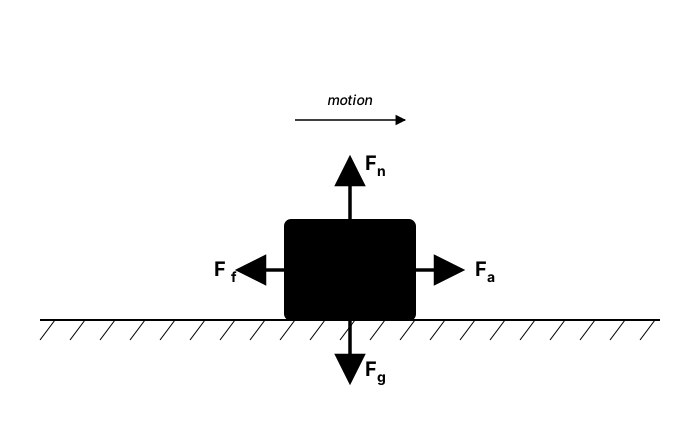
Games use three different models, and mixing up their names is a common source of bugs:
| Model | What it does | Code | Stops by itself? |
|---|---|---|---|
| Coulomb (kinetic) friction | A constant slow-down of μ × g against the motion while sliding | speed = coulomb(speed, MU * G * dt) | Yes, in a finite time |
| Static friction | Holds a resting object still until the push is stronger than μs × m × g | if abs(push) <= MU_S * mass * G: push = 0 | It never starts moving |
| Viscous damping (drag) | Removes a fixed share of the speed per second, like moving through water or air | vel *= math.exp(-C * dt) | No, it only gets close to 0 |
Coulomb friction is the one that makes a crate slide to a real stop. It removes the same amount of speed every second, and it must never push the object backward, so the helper clamps at zero:
def coulomb(speed, max_change):
    """Slow a speed toward 0 by at most max_change, never past 0."""
    if abs(speed) <= max_change:
        return 0.0
    return speed - math.copysign(max_change, speed)
Because the slow-down is constant, you can predict exactly where a sliding object stops: stopping distance = v² / (2 × μ × g). Use the same g as your game (980 px/s² here, not 9.8), or the prediction will be off by a factor of 100. This complete program slides three crates across ice, wood and sand and draws a red line where the formula says each one stops. The ice crate gets no line: at μ = 0.03 it needs about 2,700 px to stop, so it slides right off the 900-pixel window, which is exactly what ice should do.
import math

import pygame

STEP = 1 / 120
MAX_FRAME = 0.25
GRAVITY = 980.0
START_SPEED = 400.0
LANES = [("ice", 0.03, (170, 210, 235)), ("wood", 0.4, (140, 95, 55)), ("sand", 0.9, (205, 175, 95))]


def coulomb(speed, max_change):
    """Slow a speed toward 0 by at most max_change, never past 0."""
    if abs(speed) <= max_change:
        return 0.0
    return speed - math.copysign(max_change, speed)


pygame.init()
screen = pygame.display.set_mode((900, 420))
pygame.display.set_caption("Sliding crates: SPACE shoves them again")
clock = pygame.time.Clock()
font = pygame.font.Font(None, 26)

crates = [pygame.FRect(20, 60 + i * 120, 40, 40) for i in range(3)]
speeds = [START_SPEED] * 3
accumulator = 0.0

running = True
while running:
    accumulator += min(clock.tick(60) / 1000, MAX_FRAME)
    for event in pygame.event.get():
        if event.type == pygame.QUIT:
            running = False
        elif event.type == pygame.KEYDOWN and event.key == pygame.K_SPACE:
            for crate in crates:
                crate.x = 20
            speeds = [START_SPEED] * 3

    while accumulator >= STEP:
        for i, (_name, mu, _color) in enumerate(LANES):
            speeds[i] = coulomb(speeds[i], mu * GRAVITY * STEP)   # friction: mu * g
            crates[i].x += speeds[i] * STEP
        accumulator -= STEP

    screen.fill((16, 20, 32))
    for i, (name, mu, color) in enumerate(LANES):
        lane_y = 100 + i * 120
        pygame.draw.rect(screen, color, (0, lane_y, 900, 12))
        predicted = 20 + START_SPEED ** 2 / (2 * mu * GRAVITY)   # v^2 / (2 mu g)
        if predicted < 900:
            pygame.draw.line(screen, (255, 90, 90), (predicted, lane_y - 50), (predicted, lane_y), 2)
        pygame.draw.rect(screen, (230, 170, 80), crates[i])
        label = f"{name}: mu = {mu}   speed {speeds[i]:4.0f} px/s"
        screen.blit(font.render(label, True, (230, 230, 230)), (500, lane_y - 40))
    pygame.display.flip()

pygame.quit()
Viscous damping is what the drag in Velocity, Acceleration & Timesteps did: great for space ships and underwater movement, but on its own it leaves objects creeping at 0.001 px/s forever. If you use it for ground objects, add a threshold that sets tiny speeds to zero.
✅ Growth Mindset: Names Are Worth Getting Right
Lots of tutorials call vel *= 0.9 "friction", so if you have been mixing these up, you are in good company. Being precise isn't pedantry; it is a debugging tool. When a crate won't stop, asking "is this Coulomb friction or damping?" points straight at the fix. Learning the right words for things you already half-know is real progress.
📐 Slopes: Normals and Tangents
A floor is easy: bounce the y speed, rub the x speed. A ramp is tilted, so "up" and "along" are no longer y and x. The trick is to measure velocity against the surface instead of against the screen:
- The normal
nis a length-1 vector pointing straight out of the surface. - The dot product
vel.dot(n)says how much of the velocity points alongn: negative means moving into the surface. - The normal part is
n * vel.dot(n), and the tangent part is whatever is left:vel - normal_part.
Now the floor rules work on any slope: bounce the normal part with e, and apply friction to the tangent part.
Getting the normal's direction right matters. A segment has two perpendicular directions, and picking the wrong one makes the "push out" shove the ball into the ramp. A reliable way is to find the closest point on the ramp to the ball's center and use the direction from that point to the ball. It points out of the ramp on whichever side the ball is, every time.
This complete program drops balls (press SPACE) onto two ramps. Hard hits bounce; gentle contact slides, with friction limited to μ times the normal change, which is Coulomb friction written for any angle:
import math

import pygame

STEP = 1 / 120
MAX_FRAME = 0.25
GRAVITY = pygame.Vector2(0, 980)
RADIUS = 12
E = 0.6                   # restitution against the ramps
MU = 0.2                  # friction while sliding along a ramp
REST_SPEED = 40.0
RAMPS = [(pygame.Vector2(60, 160), pygame.Vector2(420, 300)),
         (pygame.Vector2(740, 330), pygame.Vector2(300, 500))]


def closest_point(p, a, b):
    """The point on segment a-b that is nearest to p."""
    ab = b - a
    t = (p - a).dot(ab) / ab.length_squared()
    t = max(0.0, min(1.0, t))             # stay on the segment
    return a + ab * t


def collide(pos, vel, a, b):
    """Push a ball out of one ramp and bounce or slide it. Returns (pos, vel)."""
    contact = closest_point(pos, a, b)
    offset = pos - contact
    dist = offset.length()
    if dist >= RADIUS or dist == 0:
        return pos, vel
    normal = offset / dist                # from the ramp TOWARD the ball: always points out
    pos = contact + normal * RADIUS       # push back out of the ramp
    vn = vel.dot(normal)                  # speed along the normal (negative = moving in)
    if vn >= 0:
        return pos, vel                   # already moving away
    v_normal = normal * vn
    v_tangent = vel - v_normal
    if -vn > REST_SPEED:
        return pos, v_tangent - v_normal * E          # bounce
    # Sliding contact: remove the normal part; friction slows the tangent part.
    speed = v_tangent.length()
    slow = MU * -vn                        # friction's change is at most mu x the normal change
    if speed <= slow:
        return pos, pygame.Vector2(0, 0)
    return pos, v_tangent * ((speed - slow) / speed)


pygame.init()
screen = pygame.display.set_mode((800, 600))
pygame.display.set_caption("Ramps: SPACE drops another ball")
clock = pygame.time.Clock()

balls = []
accumulator = 0.0
drops = 0

running = True
while running:
    accumulator += min(clock.tick(60) / 1000, MAX_FRAME)
    for event in pygame.event.get():
        if event.type == pygame.QUIT:
            running = False
        elif event.type == pygame.KEYDOWN and event.key == pygame.K_SPACE:
            drops += 1
            balls.append([pygame.Vector2(100 + (drops % 4) * 60, 40), pygame.Vector2(0, 0)])

    while accumulator >= STEP:
        for ball in balls:
            ball[1] += GRAVITY * STEP
            ball[0] += ball[1] * STEP
            for a, b in RAMPS:
                ball[0], ball[1] = collide(ball[0], ball[1], a, b)
        balls = [ball for ball in balls if ball[0].y < 700]   # fell off the bottom
        accumulator -= STEP

    screen.fill((16, 20, 32))
    for a, b in RAMPS:
        pygame.draw.line(screen, (170, 170, 190), a, b, 4)
    for pos, vel in balls:
        pygame.draw.circle(screen, (240, 110, 110), pos, RADIUS)
    pygame.display.flip()

pygame.quit()
The ramps here are steep enough that the balls slide down. Make MU larger than the ramp's rise divided by its run (0.39 for the top ramp) and they stop on the slope instead: static friction winning over gravity.
🛞 Rolling the Right Way
A ball rolling on the floor turns once for every 2 * pi * r pixels it travels, so its spin rate is speed / radius radians per second. The direction is the part people get wrong. In pygame, a point drawn at (cx + r * cos(a), cy + r * sin(a)) moves clockwise on screen as a grows, because screen y points down. A ball rolling to the right also turns clockwise, so:
angle += vel.x / RADIUS * dt      # rolling right turns clockwise on screen

spoke = pygame.Vector2(math.cos(angle), math.sin(angle)) * RADIUS
pygame.draw.line(screen, (30, 30, 40), center - spoke, center + spoke, 2)
If your spokes spin backward, the sign is flipped. It is a one-character bug that makes a ball look like it is skidding, and players notice it even if they can't say why.
🧭 Honest simplification
A real ball that hits the floor while sliding also starts spinning, and that spin changes how it bounces. Modeling it needs rotational physics (angular velocity and torque), which the Advanced course covers. In this course, friction acts while an object slides along a surface, and the spokes are drawn to match the ground speed.
🏋️ Practice Exercise: Material Tester
Objective: throw a rubber, a steel and a putty ball across a floor you can switch between wood, ice and sand, so each ball bounces by its combined restitution, then slides to a real stop, with spokes that turn the right way.
Time: about 35 minutes. Starter file: materials_starter.py (your instructor has it). Right now every ball bounces forever with a perfect bounce, slides without friction and spins backward. Its numbered comments match the steps below.
- Run the starter and describe what is wrong with each ball. (≈ 3 min)
- Write
combine_restitution()with this course's rule. (≈ 3 min) - In
step(), bounce with the combined restitution instead of-1. The balls now bounce lower each time, but never settle. (≈ 5 min) - Add the resting branch: only bounce when
vel.y > REST_SPEED; otherwise zero the vertical speed, apply friction and seton_floor. (≈ 7 min) - Write
coulomb()so the balls slide to a real stop without ever sliding backward. (≈ 7 min) - Fix the spin sign so the spokes turn clockwise when a ball moves right. (≈ 3 min)
- Before pressing 1, 2 and 3, predict the order in which the balls stop on each floor. Then check your predictions. (≈ 7 min)
You are done when:
- rubber bounces several times, steel a couple of times and putty barely at all;
- every ball comes to rest without jittering, and stops sliding after a while (on ice it takes a long time);
- no ball ever slides backward or sinks into the floor;
- the spokes turn clockwise when a ball moves right;
- closing the window prints each ball's bounces and final position.
💡 Hint
If the balls jitter on the floor forever, the rest threshold isn't being used: check that the bounce happens only when self.vel.y > REST_SPEED. If a ball slides backward, coulomb() is subtracting too much: when abs(speed) <= max_change it must return exactly 0.0. math.copysign(3, -7) is -3.0, which is how you subtract "toward zero" for both directions.
✅ Example Solution
If your instructor hands you the lab file, you will see a few extra lines marked lab runtime near the top, plus an extra and frame_budget() condition on the main loop. They let the instructor's checker run the program automatically; when you run it yourself they do nothing.
"""Material Tester: Intermediate Lesson 7 practice exercise (solution).

Three balls (rubber, steel, putty) are thrown across one floor. Each
bounce keeps a share of the speed set by restitution (ball x floor),
and Coulomb friction slows the balls while they slide along the floor,
so they really stop instead of creeping forever. The spokes turn with
the ground speed (rolling right turns clockwise on screen).

1 / 2 / 3: wood, ice or sand floor.   R: throw again.   Close to quit.
"""
import math

import pygame


WIDTH, HEIGHT = 800, 600
FLOOR_Y = 540
GRAVITY = 980.0             # px/s^2
STEP = 1 / 120
MAX_FRAME = 0.25
REST_SPEED = 40.0           # slower than this into the floor: stop bouncing
RADIUS = 18
FLOORS = {                  # name: (restitution, friction coefficient mu, color)
    "wood": (0.9, 0.40, (130, 90, 55)),
    "ice": (0.95, 0.03, (170, 210, 235)),
    "sand": (0.35, 0.90, (200, 170, 90)),
}
BALLS = [                   # name, restitution, color
    ("rubber", 0.85, (240, 90, 90)),
    ("steel", 0.60, (190, 195, 205)),
    ("putty", 0.10, (150, 120, 90)),
]


def combine_restitution(e_ball, e_floor):
    """This course's one rule for two materials: multiply them."""
    return e_ball * e_floor


def coulomb(speed, max_change):
    """Move a speed toward 0 by at most max_change, never past 0 (friction can't reverse you)."""
    if abs(speed) <= max_change:
        return 0.0
    return speed - math.copysign(max_change, speed)


class Ball:
    def __init__(self, name, restitution, color, x, y):
        self.name = name
        self.restitution = restitution
        self.color = color
        self.pos = pygame.Vector2(x, y)
        self.vel = pygame.Vector2(250, 0)
        self.angle = 0.0            # radians, for drawing the spokes
        self.bounces = 0
        self.on_floor = False

    def step(self, dt, floor):
        e_floor, mu, _color = FLOORS[floor]
        self.vel.y += GRAVITY * dt
        self.pos += self.vel * dt
        self.on_floor = False
        if self.pos.y + RADIUS >= FLOOR_Y and self.vel.y > 0:
            self.pos.y = FLOOR_Y - RADIUS                 # push back out of the floor
            if self.vel.y > REST_SPEED:                   # hit hard enough: bounce
                self.vel.y *= -combine_restitution(self.restitution, e_floor)
                self.bounces += 1
            else:                                         # sliding along the floor
                self.vel.y = 0.0
                # Coulomb friction: a constant slow-down of mu * g, never past zero.
                self.vel.x = coulomb(self.vel.x, mu * GRAVITY * dt)
                self.on_floor = True
        if self.pos.x - RADIUS < 0:                       # side walls
            self.pos.x = RADIUS
            self.vel.x = abs(self.vel.x) * self.restitution
        elif self.pos.x + RADIUS > WIDTH:
            self.pos.x = WIDTH - RADIUS
            self.vel.x = -abs(self.vel.x) * self.restitution
        if self.on_floor:
            self.angle += self.vel.x / RADIUS * dt        # rolling right turns clockwise on screen


def make_balls():
    return [Ball(name, e, color, 60, 120 + i * 90) for i, (name, e, color) in enumerate(BALLS)]


def draw_ball(screen, ball):
    pygame.draw.circle(screen, ball.color, ball.pos, RADIUS)
    for k in range(2):                                    # two spokes show the spin
        a = ball.angle + k * math.pi / 2
        offset = pygame.Vector2(math.cos(a), math.sin(a)) * (RADIUS - 3)
        pygame.draw.line(screen, (30, 30, 40), ball.pos - offset, ball.pos + offset, 2)


def main():
    pygame.init()
    screen = pygame.display.set_mode((WIDTH, HEIGHT))
    pygame.display.set_caption("Material Tester")
    clock = pygame.time.Clock()
    font = pygame.font.Font(None, 26)

    floor = "wood"
    balls = make_balls()
    accumulator = 0.0
    floor_keys = {pygame.K_1: "wood", pygame.K_2: "ice", pygame.K_3: "sand"}

    running = True
    while running:
        accumulator += min(clock.tick(60) / 1000, MAX_FRAME)
        for event in pygame.event.get():
            if event.type == pygame.QUIT:
                running = False
            elif event.type == pygame.KEYDOWN:
                if event.key in floor_keys:
                    floor = floor_keys[event.key]
                    balls = make_balls()
                elif event.key == pygame.K_r:
                    balls = make_balls()

        while accumulator >= STEP:
            for ball in balls:
                ball.step(STEP, floor)
            accumulator -= STEP

        e_floor, mu, floor_color = FLOORS[floor]
        screen.fill((18, 22, 34))
        pygame.draw.rect(screen, floor_color, (0, FLOOR_Y, WIDTH, HEIGHT - FLOOR_Y))
        for i, ball in enumerate(balls):
            draw_ball(screen, ball)
            text = (f"{ball.name:6}  e = {combine_restitution(ball.restitution, e_floor):.2f}"
                    f"   bounces {ball.bounces:2}   vx {ball.vel.x:+5.0f} px/s")
            screen.blit(font.render(text, True, ball.color), (10, 10 + i * 24))
        info = f"floor: {floor} (e {e_floor}, mu {mu})   1/2/3 change floor, R throws again"
        screen.blit(font.render(info, True, (220, 220, 220)), (10, 88))
        pygame.display.flip()

    pygame.quit()
    print(f"Floor: {floor}")
    for ball in balls:
        print(f"{ball.name}: {ball.bounces} bounces, x = {ball.pos.x:.0f}, vx = {ball.vel.x:.1f} px/s")


if __name__ == "__main__":
    main()
📓 Learning Journal
Take five minutes to write in your learning journal (a notebook or a plain text file works). Jot down:
- Key concepts you learned today
- Techniques that clicked (and the ones that haven't, yet)
- Questions or confusion to bring to the next session
- Ideas to try in your own game
- Progress and feelings: how did this lesson go for you?
✍️ This lesson's prompts:
- In your own words, what is the difference between Coulomb friction and viscous damping? Name one game object that should use each.
- Invent three surfaces for a game you would like to make (for example mud, metal grating, a bouncy mushroom). Give each an e and a μ, and explain your choices.
- Which prediction in step 7 of the exercise surprised you, and why?
📝 Summary
Restitution decides how much of an impact's speed comes back, and each bounce reaches e² of the previous height. Two materials are combined with one rule, here a product, and slow hits rest instead of bouncing forever, with a threshold bigger than gravity × step. Coulomb friction removes a constant amount of speed and stops objects in a predictable distance, v² / (2μg); static friction keeps resting objects still; viscous damping removes a share per second and never quite reaches zero. On slopes, you split velocity into normal and tangent parts with a normal that points from the surface toward the object, and rolling spin is speed ÷ radius, clockwise on screen when moving right.
🎓 Key Takeaways
- Bounce: flip the normal speed and keep e of it; the next height is e² times the last.
- Pick one rule for combining materials (this course multiplies) and use it everywhere.
- Coulomb friction is a constant slow-down that clamps at zero; damping is a percentage that never reaches zero.
- Stopping distance is v² / (2μg) with your game's g, 980 px/s² here.
- Get the normal from the closest point toward the object, then bounce the normal part and rub the tangent part.
- Rolling right turns clockwise on screen:
angle += vel.x / radius * dt.
🔭 Looking Ahead
So far objects bounce off the world, which never moves. In the next lesson, Impulse Collisions (Circles), two moving balls hit each other, and mass decides who gets pushed how far.
❓ Common Questions
Can restitution be bigger than 1?
Mathematically yes: the object would leave faster than it arrived, gaining energy every bounce. That can be fun for a bumper or trampoline, but it's better to give those a special rule (such as "always leave at 900 px/s") than to let an e above 1 run away.
Why does my ball jitter on the floor instead of resting?
The rest threshold is missing or smaller than gravity × step. Gravity alone adds that much speed every step, so the ball keeps "bouncing" by tiny amounts. Use a threshold of 30–40 px/s with a 1/120 s step.
Is static friction bigger than kinetic friction?
For most real materials it is, which is why it takes a harder shove to get a heavy box moving than to keep it moving. In games you can set them equal until you need that "sticky start" feel.
Do I need friction and drag on the same object?
Often, yes. A car can have Coulomb friction from the road and drag from the air. Apply each for what it models: friction only while touching a surface, drag all the time.
Why multiply the restitutions instead of taking the smaller one?
Either works if you use it consistently. Multiplying lets both materials matter: a rubber ball on sand and a steel ball on sand behave differently. Taking the minimum makes the less bouncy material decide alone. Pick the one your designers find easier to tune.
🎯 Quick Quiz
Question 1: A ball hits the floor at 400 px/s and the combined restitution is 0.5. How does it leave the floor?
Question 2: A ball dropped from 100 px has e = 0.6. About how high does its first bounce go?
Question 3: Why does vel.x *= math.exp(-C * dt) on its own never stop a sliding crate?
Question 4: Why take a ramp's normal as the direction from the closest point on the ramp to the ball's center?
Question 5: A crate slides at 490 px/s on a floor with μ = 0.5 and g = 980 px/s². How far does it slide before stopping?
🌟 Going Further
- Surface patches: split the Material Tester floor into three sections (wood, ice, sand side by side) so each ball crosses all three.
- A ramp in the tester: add one ramp from the ramp program to the Material Tester and let balls roll down it onto the floor.
- Static friction: give a crate a push key. It shouldn't move until the push is stronger than
MU_S * mass * G; after that, Coulomb friction takes over. - Bounce designer: let the player type the height of the second bounce and calculate
e = sqrt(h2 / h1). - Read the docs: pygame.math.Vector2, especially
dot,reflectandmove_towards, and Python's math.copysign. - Coming up in Game Dev III: Advanced: SAT & Rotational Collisions adds spin, torque and friction for boxes and polygons.