Lesson 6: Gravity & Jumping
The jump is the most-pressed button in a platformer, and players can feel a bad one within seconds. In this lesson you add gravity to your fixed-timestep physics, cap falling speed, and design a jump from two numbers a designer actually cares about: how high it goes and how long it takes to get there.
🎯 Learning Objectives
By the end of this lesson, you will be able to:
- Explain why gravity is an acceleration, and apply it so heavy and light objects fall the same way.
- Cap falling speed with a terminal velocity and calculate how far an object can move in one step.
- Calculate the gravity and launch speed for a jump from its height and its time to the top.
- Build a variable jump height and a faster fall that behave the same at any frame rate.
- Debug a landing that flickers or never settles by comparing thresholds with gravity × step.
Project: Moon Jumper, a character whose Earth and Moon jumps are built from design numbers, with short hops and snappy falls.
In This Lesson
🍎 Gravity Is an Acceleration
Drop a ball and it doesn't fall at a fixed speed. It starts slowly and goes faster and faster, because gravity keeps adding the same amount of downward velocity every second. That makes gravity an acceleration, not a speed: exactly the vel += accel * dt line from the previous lesson.
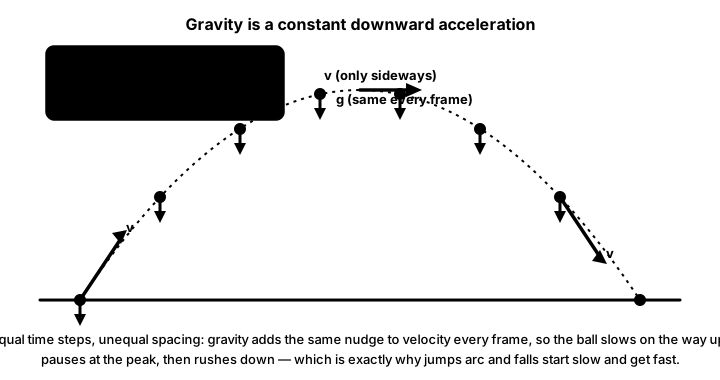
On Earth, gravity is about 9.8 m/s². Games measure in pixels, so you pick a scale. If 100 pixels stand for 1 meter, Earth gravity is 9.8 × 100 = 980 px/s², the number this course uses as its default. Screen y grows downward, so gravity is positive: it adds to vel.y.
With the force-based body from the last lesson, gravity is one more force. Multiplying by the mass here is what makes every object fall the same way: a = F / m = (g × m) / m = g.
GRAVITY = 980.0                                     # px/s², down is +y on screen
body.apply_force(pygame.Vector2(0, GRAVITY * body.mass))   # a = g for any mass
Try it in the simulator. Each button changes the gravity; Launch throws another ball with the same starting velocity. The Moon's gravity is about 16.5% of Earth's, so the same throw goes much higher and farther.
🪂 Falling With a Cap: Terminal Velocity
A skydiver stops speeding up after a while, because air pushes back harder the faster they fall. Games copy the result with a simple cap called terminal velocity: after adding gravity, never let the fall speed pass MAX_FALL.
vel_y = min(vel_y + GRAVITY * STEP, MAX_FALL) # gravity first, then the capThe cap does two jobs. It keeps long falls readable, so players can still steer and see where they will land. And it bounds how far anything moves in one step: at 900 px/s with a step of 1/120 s, a falling object moves at most 900 ÷ 120 = 7.5 px per step. A platform thicker than that can't be skipped over between two checks.
This complete program drops a crate from far above the screen. Watch the speed climb and stop at the cap. Press SPACE to drop it again.
import pygame

STEP = 1 / 120
MAX_FRAME = 0.25
GRAVITY = 980.0           # px/s^2 (9.8 m/s^2 if 100 px = 1 m)
MAX_FALL = 900.0          # terminal velocity, px/s
FLOOR_Y = 560

pygame.init()
screen = pygame.display.set_mode((600, 600))
pygame.display.set_caption("Falling crate: SPACE drops it again")
clock = pygame.time.Clock()
font = pygame.font.Font(None, 28)

crate = pygame.FRect(280, -2000, 40, 40)   # starts high above the screen
vel_y = 0.0
accumulator = 0.0

running = True
while running:
    accumulator += min(clock.tick(60) / 1000, MAX_FRAME)
    for event in pygame.event.get():
        if event.type == pygame.QUIT:
            running = False
        elif event.type == pygame.KEYDOWN and event.key == pygame.K_SPACE:
            crate.y, vel_y = -2000, 0.0

    while accumulator >= STEP:
        vel_y = min(vel_y + GRAVITY * STEP, MAX_FALL)   # gravity, then the cap
        crate.y += vel_y * STEP
        if crate.bottom >= FLOOR_Y:                     # landed
            crate.bottom = FLOOR_Y
            vel_y = 0.0
        accumulator -= STEP

    screen.fill((16, 20, 32))
    pygame.draw.rect(screen, (90, 70, 110), (0, FLOOR_Y, 600, 40))
    pygame.draw.rect(screen, (230, 170, 80), crate)
    text = f"fall speed {vel_y:4.0f} px/s (cap {MAX_FALL:.0f})"
    screen.blit(font.render(text, True, (230, 230, 230)), (10, 10))
    pygame.display.flip()

pygame.quit()
📐 Designing a Jump From Height and Time
A jump is two things: an instant upward velocity when the button is pressed, then gravity pulling it back. Guessing both numbers until the jump feels right is slow. Designers usually think in different terms: "the hero should clear 140 pixels, and reach the top after 0.4 seconds." Two formulas turn that into the numbers the code needs:
| You choose | You calculate | Formula |
|---|---|---|
| height h (px), time to the top t (s) | gravity g | g = 2 * h / t ** 2 |
| the same h and t | launch speed v₀ | v0 = 2 * h / t |
They come from two facts about a throw straight up: it rises for t = v0 / g seconds, and it reaches h = v0 ** 2 / (2 * g). Solve those two for g and v₀ and you get the table. For 140 px in 0.4 s, g = 1750 px/s² and v0 = 700 px/s: stronger than the 980 default, which is normal. Snappy platformer jumps usually need more gravity than real life.
This program designs two jumps and checks them with a fixed-step simulation:
# Design a jump from height and time, then check it with a fixed-step simulation.
STEP = 1 / 120


def gravity_for(height, apex_time):
    return 2 * height / apex_time ** 2


def jump_speed_for(height, apex_time):
    return 2 * height / apex_time


for name, height, apex_time in (("Earth", 140, 0.40), ("Moon", 260, 0.90)):
    g = gravity_for(height, apex_time)
    v0 = jump_speed_for(height, apex_time)
    y, vy, peak = 0.0, -v0, 0.0
    while vy < 0:                         # simulate until the jump stops rising
        vy += g * STEP
        y += vy * STEP
        peak = max(peak, -y)
    print(f"{name}: g = {g:.0f} px/s^2, jump speed = {v0:.0f} px/s, "
          f"simulated peak = {peak:.1f} px (designed {height})")
Earth: g = 1750 px/s^2, jump speed = 700 px/s, simulated peak = 137.1 px (designed 140)
Moon: g = 642 px/s^2, jump speed = 578 px/s, simulated peak = 257.6 px (designed 260)The simulated jumps land within 3 pixels of the design: semi-implicit Euler loses about v0 * STEP / 2 at the top. Thanks to the fixed step, that small difference is the same on every computer.
Here is the jump as a complete program. The jump is a single event (KEYDOWN), and it only works while standing on the floor:
import pygame

STEP = 1 / 120
MAX_FRAME = 0.25
FLOOR_Y = 540
GRAVITY = 1750.0          # from a 140 px jump that peaks after 0.4 s
JUMP_SPEED = 700.0
MAX_FALL = 900.0

pygame.init()
screen = pygame.display.set_mode((800, 600))
pygame.display.set_caption("Basic jump: SPACE")
clock = pygame.time.Clock()

player = pygame.FRect(0, 0, 32, 48)
player.midbottom = (400, FLOOR_Y)
vel_y = 0.0
on_ground = True
accumulator = 0.0

running = True
while running:
    accumulator += min(clock.tick(60) / 1000, MAX_FRAME)
    for event in pygame.event.get():
        if event.type == pygame.QUIT:
            running = False
        elif event.type == pygame.KEYDOWN and event.key == pygame.K_SPACE and on_ground:
            vel_y = -JUMP_SPEED              # jump: an instant upward velocity
            on_ground = False

    while accumulator >= STEP:
        vel_y = min(vel_y + GRAVITY * STEP, MAX_FALL)
        player.y += vel_y * STEP
        if player.bottom >= FLOOR_Y:         # on (or into) the floor
            player.bottom = FLOOR_Y
            vel_y = 0.0
            on_ground = True
        else:
            on_ground = False
        accumulator -= STEP

    screen.fill((16, 20, 34))
    pygame.draw.rect(screen, (70, 60, 90), (0, FLOOR_Y, 800, 60))
    pygame.draw.rect(screen, (255, 200, 90), player)
    pygame.display.flip()

pygame.quit()
✅ Growth Mindset: Formulas Are Tools, Not Tests
If a line like g = 2 * h / t ** 2 makes your stomach drop, that's a very common reaction, not a sign that physics isn't for you. You don't have to derive it; you only have to use it and check it. Change h, run the program, and see whether the simulated peak matches your design. Every time the numbers match, the formula becomes a little more yours.
🎮 Short Hops and Snappy Falls
In most platformers, a quick tap gives a small hop and holding the button gives the full jump. The simplest way to do that: when the jump button comes up while the character is still rising, cut the upward speed once.
JUMP_CUT = 0.45                                   # keep 45% of the upward speed

for event in pygame.event.get():
    if event.type == pygame.KEYUP and event.key == pygame.K_SPACE:
        if vel_y < 0:                             # still going up?
            vel_y *= JUMP_CUT
Do the cut on the KEYUP event, one time. A version that multiplies the speed by 0.5 on every frame the button isn't held is a per-frame multiplier in disguise: it cuts harder at higher frame rates, the same trap you fixed with drag.
Real throws take as long to fall as to rise, and many players find that floaty. A fall multiplier makes gravity stronger on the way down, so the character rises gracefully and comes down with weight:
FALL_MULTIPLIER = 1.6
g = GRAVITY * (FALL_MULTIPLIER if vel_y > 0 else 1.0)   # vel_y > 0 means falling
vel_y = min(vel_y + g * STEP, MAX_FALL)
Both tricks leave the designed height alone: the full jump still peaks at h, because the multiplier only starts after the top.
🧍 Landing Without Flicker
In the jump program, the floor check runs every step:
if player.bottom >= FLOOR_Y:
    player.bottom = FLOOR_Y      # 1. push back out of the floor
    vel_y = 0.0                  # 2. stop falling
    on_ground = True             # 3. allowed to jump again
else:
    on_ground = False
While standing, gravity pushes the player 1/120 s worth into the floor each step and the check pushes them straight back, so on_ground is True on every step and never flickers. Because the player is a pygame.FRect, those tiny moves keep their fractions instead of being rounded away. For platforms you can land on from the side or from below, a floor check like this is not enough; the Tile Maps lesson later in this course replaces it with a one-pixel probe below the feet.
A classic bug appears when objects bounce instead of stopping. Suppose a bouncing ball is told to rest once abs(vel_y) < 5 after a bounce, with a variable timestep. At 30 FPS, gravity alone adds 980 × (1/30) ≈ 33 px/s in a single frame, so the speed can never drop below 5 and the ball buzzes on the floor forever. The rule: a resting threshold must be larger than gravity × step. With a fixed step of 1/120 s that is about 8 px/s, so 30 or 40 px/s is safe. You will use exactly that in the next lesson.
✅ Growth Mindset: Make the Invisible Visible
Landing bugs are hard because they happen in a single step you can't see. When a character jitters or refuses to jump, draw the value: put on_ground and vel_y on screen, or print them for ten steps around the landing. Experienced developers do this all the time. It isn't a sign you're lost; it's how you find your way.
🏋️ Practice Exercise: Moon Jumper
Objective: build a jumper whose Earth and Moon jumps come from design numbers (height and time to the top), with terminal velocity, a short hop when you tap, and a snappier fall.
Time: about 35 minutes. Starter file: jumper_starter.py (your instructor has it). It draws the floor, the player and a dashed line at the design height; the player can walk but not jump. Its numbered comments match the steps below.
- Run the starter and walk with the arrow keys. SPACE does nothing yet. (≈ 3 min)
- Write
gravity_for()andjump_speed_for()from the formulas in Designing a Jump. The HUD should now show g = 1750 and jump speed = 700 for Earth. (≈ 5 min) - In
step(), add gravity and cap the fall atMAX_FALL. (≈ 5 min) - Write
jump(): only on the ground, set the upward velocity and leave the ground. Hold SPACE: the "best jump" should reach about 137 px, touching the dashed line. (≈ 5 min) - Write
release_jump()so a quick tap gives a short hop. (≈ 5 min) - Use
FALL_MULTIPLIERwhile falling. The jump should still reach the line but come down faster. (≈ 5 min) - Press G for the Moon design, then add a third world of your own to
WORLDS(for example a heavy "Jupiter" jump). (≈ 7 min)
You are done when:
- a held jump reaches the dashed line (within a few pixels) on both Earth and Moon;
- a quick tap gives a clearly lower hop;
- the player can't jump again in mid-air, and lands on the floor without jittering;
- the fall is visibly quicker than the rise;
- closing the window prints a line like
Highest jump: 137 px (designed for 140 px).
💡 Hint
Up is negative y, so the jump sets self.vel.y = -self.jump_speed, and "still rising" means self.vel.y < 0. If the player sinks through the floor, check that gravity is added before the position moves and the floor check comes after. If the Moon jump flies off the top of the window, check that set_world() recalculates both gravity and jump speed.
✅ Example Solution
If your instructor hands you the lab file, you will see a few extra lines marked lab runtime near the top, plus an extra and frame_budget() condition on the main loop. They let the instructor's checker run the program automatically; when you run it yourself they do nothing.
"""Moon Jumper: Intermediate Lesson 6 practice exercise (solution).

A platformer jump designed from two numbers (how high, and how long to
the top) instead of guessed gravity. Gravity runs on a fixed timestep,
falls are capped at terminal velocity, letting go of SPACE early gives a
short hop, and the fall is snappier than the rise.

Left/Right: walk.   SPACE: jump (hold for a full jump).
G: switch between Earth and Moon jump designs.   Close the window to quit.
"""
import pygame


WIDTH, HEIGHT = 800, 600
FLOOR_Y = 540
STEP = 1 / 120              # fixed physics step (seconds)
MAX_FRAME = 0.25
MOVE_SPEED = 260.0          # px/s
MAX_FALL = 900.0            # terminal velocity, px/s
FALL_MULTIPLIER = 1.6       # gravity is stronger on the way down
JUMP_CUT = 0.45             # letting go early keeps this share of the upward speed
WORLDS = {                  # name: (jump height in px, seconds to reach the top)
    "Earth": (140, 0.40),
    "Moon": (260, 0.90),
}


def gravity_for(height, apex_time):
    """Gravity (px/s^2) that stops a jump exactly `height` px up after `apex_time` s."""
    return 2 * height / apex_time ** 2


def jump_speed_for(height, apex_time):
    """Upward launch speed (px/s) for the same jump."""
    return 2 * height / apex_time


class Jumper:
    def __init__(self, x):
        self.rect = pygame.FRect(0, 0, 32, 48)     # FRect: float position
        self.rect.midbottom = (x, FLOOR_Y)
        self.vel = pygame.Vector2(0, 0)
        self.on_ground = True
        self.set_world("Earth")

    def set_world(self, name):
        self.world = name
        height, apex_time = WORLDS[name]
        self.gravity = gravity_for(height, apex_time)
        self.jump_speed = jump_speed_for(height, apex_time)

    def jump(self):
        if self.on_ground:
            self.vel.y = -self.jump_speed          # up is negative y
            self.on_ground = False

    def release_jump(self):
        """SPACE came up: if still rising, cut the rise short (once)."""
        if self.vel.y < 0:
            self.vel.y *= JUMP_CUT

    def step(self, dt, direction):
        self.vel.x = direction * MOVE_SPEED
        g = self.gravity * (FALL_MULTIPLIER if self.vel.y > 0 else 1.0)
        self.vel.y = min(self.vel.y + g * dt, MAX_FALL)   # gravity, then terminal velocity
        self.rect.x += self.vel.x * dt
        self.rect.left = max(0, min(WIDTH - self.rect.width, self.rect.left))
        self.rect.y += self.vel.y * dt
        if self.rect.bottom >= FLOOR_Y:                  # landed (or standing)
            self.rect.bottom = FLOOR_Y
            self.vel.y = 0
            self.on_ground = True
        else:
            self.on_ground = False


def main():
    pygame.init()
    screen = pygame.display.set_mode((WIDTH, HEIGHT))
    pygame.display.set_caption("Moon Jumper")
    clock = pygame.time.Clock()
    font = pygame.font.Font(None, 26)

    player = Jumper(WIDTH / 2)
    held = set()
    accumulator = 0.0
    best_height = 0.0                        # highest jump so far, in px
    jump_start = FLOOR_Y

    running = True
    while running:
        frame_time = min(clock.tick(60) / 1000, MAX_FRAME)

        for event in pygame.event.get():
            if event.type == pygame.QUIT:
                running = False
            elif event.type == pygame.KEYDOWN:
                held.add(event.key)
                if event.key == pygame.K_SPACE:
                    player.jump()
                elif event.key == pygame.K_g:
                    player.set_world("Moon" if player.world == "Earth" else "Earth")
                    best_height = 0.0
            elif event.type == pygame.KEYUP:
                held.discard(event.key)
                if event.key == pygame.K_SPACE:
                    player.release_jump()

        direction = (pygame.K_RIGHT in held) - (pygame.K_LEFT in held)
        accumulator += frame_time
        while accumulator >= STEP:
            player.step(STEP, direction)
            best_height = max(best_height, jump_start - player.rect.bottom)
            accumulator -= STEP

        design_height = WORLDS[player.world][0]
        screen.fill((16, 20, 34))
        pygame.draw.rect(screen, (70, 60, 90), (0, FLOOR_Y, WIDTH, HEIGHT - FLOOR_Y))
        marker_y = FLOOR_Y - design_height
        for x in range(0, WIDTH, 24):                     # dashed "design height" line
            pygame.draw.line(screen, (90, 110, 150), (x, marker_y), (x + 12, marker_y))
        pygame.draw.rect(screen, (255, 200, 90), player.rect)
        lines = [
            f"{player.world}: g = {player.gravity:.0f} px/s^2, jump speed = {player.jump_speed:.0f} px/s",
            f"design height {design_height} px   best jump {best_height:.0f} px   (G switches world)",
        ]
        for i, text in enumerate(lines):
            screen.blit(font.render(text, True, (230, 230, 230)), (10, 10 + i * 24))
        pygame.display.flip()

    pygame.quit()
    print(f"World: {player.world}")
    print(f"Highest jump: {best_height:.0f} px (designed for {WORLDS[player.world][0]} px)")


if __name__ == "__main__":
    main()
📓 Learning Journal
Take five minutes to write in your learning journal (a notebook or a plain text file works). Jot down:
- Key concepts you learned today
- Techniques that clicked (and the ones that haven't, yet)
- Questions or confusion to bring to the next session
- Ideas to try in your own game
- Progress and feelings: how did this lesson go for you?
✍️ This lesson's prompts:
- Describe the jump in a platformer you love using this lesson's words: height, time to the top, short hops, fall speed. What numbers would you guess?
- Why is "height and time" a friendlier way to design a jump than "gravity and launch speed"? Who on a team benefits?
- Which part of Moon Jumper took the most tries? What did you change to get it working?
📝 Summary
Gravity is a constant downward acceleration, 980 px/s² by default in this course, and applying it as g × mass makes every object fall the same way. A terminal velocity keeps falls readable and limits how far anything moves in one step. Instead of guessing, you design a jump from its height and its time to the top, and two formulas give you the gravity and launch speed. A one-time cut on KEYUP gives short hops, and a fall multiplier gives the descent some weight, both frame-rate independent. A landing that pushes back, zeroes the fall and sets on_ground every step stays steady, and any resting threshold has to be larger than gravity × step.
🎓 Key Takeaways
- Gravity changes velocity, not position:
vel.y += g * dt, positive because screen y points down. - Cap the fall with
min(vel_y, MAX_FALL); the per-step distance isMAX_FALL * STEP. - Design jumps with
g = 2h / t²andv0 = 2h / t, then check them in the game. - Cut the jump once on release and use a fall multiplier; never multiply per frame.
- Resting and "stop bouncing" thresholds must be larger than gravity × step.
🔭 Looking Ahead
Your jumper stops dead when it lands. In the next lesson, Bounce & Friction, objects rebound with restitution, slide to a stop with real friction, and roll down ramps.
❓ Common Questions
Why 980 and not 9.8?
9.8 is in meters per second squared. Your game measures in pixels, so the number depends on how many pixels you treat as a meter. With 100 px per meter it is 980. With 9.8 px/s², objects would take about 10 seconds to fall 500 pixels.
Should heavier objects fall faster?
No. Without air resistance, everything falls with the same acceleration. That's why gravity is applied as g × mass: dividing by the mass again gives the same g for everyone. Air resistance is what makes a feather slow, and you can add it as drag if your game needs it.
My jump reaches 137 pixels, not 140. Is that a bug?
No. Semi-implicit Euler with a step of 1/120 s loses about v0 * STEP / 2 (here about 3 px) at the top. It is the same on every computer, so you can leave it, design for 143, or use a smaller step.
How do I add a double jump?
Replace "only on the ground" with a counter: set jumps_left = 2 on landing, and allow a jump while jumps_left > 0, subtracting one each time. Give the second jump its own speed if it should be smaller.
Why is gravity stronger than real life in my jump?
Because the time to the top is short. Real people jumping 1.4 m would hang in the air far longer than players enjoy. Designing from height and time lets the "feel" decide, and the formulas produce whatever gravity that takes.
🎯 Quick Quiz
Question 1: Screen y grows downward. Which line applies gravity of 980 px/s² for one step?
Question 2: You want a jump 100 px high that reaches the top after 0.5 s. What gravity do you need?
Question 3: Why cut the jump once on KEYUP instead of multiplying vel_y by 0.5 on every frame the button isn't held?
Question 4: Terminal velocity is 900 px/s and the physics step is 1/120 s. How far can a falling object move in one step?
Question 5: A ball is set to rest once abs(vel_y) < 5 after a bounce, with a variable timestep. At 30 FPS it buzzes on the floor forever. Why?
🌟 Going Further
- Double jump: add a jump counter to Moon Jumper that resets on landing, with a smaller second jump.
- Gravity flip: add a key that flips gravity upward and a ceiling to land on. Which lines need a sign change?
- Jump tuner: show h and t on screen and let the number keys change them while you play, recalculating
gandv0each time. - Orbit toy: using the point-gravity sidebar, launch a moon around a planet in pygame-ce. Launch it slower than
sqrt(GM / r)and watch the orbit become an oval. - Later in this course: Character Controllers adds coyote time (a short grace period to jump after walking off a ledge) and jump buffering (a jump pressed just before landing still counts).
- Read the docs: pygame.Rect and FRect, especially
midbottomandbottom.