Lesson 11: Tile Maps
Many 2D platformers, from early console classics to today's indie hits, build their levels from a grid of small square tiles. In this lesson you turn a few lines of text into a playable cave, draw only the tiles on screen, make a player run and jump on them without jitter, and save the level as JSON.
🎯 Learning Objectives
By the end of this lesson, you will be able to:
- Build a tile map from text rows and convert between world pixels and tile coordinates with floor division.
- Draw a tile map with culling, so only the tiles the camera can see are drawn.
- Build tile collision that moves and resolves one axis at a time, with a 1-pixel ground probe that never flickers.
- Save a level to JSON and load it back, converting string keys back to integer tile ids.
- Explain how isometric tiles map to the same grid with a different conversion.
Project: Coin Cave, a scrolling tile-map level with coins, pits and a JSON save/load key.
In This Lesson
🧱 Worlds Made of Numbers
Think of a LEGO baseplate: a grid of studs where every brick snaps into a fixed spot. A tile map is the same idea. The level is a grid of cells, each cell holds a small number that says what kind of tile is there (0 for air, 1 for ground, 2 for brick, 3 for a coin), and the whole level is just a list of rows of those numbers.
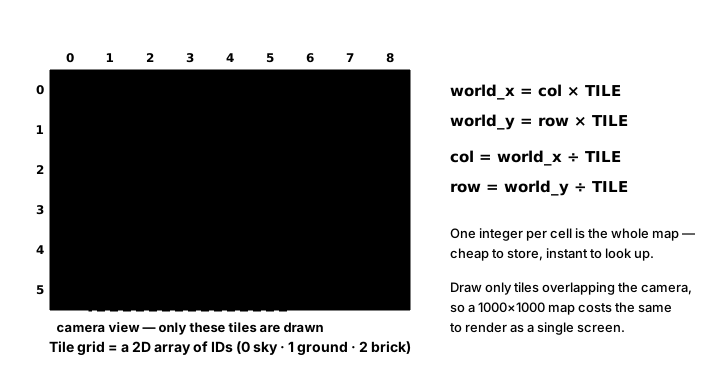
Typing numbers is slow, so levels are often written as text, one character per tile, and turned into ids with a legend:
LEVEL_ROWS = [
    "#..........#",
    "#...o..o...#",
    "#..BBBBBB..#",
    "############",
]
LEGEND = {".": 0, "#": 1, "B": 2, "o": 3}

rows = [[LEGEND[ch] for ch in line] for line in LEVEL_ROWS]
print(rows[1][4])          # 3: the coin in row 1, column 4
Notice the order: rows[row][col], the row (y) first, because the outer list holds rows. Mixing that up is the most common tile-map bug.
From pixels to tiles and back
A tile at column col starts at col * TILE pixels. Going the other way, a pixel position belongs to the tile x // TILE. Use floor division //, never int(x / TILE): int() rounds toward zero, so a point 5 pixels left of the map, int(-5 / 32), would wrongly land in tile 0. -5 // 32 is -1, the correct tile. Floor division of a float gives a float, so wrap it in int() after dividing:
def world_to_tile(self, x, y):
    """Floor division, so -5 px is tile -1 (int(-5 / 32) would wrongly give 0)."""
    return int(x // self.tile_size), int(y // self.tile_size)
💡 Why this matters
A 60 × 15 level is 900 small numbers, about as much data as a short paragraph. Asking "what is at this pixel?" is two divisions and a list lookup, however big the level is.
🎨 Tile Types and Culled Drawing
Each id needs a few facts: a name, how to draw it, and whether it is solid. That is a perfect job for the @dataclass you met in Saving & Loading:
@dataclass
class TileType:
    name: str
    color: tuple
    solid: bool


TILE_TYPES = {
    0: TileType("air", (0, 0, 0), False),        # never drawn: id 0 means "nothing here"
    1: TileType("ground", (110, 76, 50), True),
    2: TileType("brick", (170, 92, 70), True),
    3: TileType("coin", (250, 210, 60), False),
}
Id 0 is reserved for "nothing here" on purpose, as its own entry in the table. If you later draw tiles from a sprite sheet, give TileType a separate frame field for the sheet position rather than reusing the id: otherwise frame 0 of the sheet becomes the one tile you can never draw.
Each tile type gets one small Surface, built once when the map is created, never in the game loop. Then the map draws with culling: it works out which columns and rows the camera can see and loops over only those. camera_x // TILE is a float when camera_x is a float, and range() only accepts whole numbers, so every bound goes through int(). Here is a complete tile viewer; hold the arrow keys to scroll and watch how few tiles are drawn:
import pygame

TILE = 32
WIDTH, HEIGHT = 640, 480
LEVEL_ROWS = [
    "#..........................................................#",
    "#..........................................................#",
    "#..........................................................#",
    "#..........................................................#",
    "#..........................................................#",
    "#..........................................................#",
    "#............................o......................oo.....#",
    "#............o..............BBB....................BBBB....#",
    "#...........BBB....................o.......................#",
    "#......oo...............o........BBBBB........o............#",
    "#.....BBBB............BBBBB...........#......BBBB..........#",
    "#..................o..................#...o................#",
    "#.....................................#..................o.#",
    "##################...####################..#################",
    "##################...####################..#################",
]
COLORS = {"#": (110, 76, 50), "B": (170, 92, 70), "o": (250, 210, 60)}
SCROLL_SPEED = 400                         # pixels per second

pygame.init()
screen = pygame.display.set_mode((WIDTH, HEIGHT))
pygame.display.set_caption("Tile Viewer")
clock = pygame.time.Clock()
font = pygame.font.Font(None, 28)
images = {}
for ch, color in COLORS.items():           # one Surface per tile type, built once
    image = pygame.Surface((TILE, TILE))
    image.fill(color)
    pygame.draw.rect(image, (0, 0, 0), image.get_rect(), 1)
    images[ch] = image
map_w = len(LEVEL_ROWS[0])
camera_x = 0.0

running = True
while running:
    dt = clock.tick(60) / 1000
    for event in pygame.event.get():
        if event.type == pygame.QUIT:
            running = False
    keys = pygame.key.get_pressed()
    camera_x += (keys[pygame.K_RIGHT] - keys[pygame.K_LEFT]) * SCROLL_SPEED * dt
    camera_x = max(0, min(camera_x, map_w * TILE - WIDTH))

    first_col = int(camera_x // TILE)                   # culling: visible columns only
    last_col = min(map_w - 1, int((camera_x + WIDTH) // TILE))
    screen.fill((120, 180, 235))
    drawn = 0
    for row, line in enumerate(LEVEL_ROWS):
        for col in range(first_col, last_col + 1):
            image = images.get(line[col])
            if image is not None:
                screen.blit(image, (col * TILE - camera_x, row * TILE))
                drawn += 1

    mx, my = pygame.mouse.get_pos()
    tile = (int((mx + camera_x) // TILE), int(my // TILE))
    info = f"camera_x {camera_x:6.1f}   tiles drawn {drawn}   mouse over tile {tile}"
    screen.blit(font.render(info, True, (20, 20, 30)), (10, 8))
    pygame.display.flip()

pygame.quit()
The mouse readout shows the pixel-to-tile conversion in action: add the camera offset to turn a screen pixel into a world pixel, then floor-divide. The demo below does the same thing on a miniature map. The bright tiles are the ones inside the camera's rectangle and get drawn; the dim ones are skipped:
🧍 Colliding with Tiles, One Axis at a Time
The player is a pygame.FRect with a float position and a Vector2 velocity, the pattern from the Intro course. To collide, you don't test all 900 tiles; you only need the tiles the player's rectangle overlaps. Convert its corners to tile coordinates and loop over that small block:
def tiles_touching(self, rect):
    """Every (col, row) whose square overlaps rect (edges that only touch don't count)."""
    first_col, first_row = self.world_to_tile(rect.left, rect.top)
    last_col, last_row = self.world_to_tile(rect.right, rect.bottom)
    for row in range(first_row, last_row + 1):
        for col in range(first_col, last_col + 1):
            square = pygame.FRect(col * self.tile_size, row * self.tile_size,
                                  self.tile_size, self.tile_size)
            if rect.colliderect(square):
                yield col, row, square


def solid_squares(self, rect):
return [square for col, row, square in self.tiles_touching(rect) if self.is_solid(col, row)](yield makes tiles_touching a generator: it hands back one tile at a time to the for loop or list comprehension that uses it.) Now the movement itself. If you move diagonally in one step and then find you overlap a tile, you can't tell whether you hit a wall from the side or landed on it from above, and a player running along the floor snags on the seams between floor tiles. The fix is to move and resolve one axis at a time: move along x and push out sideways, then move along y and push out up or down.
def move_and_collide(body, vel, dt, tilemap):
    """Move one axis at a time and push out of solid tiles (the per-axis rule)."""
    body.x += vel.x * dt
    for square in tilemap.solid_squares(body):
        if vel.x > 0:
            body.right = square.left
        elif vel.x < 0:
            body.left = square.right
    body.y += vel.y * dt
    for square in tilemap.solid_squares(body):
        if vel.y > 0:
            body.bottom = square.top
        elif vel.y < 0:
            body.top = square.bottom
        vel.y = 0
A ground check that never flickers
After landing, the player's bottom edge sits exactly on the tile's top edge. Touching edges don't count as overlapping, so on the next frame the player's own rectangle overlaps nothing. If "on the ground" meant "overlapping a tile", it would be true on the frame you land, false the next, true again after gravity pulls you in: the jump button would work only every other frame. Instead, check a thin probe, 1 pixel tall, just under the feet:
def on_ground(body, tilemap):
    """A 1 px probe under the feet: steady even when a frame's fall is tiny."""
    probe = pygame.FRect(body.left, body.bottom, body.width, 1)
    return len(tilemap.solid_squares(probe)) > 0
Gravity uses the course's default from Gravity & Jumping, 980 px/s² (Earth gravity at 100 px per meter), plus a take-off speed for jumps and a maximum fall speed. With a 520 px/s take-off, the formula v0 ** 2 / (2 * g) gives a jump about 138 px high (just over four tiles, a few pixels less in the real loop, as the timestep FAQ below shows) that takes about 0.53 s to reach the top, which is a little floaty on purpose so the cave is easy to explore. For a snappier jump, design both numbers from a height and a time to the top, as in Gravity & Jumping: 140 px in 0.4 s gives g = 1750 and v0 = 700. The map's edges also need a rule. is_solid treats columns left and right of the map as walls, so nobody walks out of the level, but treats rows below the map as open, so the player can fall into a pit and respawn.
✅ Growth Mindset: Stuck in the Wall Is a Rite of Passage
Players sinking into floors, jittering on the ground or sticking to walls are the classic tile-collision bugs, and every platformer programmer has shipped at least one of them to a friend. You don't need to be good at this already; you need a way to see what is happening. Draw the player's rectangle and the probe as outlines, print vel and on_ground() each frame, and slow the game down by multiplying dt by 0.1. The bug almost always turns out to be one of three things: both axes moved at once, the probe missing, or rows[col][row] written the wrong way round.
🗂️ Levels as JSON
A level is data, so it can be saved with exactly the tools from Saving & Loading: a dictionary of plain values, written with json.dump. The rows are lists of ints and the tile types become dictionaries with asdict.
def to_json(self):
    return {
        "tile_size": self.tile_size,
        "rows": self.rows,
        "tile_types": {tid: asdict(t) for tid, t in self.tile_types.items()},
    }

@classmethod
def from_json(cls, data):
    # JSON object keys are always strings, so turn "1" back into 1.
    types = {int(tid): TileType(t["name"], tuple(t["color"]), t["solid"])
             for tid, t in data["tile_types"].items()}
    return cls(data["rows"], types, data["tile_size"])
Two details make or break this. First, JSON keys are always strings, so the tile_types dictionary comes back keyed by "1", "2", "3"; the rows still hold the number 1, so without int(tid) no tile would ever find its type. (The color comes back as a list, so it is turned back into a tuple too.) Second, anything derived from the tile types, the set of solid ids and the tile images, must be rebuilt after loading. The TileMap constructor calls its rebuild() method, so a map made by from_json is complete:
def rebuild(self):
    """Recompute everything derived from tile_types: the solid set and the images."""
    self.solid_ids = {tid for tid, t in self.tile_types.items() if t.solid}
    self.images = {}
    for tid, t in self.tile_types.items():
        if tid == AIR:
            continue
        image = pygame.Surface((self.tile_size, self.tile_size), pygame.SRCALPHA)
        if t.solid:
            image.fill(t.color)
            pygame.draw.rect(image, (0, 0, 0), image.get_rect(), 1)
        else:
            pygame.draw.circle(image, t.color, (self.tile_size / 2, self.tile_size / 2), self.tile_size / 4)
self.images[tid] = image(@classmethod marks a method that belongs to the class rather than one object; cls is the class itself, so TileMap.from_json(data) builds and returns a new TileMap.)
🔷 Sidebar: Isometric Tiles
Many strategy and farming games draw their grid as diamonds, the "isometric" look. The good news: the map data is exactly the same 2D list. Only the conversion between grid and screen changes. Each step in col moves right and down half a tile; each step in row moves left and down half a tile:
import math

TILE_W, TILE_H = 64, 32          # a diamond twice as wide as it is tall


def cart_to_iso(col, row):
    """Grid cell -> screen offset of the diamond's top corner."""
    return (col - row) * TILE_W / 2, (col + row) * TILE_H / 2


def iso_to_cart(x, y):
    """Screen offset (for example the mouse, minus the map origin) -> grid cell."""
    col = (x / (TILE_W / 2) + y / (TILE_H / 2)) / 2
    row = (y / (TILE_H / 2) - x / (TILE_W / 2)) / 2
    return math.floor(col), math.floor(row)


print(cart_to_iso(3, 1))         # (64.0, 64.0)
print(iso_to_cart(64, 80))       # (3, 1): the middle of that diamond
As before, the return trip must round down: math.floor is right for negative values too, where int() would pick the wrong diamond. Draw isometric tiles from the back row to the front so nearer tiles overlap farther ones.
🏋️ Practice Exercise: Coin Cave
Objective: make a scrolling tile-map level playable: culled drawing, solid tiles you can run and jump on, coins to collect, and a level you can save to JSON and load back.
Time: about 60 minutes. Starter file: coin_cave_starter.py (your instructor has it). The level, the tile types, gravity, the camera and the S/L keys are already there; right now the player falls straight through the floor. Each step below names what to change, and the starter marks each spot with a numbered to-do comment (the numbers are labels, not step numbers).
- Run the starter and watch the player fall out of the world and respawn. Finish
world_to_tilewith floor division. (≈ 5 min) - Cull
draw(): compute the first and last visible column and row, all throughint(). The HUD's "Drawn" count should drop to roughly a third of the level. (≈ 10 min) - Resolve collisions in
move_and_collide, x first, then y. You can now stand, walk and hit walls. (≈ 15 min) - Write
on_groundwith a 1-pixel probe. Jumping now works every time you press Space. (≈ 5 min) - Collect coins: turn every coin tile the player touches into air and count it. (≈ 10 min)
- Fix
from_jsonso the tile types come back with integer keys. Press S, then L: the level must still be solid and colored. (≈ 10 min)
You are done when:
- the player lands, stands still without jitter, and can jump every time while standing;
- running into the wall in the middle of the level stops you flat against it, and you can jump over it;
- coins vanish and the counter goes up; falling into a pit respawns you at the start;
- pressing S then L reloads the level from
level.jsonand it plays exactly the same.
💡 Hint
If you sink into the floor, you are probably pushing out on the wrong axis: in the y pass, falling (vel.y > 0) means body.bottom = square.top. If jumping only works sometimes, print on_ground(body, tilemap) every frame. If the reloaded level is invisible and you fall through it, print tilemap.solid_ids after loading: {'1', '2'} (strings) means int(tid) is missing.
✅ Example Solution
If your instructor hands you the lab file, you will see a few extra lines marked lab runtime near the top, plus an extra and frame_budget() condition on the main loop. They let the instructor's checker run the program automatically; when you run it yourself they do nothing.
"""Coin Cave: Intermediate Lesson 11 practice exercise (solution).

A tile-map platformer level built from text, saved to and loaded from JSON.
Left/Right (or A/D) run, Space or Up jumps. S saves the level to
level.json next to this script, L loads it back. Fall in a pit and you
respawn at the start. The camera follows the player sideways.
"""
import json
from dataclasses import asdict, dataclass
from pathlib import Path

import pygame


WIDTH, HEIGHT = 640, 480
TILE = 32
GRAVITY = 980              # px/s², the course's platformer gravity
JUMP_SPEED = 520           # px/s upward at take-off (about 4 tiles high)
RUN_SPEED = 220            # px/s
MAX_FALL = 900             # px/s terminal velocity
START = (2 * TILE, 11 * TILE)
LEVEL_FILE = Path(__file__).parent / "level.json"

LEVEL_ROWS = [
    "#..........................................................#",
    "#..........................................................#",
    "#..........................................................#",
    "#..........................................................#",
    "#..........................................................#",
    "#..........................................................#",
    "#............................o......................oo.....#",
    "#............o..............BBB....................BBBB....#",
    "#...........BBB....................o.......................#",
    "#......oo...............o........BBBBB........o............#",
    "#.....BBBB............BBBBB...........#......BBBB..........#",
    "#..................o..................#...o................#",
    "#.....................................#..................o.#",
    "##################...####################..#################",
    "##################...####################..#################",
]
LEGEND = {".": 0, "#": 1, "B": 2, "o": 3}
AIR, COIN = 0, 3


@dataclass
class TileType:
    name: str
    color: tuple
    solid: bool


TILE_TYPES = {
    0: TileType("air", (0, 0, 0), False),        # never drawn: id 0 means "nothing here"
    1: TileType("ground", (110, 76, 50), True),
    2: TileType("brick", (170, 92, 70), True),
    3: TileType("coin", (250, 210, 60), False),
}


class TileMap:
    def __init__(self, rows, tile_types, tile_size=TILE):
        self.rows = [list(row) for row in rows]      # rows[row][col] = tile id (int)
        self.tile_types = tile_types
        self.tile_size = tile_size
        self.height = len(self.rows)
        self.width = len(self.rows[0])
        self.solid_ids = set()
        self.images = {}
        self.rebuild()

    @classmethod
    def from_text(cls, text_rows, legend, tile_types):
        return cls([[legend[ch] for ch in line] for line in text_rows], tile_types)

    def rebuild(self):
        """Recompute everything derived from tile_types: the solid set and the images."""
        self.solid_ids = {tid for tid, t in self.tile_types.items() if t.solid}
        self.images = {}
        for tid, t in self.tile_types.items():
            if tid == AIR:
                continue
            image = pygame.Surface((self.tile_size, self.tile_size), pygame.SRCALPHA)
            if t.solid:
                image.fill(t.color)
                pygame.draw.rect(image, (0, 0, 0), image.get_rect(), 1)
            else:
                pygame.draw.circle(image, t.color, (self.tile_size / 2, self.tile_size / 2), self.tile_size / 4)
            self.images[tid] = image

    @property
    def pixel_size(self):
        return self.width * self.tile_size, self.height * self.tile_size

    def world_to_tile(self, x, y):
        """Floor division, so -5 px is tile -1 (int(-5 / 32) would wrongly give 0)."""
        return int(x // self.tile_size), int(y // self.tile_size)

    def get(self, col, row):
        if 0 <= col < self.width and 0 <= row < self.height:
            return self.rows[row][col]
        return AIR

    def is_solid(self, col, row):
        if col < 0 or col >= self.width:
            return True                 # the left and right edges are walls
        return self.get(col, row) in self.solid_ids   # above and below the map: open

    def tiles_touching(self, rect):
        """Every (col, row) whose square overlaps rect (edges that only touch don't count)."""
        first_col, first_row = self.world_to_tile(rect.left, rect.top)
        last_col, last_row = self.world_to_tile(rect.right, rect.bottom)
        for row in range(first_row, last_row + 1):
            for col in range(first_col, last_col + 1):
                square = pygame.FRect(col * self.tile_size, row * self.tile_size,
                                      self.tile_size, self.tile_size)
                if rect.colliderect(square):
                    yield col, row, square

    def solid_squares(self, rect):
        return [square for col, row, square in self.tiles_touching(rect) if self.is_solid(col, row)]

    def draw(self, surface, camera_x, camera_y):
        """Draw only the tiles the camera can see. Returns how many were drawn."""
        view_w, view_h = surface.get_size()
        first_col = max(0, int(camera_x // self.tile_size))
        first_row = max(0, int(camera_y // self.tile_size))
        last_col = min(self.width - 1, int((camera_x + view_w) // self.tile_size))
        last_row = min(self.height - 1, int((camera_y + view_h) // self.tile_size))
        drawn = 0
        for row in range(first_row, last_row + 1):
            for col in range(first_col, last_col + 1):
                image = self.images.get(self.rows[row][col])
                if image is not None:
                    surface.blit(image, (col * self.tile_size - camera_x, row * self.tile_size - camera_y))
                    drawn += 1
        return drawn

    def to_json(self):
        return {
            "tile_size": self.tile_size,
            "rows": self.rows,
            "tile_types": {tid: asdict(t) for tid, t in self.tile_types.items()},
        }

    @classmethod
    def from_json(cls, data):
        # JSON object keys are always strings, so turn "1" back into 1.
        types = {int(tid): TileType(t["name"], tuple(t["color"]), t["solid"])
                 for tid, t in data["tile_types"].items()}
        return cls(data["rows"], types, data["tile_size"])


def save_level(tilemap, path):
    with open(path, "w", encoding="utf-8") as f:
        json.dump(tilemap.to_json(), f)


def load_level(path):
    with open(path, encoding="utf-8") as f:
        return TileMap.from_json(json.load(f))


def move_and_collide(body, vel, dt, tilemap):
    """Move one axis at a time and push out of solid tiles (the per-axis rule)."""
    body.x += vel.x * dt
    for square in tilemap.solid_squares(body):
        if vel.x > 0:
            body.right = square.left
        elif vel.x < 0:
            body.left = square.right
    body.y += vel.y * dt
    for square in tilemap.solid_squares(body):
        if vel.y > 0:
            body.bottom = square.top
        elif vel.y < 0:
            body.top = square.bottom
        vel.y = 0


def on_ground(body, tilemap):
    """A 1 px probe under the feet: steady even when a frame's fall is tiny."""
    probe = pygame.FRect(body.left, body.bottom, body.width, 1)
    return len(tilemap.solid_squares(probe)) > 0


def collect_coins(body, tilemap):
    found = 0
    for col, row, square in list(tilemap.tiles_touching(body)):
        if tilemap.get(col, row) == COIN:
            tilemap.rows[row][col] = AIR
            found += 1
    return found


def main():
    pygame.init()
    screen = pygame.display.set_mode((WIDTH, HEIGHT))
    pygame.display.set_caption("Coin Cave")
    clock = pygame.time.Clock()
    font = pygame.font.Font(None, 28)
    tilemap = TileMap.from_text(LEVEL_ROWS, LEGEND, TILE_TYPES)
    body = pygame.FRect(START, (24, 30))
    vel = pygame.Vector2(0, 0)
    coins = 0
    grounded = False
    history = []

    running = True
    while running:
        dt = min(clock.tick(60) / 1000, 0.05)
        for event in pygame.event.get():
            if event.type == pygame.QUIT:
                running = False
            elif event.type == pygame.KEYDOWN:
                if event.key in (pygame.K_SPACE, pygame.K_UP, pygame.K_w) and grounded:
                    vel.y = -JUMP_SPEED
                elif event.key == pygame.K_s:
                    save_level(tilemap, LEVEL_FILE)
                    history.append(f"Level saved: {tilemap.width} x {tilemap.height} tiles")
                elif event.key == pygame.K_l and LEVEL_FILE.exists():
                    tilemap = load_level(LEVEL_FILE)
                    history.append(f"Level loaded: {tilemap.width} x {tilemap.height} tiles, "
                                   f"solid ids {sorted(tilemap.solid_ids)}")

        keys = pygame.key.get_pressed()
        vel.x = ((keys[pygame.K_RIGHT] or keys[pygame.K_d]) - (keys[pygame.K_LEFT] or keys[pygame.K_a])) * RUN_SPEED
        vel.y = min(vel.y + GRAVITY * dt, MAX_FALL)
        move_and_collide(body, vel, dt, tilemap)
        grounded = on_ground(body, tilemap)
        coins += collect_coins(body, tilemap)
        if body.top > tilemap.pixel_size[1]:           # fell into a pit
            body.topleft = START
            vel.update(0, 0)

        world_w = tilemap.pixel_size[0]
        camera_x = max(0, min(body.centerx - WIDTH / 2, world_w - WIDTH))
        camera_y = 0                                   # the level is exactly one screen tall

        screen.fill((120, 180, 235))
        drawn = tilemap.draw(screen, camera_x, camera_y)
        pygame.draw.rect(screen, (60, 200, 110), body.move(-camera_x, -camera_y), border_radius=4)
        col, row = tilemap.world_to_tile(*body.center)
        hud = f"Coins {coins}   Tile ({col}, {row})   Drawn {drawn} of {tilemap.width * tilemap.height}"
        screen.blit(font.render(hud, True, (20, 20, 30)), (10, 8))
        pygame.display.flip()

    pygame.quit()
    for line in history:
        print(line)
    print(f"Grounded at the end: {grounded}")


if __name__ == "__main__":
    main()
📓 Learning Journal
Take five minutes to write in your learning journal (a notebook or a plain text file works). Jot down:
- Key concepts you learned today
- Techniques that clicked (and the ones that haven't, yet)
- Questions or confusion to bring to the next session
- Ideas to try in your own game
- Progress and feelings: how did this lesson go for you?
✍️ This lesson's prompts:
- Explain, as if to a friend, why the ground check uses a probe below the feet instead of the player's own rectangle.
- Pick a tile-based game you know. Which tile types does it have, and which property (solid, deadly, slippery, collectible) would each one need?
- Design a short level on paper as text rows. What does your legend look like?
📝 Summary
You built a level out of numbers: text rows turned into a 2D list of tile ids, each id described by a small TileType dataclass, with 0 reserved for air. Converting pixels to tiles is floor division, and drawing loops only over the columns and rows the camera can see. The player collides with just the handful of tiles its rectangle overlaps, moving and resolving one axis at a time, and a 1-pixel probe under its feet gives a ground check that never flickers. Finally, the level saves to JSON and loads back with its tile ids turned back into integers and its collision data rebuilt.
🎓 Key Takeaways
- A tile map is
rows[row][col]: row first. Pixel to tile isint(x // TILE), which floors negative values correctly. - Reserve id 0 for air in the tile-type table; keep sprite-sheet frames in their own field.
- Build tile images once; cull drawing to the visible columns and rows, with integer
range()bounds. - Move x then resolve x, move y then resolve y, testing only the tiles the body overlaps.
- "On the ground" is a 1-pixel probe under the feet, not the body's own overlap.
- JSON keys load as strings: convert tile ids back with
int()and rebuild derived data after loading.
🔭 Looking Ahead
This lesson's camera just keeps the player centered horizontally. In the next lesson, Cameras, you build a proper camera class with smooth following, a deadzone, look-ahead, level-edge clamping and zoom, and use it on a level that is taller than the screen.
❓ Common Questions
Why is the player's rectangle an FRect and not a Rect?
A pygame.Rect stores whole numbers. At 60 FPS, gravity adds about 16 px/s per frame, and a slow fall of a fraction of a pixel per frame would be cut to zero, so objects stall or drift. FRect keeps float positions, and all of its edge attributes (bottom, right, ...) work the same way.
What if my player moves more than a whole tile in one frame?
Then it can skip over a thin wall, which is called tunneling. A body only skips a tile if one step carries it past the tile's whole thickness plus its own height. At this lesson's speeds (220 px/s sideways, at most 900 px/s falling) with dt capped at 0.05 s, the largest step is 45 px, less than 32 + 30 = 62 px for a one-tile platform and a 30 px tall player, so the Coin Cave is safe. Much faster or much smaller objects need their movement split into several smaller steps per frame.
Why doesn't this platformer use the fixed-timestep accumulator from Velocity & Timesteps?
It could, and a physics-heavy game should. Here we chose a simpler loop on purpose: one variable step per frame, dt = min(clock.tick(60) / 1000, 0.05), so the tile-collision code stays easy to follow. The cap does the important safety work. A hitch or a dragged window can never hand the physics a huge step, and the tunneling answer above shows the largest step stays well under what could skip a platform. The trade-off is the one you measured in Velocity & Timesteps: the same jump peaks at a slightly different height on different frame rates. With this lesson's numbers (520 px/s take-off, 980 px/s² gravity) it reaches about 129 px at 30 FPS and 136 px at 144 FPS, roughly 5% apart. That is fine for exploring a cave, but it could decide whether a jump just clears a ledge. If your game needs identical jumps on every machine (tight ledges, replays, speedruns, networked play), move the update into the accumulator loop you already know: call the same player update with STEP instead of dt inside the while accumulator >= STEP loop, and nothing else in the player code changes.
Should I draw every tile as its own sprite in a Group?
For the level itself, no. A sprite per tile means thousands of objects to update and collide. The tile map already knows where everything is, and a lookup by (col, row) is faster than checking every sprite. Keep sprites for things that move, such as the player, enemies and bullets.
Can a level be bigger than the screen vertically too?
Yes. The culling in draw() already handles rows as well as columns; only this lesson's simple camera stays at camera_y = 0. The next lesson follows the player in both directions.
Is there a ready-made tile map editor I can use?
Tiled (mapeditor.org) is a free, popular level editor, and the pytmx package loads its maps in Python. Writing your own tiny format first, as here, makes it much easier to understand what those tools are doing.
🎯 Quick Quiz
Question 1: With TILE = 32, what does world_to_tile(-5, 40) return?
Question 2: Why does move_and_collide move and resolve x first, then y, instead of both at once?
Question 3: Why does on_ground test a 1-pixel probe under the feet instead of the player's own rectangle?
Question 4: After loading a level from JSON, tilemap.solid_ids is {"1", "2"} and you fall through every floor. What is the fix?
Question 5: Why do the culling bounds use int(camera_x // TILE) rather than just camera_x // TILE?
🌟 Going Further
- Deadly tiles: add spikes as a new tile type with a
deadlyfield. Touching one respawns the player. Remember to save and load the new field. - One-way platforms: add a tile you can jump up through but land on from above. Hint: only resolve it in the y pass, only when falling, and only if the player's bottom was above the tile's top before this frame's move.
- Draw from a sprite sheet: give
TileTypeaframefield and cut the tile images from a sheet withsubsurface, as in the Sprite Sheets lesson of the Intro course. - Read the docs: pygame-ce's Rect and FRect, and the Tiled map editor.
- Coming up in Game Dev II: Intermediate: Character Controllers adds coyote time, jump buffering and animation on top of this lesson's movement, and Building a Level Editor lets you paint tile maps with the mouse.