Lesson 16: Noise Terrain & Biomes
Random numbers that jump around make great loot and terrible landscapes. In this lesson you write your own smooth noise, stack it into natural-looking terrain, and grow a whole island of beaches, forests, deserts and snowy peaks from a single seed.
🎯 Learning Objectives
By the end of this lesson, you will be able to:
- Explain the difference between white noise and smooth noise, and why terrain needs the smooth kind.
- Build 2D value noise from a seeded lattice and the smoothstep blend, so that each seed makes a different world.
- Combine octaves into fractal noise, and predict how persistence and lacunarity change the result.
- Turn height and moisture maps into seven biomes and shape the land into an island.
- Measure the cost of drawing a map, and draw it once instead of every frame.
Project: Island Biomes, a map generator where R rolls a new seed, keys 1 to 6 set the octaves, and I switches the island shape on and off.
In This Lesson
🌊 From Static to Landscape
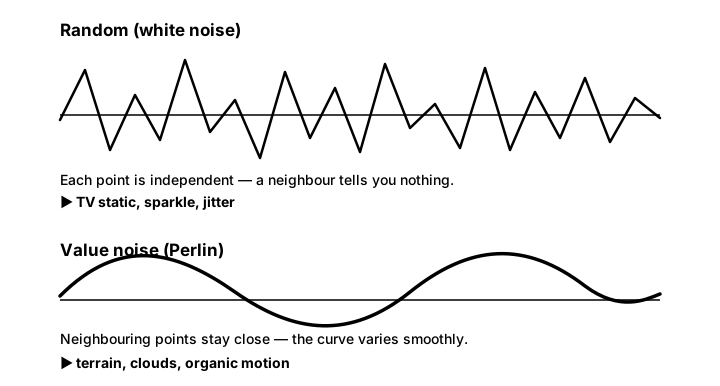
Try making a height map the obvious way: rng.random() for every cell. You get TV static, because each cell has no idea what its neighbors are doing. Real hills don't work like that. Walk a step and the ground is almost as high as it was a step ago. Terrain needs randomness with one extra property: nearby inputs give nearby outputs. Functions with that property are called noise functions, and they are the workhorse behind generated terrain, clouds, caves and wobbling motion.
💡 Why this matters
With noise and a seed, a few lines of code replace hand-drawn maps: every seed is a new world, and the same seed rebuilds the same world exactly. That is how you get endless, replayable variety without drawing every level yourself.
📈 Value Noise in One Dimension
Value noise is the simplest smooth noise to build, and you already know both ingredients:
- A random value at every whole number (0, 1, 2, …), called the lattice, from a seeded generator like the ones in Randomness for Games.
- A smooth blend between the two lattice values around
x. That'slerpfrom Interpolation & Easing, with smoothstep (3t² − 2t³, one more ease-in-out curve to add to your easing library) so the curve is flat at every lattice point and has no sharp corners.
Here is a complete program that draws white noise above value noise, with the lattice points marked:
import math
import random

import pygame

WIDTH, HEIGHT = 800, 420
SPACING = 60                                   # pixels between lattice points
rng = random.Random(3)
LATTICE = [rng.random() for _ in range(64)]    # one random value per whole number
WHITE = [rng.random() for _ in range(WIDTH)]   # one random value per pixel


def smoothstep(t):
    """Ease in and out: flat at 0 and at 1."""
    return t * t * (3 - 2 * t)


def noise1d(x):
    """Value noise: blend the random values at the whole numbers around x."""
    i = math.floor(x)
    t = smoothstep(x - i)
    a, b = LATTICE[i % 64], LATTICE[(i + 1) % 64]
    return a + (b - a) * t


def curve(values, top, height):
    """Turn values in 0..1 into screen points inside a band of the window."""
    return [(x, top + height - v * height) for x, v in enumerate(values)]


pygame.init()
screen = pygame.display.set_mode((WIDTH, HEIGHT))
pygame.display.set_caption("White Noise vs Value Noise")
clock = pygame.time.Clock()
font = pygame.font.Font(None, 26)

white_points = curve(WHITE, 40, 140)
smooth_points = curve([noise1d(x / SPACING) for x in range(WIDTH)], 250, 140)
labels = [font.render("random() for every pixel: white noise", True, (240, 150, 150)),
          font.render("value noise: random only at the dots, smooth between", True, (150, 220, 170))]

running = True
while running:
    clock.tick(30)
    for event in pygame.event.get():
        if event.type == pygame.QUIT:
            running = False
    screen.fill((20, 24, 36))
    pygame.draw.lines(screen, (240, 110, 110), False, white_points)
    pygame.draw.lines(screen, (110, 210, 140), False, smooth_points, 3)
    for i in range(WIDTH // SPACING + 1):              # the lattice points
        pygame.draw.circle(screen, (255, 255, 255), (i * SPACING, 250 + 140 - LATTICE[i % 64] * 140), 4)
    screen.blit(labels[0], (10, 12))
    screen.blit(labels[1], (10, 222))
    pygame.display.flip()

pygame.quit()
noise1d(3.0) is exactly the lattice value at 3; noise1d(3.5) is halfway between the values at 3 and 4; and because smoothstep is flat at both ends, the curve glides through each dot instead of turning a sharp corner. Try replacing smoothstep(x - i) with just x - i (plain linear blending) and look at the dots again.
🗺️ 2D Noise That Obeys the Seed
For a map, you need a lattice value at every whole-number point (ix, iy), and you need it without storing an endless grid. The classic trick, used by Perlin noise too, is a permutation table: the numbers 0 to 255 in a shuffled order. Two lookups turn any (ix, iy) into one of 256 random values, and because the shuffle comes from the seed's generator, every seed shuffles differently and gives a different world.
class ValueNoise:
    """2D value noise. A seed shuffles the lattice, so each seed is a new world."""

    def __init__(self, seed):
        rng = random.Random(seed)
        self.values = [rng.random() for _ in range(256)]
        self.perm = list(range(256))
        rng.shuffle(self.perm)

    def lattice(self, ix, iy):
        """A fixed random value for every whole-number grid point (repeats every 256)."""
        return self.values[self.perm[(self.perm[ix & 255] + iy) & 255]]

    def noise(self, x, y):
        """Smoothly blend the four lattice values around (x, y). Result in 0..1."""
        ix, iy = math.floor(x), math.floor(y)
        tx, ty = smoothstep(x - ix), smoothstep(y - iy)
        top = lerp(self.lattice(ix, iy), self.lattice(ix + 1, iy), tx)
        bottom = lerp(self.lattice(ix, iy + 1), self.lattice(ix + 1, iy + 1), tx)
        return lerp(top, bottom, ty)
ix & 255keeps only the lowest 8 bits ofix, which for any integer, even a negative one, is a number from 0 to 255. It works likeix % 256.noise(x, y)blends the two top corners across, the two bottom corners across, and then those two results down: threelerps.math.floor, notint: forx = -0.5,intgives 0 but the cell to the left starts at −1.- The pattern repeats every 256 lattice squares. The exercise map spans only a few dozen, so you never see it.
A common mistake in older tutorials is a noise function that takes a seed but never uses it, so every "new" world is the same. Here the seed is used exactly once, to build the generator that shuffles the table. The exercise's tests check that two seeds really give two different maps.
🏔️ Octaves: Detail at Every Scale
One layer of noise gives smooth blobs. Real coastlines are bumpy at every scale: continents, bays, coves, rocks. So add several layers, called octaves, each with finer detail and less strength than the last. This sum is called fractal noise (or fBm, fractal Brownian motion):
def fbm(noise, x, y, octaves):
    """Fractal noise: add octaves of finer, fainter detail. Result stays in 0..1."""
    total, amplitude, frequency, amp_sum = 0.0, 1.0, 1.0, 0.0
    for i in range(octaves):
        shift = i * 37.1                # each octave samples a different patch
        total += noise.noise(x * frequency + shift, y * frequency + shift) * amplitude
        amp_sum += amplitude
        amplitude *= PERSISTENCE        # 0.5: each octave half as strong...
        frequency *= LACUNARITY         # 2.0: ...and twice as detailed
return total / amp_sum| Octave | Frequency | Amplitude | Adds |
|---|---|---|---|
| 1 | 1 | 1 | The broad shape of the land |
| 2 | 2 | 0.5 | Large bays and ridges |
| 3 | 4 | 0.25 | Smaller coves and hills |
| 4 | 8 | 0.125 | Rough, rocky edges |
Dividing by amp_sum keeps the result between 0 and 1 however many octaves you use. The shift moves each octave to a different part of the lattice; without it, all octaves line up at (0, 0). FEATURE_SIZE (40 cells in the exercise) sets how big the first octave's blobs are: the map samples fbm(noise, x / 40, y / 40, octaves).
Try it in the demo: change the octaves and watch the same island gain detail without changing shape, then roll new seeds.
🌴 From Numbers to Biomes
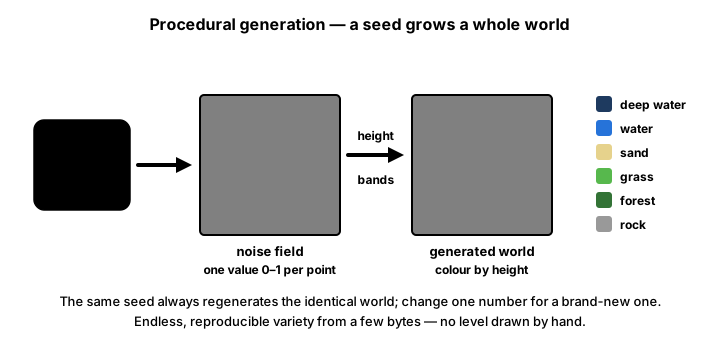
Four steps turn two grids of numbers into a map:
- Stretch. Fractal noise tends to bunch up around 0.5, and the exact range changes with the seed and the octaves. Rescale each grid so its lowest value is 0 and its highest is 1; then fixed thresholds such as "water below 0.40" mean the same thing on every map.
- Two independent layers. One noise grid is height, another is moisture. Both get their own
ValueNoise, seeded from the map's generator:ValueNoise(rng.randrange(2**32)), twice. One seed still decides everything, but the layers don't copy each other, so the same height can be a desert in one place and a forest in another. - An island mask (optional). Average the height with a value that is 1 in the middle of the map and 0 at the edges, then sink the edges a little more, so the map ends in ocean on every side.
- Biome rules. Height picks water, beach and peaks; moisture picks the lowlands:
def biome(h, m):
    """Height decides water, beach and peaks; moisture decides the lowlands."""
    if h < WATER_LEVEL:          # 0.40
        return "ocean"
    if h < BEACH_LEVEL:          # 0.44
        return "beach"
    if h > SNOW_LEVEL:           # 0.84
        return "snow"
    if h > MOUNTAIN_LEVEL:       # 0.72
        return "mountain"
    if m < 0.35:
        return "desert"
    if m < 0.65:
        return "grassland"
    return "forest"
That is seven biomes: ocean, beach, desert, grassland, forest, mountain and snow. Notice the order: snow is checked before mountain, because every snowy cell is also above the mountain line.
✅ Growth Mindset: Tuning Is the Work, Not a Detour
Your first islands might be all ocean, all desert, or one giant mountain. That isn't failure; nobody picks good thresholds on the first try. Procedural generation is a loop of generate, look, adjust one number, generate again. Keep the seed fixed while you tune, change one constant at a time, and write down what each change did. By the end of the exercise you will have a feel for these numbers that no table can give you.
⚡ Build Once, Blit Every Frame
The map only changes when you press a key, so there is no reason to redraw 23,000 cells 60 times a second. Draw it once into a small Surface, one pixel per cell, scale it up, and keep that picture:
def render_map(heights, moisture):
    """Draw the map ONCE: one pixel per cell, then scale it up."""
    small = pygame.Surface((MAP_W, MAP_H))
    for y in range(MAP_H):
        for x in range(MAP_W):
            h = heights[y][x]
            r, g, b = BIOME_COLORS[biome(h, moisture[y][x])]
            shade = 0.8 + 0.4 * h                           # higher ground is lighter
            small.set_at((x, y), [max(0, min(255, int(c * shade))) for c in (r, g, b)])
    return pygame.transform.scale_by(small, CELL)

# in the loop: rebuild only when a key changed something, then just
screen.blit(picture, (0, 0))
The shading multiplies each color by up to 1.2, so the channels are clamped to 0–255, as in every color calculation since the Intro course.
How much does this save? Measured on the machine this lesson was written on (Intel Core i7-12700K, Python 3.10, pygame-ce 2.5.8), for the exercise's 200 × 115 map, best of five runs:
| Step | Time | How often |
|---|---|---|
| Generate both noise grids, 1 / 4 / 6 octaves | about 63 / 199 / 291 ms | Only when a key changes the map |
render_map (biome lookup and set_at for every cell) | about 19 ms | Only when the map changes |
Drawing every cell as a 4 × 4 pygame.draw.rect | about 7.1 ms | Every frame, if you redraw |
| Blitting the finished picture | about 0.04 ms | Every frame |
At 60 FPS a frame has about 16.7 ms. Redrawing the rectangles every frame would spend almost half of it on a picture that hasn't changed; the blit costs a tiny fraction of that. Your numbers will differ, so measure on your own computer with time.perf_counter(), as the exercise's HUD does. The generation step is slow enough that you would not run it every frame either; that is why the exercise rebuilds only on a key press.
🏋️ Practice Exercise: Island Biomes
Objective: finish a map generator so each seed grows its own detailed island, with seven biomes decided by height and moisture.
Time: about 40 minutes. Starter file: island_biomes_starter.py (your instructor has it). It opens the window, handles the keys and draws the map once per change, but the noise is blocky, there is only one octave, the seed is ignored and there are just two biomes. Its numbered comments match the steps below.
- Run the starter. Press R a few times: the map doesn't change. (≈ 2 min)
- Finish
ValueNoise.noise()with smoothstep and threelerps. The blocks turn into smooth blobs. (≈ 8 min) - Finish
fbm()with the octave loop. Keys 1 to 6 now change the detail. (≈ 8 min) - In
generate(), build both noise layers from the seed's generator. R now makes new worlds. (≈ 4 min) - Complete
biome()with all seven biomes. (≈ 6 min) - Apply the island mask when
islandis on. (≈ 5 min) - Tune: change one threshold or
FEATURE_SIZEat a time and watch the "built in" time and the map. (≈ 7 min)
You are done when:
- R shows a different island each time, and restarting the program shows the seed-42 island again;
- keys 1 to 6 keep the same island but change how rough its coast is;
- you can see all seven biomes on most seeds, and I switches between an island and an open map;
- the map is drawn once per change, and the frame rate doesn't drop while you just look at it.
💡 Hint
If the map is still blocky after step 2, check that you use tx and ty (the smoothstepped fractions) in the lerps, not x and y. If every seed looks the same, look for a ValueNoise(0) that should be ValueNoise(rng.randrange(2**32)). If everything is ocean, print the smallest and largest height after stretch(): they should be 0 and 1.
✅ Example Solution
If your instructor hands you the lab file, you will see a few extra lines marked lab runtime near the top, plus an extra and frame_budget() condition on the main loop. They let the instructor's checker run the program automatically for a fixed number of frames; when you run it yourself they do nothing. You never need to write them.
"""Island Biomes: Intermediate Lesson 16 practice exercise (solution).

One seed grows a whole map. Two independent layers of fractal value noise
(height and moisture) pick one of seven biomes for every cell, and an
island mask sinks the edges into the ocean. The map is drawn ONCE into a
Surface and that picture is reused every frame.

Controls: R = next seed, 1-6 = octaves, I = island mask on/off.
"""
import math
import random
import time

import pygame


MAP_W, MAP_H, CELL = 200, 115, 4        # 200 x 115 cells, 4 px each
WIDTH, HEIGHT = MAP_W * CELL, MAP_H * CELL + 40
FPS = 60
FEATURE_SIZE = 40.0                     # cells per noise lattice square in octave 1
PERSISTENCE = 0.5                       # each octave has half the amplitude...
LACUNARITY = 2.0                        # ...and twice the frequency of the last

WATER_LEVEL = 0.40
BEACH_LEVEL = 0.44
MOUNTAIN_LEVEL = 0.72
SNOW_LEVEL = 0.84
BIOME_COLORS = {                        # seven biomes
    "ocean": (38, 84, 160),
    "beach": (222, 205, 140),
    "desert": (212, 180, 100),
    "grassland": (112, 176, 84),
    "forest": (44, 112, 62),
    "mountain": (128, 118, 110),
    "snow": (240, 242, 248),
}


def lerp(a, b, t):
    return a + (b - a) * t


def smoothstep(t):
    """Ease in and out (Interpolation & Easing): flat at 0 and 1, so no creases."""
    return t * t * (3 - 2 * t)


class ValueNoise:
    """2D value noise. A seed shuffles the lattice, so each seed is a new world."""

    def __init__(self, seed):
        rng = random.Random(seed)
        self.values = [rng.random() for _ in range(256)]
        self.perm = list(range(256))
        rng.shuffle(self.perm)

    def lattice(self, ix, iy):
        """A fixed random value for every whole-number grid point (repeats every 256)."""
        return self.values[self.perm[(self.perm[ix & 255] + iy) & 255]]

    def noise(self, x, y):
        """Smoothly blend the four lattice values around (x, y). Result in 0..1."""
        ix, iy = math.floor(x), math.floor(y)
        tx, ty = smoothstep(x - ix), smoothstep(y - iy)
        top = lerp(self.lattice(ix, iy), self.lattice(ix + 1, iy), tx)
        bottom = lerp(self.lattice(ix, iy + 1), self.lattice(ix + 1, iy + 1), tx)
        return lerp(top, bottom, ty)


def fbm(noise, x, y, octaves):
    """Fractal noise: add octaves of finer, fainter detail. Result stays in 0..1."""
    total, amplitude, frequency, amp_sum = 0.0, 1.0, 1.0, 0.0
    for i in range(octaves):
        shift = i * 37.1                # each octave samples a different patch
        total += noise.noise(x * frequency + shift, y * frequency + shift) * amplitude
        amp_sum += amplitude
        amplitude *= PERSISTENCE
        frequency *= LACUNARITY
    return total / amp_sum


def stretch(grid):
    """Rescale a 2D list so its lowest value is 0 and its highest is 1."""
    lo = min(min(row) for row in grid)
    hi = max(max(row) for row in grid)
    span = hi - lo if hi > lo else 1.0
    return [[(v - lo) / span for v in row] for row in grid]


def island_mask(x, y):
    """1 in the middle of the map, falling to 0 at the edges and beyond."""
    dx = (x - MAP_W / 2) / (MAP_W / 2)      # -1 at the left edge, +1 at the right
    dy = (y - MAP_H / 2) / (MAP_H / 2)
    return max(0.0, 1 - (dx * dx + dy * dy))


def generate(seed, octaves, island=True):
    """Return (heights, moisture): two MAP_H x MAP_W grids of values in 0..1."""
    rng = random.Random(seed)
    height_noise = ValueNoise(rng.randrange(2**32))     # two independent layers,
    moisture_noise = ValueNoise(rng.randrange(2**32))   # both decided by the seed
    heights, moisture = [], []
    for y in range(MAP_H):
        heights.append([fbm(height_noise, x / FEATURE_SIZE, y / FEATURE_SIZE, octaves) for x in range(MAP_W)])
        moisture.append([fbm(moisture_noise, x / FEATURE_SIZE, y / FEATURE_SIZE, octaves) for x in range(MAP_W)])
    heights, moisture = stretch(heights), stretch(moisture)
    if island:
        for y, row in enumerate(heights):
            for x, h in enumerate(row):
                k = island_mask(x, y)
                # Average with the mask, then sink the edges a little more.
                row[x] = max(0.0, (h + k) / 2 - 0.15 * (1 - k))
    return heights, moisture


def biome(h, m):
    """Height decides water, beach and peaks; moisture decides the lowlands."""
    if h < WATER_LEVEL:
        return "ocean"
    if h < BEACH_LEVEL:
        return "beach"
    if h > SNOW_LEVEL:
        return "snow"
    if h > MOUNTAIN_LEVEL:
        return "mountain"
    if m < 0.35:
        return "desert"
    if m < 0.65:
        return "grassland"
    return "forest"


def render_map(heights, moisture):
    """Draw the map ONCE: one pixel per cell, then scale it up."""
    small = pygame.Surface((MAP_W, MAP_H))
    for y in range(MAP_H):
        for x in range(MAP_W):
            h = heights[y][x]
            r, g, b = BIOME_COLORS[biome(h, moisture[y][x])]
            shade = 0.8 + 0.4 * h                           # higher ground is lighter
            small.set_at((x, y), [max(0, min(255, int(c * shade))) for c in (r, g, b)])
    return pygame.transform.scale_by(small, CELL)


def main():
    pygame.init()
    screen = pygame.display.set_mode((WIDTH, HEIGHT))
    pygame.display.set_caption("Island Biomes")
    clock = pygame.time.Clock()
    font = pygame.font.Font(None, 24)

    seed, octaves, island = 42, 4, True

    def rebuild():
        start = time.perf_counter()
        heights, moisture = generate(seed, octaves, island)
        picture = render_map(heights, moisture)
        return picture, time.perf_counter() - start

    picture, build_time = rebuild()
    builds = 1

    running = True
    while running:
        clock.tick(FPS)
        changed = False
        for event in pygame.event.get():
            if event.type == pygame.QUIT:
                running = False
            elif event.type == pygame.KEYDOWN:
                if event.key == pygame.K_r:
                    seed += 1
                    changed = True
                elif event.key == pygame.K_i:
                    island = not island
                    changed = True
                elif pygame.K_1 <= event.key <= pygame.K_6:
                    octaves = event.key - pygame.K_0
                    changed = True
        if changed:                                  # rebuild only when something changed
            picture, build_time = rebuild()
            builds += 1

        screen.fill((14, 16, 24))
        screen.blit(picture, (0, 0))                 # one blit per frame, however big the map
        hud = (f"seed {seed}   octaves {octaves}   island {'on' if island else 'off'}   "
               f"built in {build_time * 1000:.0f} ms      R new seed   1-6 octaves   I island")
        screen.blit(font.render(hud, True, (225, 230, 240)), (10, MAP_H * CELL + 12))
        pygame.display.flip()

    pygame.quit()
    print(f"Built the map {builds} times. Final seed: {seed}")


if __name__ == "__main__":
    main()
📓 Learning Journal
Take five minutes to write in your learning journal. Jot down:
- Key concepts you learned today
- Techniques that clicked (and the ones that haven't, yet)
- Questions or confusion to bring to the next session
- Ideas to try in your own game
- Progress and feelings: how did this lesson go for you?
✍️ This lesson's prompts:
- Explain to a friend why
random()for every cell makes static, while value noise makes hills. - Which constant changed your island the most when you tuned it? Describe the change in plain words.
- Besides terrain, where could smooth noise help in your game (clouds, a wobbling flame, wandering enemies)?
📝 Summary
White noise gives every point its own random value; smooth noise keeps neighbors close, which is what terrain needs. You built value noise from a seeded lattice, a permutation table and smoothstep lerps, so every seed really makes a new world. Octaves stack finer, fainter layers into fractal noise. Stretched height and moisture grids, an island mask and a few thresholds turn the numbers into seven biomes. Finally, you measured the drawing cost and drew the map once into a Surface, blitting that picture every frame.
🎓 Key Takeaways
- Value noise = random values at whole numbers, smoothly blended in between.
- Build the lattice from
random.Random(seed); the same seed rebuilds the same world. - Each octave doubles the frequency and halves the amplitude (with persistence 0.5, lacunarity 2).
- Stretch each grid to 0–1; two independent layers (height, moisture) decide the biome.
- Generate and draw only when something changes; blit the cached picture every frame.
🔭 Looking Ahead
Your worlds now need an interface. In the next lesson, UI & HUD, you anchor health bars, a minimap and dialog boxes to the screen so players can read the game at a glance.
❓ Common Questions
What is the difference between value noise and Perlin noise?
Value noise stores a random value at each lattice point and blends the values. Perlin noise stores a random direction (a gradient) at each lattice point and blends slopes, which tends to look less blocky along the grid. Both use a permutation table and a smooth blend. Value noise is easier to understand, and with a few octaves it works well for maps like this one.
Can I use a library instead of writing noise myself?
Yes. Packages on PyPI such as opensimplex provide gradient noise; install it with pip install opensimplex and read its documentation for how to seed it. This course writes its own so there is nothing extra to install and so you know what the library does. Whatever you use, check that changing the seed really changes the output.
Generating takes a moment. How do games make huge worlds?
They generate only what is near the player, in chunks, and keep finished chunks. Because noise gives the same value for the same coordinates every time, a chunk generated later lines up perfectly with its neighbors. Some also use numpy or compiled code for speed; that is beyond this course.
Why does stretch() make every map use the full 0–1 range?
So the thresholds mean the same on every map. Without it, a seed whose noise happens to stay between 0.3 and 0.7 would have no snow and little ocean. The trade-off: every map now has some deepest ocean and some highest peak, even a mostly flat one.
Can I scroll across an endless noise map?
Yes: noise works for any coordinates, including negative ones (that's why the code uses math.floor). Sample fbm at (x + offset_x) / FEATURE_SIZE and change the offset. Skip stretch() for endless maps, since it needs the whole grid, and use fixed thresholds on the raw values instead.
🎯 Quick Quiz
Question 1: What makes value noise better for terrain than calling rng.random() for every cell?
Question 2: With PERSISTENCE = 0.5 and LACUNARITY = 2.0, what are the frequency and amplitude of the third octave?
Question 3: Pressing R changes the seed number on screen, but the map stays identical. What is the most likely bug?
Question 4: Why does the exercise use two separate noise layers for height and moisture?
Question 5: Why does the exercise draw the map into a Surface once and blit it every frame?
🌟 Going Further
- Temperature: add a third layer that gets colder toward the top and bottom of the map and with height, and turn cold lowland into tundra.
- Rivers: from a few random mountain cells, step to the lowest neighbor until you reach the ocean, and paint the path blue.
- Save the world: save only the seed, octaves and island flag to JSON (as in Saving & Loading) and rebuild the map when loading.
- Scrolling map: make the map bigger than the window and scroll it with a camera from Cameras, generating the picture once.
- Read the docs: the pygame-ce pages for pygame.transform (
scale_by) and Surface.set_at. - Coming up in Game Dev III: Advanced: Dungeons & Caves and Wave Function Collapse, two more ways to generate levels from a seed.