Gravity Simulation
The Universal Force in Games
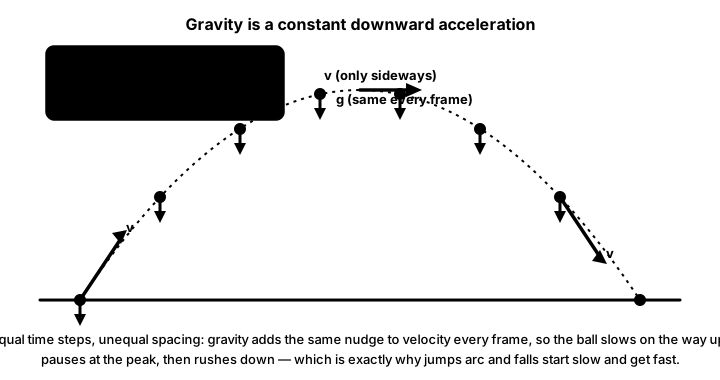
Gravity is one of the most fundamental forces in game physics! From simple platformer jumps to complex orbital mechanics, gravity creates the weight and feel that makes games believable. Let's explore how to implement various gravity systems! 🌍🚀
Understanding Gravity
🍎 The Falling Apple Analogy
Think of gravity in games like Newton's apple:
- Constant Gravity: Earth-like, always pulling down (9.8 m/s²)
- Variable Gravity: Different on each planet/level
- Point Gravity: Planets pulling objects toward their center
- Multiple Sources: Several gravity wells affecting objects
- Anti-Gravity: Reverse gravity zones or effects
Interactive Gravity Simulator
Click to drop objects or create gravity wells!
Mode: Earth Gravity | Objects: 0
Basic Gravity Implementation
import pygame
import math

class GravitySystem:
    """Basic gravity system for games"""
    def __init__(self, gravity_strength=980):
        # Earth gravity is ~9.8 m/s², we use 980 px/s² for games
        self.gravity = gravity_strength
        self.direction = pygame.math.Vector2(0, 1)  # Down by default

    def apply_to_object(self, obj):
        """Apply gravity force to an object"""
        gravity_force = self.direction * self.gravity * obj.mass
        obj.apply_force(gravity_force)

    def set_strength(self, strength):
        """Change gravity strength"""
        self.gravity = strength

    def set_direction(self, angle_degrees):
        """Change gravity direction (for rotating levels)"""
        angle_rad = math.radians(angle_degrees)
        self.direction = pygame.math.Vector2(
            math.sin(angle_rad),
            math.cos(angle_rad)
        )

# Platformer gravity example
class PlatformerCharacter:
    def __init__(self, x, y):
        self.position = pygame.math.Vector2(x, y)
        self.velocity = pygame.math.Vector2(0, 0)
        self.mass = 1.0

        # Platformer-specific physics
        self.gravity = 1500  # Strong gravity for snappy jumps
        self.jump_speed = -500
        self.move_speed = 300
        self.terminal_velocity = 600  # Max fall speed

        # State
        self.on_ground = False
        self.jump_buffer_time = 0  # Coyote time
        self.jump_pressed = False

    def update(self, dt):
        """Update with gravity"""
        # Apply gravity if not on ground
        if not self.on_ground:
            self.velocity.y += self.gravity * dt

            # Cap fall speed
            if self.velocity.y > self.terminal_velocity:
                self.velocity.y = self.terminal_velocity

        # Update position
        self.position += self.velocity * dt

        # Ground check (simple)
        if self.position.y >= 400:  # Ground at y=400
            self.position.y = 400
            self.velocity.y = 0
            self.on_ground = True
        else:
            self.on_ground = False

    def jump(self):
        """Initiate jump"""
        if self.on_ground or self.jump_buffer_time > 0:
            self.velocity.y = self.jump_speed
            self.on_ground = False
            self.jump_buffer_time = 0

    def variable_jump_height(self, holding_jump):
        """Allow variable jump height by releasing early"""
        if not holding_jump and self.velocity.y < 0:
            # Cut jump short
            self.velocity.y *= 0.5
Planetary Gravity
# Point gravity (planets, black holes)
class CelestialBody:
    def __init__(self, x, y, mass):
        self.position = pygame.math.Vector2(x, y)
        self.mass = mass
        self.radius = math.sqrt(mass) * 5  # Visual radius
        self.gravitational_constant = 100  # Adjust for game feel

    def apply_gravity_to(self, obj):
        """Apply gravitational force to another object"""
        # Calculate distance vector
        direction = self.position - obj.position
        distance = direction.length()

        # Avoid division by zero and singularity
        if distance < self.radius:
            return

        # Newton's law of universal gravitation: F = G * m1 * m2 / r²
        force_magnitude = (self.gravitational_constant * self.mass * obj.mass) / (distance * distance)

        # Normalize direction and apply force
        if distance > 0:
            direction.normalize_ip()
            force = direction * force_magnitude
            obj.apply_force(force)

    def get_orbital_velocity(self, distance):
        """Calculate velocity needed for circular orbit"""
        if distance > 0:
            return math.sqrt(self.gravitational_constant * self.mass / distance)
        return 0

# Multiple gravity sources
class GravityField:
    def __init__(self):
        self.sources = []
        self.objects = []

    def add_source(self, source):
        """Add a gravity source (planet, star, etc.)"""
        self.sources.append(source)

    def add_object(self, obj):
        """Add an object affected by gravity"""
        self.objects.append(obj)

    def update(self, dt):
        """Update all gravitational interactions"""
        # Apply gravity from all sources to all objects
        for obj in self.objects:
            obj.acceleration = pygame.math.Vector2(0, 0)

            for source in self.sources:
                source.apply_gravity_to(obj)

            # Update object physics
            obj.update(dt)

    def get_field_strength_at(self, position):
        """Get combined gravity field strength at position"""
        total_field = pygame.math.Vector2(0, 0)

        for source in self.sources:
            direction = source.position - position
            distance = direction.length()

            if distance > 0:
                strength = (source.gravitational_constant * source.mass) / (distance * distance)
                direction.normalize_ip()
                total_field += direction * strength

        return total_field
Advanced Gravity Effects
# Gravity zones and special effects
class GravityZone:
    def __init__(self, rect, gravity_vector):
        self.rect = pygame.Rect(rect)
        self.gravity = gravity_vector
        self.active = True

    def affects(self, position):
        """Check if position is in zone"""
        return self.rect.collidepoint(position)

    def apply_to(self, obj):
        """Apply zone gravity to object"""
        if self.active and self.affects(obj.position):
            obj.apply_force(self.gravity * obj.mass)

class AntiGravityZone(GravityZone):
    def __init__(self, rect, strength=500):
        super().__init__(rect, pygame.math.Vector2(0, -strength))
        self.particles = []  # Visual effect particles

    def update(self, dt):
        """Update visual effects"""
        # Create floating particles
        if random.random() < 0.1:
            x = random.randint(self.rect.left, self.rect.right)
            y = self.rect.bottom
            self.particles.append({
                'pos': pygame.math.Vector2(x, y),
                'vel': pygame.math.Vector2(random.uniform(-20, 20), -50),
                'life': 1.0
            })

        # Update particles
        for p in self.particles[:]:
            p['pos'] += p['vel'] * dt
            p['life'] -= dt
            if p['life'] <= 0:
                self.particles.remove(p)

# Orbital mechanics
class OrbitalObject:
    def __init__(self, center, distance, speed=None):
        self.center = center  # CelestialBody to orbit
        self.distance = distance

        # Calculate orbital velocity if not provided
        if speed is None:
            self.orbital_speed = self.center.get_orbital_velocity(distance)
        else:
            self.orbital_speed = speed

        # Initialize position and velocity
        self.angle = 0
        self.position = pygame.math.Vector2(
            center.position.x + distance,
            center.position.y
        )
        self.velocity = pygame.math.Vector2(0, -self.orbital_speed)
        self.mass = 1.0

        # Orbital parameters
        self.semi_major_axis = distance
        self.semi_minor_axis = distance
        self.eccentricity = 0  # 0 = circular, >0 = elliptical

    def update_orbit(self, dt):
        """Update using orbital mechanics"""
        # For elliptical orbit
        if self.eccentricity > 0:
            # Kepler's laws
            self.angle += self.calculate_angular_velocity() * dt

            # Calculate radius at current angle
            r = self.semi_major_axis * (1 - self.eccentricity**2) / \
                (1 + self.eccentricity * math.cos(self.angle))

            # Update position
            self.position.x = self.center.position.x + r * math.cos(self.angle)
            self.position.y = self.center.position.y + r * math.sin(self.angle)

    def calculate_angular_velocity(self):
        """Calculate angular velocity based on Kepler's laws"""
        # Simplified for circular orbits
        return self.orbital_speed / self.distance

# Realistic jump with gravity
class RealisticJump:
    def __init__(self):
        self.gravity = 980  # Earth gravity
        self.jump_velocity = -400  # Initial jump speed
        self.double_jump_velocity = -300
        self.jumps_remaining = 2

    def calculate_jump_height(self):
        """Calculate maximum jump height"""
        # h = v² / (2g)
        return (self.jump_velocity ** 2) / (2 * self.gravity)

    def calculate_jump_time(self):
        """Calculate time to reach peak"""
        # t = v / g
        return abs(self.jump_velocity) / self.gravity

    def calculate_jump_distance(self, horizontal_velocity):
        """Calculate horizontal distance of jump"""
        time_in_air = 2 * self.calculate_jump_time()
        return horizontal_velocity * time_in_air
Complete Gravity Demo Game
import pygame
from pygame.math import Vector2

# Earth gravity 980 px/s² (coordinates: +y is screen-down).
# Moon gravity ~16.5% of Earth.
EARTH_G: float = 980.0
MOON_G: float = 162.0  # EARTH_G * 0.165
JUMP_SPEED: float = 500.0  # Initial up-velocity (subtracted from y)
MAX_FALL: float = 800.0  # Terminal velocity cap (Best Practice)
MOVE_SPEED: float = 250.0


class JumpingCharacter:
    """Platformer character with gravity, jump, terminal-velocity, ground-bounce."""

    def __init__(self, x: float, y: float) -> None:
        self.position: Vector2 = Vector2(x, y)
        self.velocity: Vector2 = Vector2(0, 0)
        self.mass: float = 1.0
        self.on_ground: bool = False
        self.radius: int = 14

    def handle_input(self, keys) -> None:
        if keys[pygame.K_LEFT]:
            self.velocity.x = -MOVE_SPEED
        elif keys[pygame.K_RIGHT]:
            self.velocity.x = MOVE_SPEED
        else:
            self.velocity.x *= 0.8  # Friction

    def jump(self) -> None:
        # One-shot impulse; up = decreasing y in screen coordinates
        if self.on_ground:
            self.velocity.y = -JUMP_SPEED
            self.on_ground = False

    def update(self, dt: float, gravity: float, floor_y: int) -> None:
        # Constant down-gravity: +y direction (coordinates)
        self.velocity.y += gravity * dt
        # Terminal velocity cap prevents tunneling through thin floors
        if self.velocity.y > MAX_FALL:
            self.velocity.y = MAX_FALL
        # Euler integration
        self.position += self.velocity * dt
        # Floor bounce with energy loss
        if self.position.y + self.radius >= floor_y:
            self.position.y = floor_y - self.radius
            self.velocity.y *= -0.5
            if abs(self.velocity.y) < 20:
                self.velocity.y = 0
                self.on_ground = True


def main() -> None:
    pygame.init()
    W, H = 800, 600
    FLOOR_Y = H - 40
    screen = pygame.display.set_mode((W, H))
    pygame.display.set_caption("Gravity Demo: Platformer (Earth/Moon)")
    clock = pygame.time.Clock()
    font = pygame.font.Font(None, 24)
    player = JumpingCharacter(W // 2, FLOOR_Y - 100)
    gravity: float = EARTH_G
    world: str = "EARTH"
    running = True
    while running:
        dt = clock.tick(60) / 1000.0
        for event in pygame.event.get():
            if event.type == pygame.QUIT:
                running = False
            elif event.type == pygame.KEYDOWN:
                if event.key == pygame.K_SPACE:
                    player.jump()
                elif event.key == pygame.K_TAB:
                    gravity = MOON_G if gravity == EARTH_G else EARTH_G
                    world = "MOON" if gravity == MOON_G else "EARTH"
        player.handle_input(pygame.key.get_pressed())
        player.update(dt, gravity, FLOOR_Y)
        screen.fill((10, 10, 20))
        pygame.draw.rect(screen, (80, 60, 40), (0, FLOOR_Y, W, H - FLOOR_Y))
        pygame.draw.circle(screen, (100, 200, 255),
                           (int(player.position.x), int(player.position.y)), player.radius)
        hud = font.render(
            f"World: {world}  g={gravity:.0f} px/s²  vy={player.velocity.y:+.0f}  "
            f"SPACE=jump  Arrows=move  TAB=toggle gravity",
            True, (255, 255, 255))
        screen.blit(hud, (10, 10))
        pygame.display.flip()
    pygame.quit()


if __name__ == "__main__":
    main()
Best Practices
⚡ Gravity Implementation Tips
- Scale Appropriately: Use values that feel good (980 px/s² ≈ Earth)
- Terminal Velocity: Cap fall speed for better control
- Jump Buffering: Allow jump input slightly before landing
- Coyote Time: Allow jump slightly after leaving platform
- Variable Jump: Different heights based on button hold time
- Gravity Wells: Use inverse square law for realistic planets
- Performance: Use spatial partitioning for many gravity sources
Practice Exercises
🎯 Gravity Challenges!
- Moon Jumper: Platformer with different gravity on each level
- Orbit Simulator: Launch satellites into stable orbits
- Gravity Golf: Use planets' gravity to guide ball to hole
- Space Station: Rotating station with centrifugal "gravity"
- Gravity Puzzle: Switch gravity direction to solve puzzles
- N-Body Problem: Multiple objects affecting each other
Key Takeaways
- 🌍 Constant gravity works for most platformers
- 🚀 Point gravity creates orbital mechanics
- ⬆️ Jump feel depends on gravity tuning
- 🎮 Terminal velocity prevents uncontrollable falling
- 🌌 Multiple gravity sources enable complex behaviors
- ⚡ Gravity zones add variety to levels
- 📐 Use proper physics equations for realism
🏋️♂️ Practice Exercise: Bouncy Ball, Two Worlds
🏋️♂️ Exercise 1: Earth, Moon, and a Floor That Bounces
Objective: Build a platformer-style 'bouncy ball with tunable gravity' demo (~50 lines) that exercises three pillar gravity patterns in one program: constant down-gravity applied as a force every frame via apply_force(Vector2(0, GRAVITY * mass)) with POSITIVE y because Pygame's screen Y grows down (the lesson's Earth-mode pattern + coordinates Y-axis-flip rule); one-shot jump impulse via velocity.y = -JUMP_SPEED on SPACEBAR KEYDOWN ONLY when on_ground is True (the lesson's JumpingCharacter.jump() on-ground guard — without it, holding spacebar re-launches the ball every frame); and terminal velocity via if velocity.y > MAX_FALL_SPEED: velocity.y = MAX_FALL_SPEED (Best Practice 'Terminal Velocity: Cap fall speed for better control' + Key Takeaway 'Terminal velocity prevents uncontrollable falling'). Press M to toggle between Earth gravity (980 px/s²) and Moon gravity (~162 px/s² = Earth · 0.165) per the lesson's Moon mode; the floor reflects velocity with energy loss (velocity.y *= -0.6) so the ball settles after a few bounces — a preview of next lesson's bounce_friction.
Instructions:
- Reuse the
PhysicsObjectshape from the previous lesson:position,velocity,acceleration(allVector2),mass; plus anon_groundbool. - Define
EARTH_G = 980,MOON_G = 162(Earth · 0.165 per the lesson's Moon Gravity mode),JUMP_SPEED = 500,MAX_FALL = 800; start withgravity = EARTH_G. - Each frame,
apply_force(Vector2(0, gravity * mass))— POSITIVE y, because Pygame Y grows down so 'down' is +y (coordinates Common Problems #1). - Handle SPACE in the
KEYDOWNevent branch:if on_ground: velocity.y = -JUMP_SPEED; on_ground = False— negative because 'up' is −y; one-shot to avoid the rocket-launch foot-gun. - Handle M in the
KEYDOWNbranch to togglegravitybetween EARTH_G and MOON_G — the difference is dramatic: jump arcs roughly 6× higher on Moon. - After the integrator runs (
velocity += accel * dt; position += velocity * dt), clamp fall speed:if velocity.y > MAX_FALL: velocity.y = MAX_FALL. - Floor collision: if
position.y >= floor_y, setposition.y = floor_y,velocity.y *= -0.6(bounce with energy loss), andon_ground = Truewhenabs(velocity.y) < 5(resting threshold).
💡 Hint
Three sign conventions trip people up: (a) gravity is +y not −y — your math-class instinct says 'down is negative' but Pygame is screen-space, top-left origin, Y down; (b) jump impulse is −y not +y — 'up' is screen-up which is decreasing y; (c) when the ball lands, multiply velocity.y by a negative reflection factor (-0.6) NOT subtract a constant — reflection flips direction AND scales magnitude in one step. If the ball drifts through the floor at high speed, your MAX_FALL cap is too high (or absent) and a single frame moves more pixels than the floor is thick — classic tunneling bug from skipping terminal velocity.
✅ Example Solution
import pygame
from pygame.math import Vector2

pygame.init()
W, H = 600, 400
FLOOR_Y = H - 30
screen = pygame.display.set_mode((W, H))
pygame.display.set_caption("Bouncy Ball, Two Worlds")
clock = pygame.time.Clock()
font = pygame.font.SysFont(None, 22)

class Ball:
    def __init__(self, x, y):
        self.position = Vector2(x, y)
        self.velocity = Vector2(0, 0)
        self.acceleration = Vector2(0, 0)
        self.mass = 1.0
        self.on_ground = False

    def apply_force(self, force):
        self.acceleration += force / self.mass

    def update(self, dt, gravity):
        # Constant down-gravity: POSITIVE y (Pygame Y grows down)
        self.apply_force(Vector2(0, gravity * self.mass))
        # Euler integration
        self.velocity += self.acceleration * dt
        self.position += self.velocity * dt
        # Terminal velocity cap (Best Practice)
        if self.velocity.y > MAX_FALL:
            self.velocity.y = MAX_FALL
        # Floor collision: bounce with energy loss
        if self.position.y >= FLOOR_Y:
            self.position.y = FLOOR_Y
            self.velocity.y *= -0.6
            if abs(self.velocity.y) < 5:
                self.velocity.y = 0
                self.on_ground = True
        else:
            self.on_ground = False
        # Reset acceleration each frame
        self.acceleration = Vector2(0, 0)

EARTH_G = 980
MOON_G  = int(EARTH_G * 0.165)  # ~162 px/s²
JUMP_SPEED = 500
MAX_FALL = 800
ball = Ball(W // 2, FLOOR_Y - 20)
gravity = EARTH_G
world = "EARTH"
running = True
while running:
    dt = clock.tick(60) / 1000.0
    for event in pygame.event.get():
        if event.type == pygame.QUIT:
            running = False
        elif event.type == pygame.KEYDOWN:
            if event.key == pygame.K_SPACE and ball.on_ground:
                # One-shot jump impulse: NEGATIVE y (up = −y)
                ball.velocity.y = -JUMP_SPEED
                ball.on_ground = False
            elif event.key == pygame.K_m:
                gravity = MOON_G if gravity == EARTH_G else EARTH_G
                world = "MOON" if gravity == MOON_G else "EARTH"
    ball.update(dt, gravity)
    screen.fill((20, 20, 30))
    pygame.draw.line(screen, (120, 120, 150), (0, FLOOR_Y), (W, FLOOR_Y), 2)
    pygame.draw.circle(screen, (255, 180, 80),
                       (int(ball.position.x), int(ball.position.y)), 14)
    hud = font.render(
        f"World: {world}  g={gravity}  vy={ball.velocity.y:+.0f}  "
        f"M=toggle gravity  SPACE=jump",
        True, (255, 255, 255))
    screen.blit(hud, (10, 10))
    pygame.display.flip()
pygame.quit()
🎯 Quick Quiz
Question 1: When you apply Earth-like gravity each frame in Pygame via apply_force(Vector2(0, g * mass)), what's the SIGN of g?
Question 2: The lesson's planetary gravity mode computes the force from a gravity well as force = (G * source_mass * obj_mass) / distSq. Which physical law is this, and how does the force change as the object moves twice as far from the source?
Question 3: The lesson's Best Practice 'Terminal Velocity' says to cap fall speed via if velocity.y > MAX_FALL: velocity.y = MAX_FALL. What problem does this prevent in a Pygame platformer?
What's Next?
Now that you've mastered gravity, next we'll explore bounce and friction to make objects interact realistically with surfaces!