Velocity and Acceleration
The Foundation of Game Movement
Velocity and acceleration are the heartbeat of game physics! They transform static objects into dynamic entities that move, respond to forces, and feel alive. Let's master the fundamentals of motion! 🚀📈
Understanding Motion
🚗 The Car Journey Analogy
Think of game physics like driving a car:
- Position: Where you are on the road (x, y coordinates)
- Velocity: How fast and in what direction you're going (speed + direction)
- Acceleration: Pressing the gas or brake (change in velocity)
- Forces: Engine power, brakes, wind resistance
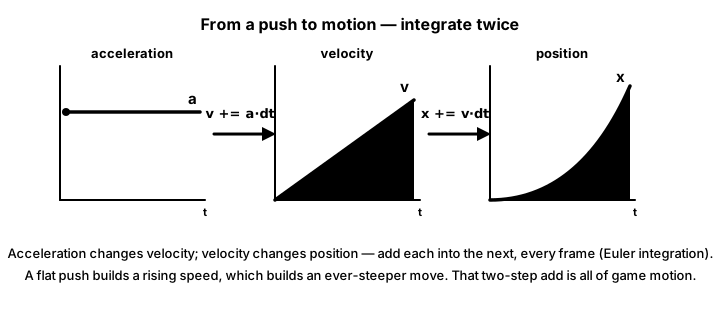
- Integration: How position changes over time based on velocity
Interactive Physics Playground
Explore velocity and acceleration concepts!
Demo: Constant Velocity
Velocity: 0, 0 | Acceleration: 0, 0
Basic Position, Velocity, and Acceleration
import pygame
import math

class PhysicsObject:
    def __init__(self, x, y):
        # Position (where the object is)
        self.position = pygame.math.Vector2(x, y)

        # Velocity (how fast position changes)
        self.velocity = pygame.math.Vector2(0, 0)

        # Acceleration (how fast velocity changes)
        self.acceleration = pygame.math.Vector2(0, 0)

        # Physical properties
        self.mass = 1.0
        self.radius = 10

    def apply_force(self, force):
        """Apply a force to the object (F = ma, so a = F/m)"""
        if self.mass > 0:
            self.acceleration += force / self.mass

    def update(self, dt):
        """Update physics simulation"""
        # Update velocity: v = v0 + a*t
        self.velocity += self.acceleration * dt

        # Update position: x = x0 + v*t
        self.position += self.velocity * dt

        # Reset acceleration (forces must be applied each frame)
        self.acceleration = pygame.math.Vector2(0, 0)

    def draw(self, screen):
        """Draw the object"""
        pygame.draw.circle(screen, (100, 200, 255),
                         (int(self.position.x), int(self.position.y)),
                         self.radius)

# Example: Basic motion
def basic_motion_example():
    pygame.init()
    screen = pygame.display.set_mode((800, 600))
    clock = pygame.time.Clock()

    # Create object
    obj = PhysicsObject(100, 300)

    # Set initial velocity
    obj.velocity.x = 100  # pixels per second

    running = True
    while running:
        dt = clock.tick(60) / 1000.0  # Delta time in seconds

        for event in pygame.event.get():
            if event.type == pygame.QUIT:
                running = False

        # Apply constant acceleration (like gravity)
        obj.apply_force(pygame.math.Vector2(0, 200))  # Downward force

        # Update physics
        obj.update(dt)

        # Bounce off floor
        if obj.position.y > 580:
            obj.position.y = 580
            obj.velocity.y *= -0.8  # Bounce with energy loss

        # Draw
        screen.fill((30, 30, 30))
        obj.draw(screen)
        pygame.display.flip()

    pygame.quit()
Types of Motion
# Different motion patterns

class MotionExamples:
    @staticmethod
    def constant_velocity(obj, speed, direction):
        """Move at constant speed in a direction"""
        obj.velocity.x = speed * math.cos(direction)
        obj.velocity.y = speed * math.sin(direction)

    @staticmethod
    def constant_acceleration(obj, accel_x, accel_y):
        """Apply constant acceleration"""
        obj.apply_force(pygame.math.Vector2(accel_x, accel_y) * obj.mass)

    @staticmethod
    def circular_motion(obj, center, radius, angular_speed):
        """Move in a circle"""
        angle = pygame.time.get_ticks() * angular_speed / 1000.0
        obj.position.x = center[0] + radius * math.cos(angle)
        obj.position.y = center[1] + radius * math.sin(angle)

        # Set velocity tangent to circle
        obj.velocity.x = -radius * angular_speed * math.sin(angle)
        obj.velocity.y = radius * angular_speed * math.cos(angle)

    @staticmethod
    def oscillating_motion(obj, center, amplitude, frequency):
        """Simple harmonic motion"""
        time = pygame.time.get_ticks() / 1000.0
        offset = amplitude * math.sin(2 * math.pi * frequency * time)
        obj.position.x = center[0] + offset

        # Velocity is derivative of position
        obj.velocity.x = amplitude * 2 * math.pi * frequency * \
                        math.cos(2 * math.pi * frequency * time)

    @staticmethod
    def projectile_motion(obj, initial_velocity, gravity):
        """Projectile with gravity"""
        obj.velocity = initial_velocity.copy()
        obj.apply_force(pygame.math.Vector2(0, gravity * obj.mass))

# Advanced physics object with more features
class AdvancedPhysicsObject:
    def __init__(self, x, y):
        self.position = pygame.math.Vector2(x, y)
        self.velocity = pygame.math.Vector2(0, 0)
        self.acceleration = pygame.math.Vector2(0, 0)

        # Rotation
        self.angle = 0  # radians
        self.angular_velocity = 0  # radians per second
        self.angular_acceleration = 0

        # Properties
        self.mass = 1.0
        self.max_speed = 500
        self.max_force = 100

        # Damping (air resistance)
        self.linear_damping = 0.99
        self.angular_damping = 0.99

    def apply_force(self, force, point=None):
        """Apply force at a point (for torque)"""
        # Linear force
        force_vector = pygame.math.Vector2(force)

        # Limit force magnitude
        if force_vector.length() > self.max_force:
            force_vector.scale_to_length(self.max_force)

        self.acceleration += force_vector / self.mass

        # Calculate torque if force applied off-center
        if point:
            r = point - self.position
            torque = r.x * force[1] - r.y * force[0]
            self.angular_acceleration += torque / self.mass

    def update(self, dt):
        """Advanced physics update"""
        # Update linear motion
        self.velocity += self.acceleration * dt

        # Limit speed
        if self.velocity.length() > self.max_speed:
            self.velocity.scale_to_length(self.max_speed)

        # Apply damping
        self.velocity *= self.linear_damping

        # Update position
        self.position += self.velocity * dt

        # Update rotation
        self.angular_velocity += self.angular_acceleration * dt
        self.angular_velocity *= self.angular_damping
        self.angle += self.angular_velocity * dt

        # Reset accelerations
        self.acceleration = pygame.math.Vector2(0, 0)
        self.angular_acceleration = 0
Integration Methods
# Different integration methods for more accurate physics

class IntegrationMethods:
    @staticmethod
    def euler(obj, dt):
        """Simple Euler integration (less accurate but fast)"""
        obj.velocity += obj.acceleration * dt
        obj.position += obj.velocity * dt

    @staticmethod
    def velocity_verlet(obj, dt):
        """Velocity Verlet integration (more accurate)"""
        # Store old acceleration
        old_acceleration = obj.acceleration.copy()

        # Update position
        obj.position += obj.velocity * dt + old_acceleration * (0.5 * dt * dt)

        # Calculate new acceleration (would involve recalculating forces)
        # new_acceleration = calculate_acceleration()

        # Update velocity
        obj.velocity += (old_acceleration + obj.acceleration) * (0.5 * dt)

    @staticmethod
    def runge_kutta_4(obj, dt):
        """4th order Runge-Kutta (very accurate but slower)"""
        # Store initial state
        initial_pos = obj.position.copy()
        initial_vel = obj.velocity.copy()

        # Calculate k1
        k1_vel = obj.acceleration.copy()
        k1_pos = obj.velocity.copy()

        # Calculate k2
        obj.position = initial_pos + k1_pos * (dt/2)
        obj.velocity = initial_vel + k1_vel * (dt/2)
        k2_vel = obj.acceleration.copy()
        k2_pos = obj.velocity.copy()

        # Calculate k3
        obj.position = initial_pos + k2_pos * (dt/2)
        obj.velocity = initial_vel + k2_vel * (dt/2)
        k3_vel = obj.acceleration.copy()
        k3_pos = obj.velocity.copy()

        # Calculate k4
        obj.position = initial_pos + k3_pos * dt
        obj.velocity = initial_vel + k3_vel * dt
        k4_vel = obj.acceleration.copy()
        k4_pos = obj.velocity.copy()

        # Final update
        obj.position = initial_pos + (k1_pos + 2*k2_pos + 2*k3_pos + k4_pos) * (dt/6)
        obj.velocity = initial_vel + (k1_vel + 2*k2_vel + 2*k3_vel + k4_vel) * (dt/6)
Practical Movement Systems
# Player movement with acceleration
class PlayerPhysics:
    def __init__(self, x, y):
        self.position = pygame.math.Vector2(x, y)
        self.velocity = pygame.math.Vector2(0, 0)
        self.acceleration = pygame.math.Vector2(0, 0)

        # Movement parameters
        self.move_speed = 300
        self.jump_force = -500
        self.gravity = 980
        self.friction = 0.85
        self.air_resistance = 0.98

        # State
        self.on_ground = False
        self.facing_right = True

    def handle_input(self, keys):
        """Process player input"""
        # Reset horizontal acceleration
        self.acceleration.x = 0

        # Left/Right movement
        if keys[pygame.K_LEFT]:
            self.acceleration.x = -self.move_speed
            self.facing_right = False
        if keys[pygame.K_RIGHT]:
            self.acceleration.x = self.move_speed
            self.facing_right = True

        # Jump
        if keys[pygame.K_SPACE] and self.on_ground:
            self.velocity.y = self.jump_force
            self.on_ground = False

    def update(self, dt):
        """Update player physics"""
        # Apply gravity
        if not self.on_ground:
            self.acceleration.y = self.gravity
        else:
            self.acceleration.y = 0
            self.velocity.y = 0

        # Update velocity
        self.velocity += self.acceleration * dt

        # Apply friction/air resistance
        if self.on_ground:
            self.velocity.x *= self.friction
        else:
            self.velocity.x *= self.air_resistance

        # Update position
        self.position += self.velocity * dt

        # Ground collision (simple)
        if self.position.y > 500:  # Ground at y=500
            self.position.y = 500
            self.on_ground = True
            self.velocity.y = 0

# Car physics example
class CarPhysics:
    def __init__(self, x, y):
        self.position = pygame.math.Vector2(x, y)
        self.velocity = pygame.math.Vector2(0, 0)
        self.angle = 0  # Car's rotation

        # Car properties
        self.max_speed = 400
        self.acceleration_rate = 200
        self.brake_rate = 300
        self.turn_speed = 3
        self.drag_coefficient = 0.95

        # Current state
        self.speed = 0
        self.steering = 0

    def accelerate(self, throttle):
        """Apply acceleration (-1 to 1)"""
        if throttle > 0:
            self.speed += self.acceleration_rate * throttle
        else:
            self.speed += self.brake_rate * throttle

        self.speed = max(-self.max_speed/2, min(self.max_speed, self.speed))

    def steer(self, direction):
        """Steer the car (-1 to 1)"""
        self.steering = direction

    def update(self, dt):
        """Update car physics"""
        # Apply steering (only if moving)
        if abs(self.speed) > 10:
            self.angle += self.steering * self.turn_speed * dt * (self.speed / self.max_speed)

        # Calculate velocity from speed and angle
        self.velocity.x = math.cos(self.angle) * self.speed
        self.velocity.y = math.sin(self.angle) * self.speed

        # Apply drag
        self.speed *= self.drag_coefficient

        # Update position
        self.position += self.velocity * dt

        # Reset steering
        self.steering = 0
Complete Physics Demo
import pygame
import math
import random

class PhysicsDemo:
    def __init__(self):
        pygame.init()
        self.screen = pygame.display.set_mode((800, 600))
        pygame.display.set_caption("Velocity and Acceleration Demo")
        self.clock = pygame.time.Clock()
        self.font = pygame.font.Font(None, 24)

        # Create physics objects
        self.objects = []
        self.create_demo_objects()

        # Demo settings
        self.show_vectors = True
        self.show_trails = True
        self.selected_object = 0
        self.gravity_enabled = True

    def create_demo_objects(self):
        """Create various demo objects"""
        # Bouncing ball
        ball = PhysicsObject(100, 100)
        ball.velocity = pygame.math.Vector2(150, 0)
        ball.color = (100, 200, 255)
        ball.name = "Bouncing Ball"
        self.objects.append(ball)

        # Orbiting object
        orbiter = PhysicsObject(400, 200)
        orbiter.velocity = pygame.math.Vector2(0, 150)
        orbiter.color = (255, 100, 100)
        orbiter.name = "Orbiter"
        orbiter.orbit_center = pygame.math.Vector2(400, 300)
        self.objects.append(orbiter)

        # Rocket
        rocket = PhysicsObject(600, 500)
        rocket.velocity = pygame.math.Vector2(0, 0)
        rocket.color = (100, 255, 100)
        rocket.name = "Rocket"
        rocket.has_thrust = True
        self.objects.append(rocket)

    def handle_events(self):
        for event in pygame.event.get():
            if event.type == pygame.QUIT:
                return False
            elif event.type == pygame.KEYDOWN:
                if event.key == pygame.K_TAB:
                    self.selected_object = (self.selected_object + 1) % len(self.objects)
                elif event.key == pygame.K_v:
                    self.show_vectors = not self.show_vectors
                elif event.key == pygame.K_t:
                    self.show_trails = not self.show_trails
                elif event.key == pygame.K_g:
                    self.gravity_enabled = not self.gravity_enabled
                elif event.key == pygame.K_r:
                    self.create_demo_objects()
                elif event.key == pygame.K_SPACE:
                    # Add random force to selected object
                    if self.objects:
                        obj = self.objects[self.selected_object]
                        force = pygame.math.Vector2(
                            random.uniform(-200, 200),
                            random.uniform(-200, 200)
                        )
                        obj.apply_force(force)
            elif event.type == pygame.MOUSEBUTTONDOWN:
                # Create new object at mouse position
                pos = pygame.mouse.get_pos()
                new_obj = PhysicsObject(pos[0], pos[1])
                new_obj.velocity = pygame.math.Vector2(
                    random.uniform(-100, 100),
                    random.uniform(-100, 100)
                )
                new_obj.color = (
                    random.randint(100, 255),
                    random.randint(100, 255),
                    random.randint(100, 255)
                )
                new_obj.name = f"Object {len(self.objects) + 1}"
                self.objects.append(new_obj)

        # Continuous input
        keys = pygame.key.get_pressed()
        if self.objects:
            obj = self.objects[self.selected_object]

            # Apply forces with arrow keys
            force_amount = 100
            if keys[pygame.K_LEFT]:
                obj.apply_force(pygame.math.Vector2(-force_amount, 0))
            if keys[pygame.K_RIGHT]:
                obj.apply_force(pygame.math.Vector2(force_amount, 0))
            if keys[pygame.K_UP]:
                obj.apply_force(pygame.math.Vector2(0, -force_amount))
            if keys[pygame.K_DOWN]:
                obj.apply_force(pygame.math.Vector2(0, force_amount))

        return True

    def update(self, dt):
        """Update physics simulation"""
        for obj in self.objects:
            # Apply gravity if enabled
            if self.gravity_enabled:
                obj.apply_force(pygame.math.Vector2(0, 300 * obj.mass))

            # Special behaviors
            if hasattr(obj, 'orbit_center'):
                # Apply centripetal force
                to_center = obj.orbit_center - obj.position
                if to_center.length() > 0:
                    to_center.normalize_ip()
                    centripetal = to_center * (obj.velocity.length_squared() / 100)
                    obj.apply_force(centripetal)

            if hasattr(obj, 'has_thrust') and obj.has_thrust:
                # Apply upward thrust
                thrust = pygame.math.Vector2(0, -500)
                obj.apply_force(thrust)

            # Update physics
            obj.update(dt)

            # Boundary collisions
            if obj.position.x - obj.radius < 0:
                obj.position.x = obj.radius
                obj.velocity.x *= -0.8
            elif obj.position.x + obj.radius > 800:
                obj.position.x = 800 - obj.radius
                obj.velocity.x *= -0.8

            if obj.position.y - obj.radius < 0:
                obj.position.y = obj.radius
                obj.velocity.y *= -0.8
            elif obj.position.y + obj.radius > 600:
                obj.position.y = 600 - obj.radius
                obj.velocity.y *= -0.8

    def draw(self):
        """Draw everything"""
        self.screen.fill((20, 20, 30))

        # Draw grid
        for x in range(0, 800, 50):
            pygame.draw.line(self.screen, (30, 30, 40), (x, 0), (x, 600))
        for y in range(0, 600, 50):
            pygame.draw.line(self.screen, (30, 30, 40), (0, y), (800, y))

        # Draw objects
        for i, obj in enumerate(self.objects):
            # Draw trail
            if self.show_trails and hasattr(obj, 'trail'):
                if len(obj.trail) > 1:
                    pygame.draw.lines(self.screen, obj.color, False, obj.trail, 1)

            # Draw object
            color = obj.color
            if i == self.selected_object:
                # Highlight selected
                pygame.draw.circle(self.screen, (255, 255, 255),
                                 (int(obj.position.x), int(obj.position.y)),
                                 obj.radius + 3, 2)

            pygame.draw.circle(self.screen, color,
                             (int(obj.position.x), int(obj.position.y)),
                             obj.radius)

            # Draw vectors
            if self.show_vectors:
                # Velocity vector (green)
                vel_end = obj.position + obj.velocity * 0.2
                pygame.draw.line(self.screen, (0, 255, 0),
                               (obj.position.x, obj.position.y),
                               (vel_end.x, vel_end.y), 2)

                # Acceleration vector (red)
                acc_end = obj.position + obj.acceleration * 10
                pygame.draw.line(self.screen, (255, 0, 0),
                               (obj.position.x, obj.position.y),
                               (acc_end.x, acc_end.y), 2)

        # Draw UI
        self.draw_ui()

    def draw_ui(self):
        """Draw user interface"""
        y_offset = 10

        # Instructions
        texts = [
            "Tab: Select Object | V: Vectors | T: Trails | G: Gravity",
            "Arrow Keys: Apply Force | Space: Random Force | Click: New Object",
            f"Gravity: {'ON' if self.gravity_enabled else 'OFF'}",
            ""
        ]

        # Selected object info
        if self.objects:
            obj = self.objects[self.selected_object]
            texts.extend([
                f"Selected: {obj.name}",
                f"Position: ({obj.position.x:.1f}, {obj.position.y:.1f})",
                f"Velocity: ({obj.velocity.x:.1f}, {obj.velocity.y:.1f}) = {obj.velocity.length():.1f}",
                f"Acceleration: ({obj.acceleration.x:.1f}, {obj.acceleration.y:.1f})"
            ])

        for text in texts:
            rendered = self.font.render(text, True, (255, 255, 255))
            self.screen.blit(rendered, (10, y_offset))
            y_offset += 25

    def run(self):
        running = True
        dt = 0

        while running:
            running = self.handle_events()
            self.update(dt)
            self.draw()
            pygame.display.flip()
            dt = self.clock.tick(60) / 1000.0

        pygame.quit()

# Enhanced PhysicsObject for the demo
class PhysicsObject:
    def __init__(self, x, y):
        self.position = pygame.math.Vector2(x, y)
        self.velocity = pygame.math.Vector2(0, 0)
        self.acceleration = pygame.math.Vector2(0, 0)
        self.mass = 1.0
        self.radius = 15
        self.color = (100, 200, 255)
        self.name = "Object"
        self.trail = []
        self.max_trail_length = 50

    def apply_force(self, force):
        if self.mass > 0:
            self.acceleration += force / self.mass

    def update(self, dt):
        # Update physics
        self.velocity += self.acceleration * dt
        self.position += self.velocity * dt

        # Update trail
        self.trail.append((self.position.x, self.position.y))
        if len(self.trail) > self.max_trail_length:
            self.trail.pop(0)

        # Reset acceleration
        self.acceleration = pygame.math.Vector2(0, 0)

if __name__ == "__main__":
    demo = PhysicsDemo()
    demo.run()
Best Practices
⚡ Physics Optimization Tips
- Use Delta Time: Always multiply by dt for frame-independent physics
- Fixed Timestep: Consider fixed timestep for deterministic physics
- Vector Math: Use pygame.math.Vector2 for cleaner code
- Force Accumulation: Reset acceleration after each update
- Limit Values: Cap maximum velocity and acceleration
- Energy Conservation: Use damping to prevent infinite energy
- Integration Method: Choose based on accuracy needs
Common Physics Patterns
🎮 Game Physics Applications
- Platformer: Gravity, jump arcs, momentum
- Racing: Acceleration, braking, turning forces
- Space Game: Thrust, inertia, orbital mechanics
- Puzzle: Trajectory prediction, force indicators
- Sports: Ball physics, spin, air resistance
- Action: Explosions, knockback, recoil
Practice Exercises
🎯 Physics Challenges!
- Lunar Lander: Control thrust to land safely
- Angry Birds Clone: Projectile motion with targets
- Racing Physics: Car with realistic acceleration/braking
- Pendulum: Swinging physics simulation
- Asteroid Field: Multiple objects with gravity
- Rocket Launch: Multi-stage rocket with fuel
Key Takeaways
- 📍 Position defines where an object is
- ➡️ Velocity is the rate of change of position
- ⚡ Acceleration is the rate of change of velocity
- 🎯 Forces cause acceleration (F = ma)
- ⏱️ Always use delta time for consistent physics
- 🔄 Integration methods affect accuracy
- 🎮 Good physics makes games feel responsive
🏋️♂️ Practice Exercise: Apply Force, See Motion
🏋️♂️ Exercise 1: F = ma + Euler Integration in 30 Lines
Objective: Build a tiny Pygame demo that exercises the three pillar patterns from this lesson in one program: F = ma via apply_force(force) dividing the input force by the object's mass to produce an acceleration delta; Euler integration via velocity += acceleration * dt; position += velocity * dt to advance state by one frame; and the critical reset-acceleration-each-frame rule (acceleration = Vector2(0, 0) at the end of update()) so accumulated forces don't carry into the next frame and exponentially launch the object off-screen. Hold ARROW keys to apply a 200-unit thrust force in that direction; release and the object drifts on inertia (proving velocity persists when no force is applied) — exactly the behavior of the lesson's PhysicsObject.update() made interactive.
Instructions:
- Initialize a
pygame.math.Vector2forposition(screen center),velocity(0, 0), andacceleration(0, 0); setmass = 1.0. - In the game loop, read
dt = clock.tick(60) / 1000.0in seconds — the lesson's frame-rate-independence rule. - Poll
pygame.key.get_pressed()and for each held arrow key, callapply_force(Vector2(±200, 0))orVector2(0, ±200). - Inside
apply_force(force), doself.acceleration += force / self.mass— the F = ma rearrangement the lesson teaches. - Inside
update(dt), integrate Euler-style:velocity += acceleration * dtthenposition += velocity * dt. - At the very end of
update(), resetself.acceleration = Vector2(0, 0)— Best Practice 'Force Accumulation' from this lesson. - Draw the object as a circle at
position, plus a HUD line showing live velocity magnitude so inertia is visible.
💡 Hint
The two easy ways to break this demo are both instructive: (a) skip the dt multiplications and the object moves the same number of pixels per frame instead of per second — try it on a 30 FPS machine vs 60 FPS and the object literally moves twice as fast on the faster machine; (b) skip the acceleration reset at the end of update() and the acceleration accumulates across frames — hold the arrow key for one second and the object launches off-screen exponentially (acceleration grows, velocity grows from acceleration, so velocity grows quadratically). Both bugs appear in real codebases.
✅ Example Solution
import pygame
from pygame.math import Vector2

pygame.init()
W, H = 600, 400
screen = pygame.display.set_mode((W, H))
pygame.display.set_caption("Apply Force, See Motion")
clock = pygame.time.Clock()
font = pygame.font.SysFont(None, 24)

class PhysicsObject:
    def __init__(self, x, y):
        self.position = Vector2(x, y)
        self.velocity = Vector2(0, 0)
        self.acceleration = Vector2(0, 0)
        self.mass = 1.0

    def apply_force(self, force):
        # F = ma  =>  a += F / m
        self.acceleration += force / self.mass

    def update(self, dt):
        # Euler integration: v += a*dt; x += v*dt
        self.velocity += self.acceleration * dt
        self.position += self.velocity * dt
        # Critical: reset acceleration each frame
        # (forces are re-applied per frame, not persistent)
        self.acceleration = Vector2(0, 0)

obj = PhysicsObject(W // 2, H // 2)
THRUST = 200  # units of force per axis
running = True
while running:
    dt = clock.tick(60) / 1000.0  # seconds since last frame
    for event in pygame.event.get():
        if event.type == pygame.QUIT:
            running = False
    keys = pygame.key.get_pressed()
    if keys[pygame.K_LEFT]:  obj.apply_force(Vector2(-THRUST, 0))
    if keys[pygame.K_RIGHT]: obj.apply_force(Vector2( THRUST, 0))
    if keys[pygame.K_UP]:    obj.apply_force(Vector2(0, -THRUST))
    if keys[pygame.K_DOWN]:  obj.apply_force(Vector2(0,  THRUST))
    obj.update(dt)
    screen.fill((20, 20, 30))
    pygame.draw.circle(screen, (100, 200, 255),
                       (int(obj.position.x), int(obj.position.y)), 12)
    hud = font.render(f"|v| = {obj.velocity.length():.1f}", True, (255, 255, 255))
    screen.blit(hud, (10, 10))
    pygame.display.flip()
pygame.quit()
🎯 Quick Quiz
Question 1: Inside apply_force(force), the lesson's PhysicsObject does self.acceleration += force / self.mass. Which physical law does this implement?
Question 2: The lesson's update(dt) does velocity += acceleration * dt; position += velocity * dt. Why multiply by dt instead of just doing velocity += acceleration; position += velocity?
Question 3: The lesson's PhysicsObject.update() ends with self.acceleration = Vector2(0, 0) after integrating velocity and position. What goes wrong if you remove that reset line?
What's Next?
Now that you understand velocity and acceleration, next we'll add gravity to create more realistic physics simulations!