Character Controllers
Creating Responsive Character Movement
Character controllers define how your game feels to play! Learn responsive movement, coyote time, jump buffering, variable jump height, wall jumps, dashing, and all the techniques that make platformers feel amazing! 🎮🏃♂️✨
Understanding Character Controllers
🏃♂️ The Athlete Analogy
Think of character controllers like an athlete's movements:
- Acceleration: Building up speed from a standstill
- Friction: Sliding to a stop
- Jump Arc: The natural curve of a jump
- Air Control: Adjusting position mid-air
- Landing: Absorbing impact
- Momentum: Maintaining speed through movements
Interactive Character Controller Demo
Use Arrow Keys/WASD to move, Space to jump, Shift to dash. Test different mechanics!
State: IDLE | Velocity: (0, 0) | Grounded: true
Jumps: 1 | Can Dash: true | Coyote: 0ms | Buffer: 0ms
Character Controller Implementation
import pygame
import math
from enum import Enum
from typing import List, Optional

class PlayerState(Enum):
    """Player state machine states"""
    IDLE = "idle"
    RUNNING = "running"
    JUMPING = "jumping"
    FALLING = "falling"
    WALL_SLIDING = "wall_sliding"
    DASHING = "dashing"
    LANDING = "landing"

class CharacterController:
    """Advanced 2D platformer character controller"""
    def __init__(self, x: float, y: float):
        # Position and dimensions
        self.rect = pygame.Rect(x, y, 24, 32)

        # Velocity
        self.velocity = pygame.Vector2(0, 0)
        self.facing = 1  # 1 for right, -1 for left

        # Movement parameters
        self.run_speed = 250
        self.acceleration = 1500
        self.friction = 1500
        self.air_friction = 100
        self.air_control = 0.5

        # Jump parameters
        self.jump_power = 450
        self.gravity = 1000
        self.max_fall_speed = 600
        self.jump_cut_multiplier = 0.5

        # State
        self.state = PlayerState.IDLE
        self.grounded = False
        self.touching_wall = False
        self.wall_direction = 0

        # Advanced mechanics
        self.setup_advanced_mechanics()

    def setup_advanced_mechanics(self):
        """Initialize advanced movement mechanics"""
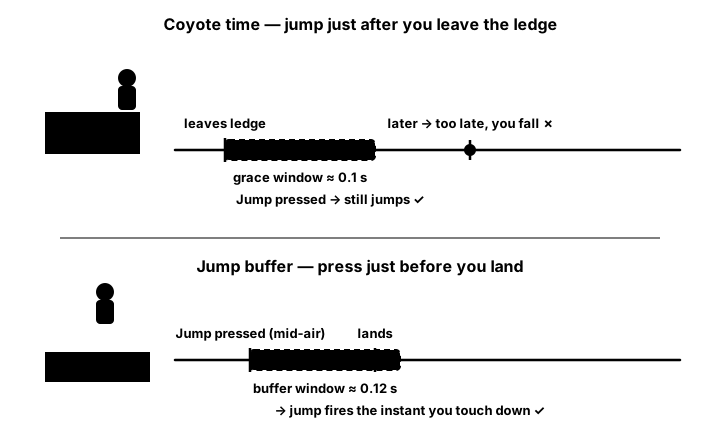
        # Coyote time (grace period for jumping after leaving platform)
        self.coyote_time = 0
        self.max_coyote_time = 0.1  # 100ms
        self.was_grounded = False

        # Jump buffering (register jump input before landing)
        self.jump_buffer_time = 0
        self.max_jump_buffer_time = 0.1  # 100ms

        # Variable jump height
        self.jump_hold_time = 0
        self.max_jump_hold_time = 0.2
        self.is_jumping = False

        # Double/multi jump
        self.jumps_remaining = 1
        self.max_jumps = 1  # Set to 2 for double jump

        # Wall jump
        self.wall_jump_power = 350
        self.wall_jump_horizontal = 200
        self.wall_slide_speed = 50
        self.can_wall_jump = True

        # Dash
        self.dash_speed = 600
        self.dash_duration = 0.15
        self.dash_time = 0
        self.can_dash = True
        self.dash_cooldown = 0.5
        self.dash_cooldown_timer = 0

    def update(self, dt: float, input_state: dict, platforms: List):
        """Update character controller"""
        # Store previous state
        self.was_grounded = self.grounded

        # Update timers
        self.update_timers(dt)

        # Handle input
        self.handle_input(dt, input_state)

        # Apply physics
        self.apply_physics(dt)

        # Check collisions
        self.check_collisions(platforms)

        # Update state machine
        self.update_state()

    def update_timers(self, dt: float):
        """Update various timers"""
        # Coyote time
        if self.was_grounded and not self.grounded:
            self.coyote_time = self.max_coyote_time
        elif self.grounded:
            self.coyote_time = 0
        else:
            self.coyote_time = max(0, self.coyote_time - dt)

        # Jump buffer
        if self.jump_buffer_time > 0:
            self.jump_buffer_time = max(0, self.jump_buffer_time - dt)

        # Dash cooldown
        if self.dash_cooldown_timer > 0:
            self.dash_cooldown_timer -= dt
            if self.dash_cooldown_timer <= 0:
                self.can_dash = True

        # Dash duration
        if self.dash_time > 0:
            self.dash_time -= dt
            if self.dash_time <= 0:
                self.state = PlayerState.FALLING

    def handle_input(self, dt: float, input_state: dict):
        """Process player input"""
        # Horizontal movement
        move_x = 0
        if input_state.get('left'):
            move_x = -1
            self.facing = -1
        elif input_state.get('right'):
            move_x = 1
            self.facing = 1

        # Apply movement based on state
        if self.state != PlayerState.DASHING:
            self.apply_horizontal_movement(move_x, dt)

        # Jump input
        if input_state.get('jump_pressed'):
            self.try_jump()
        elif input_state.get('jump_released') and self.velocity.y < 0:
            # Variable jump height - cut jump short
            if self.is_jumping:
                self.velocity.y *= self.jump_cut_multiplier
                self.is_jumping = False

        # Dash input
        if input_state.get('dash_pressed') and self.can_dash:
            self.start_dash(input_state)

    def apply_horizontal_movement(self, move_x: float, dt: float):
        """Apply horizontal movement with acceleration"""
        if self.grounded:
            # Ground movement
            if move_x != 0:
                self.velocity.x += move_x * self.acceleration * dt
                self.velocity.x = max(-self.run_speed,
                                     min(self.run_speed, self.velocity.x))
            else:
                # Apply friction
                if abs(self.velocity.x) > 10:
                    friction_force = self.friction * dt
                    if self.velocity.x > 0:
                        self.velocity.x = max(0, self.velocity.x - friction_force)
                    else:
                        self.velocity.x = min(0, self.velocity.x + friction_force)
                else:
                    self.velocity.x = 0
        else:
            # Air control
            if move_x != 0:
                self.velocity.x += move_x * self.acceleration * self.air_control * dt
                self.velocity.x = max(-self.run_speed,
                                     min(self.run_speed, self.velocity.x))

    def try_jump(self):
        """Attempt to jump with various conditions"""
        can_jump = False

        # Ground jump or coyote time
        if self.grounded or self.coyote_time > 0:
            can_jump = True
            self.jumps_remaining = self.max_jumps
        # Multi-jump
        elif self.jumps_remaining > 0:
            can_jump = True
        # Wall jump
        elif self.touching_wall and self.can_wall_jump:
            self.perform_wall_jump()
            return
        else:
            # Buffer the jump
            self.jump_buffer_time = self.max_jump_buffer_time

        if can_jump:
            self.perform_jump()

    def perform_jump(self):
        """Execute a jump"""
        self.velocity.y = -self.jump_power
        self.jumps_remaining -= 1
        self.grounded = False
        self.coyote_time = 0
        self.jump_buffer_time = 0
        self.is_jumping = True
        self.state = PlayerState.JUMPING

    def perform_wall_jump(self):
        """Execute a wall jump"""
        self.velocity.y = -self.wall_jump_power
        self.velocity.x = -self.wall_direction * self.wall_jump_horizontal
        self.facing = -self.wall_direction
        self.jumps_remaining = self.max_jumps - 1
        self.state = PlayerState.JUMPING

    def start_dash(self, input_state: dict):
        """Start a dash move"""
        self.state = PlayerState.DASHING
        self.dash_time = self.dash_duration
        self.can_dash = False
        self.dash_cooldown_timer = self.dash_cooldown

        # Determine dash direction
        dash_x = self.facing
        dash_y = 0

        if input_state.get('up'):
            dash_y = -1
        elif input_state.get('down'):
            dash_y = 1

        # Normalize diagonal dash
        magnitude = math.sqrt(dash_x**2 + dash_y**2)
        if magnitude > 0:
            dash_x /= magnitude
            dash_y /= magnitude

        self.velocity.x = dash_x * self.dash_speed
        self.velocity.y = dash_y * self.dash_speed

        # Reset jumps after dash
        self.jumps_remaining = self.max_jumps
Best Practices
⚡ Character Controller Tips
- Responsive Controls: Instant feedback to player input
- Coyote Time: Allow jumps briefly after leaving platforms
- Jump Buffering: Register jump input before landing
- Variable Jump: Different heights based on button hold
- Acceleration Curves: Smooth speed transitions
- Air Control: Limited but present mid-air movement
- State Machine: Clean state management
- Feel Parameters: Easily tweakable values
Key Takeaways
- 🎮 Character controllers define game feel
- ⏱️ Coyote time forgives timing mistakes
- 💾 Jump buffering makes controls responsive
- 📈 Variable jump adds control depth
- 🏃 Acceleration creates weight and momentum
- 🪂 Air control allows mid-jump adjustments
- 🧱 Wall mechanics add movement options
- 💨 Dash abilities increase mobility
🏋️♂️ Practice Exercise
🏋️♂️ Exercise 1: Forgive the Player — Coyote + Buffer + Variable Jump
Objective: Build a runnable pygame mini-platformer that integrates the three forgiveness/responsiveness pillars from the lesson — coyote time, jump buffering, and variable jump height — into one ~90-line program. Three runtime toggles (1/2/3) flip each layer ON/OFF independently so the difference each mechanic makes is felt directly through play.
Instructions:
- Set up a 640×360 pygame window with three rectangles: a floor and two raised platforms with a gap between them (the gap is what makes coyote time and jump buffer feel necessary).
- Track player
x,y,vx,vy,grounded, plus three forgiveness state variables:coyote_t,buffer_t, andjump_holding(used by variable jump). - For horizontal movement, apply the ground/air asymmetry from the lesson: ground uses
vx += move_x * ACCEL * dt, air usesvx += move_x * ACCEL * AIR_CONTROL * dtwithAIR_CONTROL = 0.5. On ground with no input, decayvxtoward zero byFRICTION * dt. - Each frame, count down
coyote_tandbuffer_tbydt(clamped at zero). The frame the player goes from grounded to airborne (and toggle 1 is ON), setcoyote_t = COYOTE_MAX(≈100 ms). - On SPACE press, fire a jump (
vy = -JUMP_POWER) if eithergroundedORcoyote_t > 0; otherwise (and if toggle 2 is ON), setbuffer_t = BUFFER_MAXto remember the press. The moment the player transitions back to grounded withbuffer_t > 0, consume the buffer and fire a jump. - For variable jump, on SPACE release while
vy < 0andjump_holdingis True (and toggle 3 is ON), halvevy— short tap = small hop, hold = full jump. - Apply gravity (
vy += GRAVITY * dt) and integrate position. Resolve platform collisions: onvy > 0overlap, snapplayer.bottom = plat.topand setgrounded = True; onvy < 0overlap, snapplayer.top = plat.bottomand zerovy. - Render the platforms, the player, and a HUD showing each toggle's ON/OFF state plus the live
coyote_t/buffer_tmillisecond countdowns. Try walking off the right edge of the left platform with coyote OFF vs ON, and try pressing SPACE just before landing with buffer OFF vs ON — each mechanic's contribution becomes obvious through the contrast.
💡 Hint
Track was_grounded separately from grounded across the frame so you can detect the two transition edges: was_grounded and not grounded is the moment to arm coyote, and not was_grounded and grounded is the moment to consume the buffer. Without that two-state comparison the timers fire on the wrong frames.
✅ Example Solution
"""Forgive the Player — coyote time + jump buffer + variable jump in pygame."""
import pygame, sys

pygame.init()
SCREEN = pygame.display.set_mode((640, 360))
pygame.display.set_caption("Forgive the Player")
CLOCK = pygame.time.Clock()
FONT = pygame.font.SysFont("monospace", 14)

# Level: floor + two platforms with a gap (x=240..380)
PLATFORMS = [
    pygame.Rect(0, 320, 640, 40),
    pygame.Rect(60, 230, 180, 12),
    pygame.Rect(380, 230, 200, 12),
]

# Player + state
player = pygame.Rect(80, 200, 24, 32)
vx, vy = 0.0, 0.0
grounded = False

# Tunables from the lesson
RUN_SPEED, ACCEL, FRICTION = 220.0, 1500.0, 1500.0
AIR_CONTROL, GRAVITY, JUMP_POWER = 0.5, 1400.0, 480.0

# Forgiveness state (seconds)
coyote_t, buffer_t = 0.0, 0.0
jump_holding = False
COYOTE_MAX, BUFFER_MAX = 0.10, 0.10

toggles = {"coyote": True, "buffer": True, "variable": True}

while True:
    dt = CLOCK.tick(60) / 1000.0
    space_pressed = space_released = False

    for e in pygame.event.get():
        if e.type == pygame.QUIT:
            pygame.quit(); sys.exit()
        if e.type == pygame.KEYDOWN:
            if e.key == pygame.K_SPACE: space_pressed = True
            if e.key == pygame.K_1: toggles["coyote"]   = not toggles["coyote"]
            if e.key == pygame.K_2: toggles["buffer"]   = not toggles["buffer"]
            if e.key == pygame.K_3: toggles["variable"] = not toggles["variable"]
        if e.type == pygame.KEYUP and e.key == pygame.K_SPACE:
            space_released = True

    keys = pygame.key.get_pressed()
    move_x = (1 if keys[pygame.K_RIGHT] or keys[pygame.K_d] else 0) \
           - (1 if keys[pygame.K_LEFT]  or keys[pygame.K_a] else 0)

    # Horizontal: ground vs air asymmetry
    mult = 1.0 if grounded else AIR_CONTROL
    if move_x != 0:
        vx = max(-RUN_SPEED, min(RUN_SPEED, vx + move_x * ACCEL * mult * dt))
    elif grounded:
        vx = max(0, vx - FRICTION*dt) if vx > 0 else min(0, vx + FRICTION*dt)

    # Forgiveness countdowns
    if toggles["coyote"] and not grounded:
        coyote_t = max(0.0, coyote_t - dt)
    if toggles["buffer"]:
        buffer_t = max(0.0, buffer_t - dt)

    # Jump press
    if space_pressed:
        if grounded or (toggles["coyote"] and coyote_t > 0):
            vy = -JUMP_POWER
            grounded = False; coyote_t = 0
            jump_holding = True
        elif toggles["buffer"]:
            buffer_t = BUFFER_MAX

    # Variable jump cut on early release
    if toggles["variable"] and space_released and vy < 0 and jump_holding:
        vy *= 0.5
        jump_holding = False

    # Gravity + integrate
    vy += GRAVITY * dt
    player.x += int(vx * dt)
    player.y += int(vy * dt)

    # Platform collisions
    was_grounded = grounded
    grounded = False
    for plat in PLATFORMS:
        if player.colliderect(plat):
            if vy > 0:
                player.bottom = plat.top; vy = 0
                grounded = True; jump_holding = False
            elif vy < 0:
                player.top = plat.bottom; vy = 0

    # Edge transitions: arm coyote on leave, consume buffer on land
    if was_grounded and not grounded and toggles["coyote"]:
        coyote_t = COYOTE_MAX
    if not was_grounded and grounded and toggles["buffer"] and buffer_t > 0:
        vy = -JUMP_POWER
        grounded = False; buffer_t = 0; jump_holding = True

    # Render
    SCREEN.fill((30, 30, 50))
    for plat in PLATFORMS:
        pygame.draw.rect(SCREEN, (90, 110, 130), plat)
    pygame.draw.rect(SCREEN, (240, 200, 80), player)
    hud = [
        f"[1] Coyote:   {'ON ' if toggles['coyote'] else 'OFF'}  ({coyote_t*1000:5.0f} ms)",
        f"[2] Buffer:   {'ON ' if toggles['buffer'] else 'OFF'}  ({buffer_t*1000:5.0f} ms)",
        f"[3] Variable: {'ON' if toggles['variable'] else 'OFF'}",
        f"grounded={grounded}  vy={vy:6.1f}",
    ]
    for i, line in enumerate(hud):
        SCREEN.blit(FONT.render(line, True, (220,220,220)), (10, 8 + i*18))
    pygame.display.flip()
🎯 Quick Quiz
Question 1: The lesson's try_jump() method gates a jump on if self.grounded or self.coyote_time > 0, where self.coyote_time counts down from a small positive value (~100 ms) the moment the player transitions from grounded to airborne. What player problem does this design solve?
Question 2: The lesson's try_jump() method has a fallback branch when no jump can fire immediately: self.jump_buffer_time = self.max_jump_buffer_time. On subsequent frames, the moment the player becomes grounded, this stored value is consumed and a jump fires. What player problem does this design solve?
Question 3: In the lesson's apply_horizontal_movement, ground movement applies velocity.x += move_x * self.acceleration * dt, while airborne movement applies velocity.x += move_x * self.acceleration * self.air_control * dt with self.air_control set to 0.5. Why apply the air_control multiplier mid-air but not on the ground?
What's Next?
With responsive character controls mastered, next we'll build level design tools to create engaging platformer levels!