Screen Shake and Effects
Making Games Feel Amazing
Transform your games from functional to phenomenal! Master screen shake, impact effects, freeze frames, and visual feedback techniques that create visceral, satisfying gameplay experiences! 💥📳✨
Understanding Game Feel
💥 The Impact Analogy
Think of game feel like movie special effects:
- Screen Shake: The camera shakes during explosions
- Hit Stop: Time freezes at the moment of impact
- Chromatic Aberration: Colors split during intense moments
- Recoil: Everything reacts to force
- Particle Bursts: Visual debris and sparkles
- Sound Sync: Audio reinforces visual impact
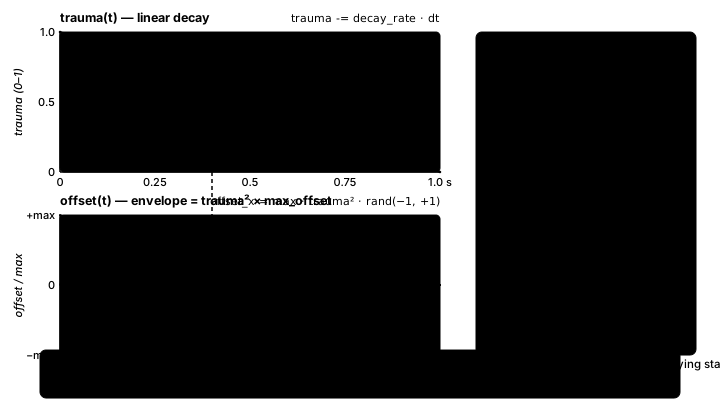
Interactive Screen Shake Demo
Click to create explosions! Experience different screen shake techniques and visual effects!
Enable/Disable Effects:
Active Shakes: 0 | Particles: 0 | Camera Offset: (0, 0) | Time Scale: 1.0
Screen Shake Implementation in Python
import pygame
import math
import random
from typing import List, Tuple, Optional
from enum import Enum

class ShakeType(Enum):
    RANDOM = "random"
    HORIZONTAL = "horizontal"
    VERTICAL = "vertical"
    CIRCULAR = "circular"
    DIRECTIONAL = "directional"

class DecayType(Enum):
    LINEAR = "linear"
    EXPONENTIAL = "exponential"
    ELASTIC = "elastic"
    BOUNCE = "bounce"

class ScreenShake:
    """Advanced screen shake system"""

    def __init__(self) -> None:
        self.trauma: float = 0.0  # Current trauma level (0-1)
        self.max_offset: int = 50  # Maximum shake offset in pixels
        self.max_angle: int = 5  # Maximum rotation in degrees
        self.decay_rate: float = 0.8  # Trauma decay per second

        # Camera properties
        self.offset_x: float = 0
        self.offset_y: float = 0
        self.angle: float = 0
        self.zoom: float = 1.0

        # Active shakes
        self.shakes: List[Shake] = []

    def add_trauma(self, amount: float) -> None:
        """Add trauma (0-1) to trigger shake"""
        self.trauma = min(1.0, self.trauma + amount)

    def add_shake(self, intensity: float, duration: float,
                  shake_type: ShakeType = ShakeType.RANDOM,
                  decay_type: DecayType = DecayType.EXPONENTIAL) -> None:
        """Add a specific shake effect"""
        shake = Shake(intensity, duration, shake_type, decay_type)
        self.shakes.append(shake)

    def update(self, dt: float) -> None:
        """Update all active shakes"""
        # Update trauma-based shake
        if self.trauma > 0:
            self.trauma = max(0, self.trauma - self.decay_rate * dt)

            # Calculate shake amount (trauma^2 for better feel)
            shake = self.trauma * self.trauma

            # Random offset
            self.offset_x = self.max_offset * shake * (random.random() * 2 - 1)
            self.offset_y = self.max_offset * shake * (random.random() * 2 - 1)
            self.angle = self.max_angle * shake * (random.random() * 2 - 1)
            self.zoom = 1 + shake * 0.1
        else:
            self.offset_x = 0
            self.offset_y = 0
            self.angle = 0
            self.zoom = 1.0

        # Update individual shakes
        total_x = 0
        total_y = 0
        total_angle = 0

        self.shakes = [s for s in self.shakes if not s.is_finished()]

        for shake in self.shakes:
            shake.update(dt)
            offset = shake.get_offset()
            total_x += offset[0]
            total_y += offset[1]
            total_angle += shake.get_rotation()

        # Combine all shakes
        self.offset_x += total_x
        self.offset_y += total_y
        self.angle += total_angle

    def apply_to_surface(self, surface: pygame.Surface, screen: pygame.Surface) -> None:
        """Apply shake transformation to rendered surface"""
        # Create transformed surface
        if abs(self.angle) > 0.01:
            rotated = pygame.transform.rotate(surface, self.angle)
        else:
            rotated = surface

        if abs(self.zoom - 1.0) > 0.01:
            size = rotated.get_size()
            new_size = (int(size[0] * self.zoom), int(size[1] * self.zoom))
            zoomed = pygame.transform.scale(rotated, new_size)
        else:
            zoomed = rotated

        # Calculate position with offset
        rect = zoomed.get_rect()
        rect.center = (screen.get_width() // 2 + self.offset_x,
                      screen.get_height() // 2 + self.offset_y)

        screen.blit(zoomed, rect)

class Shake:
    """Individual shake instance"""

    def __init__(self, intensity: float, duration: float,
                 shake_type: ShakeType, decay_type: DecayType) -> None:
        self.intensity: float = intensity
        self.duration: float = duration
        self.shake_type: ShakeType = shake_type
        self.decay_type: DecayType = decay_type
        self.elapsed: float = 0
        self.frequency: int = 30  # Oscillation frequency

    def update(self, dt: float) -> None:
        """Update shake progress"""
        self.elapsed += dt

    def is_finished(self) -> bool:
        """Check if shake is complete"""
        return self.elapsed >= self.duration

    def get_decay(self) -> float:
        """Calculate decay based on progress"""
        progress = self.elapsed / self.duration

        if self.decay_type == DecayType.LINEAR:
            return 1 - progress
        elif self.decay_type == DecayType.EXPONENTIAL:
            return (1 - progress) ** 2
        elif self.decay_type == DecayType.ELASTIC:
            return math.cos(progress * math.pi * 4) * (1 - progress)
        elif self.decay_type == DecayType.BOUNCE:
            return abs(math.sin(progress * math.pi * 3)) * (1 - progress)

        return 1 - progress

    def get_offset(self) -> Tuple[float, float]:
        """Get current shake offset"""
        decay = self.get_decay()
        strength = self.intensity * decay

        if self.shake_type == ShakeType.RANDOM:
            return (
                (random.random() * 2 - 1) * strength,
                (random.random() * 2 - 1) * strength
            )
        elif self.shake_type == ShakeType.HORIZONTAL:
            return (
                math.sin(self.elapsed * self.frequency) * strength,
                0
            )
        elif self.shake_type == ShakeType.VERTICAL:
            return (
                0,
                math.sin(self.elapsed * self.frequency) * strength
            )
        elif self.shake_type == ShakeType.CIRCULAR:
            angle = self.elapsed * self.frequency
            return (
                math.cos(angle) * strength,
                math.sin(angle) * strength
            )

        return (0, 0)

    def get_rotation(self) -> float:
        """Get current rotation amount"""
        return (random.random() * 2 - 1) * self.intensity * 0.1 * self.get_decay()

class HitStop:
    """Freeze frame effect system"""

    def __init__(self) -> None:
        self.duration: float = 0
        self.elapsed: float = 0
        self.active: bool = False
        self.time_scale: float = 1.0

    def trigger(self, duration: float) -> None:
        """Trigger hit stop effect"""
        self.duration = duration
        self.elapsed = 0
        self.active = True
        self.time_scale = 0.01

    def update(self, dt: float) -> float:
        """Update and return modified delta time"""
        if self.active:
            self.elapsed += dt

            if self.elapsed >= self.duration:
                self.active = False
                self.time_scale = 1.0

            return dt * self.time_scale

        return dt

class ImpactEffects:
    """Visual impact effects manager"""

    def __init__(self, screen: pygame.Surface) -> None:
        self.screen: pygame.Surface = screen
        self.particles: List[Particle] = []
        self.flashes: List[Flash] = []
        self.ripples: List[Ripple] = []

    def add_impact(self, x: float, y: float, impact_type: str = "normal") -> None:
        """Add impact at position"""
        if impact_type == "explosion":
            self.add_particles(x, y, 30, (255, 100, 0))
            self.add_flash((255, 200, 0, 128), 100)
            self.add_ripple(x, y, 200, 5)
        elif impact_type == "hit":
            self.add_particles(x, y, 10, (255, 255, 255))
            self.add_flash((255, 255, 255, 64), 50)
        elif impact_type == "powerup":
            self.add_particles(x, y, 20, (255, 215, 0))
            self.add_ripple(x, y, 150, 3)

    def add_particles(self, x: float, y: float, count: int, color: Tuple[int, int, int]) -> None:
        """Spawn particles at position"""
        for _ in range(count):
            angle = random.uniform(0, math.pi * 2)
            speed = random.uniform(50, 200)
            self.particles.append(Particle(x, y, angle, speed, color))

    def add_flash(self, color: Tuple[int, int, int, int], duration: float) -> None:
        """Add screen flash effect"""
        self.flashes.append(Flash(color, duration))

    def add_ripple(self, x: float, y: float, max_radius: float, speed: float) -> None:
        """Add ripple effect"""
        self.ripples.append(Ripple(x, y, max_radius, speed))

    def update(self, dt: float) -> None:
        """Update all effects"""
        self.particles = [p for p in self.particles if p.update(dt)]
        self.flashes = [f for f in self.flashes if f.update(dt)]
        self.ripples = [r for r in self.ripples if r.update(dt)]

    def render(self) -> None:
        """Render all effects"""
        for ripple in self.ripples:
            ripple.render(self.screen)

        for particle in self.particles:
            particle.render(self.screen)

        for flash in self.flashes:
            flash.render(self.screen)

class Particle:
    """Particle effect"""

    def __init__(self, x: float, y: float, angle: float, speed: float, color: Tuple[int, int, int]) -> None:
        self.x: float = x
        self.y: float = y
        self.vx: float = math.cos(angle) * speed
        self.vy: float = math.sin(angle) * speed
        self.color: Tuple[int, int, int] = color
        self.life: float = 1.0
        self.size: int = random.randint(2, 6)

    def update(self, dt: float) -> bool:
        """Update particle, return False when dead"""
        self.x += self.vx * dt
        self.y += self.vy * dt
        self.vy += 200 * dt  # Gravity
        self.life -= dt * 2

        return self.life > 0

    def render(self, screen: pygame.Surface) -> None:
        """Render particle"""
        if self.life > 0:
            alpha = int(self.life * 255)
            color = (*self.color, alpha)
            pygame.draw.circle(screen, color[:3],
                             (int(self.x), int(self.y)),
                             int(self.size * self.life))

class Flash:
    """Screen flash effect"""

    def __init__(self, color: Tuple[int, int, int, int], duration: float) -> None:
        self.color: Tuple[int, int, int, int] = color
        self.duration: float = duration
        self.elapsed: float = 0

    def update(self, dt: float) -> bool:
        """Update flash, return False when done"""
        self.elapsed += dt * 1000
        return self.elapsed < self.duration

    def render(self, screen: pygame.Surface) -> None:
        """Render flash overlay"""
        alpha = int((1 - self.elapsed / self.duration) * self.color[3])
        flash_surface = pygame.Surface(screen.get_size())
        flash_surface.fill(self.color[:3])
        flash_surface.set_alpha(alpha)
        screen.blit(flash_surface, (0, 0))

class Ripple:
    """Expanding ripple effect"""

    def __init__(self, x: float, y: float, max_radius: float, speed: float) -> None:
        self.x: float = x
        self.y: float = y
        self.radius: float = 0
        self.max_radius: float = max_radius
        self.speed: float = speed

    def update(self, dt: float) -> bool:
        """Update ripple, return False when done"""
        self.radius += self.speed * dt * 100
        return self.radius < self.max_radius

    def render(self, screen: pygame.Surface) -> None:
        """Render ripple"""
        alpha = 1 - (self.radius / self.max_radius)
        if alpha > 0:
            pygame.draw.circle(screen, (255, 255, 255),
                             (int(self.x), int(self.y)),
                             int(self.radius),
                             max(1, int(3 * alpha)))
Best Practices
⚡ Game Feel Tips
- Less is More: Subtle effects often feel better than extreme ones
- Context Matters: Scale effects to match action importance
- Combine Effects: Layer multiple small effects for big impacts
- Timing: Hit stop makes impacts feel powerful
- Decay Curves: Exponential decay usually feels most natural
- Accessibility: Allow players to reduce or disable effects
- Performance: Pool particles and limit active effects
- Test Thoroughly: Effects should enhance, not distract
Key Takeaways
- 💥 Screen shake adds visceral impact to actions
- ⏸️ Hit stop emphasizes collision moments
- ✨ Particles provide visual feedback and polish
- 📊 Decay curves control how effects fade
- 🎯 Direction matters for shake feel
- 🔄 Combine multiple effects for maximum impact
- ⚙️ Trauma system provides smooth, stacking shakes
- ♿ Always consider accessibility needs
🏋️♂️ Practice Exercise
🏋️♂️ Exercise 1: Impact-Driven Trauma — Squared Envelope on a Camera Offset
Objective: Build an impact-shake demo (~60 lines) that exercises the three pillar trauma-system patterns from this lesson — trauma is additive and clamped, trauma decays linearly, visible shake is trauma squared — and applies the resulting offset to M3's camera world↔screen translation as an additional offset so every world-space draw shakes in lockstep.
Instructions:
- Build a horizontally scrolling world (1600 px wide) with a 32×48 player rect at center; arrow-key or A/D movement at 280 px/s; camera follows player centered with clamp to
[0, WORLD_W − SCREEN_W]per pattern. - Maintain a single trauma float starting at 0.0. On KEYDOWN, accumulate trauma additively with a clamp:
trauma = min(1.0, trauma + amount). Wire 1=0.20 (tap), 2=0.50 (medium), 3=0.90 (big boom). The clamp prevents trauma from exceeding 1.0; the addition makes successive hits stack rather than overwrite. - Each frame, decay trauma LINEARLY:
trauma = max(0.0, trauma − DECAY_RATE * dt)withDECAY_RATE = 0.8(trauma takes ~1.25 s to drain from 1.0 to 0.0). - Compute visible shake as trauma SQUARED:
shake = trauma * trauma. Per-frame random offset:shake_x = MAX_OFFSET * shake * (random.random() * 2 − 1)and same forshake_y, withMAX_OFFSET = 18px. - Apply shake as an ADDITIONAL camera offset during world→screen translation:
screen = (world_x − camera_x + shake_x, world_y − camera_y + shake_y). Use this single transform for the world background blit AND the player rect — every world-space draw shakes together. - HUD prints trauma (linear), shake (squared), and offset_x in pixels every frame so the trauma² relationship is visible: trauma=0.3 → shake=0.09 (barely visible jitter); trauma=0.9 → shake=0.81 (hard shake).
💡 Hint
The lesson's ScreenShake.update method does exactly this in three lines: self.trauma = max(0, self.trauma - self.decay_rate * dt) (linear decay), shake = self.trauma * self.trauma (squared envelope, with the explicit comment # trauma^2 for better feel), and self.offset_x = self.max_offset * shake * (random.random() * 2 - 1) (random within the envelope). The shake offset is THEN added to the camera offset everywhere world coordinates get translated to screen coordinates — said screen = world − camera, this lesson says screen = world − camera + shake. Multiple impacts in rapid succession use the additive-clamped form min(1.0, trauma + amount) from the lesson's add_trauma method so successive hits stack without ever exceeding the max envelope.
✅ Example Solution
import pygame, random

pygame.init()
SCREEN_W, SCREEN_H = 800, 480
WORLD_W = 1600
screen = pygame.display.set_mode((SCREEN_W, SCREEN_H))
clock = pygame.time.Clock()
font = pygame.font.SysFont(None, 22)

# World scene -- pattern: scrollable world wider than screen
world = pygame.Surface((WORLD_W, SCREEN_H))
world.fill((40, 40, 70))
for x in range(0, WORLD_W, 80):
    pygame.draw.rect(world, (60, 110, 60), (x, 360, 78, SCREEN_H - 360))
for x in range(0, WORLD_W, 220):
    pygame.draw.rect(world, (140, 90, 60), (x + 40, 290, 80, 70))

player = pygame.Rect(SCREEN_W // 2, 312, 32, 48)
camera_x = 0

# Trauma state -- Squirrel Eiserloh GDC pattern
trauma = 0.0
DECAY_RATE = 0.8       # linear decay per second
MAX_OFFSET = 18        # max shake pixels at trauma=1.0

running = True
while running:
    dt = clock.tick(60) / 1000.0
    for event in pygame.event.get():
        if event.type == pygame.QUIT:
            running = False
        elif event.type == pygame.KEYDOWN:
            # Trauma is ADDITIVE + CLAMPED at 1.0 -- successive hits stack
            if event.key == pygame.K_1:
                trauma = min(1.0, trauma + 0.20)
            elif event.key == pygame.K_2:
                trauma = min(1.0, trauma + 0.50)
            elif event.key == pygame.K_3:
                trauma = min(1.0, trauma + 0.90)

    keys = pygame.key.get_pressed()
    if keys[pygame.K_LEFT] or keys[pygame.K_a]:
        player.x -= int(280 * dt)
    if keys[pygame.K_RIGHT] or keys[pygame.K_d]:
        player.x += int(280 * dt)
    player.x = max(0, min(WORLD_W - player.width, player.x))
    camera_x = max(0, min(WORLD_W - SCREEN_W, player.centerx - SCREEN_W // 2))

    # Trauma decays linearly
    trauma = max(0.0, trauma - DECAY_RATE * dt)
    # Visible shake envelope is trauma SQUARED -- the lesson's key insight
    shake = trauma * trauma
    shake_x = MAX_OFFSET * shake * (random.random() * 2 - 1)
    shake_y = MAX_OFFSET * shake * (random.random() * 2 - 1)

    # Render -- shake adds to camera offset
    # screen = world - camera + shake (one transform; everything shakes together)
    screen.fill((20, 20, 40))
    screen.blit(world, (-camera_x + shake_x, shake_y))
    pygame.draw.rect(screen, (220, 80, 80),
                     (player.x - camera_x + shake_x,
                      player.y + shake_y,
                      player.width, player.height))

    # HUD shows trauma (linear) AND shake (squared) -- relationship visible
    hud = [
        f"trauma:   {trauma:.3f}   (linear decay)",
        f"shake:    {shake:.3f}   (= trauma * trauma)",
        f"offset_x: {shake_x:+6.2f}px",
        "1=tap   2=medium   3=big   arrows=move",
    ]
    for i, line in enumerate(hud):
        screen.blit(font.render(line, True, (240, 240, 240)), (12, 12 + i * 22))
    pygame.display.flip()

pygame.quit()
🎯 Quick Quiz
Question 1: The lesson's ScreenShake.update computes shake = self.trauma * self.trauma (trauma squared) and uses that — not shake = self.trauma — to drive the per-frame offset. Why?
Question 2: When trauma is non-zero, every visible object in the demo — player, world background, future enemies and projectiles — jitters together in lockstep. How is this achieved in the rendering pipeline?
Question 3: The player fires a gun (impact triggers add_trauma(0.4)); 100 ms later the bullet hits an enemy (impact triggers another add_trauma(0.4)). What value does trauma take after the second hit lands, and why is the lesson's add_trauma implementation specifically self.trauma = min(1.0, self.trauma + amount)?
What's Next?
Now that you understand screen shake and impact effects, next we'll explore tweening and juice to make every interaction feel amazing!