Building Executables
Converting Python Games to Standalone Executables
Package your Python game into standalone executables! Learn PyInstaller, cx_Freeze, Nuitka, create installers, handle dependencies, and deploy across platforms! 📦🚀💿
Understanding Executable Building
🎯 Why Build Executables?
Benefits of standalone executables:
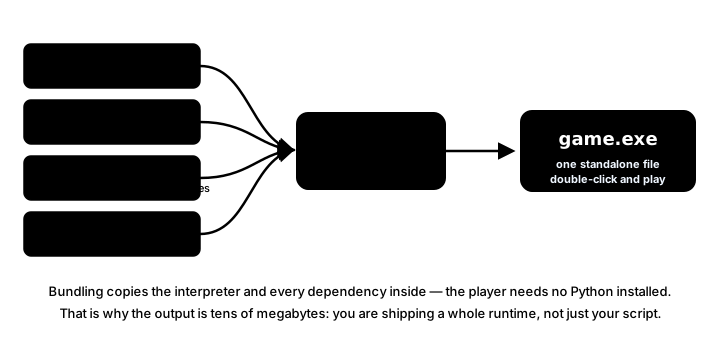
- No Python Required: Users don't need Python installed
- Single File Distribution: Easy to share and install
- Protected Source: Code is compiled/bundled
- Professional Presentation: Looks like a "real" application
- Dependency Management: All libraries included
- Platform Integration: Native OS features
PyInstaller - The Most Popular Choice
📦 Using PyInstaller
# Install PyInstaller
pip install pyinstaller

# Basic usage - creates a folder with executable
pyinstaller your_game.py

# Single file executable
pyinstaller --onefile your_game.py

# No console window (for GUI apps)
pyinstaller --onefile --windowed your_game.py

# With custom icon
pyinstaller --onefile --windowed --icon=game_icon.ico your_game.py

# Add data files
pyinstaller --onefile --add-data "assets;assets" your_game.py

# Linux/Mac syntax for data files
pyinstaller --onefile --add-data "assets:assets" your_game.py
PyInstaller Spec File
⚙️ Advanced Configuration
# game.spec - PyInstaller specification file
# -*- mode: python ; coding: utf-8 -*-

# Analysis phase
a = Analysis(
    ['main.py'],
    pathex=[],
    binaries=[],
    datas=[
        ('assets', 'assets'),
        ('levels', 'levels'),
        ('sounds', 'sounds'),
        ('config.json', '.'),
    ],
    hiddenimports=[
        'pygame',
        'numpy',
        'PIL',
    ],
    hookspath=[],
    hooksconfig={},
    runtime_hooks=[],
    excludes=[
        'matplotlib',
        'tkinter',
        'test',
    ],
    win_no_prefer_redirects=False,
    win_private_assemblies=False,
    noarchive=False,
)

# Remove unnecessary modules
a.binaries = [x for x in a.binaries if not x[0].startswith('api-ms-win')]

pyz = PYZ(a.pure, a.zipped_data)

exe = EXE(
    pyz,
    a.scripts,
    a.binaries,
    a.zipfiles,
    a.datas,
    [],
    name='MyAwesomeGame',
    debug=False,
    bootloader_ignore_signals=False,
    strip=False,
    upx=True,
    upx_exclude=[],
    runtime_tmpdir=None,
    console=False,
    disable_windowed_traceback=False,
    target_arch=None,
    codesign_identity=None,
    entitlements_file=None,
    version='version.txt',
    icon='icon.ico',
)

# macOS specific
app = BUNDLE(
    exe,
    name='MyAwesomeGame.app',
    icon='icon.icns',
    bundle_identifier='com.yourcompany.myawesomegame',
    info_plist={
        'NSHighResolutionCapable': 'True',
        'CFBundleShortVersionString': '1.0.0',
        'CFBundleVersion': '1.0.0',
    },
)
Handling Resources and Assets
📁 Resource Management
import os
import sys

def resource_path(relative_path):
    """Get absolute path to resource, works for dev and PyInstaller"""
    try:
        # PyInstaller creates a temp folder and stores path in _MEIPASS
        base_path = sys._MEIPASS
    except Exception:
        base_path = os.path.abspath(".")

    return os.path.join(base_path, relative_path)

# Usage in your game
class AssetLoader:
    def __init__(self):
        self.base_path = getattr(sys, '_MEIPASS', os.path.dirname(os.path.abspath(__file__)))

    def get_path(self, relative_path):
        return os.path.join(self.base_path, relative_path)

    def load_image(self, path):
        full_path = self.get_path(path)
        return pygame.image.load(full_path)

    def load_sound(self, path):
        full_path = self.get_path(path)
        return pygame.mixer.Sound(full_path)

    def load_font(self, path, size):
        full_path = self.get_path(path)
        return pygame.font.Font(full_path, size)

# Example usage
asset_loader = AssetLoader()
player_image = asset_loader.load_image('assets/sprites/player.png')
jump_sound = asset_loader.load_sound('assets/sounds/jump.wav')
game_font = asset_loader.load_font('assets/fonts/game.ttf', 24)

# Configuration file handling
import json

class ConfigManager:
    def __init__(self):
        # Use user's home directory for config in production
        if hasattr(sys, '_MEIPASS'):
            self.config_dir = os.path.expanduser('~/.mygame')
            if not os.path.exists(self.config_dir):
                os.makedirs(self.config_dir)
            self.config_path = os.path.join(self.config_dir, 'config.json')
        else:
            self.config_path = 'config.json'

    def load_config(self):
        if os.path.exists(self.config_path):
            with open(self.config_path, 'r') as f:
                return json.load(f)
        return self.get_default_config()

    def save_config(self, config):
        with open(self.config_path, 'w') as f:
            json.dump(config, f, indent=2)

    def get_default_config(self):
        return {
            'resolution': [1280, 720],
            'fullscreen': False,
            'volume': 0.7,
            'controls': {
                'up': pygame.K_w,
                'down': pygame.K_s,
                'left': pygame.K_a,
                'right': pygame.K_d,
            }
        }
cx_Freeze Alternative
🧊 Using cx_Freeze
# setup.py for cx_Freeze
import sys
from cx_Freeze import setup, Executable

# Dependencies
build_exe_options = {
    "packages": ["pygame", "numpy", "os"],
    "excludes": ["tkinter", "matplotlib"],
    "include_files": [
        ("assets", "assets"),
        ("levels", "levels"),
        ("sounds", "sounds"),
        ("icon.ico", "icon.ico"),
    ],
    "optimize": 2,
}

# Platform-specific options
base = None
if sys.platform == "win32":
    base = "Win32GUI"  # No console window

executables = [
    Executable(
        "main.py",
        base=base,
        target_name="MyGame",
        icon="icon.ico",
    )
]

setup(
    name="My Awesome Game",
    version="1.0.0",
    author="Your Name",
    description="An awesome game made with Python",
    options={"build_exe": build_exe_options},
    executables=executables,
)

# Build command:
# python setup.py build
# or for MSI installer on Windows:
# python setup.py bdist_msi
Nuitka for Performance
⚡ Compiling with Nuitka
# Install Nuitka
pip install nuitka

# Basic compilation
nuitka --standalone --onefile main.py

# With optimizations
nuitka --standalone --onefile --lto=yes --assume-yes-for-downloads main.py

# Windows specific with icon
nuitka --standalone --onefile --windows-console-mode=disable \
       --windows-icon-from-ico=icon.ico main.py

# Include data files
nuitka --standalone --onefile --include-data-dir=assets=assets \
       --include-data-dir=levels=levels main.py

# Maximum optimization
nuitka --standalone --onefile --lto=yes --jobs=4 \
       --enable-plugin=numpy --show-progress main.py
Creating Installers
💿 Professional Installation
Windows - Inno Setup Script
; installer.iss - Inno Setup script
[Setup]
AppName=My Awesome Game
AppVersion=1.0.0
AppPublisher=Your Company
AppPublisherURL=https://yourwebsite.com
DefaultDirName={autopf}\MyAwesomeGame
DefaultGroupName=My Awesome Game
UninstallDisplayIcon={app}\MyGame.exe
Compression=lzma2
SolidCompression=yes
OutputDir=dist
OutputBaseFilename=MyAwesomeGame_Setup

[Files]
Source: "dist\MyGame.exe"; DestDir: "{app}"
Source: "dist\assets\*"; DestDir: "{app}\assets"; Flags: recursesubdirs
Source: "README.txt"; DestDir: "{app}"; Flags: isreadme

[Icons]
Name: "{group}\My Awesome Game"; Filename: "{app}\MyGame.exe"
Name: "{group}\Uninstall"; Filename: "{uninstallexe}"
Name: "{commondesktop}\My Awesome Game"; Filename: "{app}\MyGame.exe"

[Run]
Filename: "{app}\MyGame.exe"; Description: "Launch My Awesome Game"; Flags: postinstall nowait skipifsilent

[Registry]
Root: HKCU; Subkey: "Software\YourCompany\MyAwesomeGame"; ValueType: string; ValueName: "InstallPath"; ValueData: "{app}"
macOS - Creating DMG
# Create app bundle first with PyInstaller
pyinstaller --onefile --windowed --icon=icon.icns \
            --osx-bundle-identifier com.yourcompany.game main.py

# Create DMG using create-dmg
brew install create-dmg

create-dmg \
  --volname "My Awesome Game" \
  --volicon "icon.icns" \
  --background "installer_background.png" \
  --window-pos 200 120 \
  --window-size 600 400 \
  --icon-size 100 \
  --icon "MyGame.app" 200 190 \
  --hide-extension "MyGame.app" \
  --app-drop-link 400 190 \
  "MyGame.dmg" \
  "dist/"
Linux - AppImage
# Create AppImage
# First, create AppDir structure
mkdir -p MyGame.AppDir/usr/bin
mkdir -p MyGame.AppDir/usr/share/applications
mkdir -p MyGame.AppDir/usr/share/icons/hicolor/256x256/apps

# Copy executable and assets
cp dist/mygame MyGame.AppDir/usr/bin/
cp -r assets MyGame.AppDir/usr/bin/

# Create desktop entry
cat > MyGame.AppDir/mygame.desktop << 'EOF'
[Desktop Entry]
Type=Application
Name=My Awesome Game
Exec=mygame
Icon=mygame
Categories=Game;
X-AppImage-Version=1.0.0
EOF

# Copy icon
cp icon.png MyGame.AppDir/usr/share/icons/hicolor/256x256/apps/mygame.png

# Create AppRun script
cat > MyGame.AppDir/AppRun << 'EOF'
#!/bin/bash
HERE="$(dirname "$(readlink -f "${0}")")"
exec "${HERE}/usr/bin/mygame" "$@"
EOF
chmod +x MyGame.AppDir/AppRun

# Download appimagetool and create AppImage
wget https://github.com/AppImage/AppImageKit/releases/download/continuous/appimagetool-x86_64.AppImage
chmod +x appimagetool-x86_64.AppImage
./appimagetool-x86_64.AppImage MyGame.AppDir MyGame-x86_64.AppImage
Build Automation
🔧 Automated Build Script
# build.py - Automated build script
import os
import sys
import shutil
import subprocess
import zipfile
from datetime import datetime

class GameBuilder:
    def __init__(self, game_name="MyGame", version="1.0.0"):
        self.game_name = game_name
        self.version = version
        self.build_dir = "build"
        self.dist_dir = "dist"
        self.release_dir = "releases"

    def clean(self):
        """Clean previous builds"""
        print("Cleaning previous builds...")
        for dir in [self.build_dir, self.dist_dir]:
            if os.path.exists(dir):
                shutil.rmtree(dir)

    def run_tests(self):
        """Run unit tests"""
        print("Running tests...")
        result = subprocess.run([sys.executable, "-m", "pytest", "tests/"],
                              capture_output=True, text=True)
        if result.returncode != 0:
            print("Tests failed!")
            return False
        print("All tests passed!")
        return True

    def build_executable(self):
        """Build executable with PyInstaller"""
        print(f"Building {self.game_name} v{self.version}...")

        cmd = [
            "pyinstaller",
            "--onefile",
            "--windowed",
            "--name", self.game_name,
            "--icon", "icon.ico",
            "--add-data", f"assets{os.pathsep}assets",
            "--add-data", f"sounds{os.pathsep}sounds",
            "--add-data", f"levels{os.pathsep}levels",
            "main.py"
        ]

        result = subprocess.run(cmd, capture_output=True, text=True)

        if result.returncode != 0:
            print("Build failed!")
            print(result.stderr)
            return False

        print("Build successful!")
        return True

    def create_release(self):
        """Create release package"""
        print("Creating release package...")

        if not os.path.exists(self.release_dir):
            os.makedirs(self.release_dir)

        timestamp = datetime.now().strftime("%Y%m%d_%H%M%S")
        system = sys.platform

        if system == "win32":
            archive_name = f"{self.game_name}_v{self.version}_Windows_{timestamp}.zip"
        elif system == "darwin":
            archive_name = f"{self.game_name}_v{self.version}_macOS_{timestamp}.zip"
        else:
            archive_name = f"{self.game_name}_v{self.version}_Linux_{timestamp}.tar.gz"

        archive_path = os.path.join(self.release_dir, archive_name)

        # Create archive
        if system == "win32" or system == "darwin":
            with zipfile.ZipFile(archive_path, 'w', zipfile.ZIP_DEFLATED) as zf:
                for root, dirs, files in os.walk(self.dist_dir):
                    for file in files:
                        file_path = os.path.join(root, file)
                        arc_name = os.path.relpath(file_path, self.dist_dir)
                        zf.write(file_path, arc_name)
        else:
            # Linux - use tar.gz
            import tarfile
            with tarfile.open(archive_path, 'w:gz') as tar:
                tar.add(self.dist_dir, arcname=self.game_name)

        print(f"Release created: {archive_path}")
        return True

    def build_all(self):
        """Complete build process"""
        print(f"Building {self.game_name} v{self.version}")
        print("=" * 50)

        self.clean()

        if not self.run_tests():
            print("Build aborted due to test failures")
            return False

        if not self.build_executable():
            print("Build aborted due to compilation errors")
            return False

        if not self.create_release():
            print("Warning: Release creation failed")

        print("\nBuild complete!")
        return True

# Usage
if __name__ == "__main__":
    builder = GameBuilder("MyAwesomeGame", "1.0.0")
    builder.build_all()
Common Issues and Solutions
⚠️ Troubleshooting
Missing Modules
# Add hidden imports in spec file
hiddenimports=['pkg_resources.py2_warn', 'pygame._sdl2']

# Or use command line
pyinstaller --hidden-import=pygame._sdl2 main.py
Antivirus False Positives
- Sign your executable with a code certificate
- Submit to antivirus vendors for whitelisting
- Use UPX compression carefully (or disable it)
- Build on clean systems
Large File Size
- Exclude unnecessary modules
- Use UPX compression
- Optimize assets before packaging
- Consider separate asset downloads
Path Issues
# Always use resource_path function
def resource_path(relative_path):
    base_path = getattr(sys, '_MEIPASS', os.path.dirname(os.path.abspath(__file__)))
    return os.path.join(base_path, relative_path)

# Never use hardcoded paths
# BAD: image = pygame.image.load("C:/game/assets/player.png")
# GOOD: image = pygame.image.load(resource_path("assets/player.png"))
Version Information
📋 Adding Version Info (Windows)
# version.txt file for PyInstaller
VSVersionInfo(
  ffi=FixedFileInfo(
    filevers=(1, 0, 0, 0),
    prodvers=(1, 0, 0, 0),
    mask=0x3f,
    flags=0x0,
    OS=0x40004,
    fileType=0x1,
    subtype=0x0,
    date=(0, 0)
  ),
  kids=[
    StringFileInfo(
      [
      StringTable(
        u'040904B0',
        [StringStruct(u'CompanyName', u'Your Company'),
        StringStruct(u'FileDescription', u'My Awesome Game'),
        StringStruct(u'FileVersion', u'1.0.0.0'),
        StringStruct(u'InternalName', u'mygame'),
        StringStruct(u'LegalCopyright', u'Copyright (c) 2024 Your Company'),
        StringStruct(u'OriginalFilename', u'MyGame.exe'),
        StringStruct(u'ProductName', u'My Awesome Game'),
        StringStruct(u'ProductVersion', u'1.0.0.0')])
      ]),
    VarFileInfo([VarStruct(u'Translation', [1033, 1200])])
  ]
)
Best Practices
✨ Executable Building Best Practices
- Test Early: Build executables regularly during development
- Clean Environment: Build on clean virtual environments
- Version Control: Track spec files and build scripts
- Automate: Create build scripts for consistency
- Test Thoroughly: Test on target platforms without dev tools
- Sign Code: Use code certificates for trust
- Document Requirements: List system requirements clearly
- Error Handling: Include error logging for debugging
- Update Mechanism: Plan for future updates
- Backup Builds: Keep previous versions available
Key Takeaways
- 📦 PyInstaller is the most versatile packaging tool
- 🎯 Always use resource_path for asset loading
- 💾 Test builds on clean systems without Python
- 🔧 Automate build process for consistency
- 📋 Include version information and metadata
- 🛡️ Sign executables to avoid antivirus issues
- 💿 Create proper installers for professional presentation
- 🔄 Plan for updates and patches from the start
🏋️♂️ Practice Exercise
🏋️♂️ Exercise 1: Three Strategies, One Asset — sys._MEIPASS Resolution + .spec File as Build Schema + Hidden Imports Bridge in One Pygame Window
Objective: Build a runnable pygame window in roughly 95 lines that shows three orthogonal publishing-domain disciplines visible per frame on a 1088×480 window: a 768×480 demo area split into three vertical columns (one per resource-path resolution strategy) plus a 280px right-side panel showing the auto-synthesized .spec file. The demo simulates dev-vs-frozen mode via key F (a global FROZEN_SIM bool) since we cannot literally freeze the demo at runtime. Three strategies attempt to resolve the same asset player.png against the current simulated mode: Strategy A uses a hardcoded absolute path C:\game\assets\player.png that breaks the moment the user moves the .exe; Strategy B uses os.path.join(os.path.dirname(os.path.abspath(__file__)), 'assets', 'player.png') which succeeds in dev but is not guaranteed to resolve to the extracted _MEIPASS directory in frozen mode, so sys._MEIPASS is the reliable base; Strategy C uses getattr(sys, '_MEIPASS', os.path.dirname(os.path.abspath(__file__))) plus os.path.join(base, 'assets', 'player.png') which is the canonical PyInstaller idiom that works in BOTH modes because the conditional logic is folded into the getattr lookup itself rather than a separate if frozen: branch. (a) sys._MEIPASS detection and dev-vs-frozen path-resolution duality: each strategy's column shows its resolved path string and an OK/FAIL status; toggling F flips the columns visibly — Strategy A stays FAIL in both modes (broken whenever the literal path doesn't match runtime location); Strategy B flips OK→FAIL (works in dev, breaks in frozen); Strategy C stays OK→OK (the only universal solution). (b) .spec file as build-configuration data externalization at BUILD-CONFIG scope: the right-side panel renders a synthesized .spec file from three module-level lists DECLARED_ASSETS / HIDDEN_IMPORTS / EXCLUDES, formatting Analysis(datas=[...], hiddenimports=[...], excludes=[...]) plus EXE(name='MyGame', console=False, ...) — the .spec file IS data the game declares about itself for the build pipeline, externalized from the game's runtime source code. Same data-driven externalization shape as architecture_save_load schema, pathfinding terrain-cost dict, behavior-trees child-list-order, and decision-making personality dict. (c) Hidden imports as static-analysis-vs-runtime-discovery asymmetry: keys 1/2/3 simulate three import-discovery scenarios — 1 leaves the baseline unchanged (a plain import pygame statically detected by AST parse, no hidden_imports needed); 2 appends 'importlib_plugin' to HIDDEN_IMPORTS (simulating a dynamic importlib.import_module(plugin_name) call invisible to PyInstaller's static AST parser); 3 appends 'pygame._sdl2_extra' (simulating a library-internal lazy load). Pressing 2 or 3 visibly grows HIDDEN_IMPORTS and the .spec panel updates live, demonstrating that hidden_imports is the explicit declaration that bridges what static analysis missed — same design-time-validation-vs-runtime-discovery pattern as platformer_level_design's validate() (catches design-time errors before shipping; cost: one .spec file edit) vs is_solid() (catches runtime errors; cost: a shipped game crashing with ModuleNotFoundError when the user opens it) applied at build-time-vs-ship-time scope. R resets HIDDEN_IMPORTS to the baseline. HUD shows current mode (DEV / FROZEN), simulated sys._MEIPASS value (None in dev, /tmp/_MEIxyz12 in frozen), per-strategy resolved paths, and key bindings — three orthogonal publishing-domain disciplines visible per frame as concrete strings and OK/FAIL status flags.
Instructions:
- Define three module-level lists:
DECLARED_ASSETS = ['player.png', 'jump.wav', 'tilemap.png'],HIDDEN_IMPORTS = ['pygame._sdl2'],EXCLUDES = ['matplotlib', 'tkinter']. Define a globalFROZEN_SIM = Falsethat key F toggles. DefineSIMULATED_MEIPASS = '/tmp/_MEIxyz12'as the path that simulated frozen mode reports (a stand-in for the real PyInstaller TEMP directory). - Implement three resource-path resolution functions:
strategy_a(asset, frozen)returns the hardcoded path'C:\\game\\assets\\' + asset;strategy_b(asset, frozen)returnsNoneif frozen elseos.path.join(os.path.dirname(os.path.abspath(__file__)), 'assets', asset);strategy_c(asset, frozen)returnsos.path.join(SIMULATED_MEIPASS if frozen else os.path.dirname(os.path.abspath(__file__)), 'assets', asset). - Implement
check_path(p)that returns True ifpis non-None, contains'assets', and does not start with the hardcoded'C:\\game'prefix; otherwise False. Implementrender_spec()that returns a multi-line string formattingAnalysis(datas=[...], hiddenimports=[...], excludes=[...])plusEXE(name='MyGame', console=False). - Initialize pygame at 1088×480. Lay out three columns at x=24, x=280, x=536 (each ~240px wide) plus a .spec panel at x=792 (~280px wide). Use Consolas/Courier monospace fonts at sizes 14 and 18.
- Per-frame: draw column headers (
'A: Hardcoded'/'B: __file__-only'/'C: _MEIPASS-aware'); under each header render the resolved path string (wrapped) and an OK/FAIL status colored green/red; render the .spec panel with the synthesized content; render the HUD at the bottom showing mode, simulatedsys._MEIPASSvalue, and key bindings. - Handle keys: F toggles
FROZEN_SIM; 2 appends'importlib_plugin'toHIDDEN_IMPORTSif not already present; 3 appends'pygame._sdl2_extra'if not already present; R resetsHIDDEN_IMPORTSto['pygame._sdl2']. The .spec panel re-renders every frame from the current lists, so additions appear live. - Verify the three orthogonal axes are visible per frame: (a) toggling F flips Strategy B's status from OK to FAIL while Strategy C's status stays OK — same input asset, three strategies, different success/failure across the dev-vs-frozen flip; (b) the .spec panel updates live as
HIDDEN_IMPORTSgrows when keys 2/3 fire — the .spec file IS data; (c) the strategy columns each render a different resolved-path STRING based on the same input asset name — same input, three strategies, three outputs, only one universally correct.
💡 Hint
The whole point of the demo is that one code path works in both dev mode AND frozen mode via the canonical getattr(sys, '_MEIPASS', os.path.dirname(os.path.abspath(__file__))) idiom. Strategy C succeeds where A and B fail because the conditional logic (which base path to use) is folded into the getattr lookup itself rather than a separate if frozen: branch — same runtime polymorphism via attribute lookup pattern as Python's general “look up the right thing in the right namespace” idiom. For the .spec panel, a simple multi-line f-string formatting Analysis(datas=[...], hiddenimports=[...], ...) is enough — you don't need to actually run PyInstaller; the visual point is that the .spec file IS data the game declares about itself for the build pipeline. For the hidden-imports demo, the static-analysis vs runtime-discovery distinction is the key insight — the list grows with each dynamic-import simulation key (2 or 3) because PyInstaller wouldn't have detected those imports without the explicit declaration.
✅ Example Solution
import os
import sys
import pygame

W, H = 1088, 480
FPS = 60

DECLARED_ASSETS = ['player.png', 'jump.wav', 'tilemap.png']
HIDDEN_IMPORTS = ['pygame._sdl2']
EXCLUDES = ['matplotlib', 'tkinter']
SIMULATED_MEIPASS = '/tmp/_MEIxyz12'

FROZEN_SIM = False

def strategy_a(asset, frozen):
    return 'C:\\game\\assets\\' + asset  # hardcoded; broken if user moves exe

def strategy_b(asset, frozen):
    if frozen:
        return None  # __file__ not guaranteed to resolve to _MEIPASS when frozen
    return os.path.join(os.path.dirname(os.path.abspath(__file__)), 'assets', asset)

def strategy_c(asset, frozen):
    base = SIMULATED_MEIPASS if frozen else os.path.dirname(os.path.abspath(__file__))
    return os.path.join(base, 'assets', asset)

def check_path(p):
    return p is not None and 'assets' in p and not p.startswith('C:\\game')

def render_spec():
    datas = ', '.join(f"('{a}', 'assets')" for a in DECLARED_ASSETS)
    hi = ', '.join(f"'{i}'" for i in HIDDEN_IMPORTS)
    ex = ', '.join(f"'{e}'" for e in EXCLUDES)
    return (f"# game.spec\n"
            f"a = Analysis(\n"
            f"  ['main.py'],\n"
            f"  datas=[{datas}],\n"
            f"  hiddenimports=[{hi}],\n"
            f"  excludes=[{ex}],\n"
            f")\n"
            f"exe = EXE(pyz, a.scripts,\n"
            f"  name='MyGame', console=False,\n"
            f")")

pygame.init()
screen = pygame.display.set_mode((W, H))
clock = pygame.time.Clock()
small = pygame.font.SysFont('Consolas', 14)
big = pygame.font.SysFont('Consolas', 18, bold=True)

COLS = [(24, 'A: Hardcoded', strategy_a, (255, 110, 110)),
        (280, 'B: __file__-only', strategy_b, (255, 200, 80)),
        (536, 'C: _MEIPASS-aware', strategy_c, (110, 220, 140))]

running = True
while running:
    for event in pygame.event.get():
        if event.type == pygame.QUIT:
            running = False
        elif event.type == pygame.KEYDOWN:
            if event.key == pygame.K_f:
                FROZEN_SIM = not FROZEN_SIM
            elif event.key == pygame.K_2 and 'importlib_plugin' not in HIDDEN_IMPORTS:
                HIDDEN_IMPORTS.append('importlib_plugin')
            elif event.key == pygame.K_3 and 'pygame._sdl2_extra' not in HIDDEN_IMPORTS:
                HIDDEN_IMPORTS.append('pygame._sdl2_extra')
            elif event.key == pygame.K_r:
                HIDDEN_IMPORTS = ['pygame._sdl2']

    screen.fill((20, 20, 28))

    for col_x, label, fn, color in COLS:
        screen.blit(big.render(label, True, color), (col_x, 20))
        path = fn('player.png', FROZEN_SIM)
        ok = check_path(path)
        status = 'OK' if ok else 'FAIL'
        sc = (110, 220, 140) if ok else (255, 110, 110)
        screen.blit(big.render(status, True, sc), (col_x, 60))
        path_str = str(path) if path else '(None)'
        for i in range(0, len(path_str), 24):
            screen.blit(small.render(path_str[i:i+24], True, (200, 200, 210)),
                        (col_x, 100 + (i // 24) * 18))

    pygame.draw.rect(screen, (40, 40, 50), (792, 10, 280, 460), border_radius=4)
    spec_text = render_spec()
    for i, line in enumerate(spec_text.split('\n')):
        screen.blit(small.render(line, True, (180, 200, 220)), (800, 24 + i * 18))

    mode = 'FROZEN' if FROZEN_SIM else 'DEV'
    meipass = SIMULATED_MEIPASS if FROZEN_SIM else 'None'
    hud = f"Mode: {mode}  |  sys._MEIPASS: {meipass}  |  F=toggle 2/3=add hidden R=reset"
    screen.blit(small.render(hud, True, (200, 200, 220)), (24, 450))

    pygame.display.flip()
    clock.tick(FPS)

pygame.quit()
🎯 Quick Quiz
Question 1: Why is the canonical PyInstaller resource-path idiom getattr(sys, '_MEIPASS', os.path.dirname(os.path.abspath(__file__))) rather than just hardcoding an absolute path or using __file__ directly?
Question 2: What is the architectural significance of PyInstaller's .spec file containing Analysis(datas=[...], hiddenimports=[...], excludes=[...]) as a Python data-construction call rather than as command-line flags or hardcoded inside PyInstaller's source?
Question 3: Why does the .spec file's hiddenimports=['pygame._sdl2', 'pkg_resources.py2_warn'] list exist as an explicit declaration when PyInstaller's Analysis phase already walks the import graph?
What's Next?
With your game packaged, let's explore distribution platforms to reach your audience!