Performance Optimization
Optimizing Your Game for Maximum Performance
Transform your game from prototype to polished product! Learn profiling techniques, identify bottlenecks, optimize rendering, manage memory efficiently, and deliver smooth gameplay! 🚀⚡🎮
Understanding Performance
🎯 Performance Metrics
Key metrics to monitor and optimize:
- Frame Rate (FPS): Target 60 FPS for smooth gameplay
- Frame Time: Time to render one frame (16.67ms for 60 FPS)
- Memory Usage: RAM consumption and allocation patterns
- CPU Usage: Processing load and bottlenecks
- GPU Usage: Graphics rendering efficiency
- Load Times: Asset loading and level transitions
- Battery Life: Power consumption on mobile devices
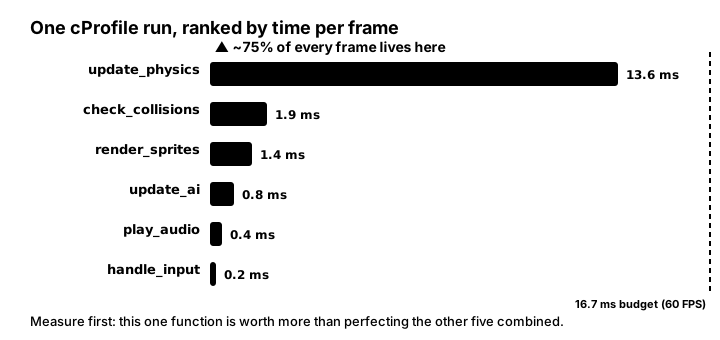
runtime = call count × cost per call is largest — here, one function eats ~75% of every frame. Speeding up the other five to zero would barely move the needle; halving the tall bar buys back real milliseconds. Measure first, then attack the tallest bar.Profiling Your Game
📊 Python Profiling Tools
import cProfile
import pstats
import pygame
import time
from memory_profiler import profile
import tracemalloc

# Basic FPS counter
class FPSCounter:
    def __init__(self):
        self.clock = pygame.time.Clock()
        self.fps_history = []
        self.frame_times = []

    def tick(self, target_fps=60):
        dt = self.clock.tick(target_fps)
        current_fps = self.clock.get_fps()
        self.fps_history.append(current_fps)
        self.frame_times.append(dt)

        # Keep only last 60 frames
        if len(self.fps_history) > 60:
            self.fps_history.pop(0)
            self.frame_times.pop(0)

        return dt / 1000.0  # Return delta time in seconds

    def get_average_fps(self):
        if self.fps_history:
            return sum(self.fps_history) / len(self.fps_history)
        return 0

    def get_frame_time_stats(self):
        if not self.frame_times:
            return {}

        return {
            'min': min(self.frame_times),
            'max': max(self.frame_times),
            'avg': sum(self.frame_times) / len(self.frame_times)
        }

# CPU Profiling
def profile_game_loop():
    profiler = cProfile.Profile()
    profiler.enable()

    # Run your game loop here
    for _ in range(1000):
        update_game()
        render_game()

    profiler.disable()
    stats = pstats.Stats(profiler)
    stats.sort_stats('cumulative')
    stats.print_stats(20)  # Print top 20 functions

# Memory profiling decorator
@profile
def memory_intensive_function():
    large_list = [i for i in range(1000000)]
    return large_list

# Memory tracking
def track_memory_usage():
    tracemalloc.start()

    # Your code here
    snapshot1 = tracemalloc.take_snapshot()

    # More code
    snapshot2 = tracemalloc.take_snapshot()

    top_stats = snapshot2.compare_to(snapshot1, 'lineno')
    for stat in top_stats[:10]:
        print(stat)
Code Optimization Techniques
⚡ Algorithm Optimization
# Bad: O(n²) collision detection
def check_collisions_naive(objects):
    collisions = []
    for i, obj1 in enumerate(objects):
        for j, obj2 in enumerate(objects[i+1:], i+1):
            if obj1.collides_with(obj2):
                collisions.append((obj1, obj2))
    return collisions

# Good: Spatial hashing O(n)
class SpatialHash:
    def __init__(self, cell_size):
        self.cell_size = cell_size
        self.buckets = {}

    def clear(self):
        self.buckets.clear()

    def add(self, obj):
        bucket_key = self._get_bucket_key(obj.x, obj.y)
        if bucket_key not in self.buckets:
            self.buckets[bucket_key] = []
        self.buckets[bucket_key].append(obj)

    def _get_bucket_key(self, x, y):
        return (int(x // self.cell_size), int(y // self.cell_size))

    def get_nearby(self, obj, radius=1):
        nearby = []
        cx, cy = self._get_bucket_key(obj.x, obj.y)

        for dx in range(-radius, radius + 1):
            for dy in range(-radius, radius + 1):
                bucket_key = (cx + dx, cy + dy)
                if bucket_key in self.buckets:
                    nearby.extend(self.buckets[bucket_key])

        return nearby

    def check_collisions(self, objects):
        self.clear()
        for obj in objects:
            self.add(obj)

        collisions = set()
        for obj in objects:
            nearby = self.get_nearby(obj)
            for other in nearby:
                if obj != other and obj.collides_with(other):
                    # Use frozenset to avoid duplicate pairs
                    collisions.add(frozenset([obj, other]))

        return list(collisions)

# Object pooling to reduce allocations
class ObjectPool:
    def __init__(self, object_class, size=100):
        self.object_class = object_class
        self.available = [object_class() for _ in range(size)]
        self.active = []

    def acquire(self):
        if self.available:
            obj = self.available.pop()
            self.active.append(obj)
            return obj
        else:
            # Pool exhausted, create new object
            obj = self.object_class()
            self.active.append(obj)
            return obj

    def release(self, obj):
        if obj in self.active:
            self.active.remove(obj)
            self.available.append(obj)
            obj.reset()  # Reset object state

# Cache expensive calculations
class MemoizedFunction:
    def __init__(self, func):
        self.func = func
        self.cache = {}

    def __call__(self, *args):
        if args not in self.cache:
            self.cache[args] = self.func(*args)
        return self.cache[args]

@MemoizedFunction
def expensive_calculation(x, y):
    # Simulate expensive operation
    import math
    return math.sqrt(x**2 + y**2) * math.sin(x) * math.cos(y)
Rendering Optimization
🎨 Graphics Performance
import pygame

class RenderOptimizer:
    def __init__(self, screen):
        self.screen = screen
        self.dirty_rects = []
        self.static_background = None

    def create_static_background(self, render_func):
        """Pre-render static elements"""
        self.static_background = pygame.Surface(self.screen.get_size())
        render_func(self.static_background)

    def add_dirty_rect(self, rect):
        """Mark area for redraw"""
        self.dirty_rects.append(rect)

    def optimize_dirty_rects(self):
        """Merge overlapping rectangles"""
        if not self.dirty_rects:
            return []

        # Sort by position
        self.dirty_rects.sort(key=lambda r: (r.x, r.y))

        optimized = []
        current = self.dirty_rects[0]

        for rect in self.dirty_rects[1:]:
            if current.colliderect(rect):
                # Merge rectangles
                current = current.union(rect)
            else:
                optimized.append(current)
                current = rect

        optimized.append(current)
        self.dirty_rects = []
        return optimized

    def render_frame(self, dynamic_objects):
        """Optimized rendering with dirty rectangles"""
        # Clear only dirty areas
        for rect in self.dirty_rects:
            if self.static_background:
                self.screen.blit(self.static_background, rect, rect)
            else:
                pygame.draw.rect(self.screen, (0, 0, 0), rect)

        # Draw only visible objects
        screen_rect = self.screen.get_rect()
        for obj in dynamic_objects:
            if screen_rect.colliderect(obj.rect):
                obj.draw(self.screen)
                self.add_dirty_rect(obj.rect)

        # Update only changed areas
        dirty_rects = self.optimize_dirty_rects()
        pygame.display.update(dirty_rects)

# Sprite batching
class SpriteBatch:
    def __init__(self):
        self.sprites = {}

    def add(self, texture_path, positions):
        """Group sprites by texture"""
        if texture_path not in self.sprites:
            self.sprites[texture_path] = {
                'texture': pygame.image.load(texture_path).convert_alpha(),
                'positions': []
            }
        self.sprites[texture_path]['positions'].extend(positions)

    def draw(self, screen):
        """Draw all sprites grouped by texture"""
        for texture_data in self.sprites.values():
            texture = texture_data['texture']
            for pos in texture_data['positions']:
                screen.blit(texture, pos)

    def clear(self):
        """Clear batch for next frame"""
        for texture_data in self.sprites.values():
            texture_data['positions'].clear()

# Level of Detail (LOD) system
class LODSprite(pygame.sprite.Sprite):
    def __init__(self, textures_by_distance):
        super().__init__()
        self.textures = textures_by_distance  # {distance: texture}
        self.distances = sorted(textures_by_distance.keys())
        self.current_texture = None
        self.rect = None

    def update_lod(self, camera_pos):
        """Switch texture based on distance"""
        distance = self.get_distance_to(camera_pos)

        for max_dist in self.distances:
            if distance <= max_dist:
                new_texture = self.textures[max_dist]
                if new_texture != self.current_texture:
                    self.current_texture = new_texture
                    self.image = new_texture
                    if self.rect:
                        self.rect = self.image.get_rect(center=self.rect.center)
                break

    def get_distance_to(self, pos):
        if self.rect:
            return ((self.rect.centerx - pos[0])**2 +
                   (self.rect.centery - pos[1])**2)**0.5
        return 0

# Frustum culling
class FrustumCuller:
    def __init__(self, screen_rect):
        self.screen_rect = screen_rect
        self.margin = 50  # Extra margin for smooth transitions

    def is_visible(self, obj_rect):
        """Check if object is in view frustum"""
        expanded_rect = self.screen_rect.inflate(self.margin * 2, self.margin * 2)
        return expanded_rect.colliderect(obj_rect)

    def cull_objects(self, objects):
        """Return only visible objects"""
        return [obj for obj in objects if self.is_visible(obj.rect)]
Asset Optimization
📦 Optimizing Game Assets
import pygame
import os
from PIL import Image
import numpy as np

class AssetOptimizer:
    def __init__(self):
        self.texture_cache = {}
        self.sound_cache = {}

    def optimize_image(self, path, max_size=(1024, 1024), quality=85):
        """Optimize image file size and dimensions"""
        img = Image.open(path)

        # Resize if too large
        if img.size[0] > max_size[0] or img.size[1] > max_size[1]:
            img.thumbnail(max_size, Image.Resampling.LANCZOS)

        # Convert to RGB if RGBA not needed
        if img.mode == 'RGBA':
            # Check if alpha channel is used
            alpha = np.array(img.split()[-1])
            if np.all(alpha == 255):
                img = img.convert('RGB')

        # Save optimized version
        optimized_path = path.replace('.png', '_opt.png')
        img.save(optimized_path, optimize=True, quality=quality)
        return optimized_path

    def create_texture_atlas(self, image_paths, atlas_size=(2048, 2048)):
        """Combine multiple textures into one atlas"""
        atlas = Image.new('RGBA', atlas_size, (0, 0, 0, 0))
        positions = {}

        current_x = 0
        current_y = 0
        row_height = 0

        for path in image_paths:
            img = Image.open(path)

            # Check if image fits in current row
            if current_x + img.width > atlas_size[0]:
                current_x = 0
                current_y += row_height
                row_height = 0

            # Check if image fits in atlas
            if current_y + img.height <= atlas_size[1]:
                atlas.paste(img, (current_x, current_y))
                positions[path] = (current_x, current_y, img.width, img.height)

                current_x += img.width
                row_height = max(row_height, img.height)

        return atlas, positions

    def load_texture_cached(self, path, convert_alpha=True):
        """Load texture with caching"""
        if path not in self.texture_cache:
            texture = pygame.image.load(path)
            if convert_alpha:
                texture = texture.convert_alpha()
            else:
                texture = texture.convert()
            self.texture_cache[path] = texture

        return self.texture_cache[path]

    def preload_assets(self, asset_list):
        """Preload all assets during loading screen"""
        for asset_path in asset_list:
            if asset_path.endswith(('.png', '.jpg', '.jpeg')):
                self.load_texture_cached(asset_path)
            elif asset_path.endswith(('.wav', '.ogg', '.mp3')):
                self.load_sound_cached(asset_path)

    def load_sound_cached(self, path):
        """Load sound with caching"""
        if path not in self.sound_cache:
            self.sound_cache[path] = pygame.mixer.Sound(path)
        return self.sound_cache[path]

    def compress_save_data(self, data):
        """Compress save game data"""
        import zlib
        import pickle

        serialized = pickle.dumps(data)
        compressed = zlib.compress(serialized, level=9)

        # Calculate compression ratio
        ratio = len(compressed) / len(serialized)
        print(f"Compression ratio: {ratio:.2%}")

        return compressed

    def decompress_save_data(self, compressed_data):
        """Decompress save game data"""
        import zlib
        import pickle

        decompressed = zlib.decompress(compressed_data)
        return pickle.loads(decompressed)

# Lazy loading for large assets
class LazyLoader:
    def __init__(self):
        self.pending = {}
        self.loaded = {}

    def queue_load(self, key, loader_func, *args):
        """Queue asset for loading"""
        self.pending[key] = (loader_func, args)

    def load_next(self):
        """Load one asset from queue"""
        if self.pending:
            key, (loader_func, args) = self.pending.popitem()
            self.loaded[key] = loader_func(*args)
            return key
        return None

    def get(self, key):
        """Get loaded asset or None"""
        return self.loaded.get(key)

    def is_loaded(self, key):
        """Check if asset is loaded"""
        return key in self.loaded
Interactive Performance Monitor
Memory Management
💾 Memory Optimization Strategies
- Object Pooling: Reuse objects instead of creating new ones
- Lazy Loading: Load assets only when needed
- Texture Atlases: Combine small textures into larger ones
- Asset Streaming: Load/unload assets based on proximity
- Reference Counting: Track and clean up unused resources
- Garbage Collection: Minimize allocations in hot paths
Platform-Specific Optimizations
🎯 Target Platform Considerations
Desktop (Windows/Mac/Linux)
- Higher memory limits (8-32GB typical system RAM)
- Multi-core CPU utilization
- Dedicated GPU support
- Higher resolution textures
Mobile (iOS/Android)
- Limited memory (1-2GB)
- Battery optimization critical
- Touch input latency
- Thermal throttling
Web (Browser)
- JavaScript performance constraints
- Download size optimization
- Progressive loading
- WebGL limitations
Performance Testing Checklist
✅ Testing Your Optimizations
- ☐ Profile on minimum spec hardware
- ☐ Test with maximum entities/effects
- ☐ Monitor memory usage over time
- ☐ Check for memory leaks
- ☐ Verify stable frame rate
- ☐ Test loading times
- ☐ Validate asset compression
- ☐ Profile network usage (multiplayer)
- ☐ Test on all target platforms
- ☐ Stress test with automated bots
Best Practices
🌟 Performance Best Practices
- Profile First: Always measure before optimizing
- Optimize Hotspots: Focus on the 20% of code that uses 80% of time
- Cache Everything: Avoid repeated calculations
- Batch Operations: Group similar operations together
- Use Appropriate Data Structures: Choose the right tool for the job
- Minimize Draw Calls: Batch rendering operations
- Reduce Texture Switches: Use texture atlases
- Cull Aggressively: Don't process what isn't visible
- LOD Systems: Use simpler assets for distant objects
- Async Loading: Never block the main thread
Key Takeaways
- 📊 Always profile before optimizing
- ⚡ Focus on algorithmic improvements first
- 💾 Manage memory carefully to avoid leaks
- 🎨 Optimize rendering with batching and culling
- 📦 Compress and optimize assets appropriately
- 🎯 Target platform capabilities matter
- 🔄 Use object pooling for frequently created objects
- 📈 Monitor performance metrics continuously
🏋️♂️ Practice Exercise
🏋️♂️ Exercise 1: Three Axes, One Hot Path — Profile Bars + Spatial Hash + Surface Cache in One Pygame Window
Objective: Build a ~95-line pygame demo with 150 bouncing circles colliding pairwise, where three independent toggles let you observe profile-first measurement, O(n²)→O(n) algorithmic improvement, and pre-built Surface caching in one window. Press P to toggle a per-phase profile-bar overlay (update / collide / render bars in milliseconds via time.perf_counter() deltas wrapping each phase) — without it, FPS drops are visible but their cause is not. Press S to toggle naive O(n²) pair-iteration vs spatial-hash O(n) collision detection — at N=150 the algorithmic difference is roughly an 8× pair-test reduction, and at N=1000 it grows to roughly 55× as N²/N. Press C to toggle pre-built CIRCLE_CACHE Surface blits vs per-frame pygame.draw.circle calls — the cached path pays the rasterization cost once at startup and amortizes it across every subsequent frame as a memory copy, while the uncached path runs the full midpoint-circle algorithm on every blit. The three axes are orthogonal: each toggle changes a different category of optimization fix, and the profile bars (when on) make the per-axis impact visible as live ms deltas.
Instructions:
- Open an 800×500 pygame window with a Clock and a font for the HUD.
- Build CIRCLE_CACHE = {radius: pre-rendered Surface} once before the main loop by calling pygame.draw.circle into a per-radius pygame.Surface with SRCALPHA — that is the cache axis paid once at startup.
- Spawn 150 Obj instances with random position, velocity, and radius; bounce each off the play-area edges in update.
- Implement collide_naive(items) with the canonical nested-i-j O(n²) pair iteration and elastic velocity-swap on overlap.
- Implement collide_spatial(items) by bucketing each Obj into a CELL=40 spatial-hash key (int(x//CELL), int(y//CELL)), then for each Obj checking only the ±1-cell neighbors — that is the algorithmic axis O(n) toggle.
- Each frame, wrap each phase (update / collide / render) in a time.perf_counter() pair; render three colored horizontal bars proportional to the measured ms when profile_on is true — that is the measurement axis.
- Use S/C/P keys to toggle each axis independently; show their state plus FPS and per-phase ms in the HUD so the per-axis impact is visible as live numbers.
💡 Hint
The three axes correspond to the lesson's three central disciplines — measure-before-you-optimize (Best Practice #1), focus-on-hotspots-with-the-right-category-of-fix (Best Practice #2: algorithmic before constant-factor), and cache-everything-that-only-depends-on-startup-state (Best Practice #3). Wrap each loop phase in a time.perf_counter() pair to get per-phase ms. Build CIRCLE_CACHE = {r: Surface} once before the main loop and key into it by each Obj's radius for the cache-on path. The spatial-hash O(n) collision uses CELL = 40 and bucket-key (int(x // CELL), int(y // CELL)), so each Obj only checks ±1-cell neighbors instead of every other Obj — that is the algorithmic complexity-class change visible as a live ms drop on the 'collide' bar when you press S.
✅ Example Solution
import pygame, random, time

W, H = 800, 500
pygame.init()
screen = pygame.display.set_mode((W, H))
clock = pygame.time.Clock()
font = pygame.font.Font(None, 18)

# Pre-built cached circle surfaces by radius (CACHE axis: pay-once at startup)
CIRCLE_CACHE = {}
for r in range(4, 16):
    s = pygame.Surface((r*2+2, r*2+2), pygame.SRCALPHA)
    pygame.draw.circle(s, (200, 100, 50), (r+1, r+1), r)
    CIRCLE_CACHE[r] = s

class Obj:
    def __init__(self):
        self.x = random.uniform(20, W-20)
        self.y = random.uniform(20, H-110)
        self.vx = random.uniform(-150, 150)
        self.vy = random.uniform(-150, 150)
        self.r = random.randint(4, 15)
    def update(self, dt):
        self.x += self.vx * dt
        self.y += self.vy * dt
        if self.x < self.r or self.x > W - self.r:
            self.vx *= -1
        if self.y < self.r or self.y > H - 130:
            self.vy *= -1

objs = [Obj() for _ in range(150)]

CELL = 40

def collide_naive(items):
    n = len(items)
    for i in range(n):
        for j in range(i+1, n):
            a, b = items[i], items[j]
            dx, dy = a.x - b.x, a.y - b.y
            if dx*dx + dy*dy < (a.r + b.r) ** 2:
                a.vx, b.vx = b.vx, a.vx
                a.vy, b.vy = b.vy, a.vy

def collide_spatial(items):
    buckets = {}
    for o in items:
        k = (int(o.x // CELL), int(o.y // CELL))
        buckets.setdefault(k, []).append(o)
    for o in items:
        cx, cy = int(o.x // CELL), int(o.y // CELL)
        for dx in (-1, 0, 1):
            for dy in (-1, 0, 1):
                for n in buckets.get((cx+dx, cy+dy), ()):
                    if n is o:
                        continue
                    ddx, ddy = o.x - n.x, o.y - n.y
                    if ddx*ddx + ddy*ddy < (o.r + n.r) ** 2:
                        o.vx, n.vx = n.vx, o.vx
                        o.vy, n.vy = n.vy, o.vy

profile_on, spatial_on, cache_on = True, True, True
running = True
while running:
    dt = clock.tick(60) / 1000.0
    for e in pygame.event.get():
        if e.type == pygame.QUIT:
            running = False
        elif e.type == pygame.KEYDOWN:
            if e.key == pygame.K_p:
                profile_on = not profile_on
            elif e.key == pygame.K_s:
                spatial_on = not spatial_on
            elif e.key == pygame.K_c:
                cache_on = not cache_on

    t0 = time.perf_counter()
    for o in objs:
        o.update(dt)
    t_update = (time.perf_counter() - t0) * 1000

    t0 = time.perf_counter()
    (collide_spatial if spatial_on else collide_naive)(objs)
    t_collide = (time.perf_counter() - t0) * 1000

    t0 = time.perf_counter()
    screen.fill((20, 20, 30))
    if cache_on:
        for o in objs:
            screen.blit(CIRCLE_CACHE[o.r], (int(o.x)-o.r-1, int(o.y)-o.r-1))
    else:
        for o in objs:
            pygame.draw.circle(screen, (200, 100, 50), (int(o.x), int(o.y)), o.r)
    t_render = (time.perf_counter() - t0) * 1000

    hud = [f'FPS: {clock.get_fps():.0f}   Objs: {len(objs)}',
           f'[S] Spatial hash: {"ON " if spatial_on else "OFF"}   (algorithmic axis)',
           f'[C] Cached blits: {"ON " if cache_on else "OFF"}   (cache axis)',
           f'[P] Profile bars: {"ON " if profile_on else "OFF"}   (measurement axis)']
    for i, line in enumerate(hud):
        screen.blit(font.render(line, True, (220, 220, 220)), (10, H-95 + i*18))

    if profile_on:
        bx, by = 380, H - 95
        m = max(t_update, t_collide, t_render, 0.001) * 1.2
        for label, ms, col in [('update ', t_update, (100, 200, 100)),
                                ('collide', t_collide, (220, 100, 100)),
                                ('render ', t_render, (100, 150, 220))]:
            w = int((ms / m) * 200)
            pygame.draw.rect(screen, col, (bx, by, w, 12))
            screen.blit(font.render(f'{label}: {ms:.2f}ms', True, (220, 220, 220)),
                        (bx + 210, by - 2))
            by += 18

    pygame.display.flip()
pygame.quit()
🎯 Quick Quiz
Question 1: When you toggle the profile bars (P key) ON, what is the PRIMARY benefit they provide for an optimization workflow?
Question 2: Why is replacing an O(n²) inner loop with an O(n) one (e.g., naive pair iteration → spatial hash) usually a BIGGER win at large N than a 10× constant-factor speedup of the per-iteration body?
Question 3: Why is pre-building CIRCLE_CACHE = {radius: Surface} once at startup and blitting from it (key C ON) faster than calling pygame.draw.circle per object per frame (key C OFF)?
What's Next?
Now that your game runs smoothly, let's learn how to package it for distribution!