Sound and Music
Bringing Your Games to Life with Audio!
Sound is half the experience! Great audio can transform a simple game into an immersive adventure. In this lesson, you'll learn how to add sound effects, background music, and create dynamic audio that responds to gameplay. Let's make some noise! 🎵🔊
Understanding Game Audio
🎭 The Movie Theater Analogy
Think of game audio like a movie theater's sound system:
- Background Music: Like the movie soundtrack - sets the mood
- Sound Effects: Like action sounds - immediate feedback
- Ambient Sounds: Like background noise - creates atmosphere
- UI Sounds: Like the "ding" before the movie - interface feedback
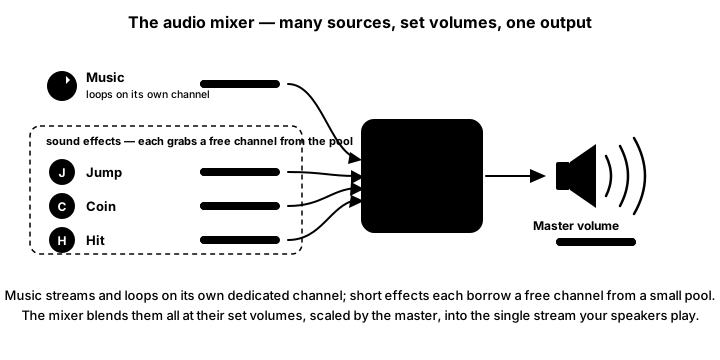
mixer is exactly what its name says. Background music streams from disk and loops on its own dedicated channel (pygame.mixer.music), while short sound effects are each loaded into memory and grab a free channel from a small pool when played (Sound.play()). The mixer blends everything at each source’s set volume, scaled by a master volume, into the single stream your speakers play — which is why you can duck the music under a loud effect, or mute effects without touching the music.Setting Up Pygame Audio
import pygame

# Configure the mixer BEFORE pygame.init().
# pygame.init() auto-initializes the mixer with default settings. If you call
# pygame.mixer.init(frequency=..., buffer=...) AFTER that, the mixer is already
# running, so the call is a no-op and your arguments are silently ignored.
# pre_init() just records the settings you want; pygame.init() then starts the
# mixer with them.
pygame.mixer.pre_init(
    frequency=22050,     # Sample rate (22050, 44100, 48000)
    size=-16,            # 16-bit signed samples
    channels=2,          # Stereo
    buffer=512           # Smaller = less latency, more CPU
)
pygame.init()            # Starts everything, including the mixer with the settings above

# Set number of channels for sound effects
pygame.mixer.set_num_channels(8)  # 8 simultaneous sounds
Loading and Playing Sounds
Sound Effects (Short Sounds)
# Load a sound effect
jump_sound = pygame.mixer.Sound("jump.wav")
coin_sound = pygame.mixer.Sound("coin.ogg")
explosion_sound = pygame.mixer.Sound("explosion.ogg")  # Sound wants WAV/OGG; play MP3 via pygame.mixer.music instead

# Play a sound
jump_sound.play()

# Play with volume control (0.0 to 1.0)
coin_sound.set_volume(0.5)
coin_sound.play()

# Play sound multiple times
explosion_sound.play(loops=3)  # Play 4 times total

# Play sound forever
engine_sound.play(loops=-1)

# Stop a specific sound
engine_sound.stop()

# Fade out a sound
engine_sound.fadeout(1000)  # Fade out over 1 second
Background Music
# Load and play background music
pygame.mixer.music.load("background_music.mp3")
pygame.mixer.music.play(loops=-1)  # Loop forever

# Control music volume (0.0 to 1.0)
pygame.mixer.music.set_volume(0.7)

# Pause and unpause music
pygame.mixer.music.pause()
pygame.mixer.music.unpause()

# Stop music
pygame.mixer.music.stop()

# Fade in/out music
pygame.mixer.music.fadeout(2000)  # Fade out over 2 seconds
pygame.mixer.music.load("new_song.mp3")
pygame.mixer.music.play(loops=-1, fade_ms=3000)  # Fade in over 3 seconds

# Queue next song
pygame.mixer.music.queue("next_song.mp3")

# Check if music is playing
if pygame.mixer.music.get_busy():
    print("Music is playing")
Interactive Audio Mixer Demo
Click on instruments to play sounds! Adjust the master volume with the slider.
Master Volume: 70%
Audio File Formats
📁 Supported Audio Formats
| Format | Extension | Best For | File Size | Quality |
|---|---|---|---|---|
| WAV | .wav | Short sound effects | Large | Excellent |
| OGG Vorbis | .ogg | Music & longer sounds | Small | Very Good |
| MP3 | .mp3 | Music | Small | Good |
| FLAC | .flac | High quality music | Medium | Excellent |
Managing Multiple Sounds
class SoundManager:
    def __init__(self):
        self.sounds = {}
        self.music_volume = 0.7
        self.sfx_volume = 0.5
        self.muted = False

    def load_sound(self, name, filepath):
        """Load a sound effect"""
        self.sounds[name] = pygame.mixer.Sound(filepath)

    def play_sound(self, name, loops=0):
        """Play a loaded sound effect"""
        if name in self.sounds and not self.muted:
            sound = self.sounds[name]
            sound.set_volume(self.sfx_volume)
            return sound.play(loops)
        return None

    def play_music(self, filepath, loops=-1):
        """Play background music"""
        if not self.muted:
            pygame.mixer.music.load(filepath)
            pygame.mixer.music.set_volume(self.music_volume)
            pygame.mixer.music.play(loops)

    def stop_music(self):
        pygame.mixer.music.stop()

    def pause_all(self):
        pygame.mixer.pause()
        pygame.mixer.music.pause()

    def unpause_all(self):
        pygame.mixer.unpause()
        pygame.mixer.music.unpause()

    def set_music_volume(self, volume):
        self.music_volume = max(0.0, min(1.0, volume))
        pygame.mixer.music.set_volume(self.music_volume)

    def set_sfx_volume(self, volume):
        self.sfx_volume = max(0.0, min(1.0, volume))
        for sound in self.sounds.values():
            sound.set_volume(self.sfx_volume)

    def toggle_mute(self):
        self.muted = not self.muted
        if self.muted:
            self.pause_all()
        else:
            self.unpause_all()

# Usage
sound_manager = SoundManager()

# Load sounds
sound_manager.load_sound('jump', 'sounds/jump.wav')
sound_manager.load_sound('coin', 'sounds/coin.wav')
sound_manager.load_sound('explosion', 'sounds/explosion.wav')

# Play sounds in game
sound_manager.play_sound('jump')
sound_manager.play_sound('coin')

# Background music
sound_manager.play_music('music/level1.ogg')
Dynamic Audio System
Distance-Based Volume
def calculate_volume_by_distance(listener_pos, sound_pos, max_distance=500):
    """Calculate volume based on distance between listener and sound source"""
    dx = listener_pos[0] - sound_pos[0]
    dy = listener_pos[1] - sound_pos[1]
    distance = math.sqrt(dx * dx + dy * dy)

    if distance >= max_distance:
        return 0.0
    else:
        # Linear falloff
        return 1.0 - (distance / max_distance)

        # Exponential falloff (more realistic)
        # return math.exp(-distance / (max_distance * 0.3))

class PositionalSound:
    def __init__(self, sound, position):
        self.sound = sound
        self.position = position
        self.channel = None

    def play(self, listener_pos, max_distance=500):
        volume = calculate_volume_by_distance(listener_pos, self.position, max_distance)
        if volume > 0:
            self.sound.set_volume(volume)
            self.channel = self.sound.play()

            # Stereo panning
            if self.channel:
                dx = self.position[0] - listener_pos[0]
                # Pan from -1 (left) to 1 (right)
                pan = max(-1, min(1, dx / max_distance))
                # Pygame doesn't have built-in panning, but you can simulate it
                # with channel volume for left/right speakers
Music Crossfading
class MusicCrossfader:
    def __init__(self):
        self.current_music = None
        self.target_music = None
        self.fade_speed = 0.01
        self.current_volume = 1.0
        self.target_volume = 0.0
        self.fading = False

    def crossfade_to(self, music_file):
        """Start crossfading to new music"""
        self.target_music = music_file
        self.fading = True
        self.target_volume = 1.0

    def update(self):
        """Update crossfade - call this in game loop"""
        if not self.fading:
            return

        # Fade out current
        self.current_volume -= self.fade_speed

        if self.current_volume <= 0:
            # Switch to new music
            pygame.mixer.music.stop()
            pygame.mixer.music.load(self.target_music)
            pygame.mixer.music.play(-1)
            self.current_music = self.target_music
            self.target_music = None
            self.current_volume = 1.0
            self.fading = False
        else:
            pygame.mixer.music.set_volume(self.current_volume)
Complete Audio Example Game
import pygame
import math
import random

class AudioGame:
    def __init__(self):
        pygame.mixer.pre_init(frequency=22050, size=-16, channels=2, buffer=512)
        pygame.init()  # pre_init above ensures these mixer settings actually take effect

        self.screen = pygame.display.set_mode((800, 600))
        pygame.display.set_caption("Audio Adventure")
        self.clock = pygame.time.Clock()

        # Load sounds
        self.sounds = {
            'footstep': pygame.mixer.Sound('sounds/footstep.wav'),
            'coin': pygame.mixer.Sound('sounds/coin.wav'),
            'enemy_hit': pygame.mixer.Sound('sounds/hit.wav'),
            'player_hurt': pygame.mixer.Sound('sounds/hurt.wav'),
            'powerup': pygame.mixer.Sound('sounds/powerup.wav'),
            'ambient': pygame.mixer.Sound('sounds/ambient.wav')
        }

        # Set sound volumes
        self.sounds['footstep'].set_volume(0.3)
        self.sounds['coin'].set_volume(0.5)
        self.sounds['ambient'].set_volume(0.2)

        # Load music
        pygame.mixer.music.load('music/exploration.ogg')
        pygame.mixer.music.set_volume(0.5)
        pygame.mixer.music.play(-1)

        # Play ambient sound loop
        self.ambient_channel = self.sounds['ambient'].play(-1)

        # Game objects
        self.player = {'x': 400, 'y': 300, 'health': 100, 'coins': 0}
        self.coins = [
            {'x': random.randint(50, 750), 'y': random.randint(50, 550)}
            for _ in range(10)
        ]
        self.enemies = [
            {'x': random.randint(50, 750), 'y': random.randint(50, 550), 'vx': random.choice([-1, 1])}
            for _ in range(3)
        ]

        # Audio states
        self.footstep_timer = 0
        self.in_danger = False
        self.combat_music = 'music/combat.ogg'
        self.exploration_music = 'music/exploration.ogg'

    def handle_events(self):
        for event in pygame.event.get():
            if event.type == pygame.QUIT:
                return False
            elif event.type == pygame.KEYDOWN:
                if event.key == pygame.K_SPACE:
                    self.sounds['powerup'].play()
                elif event.key == pygame.K_m:
                    # Toggle mute
                    if pygame.mixer.music.get_volume() > 0:
                        pygame.mixer.music.set_volume(0)
                        for sound in self.sounds.values():
                            sound.set_volume(0)
                    else:
                        pygame.mixer.music.set_volume(0.5)
                        self.sounds['footstep'].set_volume(0.3)
                        self.sounds['coin'].set_volume(0.5)
        return True

    def update(self):
        # Player movement
        keys = pygame.key.get_pressed()
        old_x, old_y = self.player['x'], self.player['y']

        if keys[pygame.K_LEFT]:
            self.player['x'] -= 5
        if keys[pygame.K_RIGHT]:
            self.player['x'] += 5
        if keys[pygame.K_UP]:
            self.player['y'] -= 5
        if keys[pygame.K_DOWN]:
            self.player['y'] += 5

        # Play footstep sounds when moving
        if old_x != self.player['x'] or old_y != self.player['y']:
            self.footstep_timer += 1
            if self.footstep_timer >= 15:  # Every 15 frames
                self.sounds['footstep'].play()
                self.footstep_timer = 0

        # Keep player on screen
        self.player['x'] = max(20, min(780, self.player['x']))
        self.player['y'] = max(20, min(580, self.player['y']))

        # Update enemies
        for enemy in self.enemies:
            enemy['x'] += enemy['vx'] * 2
            if enemy['x'] <= 20 or enemy['x'] >= 780:
                enemy['vx'] = -enemy['vx']

        # Check coin collection
        for coin in self.coins[:]:
            if abs(self.player['x'] - coin['x']) < 30 and abs(self.player['y'] - coin['y']) < 30:
                self.sounds['coin'].play()
                self.coins.remove(coin)
                self.player['coins'] += 1

                # Play victory sound if all coins collected
                if len(self.coins) == 0:
                    self.sounds['powerup'].play()

        # Check enemy proximity
        was_in_danger = self.in_danger
        self.in_danger = False

        for enemy in self.enemies:
            distance = math.sqrt((self.player['x'] - enemy['x'])**2 +
                               (self.player['y'] - enemy['y'])**2)

            if distance < 150:
                self.in_danger = True

                # Collision with enemy
                if distance < 30:
                    self.sounds['player_hurt'].play()
                    self.player['health'] -= 10
                    # Knockback
                    dx = self.player['x'] - enemy['x']
                    dy = self.player['y'] - enemy['y']
                    self.player['x'] += dx * 0.5
                    self.player['y'] += dy * 0.5

        # Dynamic music based on danger
        if self.in_danger and not was_in_danger:
            # Switch to combat music
            pygame.mixer.music.fadeout(500)
            pygame.mixer.music.load(self.combat_music)
            pygame.mixer.music.play(-1, fade_ms=500)
        elif not self.in_danger and was_in_danger:
            # Back to exploration music
            pygame.mixer.music.fadeout(500)
            pygame.mixer.music.load(self.exploration_music)
            pygame.mixer.music.play(-1, fade_ms=500)

    def draw(self):
        self.screen.fill((20, 20, 40))

        # Draw coins
        for coin in self.coins:
            pygame.draw.circle(self.screen, (255, 215, 0),
                             (coin['x'], coin['y']), 15)

        # Draw enemies with danger zones
        for enemy in self.enemies:
            # Draw danger zone
            pygame.draw.circle(self.screen, (50, 0, 0),
                             (enemy['x'], enemy['y']), 150, 2)
            # Draw enemy
            pygame.draw.rect(self.screen, (255, 0, 0),
                           (enemy['x'] - 15, enemy['y'] - 15, 30, 30))

        # Draw player
        color = (0, 100, 255) if not self.in_danger else (255, 100, 100)
        pygame.draw.circle(self.screen, color,
                         (self.player['x'], self.player['y']), 20)

        # Draw UI
        font = pygame.font.Font(None, 36)
        health_text = font.render(f"Health: {self.player['health']}", True, (255, 255, 255))
        coins_text = font.render(f"Coins: {self.player['coins']}/{10 - len(self.coins)}", True, (255, 255, 255))

        if self.in_danger:
            danger_text = font.render("DANGER!", True, (255, 0, 0))
            self.screen.blit(danger_text, (350, 50))

        self.screen.blit(health_text, (10, 10))
        self.screen.blit(coins_text, (10, 50))

        # Instructions
        font_small = pygame.font.Font(None, 24)
        instructions = [
            "Arrow Keys: Move",
            "Space: Power Up Sound",
            "M: Toggle Mute",
            "Collect coins and avoid enemies!"
        ]
        for i, text in enumerate(instructions):
            rendered = font_small.render(text, True, (200, 200, 200))
            self.screen.blit(rendered, (10, 500 + i * 25))

        pygame.display.flip()

    def run(self):
        running = True
        while running:
            running = self.handle_events()
            self.update()
            self.draw()
            self.clock.tick(60)

        pygame.quit()

if __name__ == "__main__":
    game = AudioGame()
    game.run()
Audio Best Practices
💡 Pro Tips for Great Game Audio
- Preload Everything: Load all sounds at startup, not during gameplay
- Use Appropriate Formats: WAV for short SFX, OGG for music
- Volume Balance: Music quieter than SFX, SFX quieter than UI sounds
- Avoid Repetition: Use multiple variations of common sounds
- Spatial Audio: Adjust volume/pan based on distance/position
- Audio Feedback: Every player action should have a sound
- Compression: Use audio compression to reduce file sizes
- Test on Different Systems: Audio can vary greatly between devices
Common Audio Problems and Solutions
⚠️ Audio Pitfalls to Avoid
- Lag/Delay: Increase buffer size or preload sounds
- Crackling/Popping: Reduce sample rate or increase buffer
- Silent Failure: Always check if mixer initialized properly
- Memory Issues: Don't load huge files as Sound objects
- Format Problems: Ensure files are in supported formats
- Volume Spikes: Normalize audio files before using
Practice Exercises
🎯 Audio Challenges!
- Rhythm Game: Play sounds in time with visual cues
- Audio Puzzle: Use sound cues to solve puzzles
- Dynamic Soundtrack: Music that changes with game state
- 3D Audio: Implement positional audio with stereo panning
- Sound Board: Create a musical instrument or DJ mixer
- Audio Settings Menu: Volume sliders, mute options, audio device selection
Key Takeaways
- 🎵 Use pygame.mixer for all audio needs
- 🎮 Sound effects use Sound objects, music uses the music module
- 📊 Manage volume levels for better player experience
- 🔄 Preload audio files to avoid gameplay stuttering
- 🎯 Every action should have audio feedback
- 🎼 Dynamic music enhances immersion
- ⚡ Optimize audio formats and settings for performance
🏋️♂️ Practice Exercise: Sound Board
🏋️♂️ Exercise 1: SFX, Music, and Volume Together
Objective: Build a small 'sound board' that plays three preloaded sound effects when the user presses 1, 2, or 3, and toggles a looping background-music track on/off with M. The exercise practises both halves of pygame.mixer: the Sound object API for short, multi-instance SFX, and the separate pygame.mixer.music module for streamed background music — plus per-source volume balancing (Pro Tip 'Music quieter than SFX').
Instructions:
- Initialize Pygame AND the mixer separately:
pygame.init()followed bypygame.mixer.init(). Optionally callpygame.mixer.set_num_channels(8)so up to 8 sound effects can play simultaneously without cutting each other off. - Drop three short audio files (e.g.
jump.wav,coin.ogg,explosion.wav) and one music track (e.g.music.ogg) into the same folder as your script. Free SFX are easy to find on freesound.org or jsfxr.me. - BEFORE the game loop, preload each effect once:
jump_sfx = pygame.mixer.Sound("jump.wav"), etc. Set per-effect volume withjump_sfx.set_volume(0.6)so each sits properly in the mix. - Also before the loop, load and start the background music with
pygame.mixer.music.load("music.ogg"),pygame.mixer.music.set_volume(0.3)(lower than the SFX), andpygame.mixer.music.play(-1)(the-1argument loops forever). - Inside the event loop, on
KEYDOWN, branch onevent.key: K_1 callsjump_sfx.play(), K_2 plays the coin sound, K_3 plays the explosion. Pressing K_M toggles amusic_pausedbool and callspygame.mixer.music.pause()orpygame.mixer.music.unpause()accordingly. - Run a minimal render loop (clear screen, flip, tick 60). The window itself is just a focus target so the keyboard works — the audio IS the output.
💡 Hint
Two things separate good audio code from janky audio code in Pygame. **First, preload.** Putting pygame.mixer.Sound("jump.wav") inside the event handler means the file is read off disk and decoded every single time you press 1 — the lesson's Common Pitfall #1 ('Lag/Delay: Increase buffer size or preload sounds'). Construct each Sound object ONCE before the loop and just call .play() on the cached object to trigger it. **Second, music is a different API.** pygame.mixer.Sound loads the whole file into memory — fast for short clips, but a 5-minute soundtrack would chew up RAM. pygame.mixer.music STREAMS from disk one track at a time, with its own load / play / pause / unpause / set_volume functions. Key Takeaway #2 in the lesson states this directly.
✅ Example Solution
import sys
import pygame

pygame.init()
pygame.mixer.init()                  # Initialise the audio subsystem
pygame.mixer.set_num_channels(8)     # Up to 8 simultaneous SFX voices

screen = pygame.display.set_mode((640, 360))
pygame.display.set_caption("Sound Board — 1/2/3 for SFX, M toggles music")
clock = pygame.time.Clock()

# 1. Preload Sound objects ONCE before the loop
jump_sfx    = pygame.mixer.Sound("jump.wav")
coin_sfx    = pygame.mixer.Sound("coin.ogg")
explode_sfx = pygame.mixer.Sound("explosion.wav")

# 2. Tune each SFX volume independently
jump_sfx.set_volume(0.6)
coin_sfx.set_volume(0.5)
explode_sfx.set_volume(0.8)

# 3. Background music: separate API, STREAMS from disk
pygame.mixer.music.load("music.ogg")
pygame.mixer.music.set_volume(0.3)   # Music quieter than SFX (Pro Tip)
pygame.mixer.music.play(-1)          # -1 = loop forever
music_paused = False

running = True
while running:
    for event in pygame.event.get():
        if event.type == pygame.QUIT:
            running = False
        elif event.type == pygame.KEYDOWN:
            if   event.key == pygame.K_1: jump_sfx.play()
            elif event.key == pygame.K_2: coin_sfx.play()
            elif event.key == pygame.K_3: explode_sfx.play()
            elif event.key == pygame.K_m:
                if music_paused: pygame.mixer.music.unpause()
                else:            pygame.mixer.music.pause()
                music_paused = not music_paused

    screen.fill((20, 20, 30))    # The audio IS the output
    pygame.display.flip()
    clock.tick(60)

pygame.quit()
sys.exit()
🎯 Quick Quiz
Question 1: The lesson teaches two distinct APIs for game audio: pygame.mixer.Sound objects and the pygame.mixer.music module. What's the architectural difference between them?
Question 2: Why does the lesson recommend constructing your pygame.mixer.Sound objects ONCE before the game loop instead of inside the event handler that triggers playback?
Question 3: The setup snippet calls pygame.mixer.set_num_channels(8). What are these channels, and what happens if your game tries to play a 9th sound while all 8 are busy?
What's Next?
Congratulations! You've completed the Pygame Basics module! You now know how to create game loops, draw graphics, handle input, detect collisions, and add audio. Next, we'll dive into Game Mathematics where you'll learn about 2D coordinate systems, vectors, and the math that makes games work!