Sprite Animation
Bringing Characters to Life
Animation is what transforms static sprites into living, breathing characters! By sequencing frames and controlling timing, you can create walk cycles, attacks, idle animations, and more. Let's learn how to make your sprites move naturally and expressively! 🏃♂️✨
Understanding Animation Principles
🎬 The Flipbook Analogy
Think of sprite animation like a flipbook:
- Frames: Individual pages/drawings in sequence
- Frame Rate: How fast you flip the pages
- Loop: Starting over when you reach the end
- States: Different flipbooks for different actions
- Transitions: Switching between flipbooks smoothly
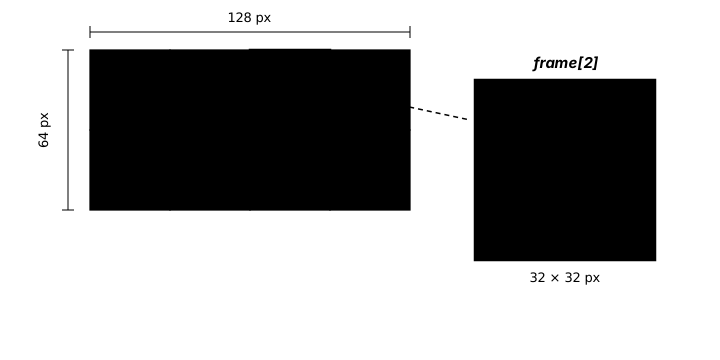
Interactive Animation Demo
Watch different animation techniques in action!
State: Idle | Frame: 0
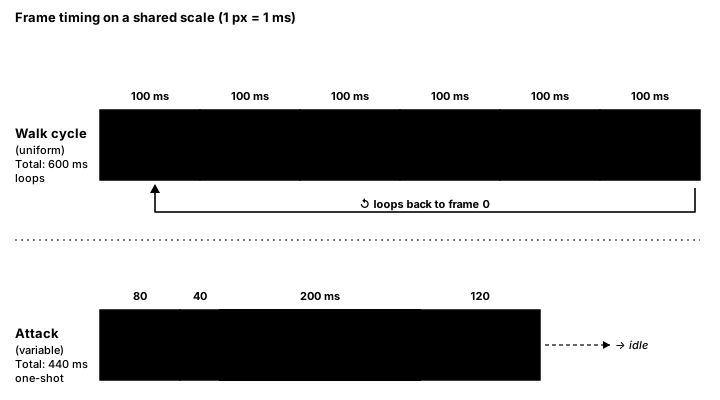
frame_duration value. Variable timing (bottom) lets specific frames linger or flash by; the long impact-hold is what makes the attack land. Both patterns appear in the code below.Basic Frame Animation
import pygame

class AnimatedSprite(pygame.sprite.Sprite):
    def __init__(self, frames: list[pygame.Surface], x: int, y: int) -> None:
        super().__init__()
        self.frames: list[pygame.Surface] = frames
        self.current_frame: int = 0
        self.image: pygame.Surface = self.frames[0]
        self.rect: pygame.Rect = self.image.get_rect()
        self.rect.x = x
        self.rect.y = y

        # Animation timing
        self.animation_speed: float = 0.15  # Frames per update
        self.animation_counter: float = 0.0

    def update(self) -> None:
        # Update animation
        self.animation_counter += self.animation_speed

        if self.animation_counter >= 1:
            self.animation_counter = 0
            self.current_frame = (self.current_frame + 1) % len(self.frames)
            self.image = self.frames[self.current_frame]

# Load animation frames
def load_animation_frames(base_path: str, frame_count: int) -> list[pygame.Surface]:
    frames: list[pygame.Surface] = []
    for i in range(frame_count):
        filename = f"{base_path}_{i}.png"
        frame = pygame.image.load(filename).convert_alpha()
        frames.append(frame)
    return frames

# Usage
walk_frames = load_animation_frames("sprites/player_walk", 8)
player = AnimatedSprite(walk_frames, 100, 100)
Time-Based Animation
class TimedAnimation:
    """Animation with precise timing control"""
    def __init__(self, frames: list[pygame.Surface], frame_duration: int = 100) -> None:
        self.frames: list[pygame.Surface] = frames
        self.frame_duration: int = frame_duration  # milliseconds per frame
        self.current_frame: int = 0
        self.time_since_last_frame: int = 0
        self.playing: bool = True
        self.loop: bool = True

    def update(self, dt: int) -> None:
        """Update animation with delta time"""
        if not self.playing:
            return

        self.time_since_last_frame += dt

        # Check if it's time to change frame
        if self.time_since_last_frame >= self.frame_duration:
            self.time_since_last_frame = 0
            self.current_frame += 1

            # Handle end of animation
            if self.current_frame >= len(self.frames):
                if self.loop:
                    self.current_frame = 0
                else:
                    self.current_frame = len(self.frames) - 1
                    self.playing = False

    def get_current_frame(self) -> pygame.Surface:
        """Get the current frame image"""
        return self.frames[self.current_frame]

    def reset(self) -> None:
        """Reset animation to beginning"""
        self.current_frame = 0
        self.time_since_last_frame = 0
        self.playing = True

    def play(self) -> None:
        self.playing = True

    def pause(self) -> None:
        self.playing = False

    def set_frame(self, frame_index: int) -> None:
        """Jump to specific frame"""
        self.current_frame = min(frame_index, len(self.frames) - 1)
Animation State Machine
from typing import Any, Optional

class AnimationStateMachine:
    """Manage multiple animation states"""
    def __init__(self) -> None:
        self.animations: dict[str, dict[str, Any]] = {}
        self.current_state: Optional[str] = None
        self.previous_state: Optional[str] = None

    def add_animation(self, state_name: str, frames: list[pygame.Surface], frame_duration: int = 100, loop: bool = True) -> None:
        """Add an animation state"""
        self.animations[state_name] = {
            'frames': frames,
            'duration': frame_duration,
            'loop': loop,
            'current_frame': 0,
            'timer': 0
        }

        # Set first animation as default
        if self.current_state is None:
            self.current_state = state_name

    def change_state(self, new_state: str) -> None:
        """Switch to a different animation"""
        if new_state in self.animations and new_state != self.current_state:
            self.previous_state = self.current_state
            self.current_state = new_state
            # Reset new animation
            self.animations[new_state]['current_frame'] = 0
            self.animations[new_state]['timer'] = 0

    def update(self, dt: int) -> Optional[pygame.Surface]:
        """Update current animation"""
        if not self.current_state:
            return None

        anim = self.animations[self.current_state]
        anim['timer'] += dt

        if anim['timer'] >= anim['duration']:
            anim['timer'] = 0
            anim['current_frame'] += 1

            if anim['current_frame'] >= len(anim['frames']):
                if anim['loop']:
                    anim['current_frame'] = 0
                else:
                    anim['current_frame'] = len(anim['frames']) - 1
                    # Could trigger animation complete event here

        return anim['frames'][anim['current_frame']]

    def get_current_frame(self) -> Optional[pygame.Surface]:
        """Get current frame of active animation"""
        if not self.current_state:
            return None
        anim = self.animations[self.current_state]
        return anim['frames'][anim['current_frame']]

# Example: Character with multiple animations
class AnimatedCharacter(pygame.sprite.Sprite):
    def __init__(self, x: int, y: int) -> None:
        super().__init__()
        self.animation: AnimationStateMachine = AnimationStateMachine()

        # Load animations
        self.load_animations()

        # Set initial image
        self.image: pygame.Surface = self.animation.get_current_frame()
        self.rect: pygame.Rect = self.image.get_rect()
        self.rect.x = x
        self.rect.y = y

        # Character state
        self.velocity_x: float = 0.0
        self.velocity_y: float = 0.0
        self.on_ground: bool = True

    def load_animations(self) -> None:
        """Load all character animations"""
        # Idle animation
        idle_frames = load_animation_frames("char_idle", 4)
        self.animation.add_animation('idle', idle_frames, 200, True)

        # Walk animation
        walk_frames = load_animation_frames("char_walk", 8)
        self.animation.add_animation('walk', walk_frames, 100, True)

        # Run animation
        run_frames = load_animation_frames("char_run", 6)
        self.animation.add_animation('run', run_frames, 80, True)

        # Jump animation
        jump_frames = load_animation_frames("char_jump", 5)
        self.animation.add_animation('jump', jump_frames, 100, False)

        # Attack animation
        attack_frames = load_animation_frames("char_attack", 6)
        self.animation.add_animation('attack', attack_frames, 60, False)

    def update(self, dt: int) -> None:
        """Update character and animation"""
        # Determine animation based on state
        if abs(self.velocity_x) > 5:
            self.animation.change_state('run')
        elif abs(self.velocity_x) > 0:
            self.animation.change_state('walk')
        elif not self.on_ground:
            self.animation.change_state('jump')
        else:
            self.animation.change_state('idle')

        # Update animation
        self.image = self.animation.update(dt)

        # Flip image based on direction
        if self.velocity_x < 0:
            self.image = pygame.transform.flip(self.image, True, False)
Advanced Animation Techniques
from typing import Any, Callable, Optional

# Animation with variable frame durations
class AdvancedAnimation:
    def __init__(self, frame_data: list[tuple[pygame.Surface, int]]) -> None:
        """
        frame_data: list of (image, duration) tuples
        """
        self.frame_data: list[tuple[pygame.Surface, int]] = frame_data
        self.current_frame: int = 0
        self.timer: int = 0
        self.total_duration: int = sum(duration for _, duration in frame_data)

    def update(self, dt: int) -> None:
        self.timer += dt

        current_image, current_duration = self.frame_data[self.current_frame]

        if self.timer >= current_duration:
            self.timer -= current_duration
            self.current_frame = (self.current_frame + 1) % len(self.frame_data)

    def get_frame(self) -> pygame.Surface:
        return self.frame_data[self.current_frame][0]

# Animation blending/transitions
class AnimationBlender:
    def __init__(self) -> None:
        self.from_animation: Any = None
        self.to_animation: Any = None
        self.blend_time: int = 0
        self.blend_duration: int = 200  # milliseconds
        self.blending: bool = False

    def start_blend(self, from_anim: Any, to_anim: Any, duration: int = 200) -> None:
        """Start blending between two animations"""
        self.from_animation = from_anim
        self.to_animation = to_anim
        self.blend_duration = duration
        self.blend_time = 0
        self.blending = True

    def update(self, dt: int) -> Optional[pygame.Surface]:
        if not self.blending:
            return None

        self.blend_time += dt
        blend_factor = min(self.blend_time / self.blend_duration, 1.0)

        if blend_factor >= 1.0:
            self.blending = False
            return self.to_animation.get_frame()

        # Simple crossfade
        from_frame = self.from_animation.get_frame()
        to_frame = self.to_animation.get_frame()

        # Create blended frame
        blended = from_frame.copy()
        blended.set_alpha(int(255 * (1 - blend_factor)))

        temp = to_frame.copy()
        temp.set_alpha(int(255 * blend_factor))
        blended.blit(temp, (0, 0))

        return blended

# Animation events
class AnimationWithEvents:
    def __init__(self, frames: list[pygame.Surface], events: Optional[dict[int, Callable[[], None]]] = None) -> None:
        self.frames: list[pygame.Surface] = frames
        self.events: dict[int, Callable[[], None]] = events or {}  # {frame_number: callback}
        self.current_frame: int = 0
        self.last_frame: int = -1

    def update(self) -> None:
        self.current_frame = (self.current_frame + 1) % len(self.frames)

        # Trigger events
        if self.current_frame != self.last_frame:
            if self.current_frame in self.events:
                self.events[self.current_frame]()
            self.last_frame = self.current_frame

    def add_event(self, frame: int, callback: Callable[[], None]) -> None:
        """Add event at specific frame"""
        self.events[frame] = callback

# Usage
attack_anim = AnimationWithEvents(attack_frames)
attack_anim.add_event(3, lambda: play_sound("sword_swing"))
attack_anim.add_event(5, lambda: check_hit_enemies())
Sprite Animation Optimization
from typing import Any, Optional

# Frame caching system
class AnimationCache:
    def __init__(self) -> None:
        self.cache: dict[Any, list[pygame.Surface]] = {}

    def get_rotated_frames(self, frames: list[pygame.Surface], angle: float) -> list[pygame.Surface]:
        """Get cached rotated frames"""
        cache_key = (id(frames), angle)

        if cache_key not in self.cache:
            rotated = []
            for frame in frames:
                rotated.append(pygame.transform.rotate(frame, angle))
            self.cache[cache_key] = rotated

        return self.cache[cache_key]

    def get_scaled_frames(self, frames: list[pygame.Surface], scale: float) -> list[pygame.Surface]:
        """Get cached scaled frames"""
        cache_key = (id(frames), scale)

        if cache_key not in self.cache:
            scaled = []
            for frame in frames:
                new_size = (int(frame.get_width() * scale),
                           int(frame.get_height() * scale))
                scaled.append(pygame.transform.smoothscale(frame, new_size))
            self.cache[cache_key] = scaled

        return self.cache[cache_key]

    def clear(self) -> None:
        """Clear cache to free memory"""
        self.cache.clear()

# Efficient sprite sheet animation
class SpriteSheetAnimation:
    def __init__(self, sheet: pygame.Surface, frame_width: int, frame_height: int, frame_count: int) -> None:
        self.sheet: pygame.Surface = sheet
        self.frame_width: int = frame_width
        self.frame_height: int = frame_height
        self.frame_count: int = frame_count
        self.current_frame: int = 0

        # Pre-calculate frame rectangles
        self.frame_rects: list[pygame.Rect] = []
        for i in range(frame_count):
            x = (i % (sheet.get_width() // frame_width)) * frame_width
            y = (i // (sheet.get_width() // frame_width)) * frame_height
            self.frame_rects.append(pygame.Rect(x, y, frame_width, frame_height))

    def get_frame(self, frame_index: Optional[int] = None) -> pygame.Surface:
        """Get frame directly from sprite sheet (no copying)"""
        if frame_index is None:
            frame_index = self.current_frame

        # Return subsurface (shares memory with sprite sheet)
        return self.sheet.subsurface(self.frame_rects[frame_index])

    def update(self) -> None:
        self.current_frame = (self.current_frame + 1) % self.frame_count
Complete Animation System Example
import pygame
import math

class CompleteAnimationDemo:
    def __init__(self):
        pygame.init()
        self.screen = pygame.display.set_mode((800, 600))
        pygame.display.set_caption("Complete Animation System")
        self.clock = pygame.time.Clock()

        # Create animated sprites
        self.create_sprites()

        # Animation settings
        self.show_onion_skin = False
        self.show_hitboxes = False

    def create_sprites(self):
        """Create various animated sprites"""
        # Walking character
        self.walker = WalkingCharacter(100, 400)

        # Flying creature
        self.flyer = FlyingCreature(400, 200)

        # Animated effects
        self.effects = []

        # UI animations
        self.ui_pulse = PulsingUI(700, 50)

        # All sprites group
        self.all_sprites = pygame.sprite.Group()
        self.all_sprites.add(self.walker, self.flyer, self.ui_pulse)

    def handle_events(self):
        for event in pygame.event.get():
            if event.type == pygame.QUIT:
                return False
            elif event.type == pygame.KEYDOWN:
                if event.key == pygame.K_SPACE:
                    # Create explosion effect
                    explosion = ExplosionEffect(400, 400)
                    self.effects.append(explosion)
                elif event.key == pygame.K_o:
                    self.show_onion_skin = not self.show_onion_skin
                elif event.key == pygame.K_h:
                    self.show_hitboxes = not self.show_hitboxes
            elif event.type == pygame.MOUSEBUTTONDOWN:
                # Create click effect
                click_effect = ClickEffect(*pygame.mouse.get_pos())
                self.effects.append(click_effect)

        return True

    def update(self, dt):
        # Update all sprites
        self.all_sprites.update(dt)

        # Update effects
        for effect in self.effects[:]:
            effect.update(dt)
            if effect.finished:
                self.effects.remove(effect)

        # Handle input for walker
        keys = pygame.key.get_pressed()
        if keys[pygame.K_LEFT]:
            self.walker.move_left()
        elif keys[pygame.K_RIGHT]:
            self.walker.move_right()
        else:
            self.walker.stop()

        if keys[pygame.K_UP]:
            self.walker.jump()

    def draw(self):
        self.screen.fill((30, 30, 40))

        # Draw ground
        pygame.draw.line(self.screen, (100, 100, 100),
                        (0, 450), (800, 450), 3)

        # Draw sprites with optional onion skinning
        if self.show_onion_skin:
            self.draw_onion_skin()

        # Draw all sprites
        self.all_sprites.draw(self.screen)

        # Draw effects
        for effect in self.effects:
            effect.draw(self.screen)

        # Draw hitboxes if enabled
        if self.show_hitboxes:
            self.draw_hitboxes()

        # Draw UI
        self.draw_ui()

    def draw_onion_skin(self):
        """Draw previous frames with transparency"""
        for sprite in self.all_sprites:
            if hasattr(sprite, 'get_onion_frames'):
                frames = sprite.get_onion_frames()
                for i, (image, pos) in enumerate(frames):
                    alpha = 50 + i * 30
                    temp = image.copy()
                    temp.set_alpha(alpha)
                    self.screen.blit(temp, pos)

    def draw_hitboxes(self):
        """Draw collision boxes"""
        for sprite in self.all_sprites:
            pygame.draw.rect(self.screen, (255, 0, 0), sprite.rect, 2)

            if hasattr(sprite, 'hit_rect'):
                pygame.draw.rect(self.screen, (0, 255, 0), sprite.hit_rect, 1)

    def draw_ui(self):
        font = pygame.font.Font(None, 24)
        texts = [
            "Space: Explosion Effect",
            "Click: Ripple Effect",
            "O: Toggle Onion Skin",
            "H: Toggle Hitboxes",
            "Arrow Keys: Move Character"
        ]

        for i, text in enumerate(texts):
            rendered = font.render(text, True, (255, 255, 255))
            self.screen.blit(rendered, (10, 10 + i * 30))

    def run(self):
        running = True
        dt = 0

        while running:
            running = self.handle_events()
            self.update(dt)
            self.draw()
            pygame.display.flip()
            dt = self.clock.tick(60) / 1000.0  # Delta time in seconds

        pygame.quit()

# Sprite classes
class WalkingCharacter(pygame.sprite.Sprite):
    def __init__(self, x, y):
        super().__init__()
        self.animations = {}
        self.create_animations()
        self.current_animation = 'idle'
        self.image = self.animations['idle'].get_frame()
        self.rect = self.image.get_rect()
        self.rect.x = x
        self.rect.y = y
        self.velocity_x = 0
        self.direction = 1
        self.frame_history = []

    def create_animations(self):
        """Create procedural animations"""
        # Create simple colored rectangles as frames
        idle_frames = []
        for i in range(4):
            surf = pygame.Surface((40, 60), pygame.SRCALPHA)
            color = (100, 150 + i * 10, 255)
            pygame.draw.rect(surf, color, (5, 10, 30, 40))
            pygame.draw.circle(surf, (255, 200, 150), (20, 15), 8)
            idle_frames.append(surf)

        walk_frames = []
        for i in range(6):
            surf = pygame.Surface((40, 60), pygame.SRCALPHA)
            color = (100, 255, 150)
            offset = math.sin(i * math.pi / 3) * 3
            pygame.draw.rect(surf, color, (5, 10 + offset, 30, 40))
            pygame.draw.circle(surf, (255, 200, 150), (20, 15 + offset), 8)
            walk_frames.append(surf)

        self.animations['idle'] = SimpleAnimation(idle_frames, 200)
        self.animations['walk'] = SimpleAnimation(walk_frames, 100)

    def update(self, dt):
        # Update animation
        old_image = self.image
        self.animations[self.current_animation].update(dt)
        self.image = self.animations[self.current_animation].get_frame()

        # Flip based on direction
        if self.direction < 0:
            self.image = pygame.transform.flip(self.image, True, False)

        # Store frame history for onion skinning
        self.frame_history.append((old_image, self.rect.copy()))
        if len(self.frame_history) > 3:
            self.frame_history.pop(0)

        # Move
        self.rect.x += self.velocity_x

    def move_left(self):
        self.velocity_x = -3
        self.direction = -1
        self.current_animation = 'walk'

    def move_right(self):
        self.velocity_x = 3
        self.direction = 1
        self.current_animation = 'walk'

    def stop(self):
        self.velocity_x = 0
        self.current_animation = 'idle'

    def jump(self):
        # Simple jump animation trigger
        pass

    def get_onion_frames(self):
        return self.frame_history

class FlyingCreature(pygame.sprite.Sprite):
    def __init__(self, x, y):
        super().__init__()
        self.create_animation()
        self.image = self.frames[0]
        self.rect = self.image.get_rect()
        self.rect.x = x
        self.rect.y = y
        self.base_y = y
        self.time = 0
        self.current_frame = 0
        self.frame_timer = 0

    def create_animation(self):
        """Create wing flapping animation"""
        self.frames = []
        for i in range(4):
            surf = pygame.Surface((60, 40), pygame.SRCALPHA)
            # Body
            pygame.draw.ellipse(surf, (150, 100, 200), (20, 15, 20, 10))
            # Wings
            wing_angle = math.sin(i * math.pi / 2) * 20
            pygame.draw.ellipse(surf, (200, 150, 255),
                              (5, 20 - wing_angle, 15, 8))
            pygame.draw.ellipse(surf, (200, 150, 255),
                              (40, 20 - wing_angle, 15, 8))
            self.frames.append(surf)

    def update(self, dt):
        # Animate
        self.frame_timer += dt
        if self.frame_timer >= 100:
            self.frame_timer = 0
            self.current_frame = (self.current_frame + 1) % len(self.frames)
            self.image = self.frames[self.current_frame]

        # Float motion
        self.time += dt / 1000
        self.rect.y = self.base_y + math.sin(self.time * 2) * 30

class PulsingUI(pygame.sprite.Sprite):
    def __init__(self, x, y):
        super().__init__()
        self.base_size = 40
        self.image = pygame.Surface((60, 60), pygame.SRCALPHA)
        self.rect = self.image.get_rect()
        self.rect.center = (x, y)
        self.pulse_time = 0

    def update(self, dt):
        self.pulse_time += dt / 1000

        # Clear and redraw with pulsing effect
        self.image.fill((0, 0, 0, 0))
        size = self.base_size + math.sin(self.pulse_time * 3) * 10
        color_intensity = 200 + math.sin(self.pulse_time * 3) * 55

        pygame.draw.circle(self.image, (color_intensity, 100, 100),
                         (30, 30), int(size / 2))

class ExplosionEffect:
    def __init__(self, x, y):
        self.x = x
        self.y = y
        self.radius = 0
        self.max_radius = 100
        self.growth_speed = 300
        self.finished = False

    def update(self, dt):
        self.radius += self.growth_speed * dt / 1000
        if self.radius >= self.max_radius:
            self.finished = True

    def draw(self, screen):
        if not self.finished:
            alpha = 1 - (self.radius / self.max_radius)
            color = (255, 200 * alpha, 100 * alpha)
            if self.radius > 0:
                pygame.draw.circle(screen, color, (int(self.x), int(self.y)),
                                 int(self.radius), 3)

class ClickEffect:
    def __init__(self, x, y):
        self.x = x
        self.y = y
        self.rings = [(0, 255)]  # (radius, alpha)
        self.finished = False

    def update(self, dt):
        new_rings = []
        for radius, alpha in self.rings:
            radius += 100 * dt / 1000
            alpha -= 200 * dt / 1000
            if alpha > 0:
                new_rings.append((radius, alpha))

        self.rings = new_rings
        if not self.rings:
            self.finished = True

    def draw(self, screen):
        for radius, alpha in self.rings:
            surf = pygame.Surface((radius * 2, radius * 2), pygame.SRCALPHA)
            pygame.draw.circle(surf, (100, 150, 255, min(255, int(alpha))),
                             (radius, radius), int(radius), 2)
            screen.blit(surf, (self.x - radius, self.y - radius))

class SimpleAnimation:
    def __init__(self, frames, frame_duration):
        self.frames = frames
        self.frame_duration = frame_duration
        self.current_frame = 0
        self.timer = 0

    def update(self, dt):
        self.timer += dt
        if self.timer >= self.frame_duration:
            self.timer = 0
            self.current_frame = (self.current_frame + 1) % len(self.frames)

    def get_frame(self):
        return self.frames[self.current_frame]

if __name__ == "__main__":
    demo = CompleteAnimationDemo()
    demo.run()
Animation Best Practices
⚡ Performance Tips
- Use Sprite Sheets: Load once, use subsurfaces
- Cache Transformations: Don't rotate/scale every frame
- Limit Active Animations: Pause off-screen animations
- Frame Rate Independence: Use delta time for timing
- Optimize Frame Count: Balance smoothness vs memory
- Pool Animation Objects: Reuse completed animations
Common Animation Principles
🎨 Making Animations Feel Good
- Anticipation: Prepare for action (crouch before jump)
- Follow Through: Continue motion after main action
- Squash & Stretch: Deform on impact/acceleration
- Timing: Fast actions feel powerful, slow feels heavy
- Secondary Motion: Hair, clothes, particles follow main motion
- Exaggeration: Push poses beyond realistic for impact
Practice Exercises
🎯 Animation Challenges!
- Walk Cycle: Create smooth 8-frame walk animation
- State Machine: Character with idle, walk, run, jump, attack
- Combo System: Chain animations based on input timing
- Procedural Animation: Generate animations programmatically
- Cutscene System: Sequence multiple animations with events
- Animation Editor: Tool to preview and adjust animation timing
Key Takeaways
- 🎬 Animation is about timing and smooth transitions
- ⏱️ Use delta time for consistent animation speed
- 🔄 State machines organize complex animation logic
- 📊 Cache transformed frames for better performance
- 🎨 Follow animation principles for better feel
- 🔧 Separate animation logic from game logic
- 💫 Small details like blinking add life to characters
🏋️♂️ Practice Exercise: Two States, One dt
🏋️♂️ Exercise 1: Idle ↔ Walk — A Frame-Rate-Independent Cycle
Objective: Build a two-state animation (Idle: 4 frames @ 200 ms each; Walk: 6 frames @ 100 ms each) driven by held arrow keys, using the lesson's time-based timing pattern (timer += dt against a frame_duration in milliseconds) so the animation runs at the same wall-clock speed on a 60 FPS machine and a 30 FPS machine — and exercise the state-change reset pattern from AnimationStateMachine.change_state() so switching idle → walk always starts walk at frame 0, not wherever it happened to be left last time.
Instructions:
- Initialize Pygame, create a 600×400 window with a descriptive caption, and create a
clock = pygame.time.Clock()—clock.tick(60)will both cap the loop at 60 FPS AND returndtin milliseconds, the time source for animation. - Write a small helper
frames(n, color)that programmatically buildsnSurfaces (64×96 withSRCALPHA) showing a small character with a vertical bob varying per frame — no external image assets needed. The bob makes frame transitions visible. - Define an
animsdict with two states:idle=frames(4, blue)atms_per_frame: 200, andwalk=frames(6, green)atms_per_frame: 100. Bothloop: True. Each state also carries its owni(current frame index) andt(accumulated milliseconds since last frame change). - Inside the game loop, read
dt = clock.tick(60)at the top — milliseconds since the last frame, the wall-clock time source. - Read
pygame.key.get_pressed(). IfK_LEFTorK_RIGHTis held, the target state iswalk; otherwiseidle. If the target state differs from the current one, switch states AND reset the NEW state'siandtboth to 0 — this is the critical state-change-reset step from the lesson'schange_state()method. - Advance the active animation:
a["t"] += dt. Ifa["t"] >= a["ms_per_frame"], resett = 0, incrementi, and whenireacheslen(frames)wrap back to 0 (becauseloop=True) — the lesson'sAnimationStateMachine.update()uses the same wrap-or-clamp logic for looping vs non-looping cases. - Each frame, fill the screen, then blit the current frame Surface centred at (300, 200) using
frame.get_rect(center=(300, 200)).pygame.display.flip()at end of frame; theclock.tick(60)from step 4 caps the rate.
💡 Hint
The two patterns this exercise drills are both grounded in lesson code. Frame-rate independence comes from using dt (real wall-clock milliseconds since last frame, returned by clock.tick) rather than a fixed counter increment per update — a counter pattern like counter += 0.15 ties animation speed to frame rate, so a 30 FPS machine runs the animation at half speed. The lesson's TimedAnimation class uses the dt-and-frame_duration pattern explicitly. State-change reset matters because each animation state keeps its own current_frame and timer — if you switch from walk mid-cycle (say at frame 3 with 70 ms accumulated) and later switch back, it will start at frame 3 with 70 ms accumulated unless you reset both. AnimationStateMachine.change_state() does exactly this. Watch the units: clock.tick(60) returns milliseconds (not seconds), so ms_per_frame values are 200 / 100, not 0.2 / 0.1.
✅ Example Solution
import sys, math
import pygame

pygame.init()
screen = pygame.display.set_mode((600, 400))
pygame.display.set_caption("Idle ↔ Walk — Two States, One dt")
clock = pygame.time.Clock()

def frames(n, color):
    """Programmatically build n Surfaces with a per-frame vertical bob — no assets needed."""
    out = []
    for i in range(n):
        s = pygame.Surface((64, 96), pygame.SRCALPHA)
        bob = int(math.sin(i / n * math.tau) * 4)
        pygame.draw.rect(s, color, (16, 24 + bob, 32, 56))                  # body
        pygame.draw.circle(s, (255, 220, 180), (32, 16 + bob), 12)          # head
        out.append(s)
    return out

anims = {
    "idle": {"frames": frames(4, ( 80, 130, 220)), "ms_per_frame": 200, "loop": True, "i": 0, "t": 0},
    "walk": {"frames": frames(6, ( 80, 200, 130)), "ms_per_frame": 100, "loop": True, "i": 0, "t": 0},
}
state = "idle"

running = True
while running:
    dt = clock.tick(60)  # ms since last frame — the time source for animation

    for event in pygame.event.get():
        if event.type == pygame.QUIT:
            running = False

    keys = pygame.key.get_pressed()
    target = "walk" if (keys[pygame.K_LEFT] or keys[pygame.K_RIGHT]) else "idle"
    if target != state:                       # state change → RESET the new animation
        state = target
        anims[state]["i"] = anims[state]["t"] = 0

    a = anims[state]
    a["t"] += dt
    if a["t"] >= a["ms_per_frame"]:
        a["t"] = 0
        a["i"] += 1
        if a["i"] >= len(a["frames"]):
            a["i"] = 0 if a["loop"] else len(a["frames"]) - 1

    screen.fill((24, 24, 36))
    f = a["frames"][a["i"]]
    screen.blit(f, f.get_rect(center=(300, 200)))
    pygame.display.flip()

pygame.quit()
sys.exit()
🎯 Quick Quiz
Question 1: A walk animation should run at the same wall-clock speed on a 60 FPS machine and a 30 FPS machine — same speed, just different smoothness. Which timing approach achieves this frame-rate independence?
Question 2: The player presses LEFT and your character switches from idle to walk. Inside your change_state(new_state) logic, what MUST happen for the walk animation to play cleanly from its first frame?
Question 3: Looking at the lesson's AnimationStateMachine.update() method, what's the difference between a loop=True animation (like a walk cycle) and a loop=False animation (like a one-shot attack swing) when the LAST frame is reached?
What's Next?
Now that you can animate individual sprites, next we'll learn about sprite sheets - the efficient way to store and manage multiple animation frames in a single image!