Lighting Systems
Illuminating Your Game World
Bring your games to life with dynamic lighting! Master different light types, implement real-time shadows, and create atmospheric effects using advanced lighting techniques like normal mapping and deferred rendering! 💡🌟🔦
Understanding Lighting
💡 The Light Physics Analogy
Think of lighting like how light works in the real world:
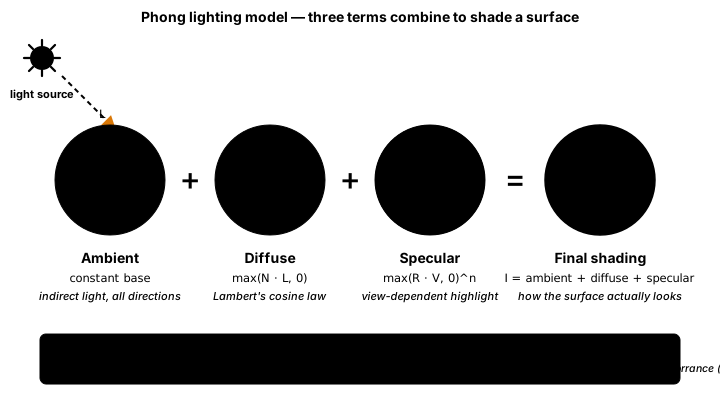
- Ambient: Indirect light bouncing everywhere (sky light)
- Diffuse: Direct light on surfaces (matte reflection)
- Specular: Shiny highlights (mirror-like reflection)
- Attenuation: Light fades with distance
- Normal Mapping: Fake surface detail with light
- Shadows: Where light doesn't reach
Lighting Implementation in Python/ModernGL
import moderngl
import numpy as np
import pygame
from pygame.locals import *
import math
from typing import Any

class LightingSystem:
    """Advanced lighting system for 3D games"""
    def __init__(self, ctx: moderngl.Context) -> None:
        self.ctx: moderngl.Context = ctx
        self.lights: list["Light"] = []
        self.max_lights: int = 32

        # Create lighting shader
        self.shader: moderngl.Program = self.create_lighting_shader()

    def create_lighting_shader(self) -> moderngl.Program:
        """Create advanced lighting shader with PBR support"""
        vertex_shader = '''
        #version 330

        in vec3 in_position;
        in vec3 in_normal;
        in vec2 in_texcoord;
        in vec3 in_tangent;

        out vec3 v_position;
        out vec3 v_normal;
        out vec2 v_texcoord;
        out vec3 v_tangent;
        out vec3 v_bitangent;
        out vec3 v_world_pos;
        out vec4 v_shadow_coord;

        uniform mat4 u_model;
        uniform mat4 u_view;
        uniform mat4 u_projection;
        uniform mat4 u_light_space_matrix;

        void main() {
            vec4 world_pos = u_model * vec4(in_position, 1.0);
            v_world_pos = world_pos.xyz;
            v_position = (u_view * world_pos).xyz;

            // Transform normals
            mat3 normal_matrix = transpose(inverse(mat3(u_model)));
            v_normal = normalize(normal_matrix * in_normal);
            v_tangent = normalize(normal_matrix * in_tangent);
            v_bitangent = cross(v_normal, v_tangent);

            v_texcoord = in_texcoord;

            // Shadow mapping
            v_shadow_coord = u_light_space_matrix * world_pos;

            gl_Position = u_projection * u_view * world_pos;
        }
        '''

        fragment_shader = '''
        #version 330

        in vec3 v_position;
        in vec3 v_normal;
        in vec2 v_texcoord;
        in vec3 v_tangent;
        in vec3 v_bitangent;
        in vec3 v_world_pos;
        in vec4 v_shadow_coord;

        out vec4 f_color;

        // Material properties
        uniform vec3 u_albedo;
        uniform float u_metallic;
        uniform float u_roughness;
        uniform float u_ao;

        // Camera
        uniform vec3 u_camera_pos;

        // Lights
        struct Light {
            int type; // 0=dir, 1=point, 2=spot
            vec3 position;
            vec3 direction;
            vec3 color;
            float intensity;
            float range;
        };

        uniform Light u_lights[32];
        uniform int u_light_count;
        uniform vec3 u_ambient_color;

        const float PI = 3.14159265359;

        // PBR calculations
        vec3 calculatePBR(vec3 albedo, float metallic, float roughness,
                         vec3 normal, vec3 viewDir, vec3 lightDir,
                         vec3 radiance) {
            vec3 halfwayDir = normalize(viewDir + lightDir);

            // Fresnel
            vec3 F0 = mix(vec3(0.04), albedo, metallic);
            float cosTheta = max(dot(halfwayDir, viewDir), 0.0);
            vec3 F = F0 + (1.0 - F0) * pow(1.0 - cosTheta, 5.0);

            // Distribution
            float NDF = pow(max(dot(normal, halfwayDir), 0.0), 2.0 / (roughness * roughness) - 2.0);
            NDF /= PI * roughness * roughness;

            // Geometry
            float k = (roughness + 1.0) * (roughness + 1.0) / 8.0;
            float NdotV = max(dot(normal, viewDir), 0.0);
            float NdotL = max(dot(normal, lightDir), 0.0);
            float G = (NdotV / (NdotV * (1.0 - k) + k)) *
                     (NdotL / (NdotL * (1.0 - k) + k));

            // BRDF
            vec3 numerator = NDF * G * F;
            float denominator = 4.0 * NdotV * NdotL + 0.001;
            vec3 specular = numerator / denominator;

            vec3 kS = F;
            vec3 kD = vec3(1.0) - kS;
            kD *= 1.0 - metallic;

            return (kD * albedo / PI + specular) * radiance * NdotL;
        }

        void main() {
            vec3 normal = normalize(v_normal);
            vec3 viewDir = normalize(u_camera_pos - v_world_pos);

            vec3 color = vec3(0.0);

            // Process each light
            for(int i = 0; i < u_light_count; i++) {
                Light light = u_lights[i];

                vec3 lightDir;
                float attenuation = 1.0;

                if(light.type == 0) { // Directional
                    lightDir = normalize(-light.direction);
                } else if(light.type == 1) { // Point
                    lightDir = normalize(light.position - v_world_pos);
                    float distance = length(light.position - v_world_pos);
                    attenuation = 1.0 / (1.0 + 0.09 * distance +
                                       0.032 * distance * distance);
                } else if(light.type == 2) { // Spot
                    lightDir = normalize(light.position - v_world_pos);
                    float distance = length(light.position - v_world_pos);
                    float theta = dot(lightDir, normalize(-light.direction));
                    float intensity = smoothstep(0.9, 0.95, theta);
                    attenuation = intensity / (distance * distance);
                }

                vec3 radiance = light.color * light.intensity * attenuation;

                color += calculatePBR(u_albedo, u_metallic, u_roughness,
                                     normal, viewDir, lightDir, radiance);
            }

            // Ambient lighting
            vec3 ambient = u_ambient_color * u_albedo * u_ao;
            color += ambient;

            // Tone mapping and gamma correction
            color = color / (color + vec3(1.0));
            color = pow(color, vec3(1.0/2.2));

            f_color = vec4(color, 1.0);
        }
        '''

        return self.ctx.program(
            vertex_shader=vertex_shader,
            fragment_shader=fragment_shader
        )

class Light:
    """Base light class"""
    def __init__(self, light_type: str = 'point') -> None:
        self.type: str = light_type
        self.position: np.ndarray = np.array([0.0, 10.0, 0.0], dtype='f4')
        self.direction: np.ndarray = np.array([0.0, -1.0, 0.0], dtype='f4')
        self.color: np.ndarray = np.array([1.0, 1.0, 1.0], dtype='f4')
        self.intensity: float = 1.0
        self.range: float = 50.0
        self.cast_shadow: bool = False

class DirectionalLight(Light):
    """Directional light (sun/moon)"""
    def __init__(self) -> None:
        super().__init__('directional')
        self.direction = np.array([-0.5, -0.7, -0.5], dtype='f4')
        self.cast_shadow = True

class PointLight(Light):
    """Point light source"""
    def __init__(self, position: Any) -> None:
        super().__init__('point')
        self.position = np.array(position, dtype='f4')
        self.attenuation: np.ndarray = np.array([1.0, 0.09, 0.032], dtype='f4')

class SpotLight(Light):
    """Spot light source"""
    def __init__(self, position: Any, direction: Any) -> None:
        super().__init__('spot')
        self.position = np.array(position, dtype='f4')
        self.direction = np.array(direction, dtype='f4')
        self.inner_cone: float = math.radians(30)
        self.outer_cone: float = math.radians(45)
Shadow Mapping
from typing import Any

class ShadowMapper:
    """Shadow mapping system"""
    def __init__(self, ctx: moderngl.Context, size: int = 2048) -> None:
        self.ctx: moderngl.Context = ctx
        self.size: int = size

        # Create shadow map texture
        self.shadow_texture: moderngl.Texture = ctx.depth_texture((size, size))
        self.shadow_fbo: moderngl.Framebuffer = ctx.framebuffer(
            depth_attachment=self.shadow_texture
        )

        # Shadow pass shader
        self.shadow_shader: moderngl.Program = self.create_shadow_shader()

    def create_shadow_shader(self) -> moderngl.Program:
        """Create depth-only shader for shadow mapping"""
        vertex_shader = '''
        #version 330

        in vec3 in_position;

        uniform mat4 u_light_space_matrix;
        uniform mat4 u_model;

        void main() {
            gl_Position = u_light_space_matrix * u_model * vec4(in_position, 1.0);
        }
        '''

        fragment_shader = '''
        #version 330

        void main() {
            // OpenGL handles depth writing automatically
        }
        '''

        return self.ctx.program(
            vertex_shader=vertex_shader,
            fragment_shader=fragment_shader
        )

    def render_shadow_map(self, scene: Any, light: Any) -> None:
        """Render scene from light's perspective"""
        self.shadow_fbo.use()
        self.ctx.viewport = (0, 0, self.size, self.size)
        self.shadow_fbo.clear()

        # Render all shadow-casting objects
        for obj in scene.objects:
            if obj.cast_shadow:
                self.shadow_shader['u_model'].value = obj.model_matrix
                obj.render(self.shadow_shader)

        # Reset viewport
        self.ctx.screen.use()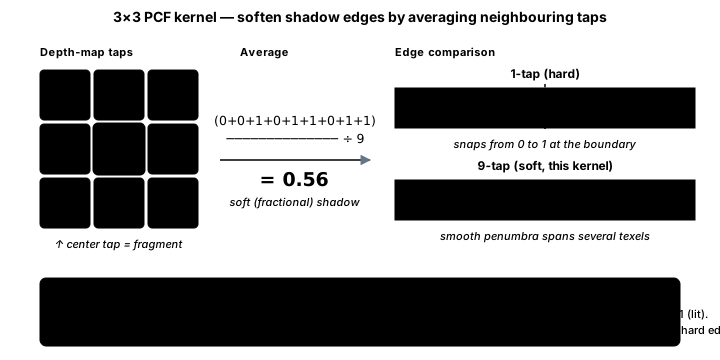
Best Practices
⚡ Lighting Tips
- Light Count: Limit dynamic lights for performance
- Deferred Rendering: Handle many lights efficiently
- LOD for Shadows: Use cascaded shadow maps
- Baked Lighting: Precompute static lights
- Light Culling: Only process visible lights
- Soft Shadows: Use PCF or variance shadow maps
- HDR: Use high dynamic range for realistic lighting
- Light Probes: Capture environment lighting
Key Takeaways
- 💡 Different light types serve different purposes
- 🌈 PBR provides realistic material rendering
- 🌑 Shadow mapping adds depth and realism
- ✨ Specular highlights make surfaces shine
- 🌍 Normal mapping adds surface detail
- 💡 Ambient light provides base illumination
- 🎮 Deferred rendering handles many lights
- 📊 Performance requires careful optimization
🏋️♂️ Practice Exercise
🏋️♂️ Exercise 1: Four Lights, One Pixel — Multi-Light Additive Composition, Per-Light-Type Falloff, Ambient Floor in One Pygame Window
Objective: Build a runnable pygame program (~95 lines) that distills the lesson's GLSL fragment-shader pipeline into a 2D pygame demo so each architectural discipline is visible per frame. The window is 1088×480 split into a 768×480 lit world (a gray checkerboard ground that serves as the diffuse layer) and a 320px sidebar. Four light sources composit additively into a per-pixel lightmap surface that is then BLEND_RGB_MULT-blended onto the diffuse layer to produce the final lit scene — the 2D analog of the lesson's GLSL fragment-shader main() that sums per-light radiance into one accumulator and then multiplies by albedo. Three orthogonal multi-light disciplines are visible per frame: (a) Multi-light additive composition — the lightmap starts at the AMBIENT base color (e.g., (15, 18, 28) cool moonlight) and each enabled light contributes via pygame.BLEND_RGB_ADD, the exact 2D analog of the lesson's `for(int i = 0; i < u_light_count; i++) color += calculatePBR(...)` summing each light into the same accumulator. Light is additive at per-pixel scope (two flashlights on the same wall give brighter wall, not 'red OR blue chosen by priority'), so the right composition operator is sum, not max-of-N or priority-pick. (b) Per-light-type falloff function — the demo runs four kinds of light, each with the lesson's matching falloff: AMBIENT is a constant RGB floor (no distance term, no direction term — it just IS), DIRECTIONAL SUN provides constant illumination across the entire scene (a pre-tinted full-window fill, no falloff because the sun is 'infinitely far' so all pixels see the same intensity), POINT LIGHTS use the lesson's exact attenuation `1.0 / (1.0 + 0.018*d + 0.0008*d*d)` (the lesson's 0.09 / 0.032 constants retuned for 2D pixel scale where 1 unit ≈ 1 pixel), pre-rendered once at startup as circular RGB splats blitted at light position with BLEND_RGB_ADD, and SPOT LIGHT combines the lesson's cone-angle smoothstep `intensity = smoothstep(0.9, 0.95, theta)` (where theta = dot(light_dir_to_pixel, light_facing_dir)) with point-light distance attenuation, rebuilt per frame because facing tracks the mouse cursor relative to the WASD-controlled player. Different falloff functions encode different physical situations — candle/torch is point, sun is directional, flashlight is spot — and the lesson's shader literally branches on `light.type == 0/1/2` to apply the right one, mirrored here by four separate code paths each gated on a toggle flag. (c) Ambient term as constant base added LAST, not multiplied — the lightmap starts filled with AMBIENT before any other light is added, modeling the lesson's `color += ambient` as the LAST line of the fragment-shader main() (after the per-light loop). Ambient is the 'sky scatter / indirect bounce' floor that prevents pure-black areas where no point/spot light reaches, providing visual reference (the world is still visible outside any light's range) AND a global mood knob (cool dim ambient = moonlit night, warm bright ambient = sunny day, near-zero ambient = dungeon-with-explicit-lights atmosphere). Adding ambient (color += ambient) keeps it independent of direct-light intensity; multiplying ambient against the per-light sum would couple the two so that doubling ambient also doubles every direct light — the additive form is what makes ambient a clean designer-tunable floor without side effects on the lights. Keys 1/2/3/4/5 toggle each light type ON/OFF independently so each discipline's contribution is directly visible: turn AMBIENT off and outside areas snap to pure black; turn DIRECTIONAL off and the global brightness drops uniformly; turn POINT 1 off and the warm-orange pool disappears; turn POINT 2 off and the cool-blue pool disappears; turn SPOT off and the mouse-aimed cone is gone. WASD moves the player (the spot light's origin); the mouse cursor sets the spot's facing direction. Sidebar shows: keybinding hints, live RGB values sampled from the lightmap at the cursor position (the per-pixel additive sum visible as concrete numbers), per-light enabled/disabled checkboxes, player position, and FPS. Cross-references particle_effects (additive composition shape — had N short-lived particles each contributing +RGB to a temp surface with BLEND_RGB_ADD; same easing-on-t shape as polish_tweening's eased-progress reshape, applied at per-pixel cone-falloff scope rather than per-tween-progress scope), platformer_camera (the lesson's quadratic point-light attenuation `1 / (1 + Kl*d + Kq*d²)` is the same approach-toward-a-target shape as platformer_camera's smooth-follow exponential decay
Instructions:
- Set up the 1088×480 pygame window (768×480 lit world + 320×480 sidebar) with a 60 FPS clock and a small monospace font for the sidebar HUD.
- Pre-render the gray checkerboard ground surface at module scope (32-pixel cells alternating between two gray shades) so the lightmap has a diffuse layer to multiply against — the visible cell pattern proves the lighting is multiplicative, not just being drawn directly to screen.
- Pre-render two POINT LIGHT splats (warm orange (255, 130, 60) and cool blue (60, 140, 255)) at startup as 400×400 RGB surfaces using a per-pixel loop that evaluates the lesson's quadratic falloff `1.0 / (1.0 + 0.018*d + 0.0008*d*d)` (with a small floor subtraction so the splat fades to 0 at the radius edge); set_colorkey((0, 0, 0)) so transparent border pixels don't pollute the BLEND_RGB_ADD blits.
- Each frame, build the lightmap surface fresh: fill with AMBIENT (or pure black if ambient is toggled off), then BLEND_RGB_ADD-blit the directional sun fill (a pre-tinted full-window surface that adds a constant warmth to every pixel), then BLEND_RGB_ADD-blit each enabled point light splat at its position, then BLEND_RGB_ADD-blit the spot light surface.
- The spot light surface is rebuilt per frame because facing tracks the mouse: compute face = (mouse - player).normalize(), then loop over the spot's bounding box and set each pixel via cone = smoothstep(0.9, 0.95, theta) where theta = dot(facing, pixel_direction_from_player), multiplied by the same point-light distance attenuation — only pixels with theta >= 0.9 (within the cone) and d < SPOT_RAD (within range) light up.
- Composite the final scene by copying the ground surface and BLEND_RGB_MULT-blitting the lightmap onto it: lightmap RGB values in [0, 255] become a per-channel multiplier where 255 means 'full diffuse pass-through' and 0 means 'pure black'. The lit ground is then blitted to (0, 0) on the main screen.
- Render the sidebar at (WORLD_W, 0): keybinding hints, the lightmap RGB value sampled at the cursor (proving the additive sum is concrete), per-light enable/disable lines, player position, and FPS.
- Toggle each light independently (1=ambient, 2=sun, 3=point1, 4=point2, 5=spot) and verify the contribution is visually isolable: ambient off makes outside areas pure black; sun off drops global brightness; each point light off removes its colored pool; spot off removes the mouse-aimed cone.
💡 Hint
The pre-rendered point-light splat is the key efficiency move: per-pixel attenuation math runs once at startup (a 400×400 = 160k cell loop that takes < 1 second), and each frame the splat is just a fast BLEND_RGB_ADD blit. The spot light has to rebuild per frame because facing changes, but using a 2-pixel stride in the bounding-box loop (range(0, SPOT_RAD*2, 2) and pygame.draw.rect for 2×2 cells) keeps it under 1ms per frame. For the cone gate, smoothstep(edge0, edge1, x) is `t = clamp((x - edge0) / (edge1 - edge0), 0, 1); return t*t*(3 - 2*t)` — the standard cubic Hermite smoothstep from the GLSL spec that the lesson's shader uses verbatim. Use BLEND_RGB_ADD (not BLEND_ADD which is a pre-pygame-2 alias) for the lightmap composition and BLEND_RGB_MULT for the final ground × lightmap product. The sample swatch in the sidebar (a small rect filled with the cursor's lightmap color) is a good sanity check — hover over a point-light's center and the swatch shows that light's color saturated; hover over an unlit area with only ambient enabled and the swatch shows the dim ambient floor.
✅ Example Solution
import math, pygame
pygame.init()

WORLD_W, WORLD_H, SIDE_W = 768, 480, 320
SCREEN_W = WORLD_W + SIDE_W
screen = pygame.display.set_mode((SCREEN_W, WORLD_H))
clock = pygame.time.Clock()
font = pygame.font.SysFont('consolas', 13)

# --- Lesson's GLSL falloff translated to 2D Python ---
def point_attenuation(d: float) -> float:
    return 1.0 / (1.0 + 0.018 * d + 0.0008 * d * d)

def make_point_splat(radius: int, color: tuple[int, int, int]) -> pygame.Surface:
    surf = pygame.Surface((radius * 2, radius * 2))
    surf.set_colorkey((0, 0, 0))
    for x in range(radius * 2):
        for y in range(radius * 2):
            d = math.hypot(x - radius, y - radius)
            if d > radius: continue
            a = max(0.0, point_attenuation(d) - 0.04)
            r = min(255, int(color[0] * a))
            g = min(255, int(color[1] * a))
            b = min(255, int(color[2] * a))
            if r or g or b: surf.set_at((x, y), (r, g, b))
    return surf

AMBIENT = (15, 18, 28)
SUN = (50, 42, 28)
P1_POS, P1_RAD = (240, 200), 200
P2_POS, P2_RAD = (560, 320), 200
SPOT_RAD = 240
P1 = make_point_splat(P1_RAD, (255, 130, 60))
P2 = make_point_splat(P2_RAD, (60, 140, 255))

ground = pygame.Surface((WORLD_W, WORLD_H))
for ty in range(0, WORLD_H, 32):
    for tx in range(0, WORLD_W, 32):
        c = 110 if (tx // 32 + ty // 32) % 2 == 0 else 80
        pygame.draw.rect(ground, (c, c, c), (tx, ty, 32, 32))

flags = {'ambient': True, 'sun': True, 'p1': True, 'p2': True, 'spot': True}
player = pygame.Vector2(380, 240)
running = True
while running:
    dt = clock.tick(60) / 1000.0
    mx, my = pygame.mouse.get_pos()
    for ev in pygame.event.get():
        if ev.type == pygame.QUIT: running = False
        if ev.type == pygame.KEYDOWN:
            if ev.key == pygame.K_1: flags['ambient'] = not flags['ambient']
            if ev.key == pygame.K_2: flags['sun'] = not flags['sun']
            if ev.key == pygame.K_3: flags['p1'] = not flags['p1']
            if ev.key == pygame.K_4: flags['p2'] = not flags['p2']
            if ev.key == pygame.K_5: flags['spot'] = not flags['spot']
    keys = pygame.key.get_pressed()
    spd = 200 * dt
    if keys[pygame.K_a]: player.x -= spd
    if keys[pygame.K_d]: player.x += spd
    if keys[pygame.K_w]: player.y -= spd
    if keys[pygame.K_s]: player.y += spd
    player.x = max(0, min(WORLD_W, player.x))
    player.y = max(0, min(WORLD_H, player.y))

    lightmap = pygame.Surface((WORLD_W, WORLD_H))
    lightmap.fill(AMBIENT if flags['ambient'] else (0, 0, 0))
    if flags['sun']:
        sun = pygame.Surface((WORLD_W, WORLD_H)); sun.fill(SUN)
        lightmap.blit(sun, (0, 0), special_flags=pygame.BLEND_RGB_ADD)
    if flags['p1']:
        lightmap.blit(P1, (P1_POS[0] - P1_RAD, P1_POS[1] - P1_RAD), special_flags=pygame.BLEND_RGB_ADD)
    if flags['p2']:
        lightmap.blit(P2, (P2_POS[0] - P2_RAD, P2_POS[1] - P2_RAD), special_flags=pygame.BLEND_RGB_ADD)
    if flags['spot']:
        spot = pygame.Surface((SPOT_RAD * 2, SPOT_RAD * 2))
        face = pygame.Vector2(mx - player.x, my - player.y)
        if face.length() > 0:
            face = face.normalize()
            for x in range(0, SPOT_RAD * 2, 2):
                for y in range(0, SPOT_RAD * 2, 2):
                    dx, dy = x - SPOT_RAD, y - SPOT_RAD
                    d = math.hypot(dx, dy)
                    if d > SPOT_RAD or d < 1: continue
                    theta = (dx / d) * face.x + (dy / d) * face.y
                    if theta < 0.9: continue
                    t = min(1.0, max(0.0, (theta - 0.9) / 0.05))
                    cone = t * t * (3 - 2 * t)
                    a = max(0.0, point_attenuation(d) - 0.04) * cone
                    pygame.draw.rect(spot, (min(255, int(255*a)), min(255, int(240*a)), min(255, int(220*a))), (x, y, 2, 2))
        spot.set_colorkey((0, 0, 0))
        lightmap.blit(spot, (int(player.x) - SPOT_RAD, int(player.y) - SPOT_RAD), special_flags=pygame.BLEND_RGB_ADD)

    final = ground.copy()
    final.blit(lightmap, (0, 0), special_flags=pygame.BLEND_RGB_MULT)
    screen.fill((10, 10, 12))
    screen.blit(final, (0, 0))
    pygame.draw.rect(screen, (25, 28, 36), (WORLD_W, 0, SIDE_W, WORLD_H))
    sx, sy = max(0, min(WORLD_W - 1, mx)), max(0, min(WORLD_H - 1, my))
    sample = lightmap.get_at((sx, sy))[:3]
    lines = [
        '1/2/3/4/5 toggle ambient/sun/p1/p2/spot',
        'WASD: player    Mouse: spot facing',
        '',
        'Lightmap @ cursor RGB: %3d %3d %3d' % sample,
        '',
        '[%s] ambient   base RGB floor' % ('X' if flags['ambient'] else ' '),
        '[%s] direct sun constant fill' % ('X' if flags['sun'] else ' '),
        '[%s] point 1   warm orange' % ('X' if flags['p1'] else ' '),
        '[%s] point 2   cool blue' % ('X' if flags['p2'] else ' '),
        '[%s] spot      mouse-aimed' % ('X' if flags['spot'] else ' '),
        '',
        'Player: %d, %d' % (player.x, player.y),
        'FPS: %d' % int(clock.get_fps()),
    ]
    for i, line in enumerate(lines):
        screen.blit(font.render(line, True, (220, 225, 235)), (WORLD_W + 16, 16 + i * 18))
    pygame.draw.rect(screen, sample, (WORLD_W + 16, 320, 200, 32))
    pygame.draw.rect(screen, (90, 95, 110), (WORLD_W + 16, 320, 200, 32), 1)
    pygame.display.flip()

pygame.quit()
🎯 Quick Quiz
Question 1: In the lesson's GLSL fragment shader, the main() function loops over u_lights[0..u_light_count] and writes `color += calculatePBR(...)` inside the loop — each light's computed contribution is added into the SAME `color` accumulator that will be written to the framebuffer. The 2D pygame demo mirrors this with BLEND_RGB_ADD blits onto a shared lightmap surface. Which statement most accurately describes WHY this additive composition is the right operator for combining N light contributions into one final per-pixel result, rather than (for example) taking the maximum of the N contributions or sorting lights by intensity and picking the top one?
Question 2: The lesson's GLSL fragment shader contains an `if (light.type == 0) ... else if (light.type == 1) ... else if (light.type == 2) ...` branch that applies a different per-light-type formula: directional lights use `lightDir = normalize(-light.direction)` with attenuation = 1.0; point lights use `attenuation = 1.0 / (1.0 + 0.09*distance + 0.032*distance*distance)`; spot lights additionally multiply by `intensity = smoothstep(0.9, 0.95, theta)` where theta is the dot product of light direction and cone-axis direction. The 2D pygame demo encodes the same three-way distinction via separate code paths for ambient/sun/point/spot. Which statement most accurately describes WHY the per-light-type branching exists in the shader, rather than (for example) a single universal falloff function applied to every light?
Question 3: The lesson's GLSL fragment shader main() ends with two final lines AFTER the per-light loop: `vec3 ambient = u_ambient_color * u_albedo * u_ao;` then `color += ambient;`. The 2D pygame demo mirrors this with `lightmap.fill(AMBIENT)` as the very first step before any direct-light blit, with key 1 toggling ambient ON/OFF. Which statement most accurately describes WHY ambient is added (color += ambient) rather than (for example) being applied only when no direct light reached a pixel, or being multiplied with the direct-light sum?
What's Next?
Now that you understand lighting systems, next we'll explore post-processing effects to add the final polish to your visuals!