Lesson 13: Character Controllers
A platformer lives or dies by how its hero moves: a jump that ignores a press made a split second too early feels broken, even when the code is "correct." In this lesson you build a complete character controller with weight, air control and two small forgiveness windows, then let the player's state pick the animation.
🎯 Learning Objectives
By the end of this lesson, you will be able to:
- Tune how a character runs with acceleration, friction and air control, in pixels per second and pixels per second squared.
- Build coyote time and a jump buffer that switch on and off on the right frames.
- Combine a variable-height jump with a rule of one jump per ground contact, so there are no free mid-air jumps.
- Drive animation from a
Stateenum, including a one-shot landing clip and events fired on chosen frames. - Debug controller bugs such as a timer that never runs, a flickering ground flag or a jump that fires twice, by watching the timers on screen.
Project: Forgiving Jump, a small platformer level where keys 1, 2 and 3 switch coyote time, the jump buffer and the jump cut on and off, so you can feel what each one adds.
In This Lesson
🏃 What a Controller Does
Watch a sprinter. They don't reach full speed on the first step; they build up to it. When they stop, they slide a little. Once they leave the ground, they can twist and lean, but they can't change direction the way they could with their feet planted. A character controller is the code that gives your hero those same habits: how fast it speeds up, how quickly it stops, how much it can steer in the air, and how high and how long it jumps.
You already have most of the pieces. Gravity & Jumping gave you gravity, terminal velocity and a variable-height jump. Tile Maps gave you float positions, per-axis collision and a 1 px ground probe. This lesson puts them into one controller and adds the parts that make it feel good.
Every frame, the controller runs the same steps in the same order:
| Parameter | Unit | What it changes |
|---|---|---|
RUN_SPEED | px/s | Top running speed |
GROUND_ACCEL | px/s² | How fast you reach top speed: low feels heavy, high feels snappy |
GROUND_FRICTION | px/s² | How fast you stop when you let go: low feels icy |
AIR_ACCEL | px/s² | Steering in the air; zero means you are locked into your jump |
JUMP_SPEED, GRAVITY | px/s, px/s² | Together they set the jump height: JUMP_SPEED² / (2 × GRAVITY) |
COYOTE_TIME, BUFFER_TIME | s | How forgiving the jump is about timing |
💡 Why this matters
Players never see your code, but they feel it within seconds. Keeping every feel value as a named constant in real units means you can tune the game by changing numbers, not by rewriting logic, and a value that feels right at 60 FPS stays right at 144 FPS.
↔️ Running: Acceleration, Friction and Air Control
The simplest controller sets the speed straight from the keys: right arrow held, vel.x = 240; nothing held, vel.x = 0. It works, but the hero starts and stops like a switch. To give it weight, move the speed toward a target a little each frame. One small helper does it:
def approach(value, target, max_step):
    """Move value toward target by at most max_step, without overshooting."""
    if value < target:
        return min(value + max_step, target)
    return max(value - max_step, target)

# Each frame, with move_x = -1, 0 or +1 from the keys:
if move_x != 0:
    accel = GROUND_ACCEL if self.on_ground else AIR_ACCEL
    self.vel.x = approach(self.vel.x, move_x * RUN_SPEED, accel * dt)
elif self.on_ground:
    self.vel.x = approach(self.vel.x, 0, GROUND_FRICTION * dt)
Three details matter here:
accel * dtis the most the speed may change this frame. WithGROUND_ACCEL = 1800, the hero reaches 240 px/s in 240 ÷ 1800 ≈ 0.13 s, whatever the frame rate.approachnever overshoots. Plainvel.x -= FRICTION * dtwould push a nearly stopped hero backward and make it jitter around zero.- No friction in the air. With no key held in mid-air, the speed stays as it was, so a running jump carries forward. Pressing a key in the air uses the smaller
AIR_ACCEL, so you can steer, but less than on the ground.
🔮 Predict, then run
When the skeleton in the next section is running, predict what happens if you set GROUND_FRICTION = 200. Then try it. Now set AIR_ACCEL = 0 and try to land a jump on a ledge you misjudged. Which change would you keep for an ice level, and which for a game about precise jumps?
🧱 A Controller Skeleton
Here is a complete, runnable controller with running, jumping and collisions, and no forgiveness yet. Save it as controller_skeleton.py and play it for a minute. Try to run off the left floor and jump at the very last moment before the gap.
import pygame

WIDTH, HEIGHT = 800, 450
RUN_SPEED = 240          # px/s
GROUND_ACCEL = 1800      # px/s²
AIR_ACCEL = 900          # px/s²: less grip in the air
GROUND_FRICTION = 2200   # px/s²
GRAVITY = 980            # px/s²
JUMP_SPEED = 470         # px/s


def approach(value, target, max_step):
    """Move value toward target by at most max_step, without overshooting."""
    if value < target:
        return min(value + max_step, target)
    return max(value - max_step, target)


class Player:
    def __init__(self, x, y):
        self.rect = pygame.FRect(x, y, 24, 36)     # float position
        self.vel = pygame.Vector2(0, 0)
        self.on_ground = False

    def update(self, move_x, jump_pressed, dt, platforms):
        # Horizontal: accelerate toward the target speed, or brake on the ground.
        if move_x != 0:
            accel = GROUND_ACCEL if self.on_ground else AIR_ACCEL
            self.vel.x = approach(self.vel.x, move_x * RUN_SPEED, accel * dt)
        elif self.on_ground:
            self.vel.x = approach(self.vel.x, 0, GROUND_FRICTION * dt)

        if jump_pressed and self.on_ground:            # strict: ground only, for now
            self.vel.y = -JUMP_SPEED
        self.vel.y += GRAVITY * dt

        # Move and resolve x, then move and resolve y.
        self.rect.x += self.vel.x * dt
        for p in platforms:
            if self.rect.colliderect(p):
                if self.vel.x > 0:
                    self.rect.right = p.left
                elif self.vel.x < 0:
                    self.rect.left = p.right
                self.vel.x = 0
        self.rect.y += self.vel.y * dt
        for p in platforms:
            if self.rect.colliderect(p):
                if self.vel.y > 0:
                    self.rect.bottom = p.top
                elif self.vel.y < 0:
                    self.rect.top = p.bottom
                self.vel.y = 0

        # A 1 px probe under the feet decides "on the ground".
        probe = pygame.FRect(self.rect.left, self.rect.bottom, self.rect.width, 1)
        self.on_ground = self.vel.y >= 0 and probe.collidelist(platforms) != -1


pygame.init()
screen = pygame.display.set_mode((WIDTH, HEIGHT))
pygame.display.set_caption("Controller Skeleton")
clock = pygame.time.Clock()
platforms = [pygame.FRect(0, 400, 330, 50), pygame.FRect(430, 400, 370, 50),
             pygame.FRect(110, 300, 150, 16), pygame.FRect(470, 270, 170, 16)]
player = Player(40, 300)

running = True
while running:
    dt = clock.tick(60) / 1000
    jump_pressed = False
    for event in pygame.event.get():
        if event.type == pygame.QUIT:
            running = False
        elif event.type == pygame.KEYDOWN and event.key in (pygame.K_SPACE, pygame.K_UP):
            jump_pressed = True                        # the moment of the press
    keys = pygame.key.get_pressed()
    move_x = int(keys[pygame.K_RIGHT]) - int(keys[pygame.K_LEFT])

    player.update(move_x, jump_pressed, dt, platforms)
    if player.rect.top > HEIGHT:                       # fell in the gap: respawn
        player.rect.topleft = (40, 300)
        player.vel.update(0, 0)

    screen.fill((22, 27, 44))
    for p in platforms:
        pygame.draw.rect(screen, (92, 112, 140), p)
    pygame.draw.rect(screen, (250, 200, 90), player.rect, border_radius=5)
    pygame.display.flip()

pygame.quit()
It follows the rules from Tile Maps:
- The position is an
FRect, so a step of 3.7 pixels is not rounded away. With a plainRect, slow speeds stall and the hero drifts. - One axis at a time. Move x and push out along x; then move y and push out along y. If you move both at once and then resolve, the code can't tell whether you hit a wall or a floor, and the hero teleports to the top of walls it runs into.
- A 1 px ground probe. After resolving, the hero's feet sit exactly on the platform, touching but not overlapping it, so
colliderectwith the hero itself would say "not on the ground" on every frame. A thin strip just under the feet does overlap the platform, soon_groundstays steady.
Notice how the jump reads the event (KEYDOWN), not get_pressed(). The controller needs to know the moment the key went down, because that is what the buffer will remember.
Play it again and count how often you run off the edge, press jump a fraction too late and fall into the gap. Nothing is wrong with the code. That is the problem the next section solves.
⏱️ Coyote Time and the Jump Buffer
People don't press buttons on an exact frame. At 60 FPS a frame lasts about 17 ms, and a press can easily land a few frames early or late. Two tiny windows absorb that:
- Coyote time (named after the cartoon coyote who runs off a cliff and hangs in the air before falling): for a short time after you leave a ledge, you can still jump as if you were on it.
- Jump buffer: if you press jump just before landing, the press is remembered and the jump fires the moment you touch down.
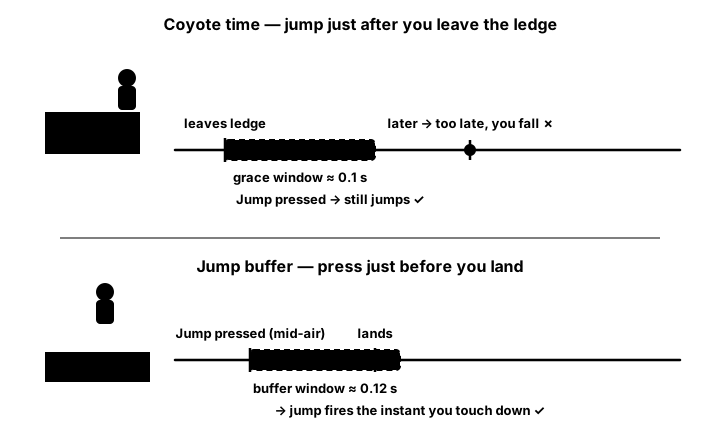
Try both in the demo. Click the canvas, then use the arrow keys (or A/D) and Space. Switch each feature off and try the same jump again. The strip at the bottom marks every press: green if it jumped, red if it was ignored.
Coding the two timers
Both are just numbers of seconds that count down by dt. The trick is when you fill them and when you empty them:
# Start of update(): self.on_ground still holds LAST frame's probe result.
if self.on_ground:
    self.coyote = COYOTE_TIME            # refilled on every grounded frame...
else:
    self.coyote = max(0.0, self.coyote - dt)   # ...and drains once you are in the air

# A press sets the buffer (press_jump() is called from the KEYDOWN event).
def press_jump(self):
    self.pressed = True
    self.buffer = BUFFER_TIME

# Later in update(): jump on a fresh OR a remembered press, from the ground OR coyote time.
if (self.pressed or self.buffer > 0) and (self.on_ground or self.coyote > 0):
    self.vel.y = -JUMP_SPEED
    self.coyote = 0.0                    # used up: no second jump from this ledge
    self.buffer = 0.0                    # used up: the press can't fire twice
self.pressed = False
self.buffer = max(0.0, self.buffer - dt)
Refilling the coyote timer on every grounded frame means you never have to catch the exact frame the hero left the ledge; the timer is simply full at that moment and starts draining. And because the jump check runs every frame, a buffered press fires on the first frame the probe finds the ground, with no special "just landed" code.
Both "used up" lines matter. Forget self.coyote = 0.0 and the hero can jump, then jump again in mid-air while the coyote timer is still running. Forget self.buffer = 0.0 and one press can fire a second jump on the next landing.
✅ Growth Mindset: Make the Invisible Visible
Timing bugs are hard to see because they happen in a tenth of a second. If your coyote time "doesn't work", you haven't failed; you just can't see the timers yet. Draw them on screen in milliseconds (the exercise does), or print on_ground, coyote and buffer every frame for a few seconds. A timer stuck at 0, or one that refills in mid-air, jumps out at you in the numbers, and each bug you find this way trains your eye for the next one.
🪂 Variable Jumps, One Jump per Landing
In Gravity & Jumping you let the player control the jump height by how long they hold the button. The controller version is the same idea: when jump is released while the hero is still rising from its own jump, cut the upward speed.
def release_jump(self):                  # called from the KEYUP event
    if self.jumping and self.vel.y < 0:  # still rising from our own jump
        self.vel.y *= JUMP_CUT           # 0.5 keeps half the upward speed
    self.jumping = False
The jumping flag is set when the jump starts and cleared on landing or when the hero bumps a ceiling. Without it, releasing jump while something else launches the hero upward, such as a spring, would cut that launch too.
The last rule is the simplest and the one most often broken: a jump needs the ground or coyote time. There is no "else, jump anyway" branch. If you want a double jump later, give the hero a counter such as air_jumps = 1 that is refilled only when the ground probe finds a platform, and spend it on a mid-air press. Because it refills only on the ground, the hero can never gain extra jumps in the air.
🎭 Let the State Pick the Animation
Once the physics has run, you know everything about the hero this frame: rising, falling, running, standing, or just landed. Name those situations with an Enum (you met Enum in Game States & Scenes) and pick one from the physics:
from enum import Enum


class State(Enum):
    IDLE = "idle"
    RUN = "run"
    JUMP = "jump"
    FALL = "fall"
    LAND = "land"


def pick_state(self):
    if not self.on_ground:
        return State.JUMP if self.vel.y < 0 else State.FALL
    if self.land_timer > 0:              # set to LAND_TIME on the frame we touch down
        return State.LAND
    if abs(self.vel.x) > 10:
        return State.RUN
    return State.IDLE
This time each member gets a value you choose, a short string, instead of auto(). Both work the same way; State.RUN.value gives back "run", which is handy for on-screen labels and, later, for saving a state to a file.
The physics decides the state, and the state decides the animation, never the other way round. That keeps one source of truth: the hero can't be drawn "running" while it is actually falling.
An animator holds one clip per state: a list of frames, the seconds each frame lasts, and whether it loops. It uses the subtract-the-remainder timing from the Intro course's Sprite Animation lesson, in seconds:
def play(self, state):
    if state == self.state:
        return                           # already playing: don't restart the clip
    self.state, self.index, self.timer, self.finished = state, 0, 0.0, False
    self._fire()                         # frame 0 may have an event too

def update(self, dt):
    frames, frame_time, loops = self.clips[self.state]
    self.timer += dt
    while self.timer >= frame_time and not self.finished:
        self.timer -= frame_time         # keep the leftover time
        if self.index + 1 < len(frames):
            self.index += 1
        elif loops:
            self.index = 0
        else:
            self.finished = True         # one-shot clips hold their last frame
            break
        self._fire()                     # run any event attached to the new frame
Two ideas from this code are worth keeping:
- One-shot clips. The landing squash plays once and holds its last frame (
loops = False). The controller'sland_timerkeeps the hero inLANDjust long enough for it. - Animation events.
animator.on_frame(State.RUN, 1, footstep)attaches a function to frame 1 of the run clip. Each time the clip enters that frame, the function runs: a dust puff, a footstep sound, or the moment a sword swing can hit. Becauseupdatesteps through frames one at a time in awhileloop, an event still fires on a slow frame that skips past it.
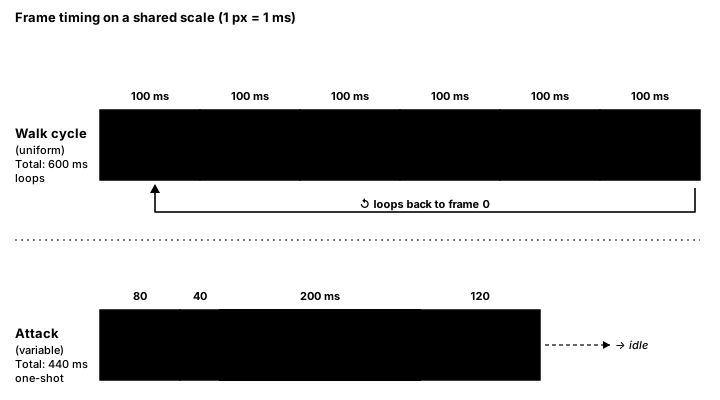
0.1). The "hit" frame of a one-shot attack is exactly where you would attach an event.🏋️ Practice Exercise: Forgiving Jump
Objective: finish a platformer controller so late and early jump presses are forgiven, short taps make short hops, and the hero's animation follows its state.
Time: about 45 minutes. Starter file: forgiving_jump_starter.py (your instructor has it). It runs, jumps and animates already, but only jumps on the exact frame the hero stands on a platform. Its numbered comments match the steps below.
- Run the starter. Run off the left floor and try a late jump over the gap; watch the HUD. (≈ 3 min)
- Coyote time: at the top of
update(), refillself.coyotetoCOYOTE_TIMEon grounded frames (whenself.coyote_on) and count it down bydtotherwise. (≈ 7 min) - Jump buffer: in
press_jump(), setself.buffer = BUFFER_TIMEwhenself.buffer_on. (≈ 3 min) - Jump cut: in
release_jump(), multiplyself.vel.ybyJUMP_CUTif the cut is on, the hero is jumping and still rising. (≈ 5 min) - Make the jump check accept a buffered press and coyote time. The two lines that use both up when the jump fires are already there; read their comments. (≈ 10 min)
- Fill in
pick_state()so the right clip plays: JUMP, FALL, LAND, RUN or IDLE. (≈ 7 min) - Test each feature with keys 1, 2 and 3: switch it off, try the same jump, switch it back on. (≈ 10 min)
You are done when:
- you can run off a ledge and still jump for a moment afterward, but not a whole second later;
- pressing jump just before landing jumps as soon as you touch down;
- a quick tap gives a short hop and a held press a full jump;
- pressing jump in mid-air after walking off a ledge (once the coyote window has closed) does nothing;
- the HUD shows IDLE, RUN, JUMP, FALL and a brief LAND at the right moments, and dust puffs appear as you run.
💡 Hint
If coyote time never seems to work, check where you refill it: it must use last frame's on_ground, at the very start of update(), before anything changes it. If the hero can jump twice in the air, look for the line that sets self.coyote = 0.0 when the jump fires. For pick_state(), check the air first (not self.on_ground), then land_timer, then speed.
✅ Example Solution
If your instructor hands you the lab file, you will see a few extra lines marked lab runtime near the top, plus an extra and frame_budget() condition on the main loop. They let the instructor's checker run the program automatically for a fixed number of frames; when you run it yourself they do nothing. You never need to write them.
"""Forgiving Jump: Intermediate Lesson 13 practice exercise (solution).

A platformer character controller with acceleration, air control, coyote
time, a jump buffer and a variable-height jump, plus an animation that is
picked from the player's state. Keys 1, 2 and 3 switch each forgiveness
feature on and off so you can feel the difference.

Controls: Left/Right or A/D to run, Space/W/Up to jump, 1/2/3 toggles.
"""
from enum import Enum

import pygame


WIDTH, HEIGHT = 800, 450
FPS = 60

# Feel parameters: speeds in px/s, accelerations in px/s², times in seconds.
RUN_SPEED = 240
GROUND_ACCEL = 1800
AIR_ACCEL = 900             # less control in the air than on the ground
GROUND_FRICTION = 2200
GRAVITY = 980
MAX_FALL_SPEED = 700
JUMP_SPEED = 470            # about 110 px high: 470² / (2 × 980)
JUMP_CUT = 0.5              # releasing jump early keeps half the upward speed
COYOTE_TIME = 0.10          # you can still jump this long after leaving a ledge
BUFFER_TIME = 0.12          # a press this long before landing still counts
LAND_TIME = 0.12            # how long the landing squash plays

BG_COLOR = (22, 27, 44)
PLATFORM_COLOR = (92, 112, 140)
TEXT_COLOR = (225, 230, 240)
JUMP_KEYS = (pygame.K_SPACE, pygame.K_w, pygame.K_UP)


class State(Enum):
    IDLE = "idle"
    RUN = "run"
    JUMP = "jump"
    FALL = "fall"
    LAND = "land"


def make_level():
    """Two floors with a gap, plus three ledges. FRects keep float positions."""
    return [
        pygame.FRect(0, 400, 330, 50),
        pygame.FRect(430, 400, 370, 50),
        pygame.FRect(110, 300, 150, 16),
        pygame.FRect(470, 270, 170, 16),
        pygame.FRect(290, 180, 120, 16),
    ]


def approach(value, target, max_step):
    """Move value toward target by at most max_step, without overshooting."""
    if value < target:
        return min(value + max_step, target)
    return max(value - max_step, target)


class Player:
    def __init__(self, x, y):
        self.rect = pygame.FRect(x, y, 24, 36)
        self.vel = pygame.Vector2(0, 0)
        self.on_ground = False
        self.facing = 1
        self.coyote = 0.0           # seconds of coyote time left
        self.buffer = 0.0           # seconds a jump press is remembered
        self.pressed = False        # a jump press arrived this frame
        self.jumping = False        # rising from our own jump (can be cut)
        self.land_timer = 0.0
        self.state = State.FALL
        self.jumps = 0
        # Forgiveness features (keys 1, 2, 3)
        self.coyote_on = True
        self.buffer_on = True
        self.cut_on = True

    def press_jump(self):
        self.pressed = True
        if self.buffer_on:
            self.buffer = BUFFER_TIME

    def release_jump(self):
        if self.cut_on and self.jumping and self.vel.y < 0:
            self.vel.y *= JUMP_CUT
        self.jumping = False

    def update(self, move_x, dt, platforms):
        was_on_ground = self.on_ground

        # 1. Coyote time: refilled on every grounded frame, drains in the air.
        if self.on_ground and self.coyote_on:
            self.coyote = COYOTE_TIME
        else:
            self.coyote = max(0.0, self.coyote - dt)

        # 2. Horizontal speed: accelerate toward the target, brake with friction.
        if move_x != 0:
            accel = GROUND_ACCEL if self.on_ground else AIR_ACCEL
            self.vel.x = approach(self.vel.x, move_x * RUN_SPEED, accel * dt)
            self.facing = move_x
        elif self.on_ground:
            self.vel.x = approach(self.vel.x, 0, GROUND_FRICTION * dt)

        # 3. Jump: a press this frame or a buffered press, while grounded or in coyote time.
        wants_jump = self.pressed or self.buffer > 0
        if wants_jump and (self.on_ground or self.coyote > 0):
            self.vel.y = -JUMP_SPEED
            self.on_ground = False
            self.coyote = 0.0       # no second jump from the same ledge
            self.buffer = 0.0       # the buffered press is used up
            self.jumping = True
            self.jumps += 1
        self.pressed = False
        self.buffer = max(0.0, self.buffer - dt)

        # 4. Gravity, capped at a terminal speed.
        self.vel.y = min(self.vel.y + GRAVITY * dt, MAX_FALL_SPEED)

        # 5. Move and resolve one axis at a time.
        self.rect.x += self.vel.x * dt
        for p in platforms:
            if self.rect.colliderect(p):
                if self.vel.x > 0:
                    self.rect.right = p.left
                elif self.vel.x < 0:
                    self.rect.left = p.right
                self.vel.x = 0
        self.rect.x = max(0, min(self.rect.x, WIDTH - self.rect.width))

        self.rect.y += self.vel.y * dt
        for p in platforms:
            if self.rect.colliderect(p):
                if self.vel.y > 0:
                    self.rect.bottom = p.top
                elif self.vel.y < 0:
                    self.rect.top = p.bottom
                    self.jumping = False
                self.vel.y = 0

        # 6. Ground probe: a 1 px strip under the feet, so the flag never flickers.
        probe = pygame.FRect(self.rect.left, self.rect.bottom, self.rect.width, 1)
        self.on_ground = self.vel.y >= 0 and probe.collidelist(platforms) != -1
        if self.on_ground:
            self.jumping = False

        # 7. Landing and state.
        if self.on_ground and not was_on_ground:
            self.land_timer = LAND_TIME
        self.land_timer = max(0.0, self.land_timer - dt)
        self.state = self.pick_state()

        if self.rect.top > HEIGHT:          # fell into the gap: respawn
            self.rect.topleft = (40, 300)
            self.vel.update(0, 0)

    def pick_state(self):
        if not self.on_ground:
            return State.JUMP if self.vel.y < 0 else State.FALL
        if self.land_timer > 0:
            return State.LAND
        if abs(self.vel.x) > 10:
            return State.RUN
        return State.IDLE


def make_frame(color, width, height):
    """One animation frame drawn in code: a body with an eye stripe."""
    surf = pygame.Surface((32, 40), pygame.SRCALPHA)
    body = pygame.Rect(0, 0, width, height)
    body.midbottom = (16, 40)
    pygame.draw.rect(surf, color, body, border_radius=5)
    pygame.draw.rect(surf, (30, 30, 40), (body.centerx + 2, body.top + 8, 6, 4))
    return surf


def make_clips():
    """{state: (frames, seconds per frame, loops)}. Squash and stretch sells the motion."""
    idle = [make_frame((250, 200, 90), 24, 36), make_frame((250, 200, 90), 25, 35)]
    run = [make_frame((250, 180, 70), w, h) for w, h in ((24, 36), (26, 34), (24, 36), (22, 37))]
    jump = [make_frame((255, 220, 120), 20, 40)]
    fall = [make_frame((240, 170, 90), 26, 34)]
    land = [make_frame((250, 160, 60), 30, 28), make_frame((250, 180, 70), 27, 32)]
    return {
        State.IDLE: (idle, 0.5, True),
        State.RUN: (run, 0.09, True),
        State.JUMP: (jump, 0.1, True),
        State.FALL: (fall, 0.1, True),
        State.LAND: (land, LAND_TIME / 2, False),
    }


class Animator:
    """Plays the clip for the current state. Times are in seconds."""

    def __init__(self, clips):
        self.clips = clips
        self.state = None
        self.index = 0
        self.timer = 0.0
        self.finished = False
        self.events = {}            # {(state, frame index): callback}

    def on_frame(self, state, index, callback):
        self.events[(state, index)] = callback

    def play(self, state):
        if state == self.state:
            return                  # already playing: don't restart the clip
        self.state = state
        self.index = 0
        self.timer = 0.0
        self.finished = False
        self._fire()

    def update(self, dt):
        frames, frame_time, loops = self.clips[self.state]
        self.timer += dt
        while self.timer >= frame_time and not self.finished:
            self.timer -= frame_time            # keep the remainder
            if self.index + 1 < len(frames):
                self.index += 1
            elif loops:
                self.index = 0
            else:
                self.finished = True            # one-shot clips hold the last frame
                break
            self._fire()

    def _fire(self):
        callback = self.events.get((self.state, self.index))
        if callback is not None:
            callback()

    def image(self):
        return self.clips[self.state][0][self.index]


def main():
    pygame.init()
    screen = pygame.display.set_mode((WIDTH, HEIGHT))
    pygame.display.set_caption("Forgiving Jump")
    clock = pygame.time.Clock()
    font = pygame.font.Font(None, 24)           # fonts load once, before the loop

    platforms = make_level()
    player = Player(40, 300)
    animator = Animator(make_clips())
    dust = []                                    # [x, y, seconds left]

    def footstep():
        dust.append([player.rect.centerx - player.facing * 10, player.rect.bottom, 0.3])

    animator.on_frame(State.RUN, 1, footstep)    # animation events: puff on each footfall
    animator.on_frame(State.RUN, 3, footstep)
    animator.play(player.state)

    held_left = held_right = False
    running = True
    while running:
        dt = clock.tick(FPS) / 1000

        for event in pygame.event.get():
            if event.type == pygame.QUIT:
                running = False
            elif event.type == pygame.KEYDOWN:
                if event.key in (pygame.K_LEFT, pygame.K_a):
                    held_left = True
                elif event.key in (pygame.K_RIGHT, pygame.K_d):
                    held_right = True
                elif event.key in JUMP_KEYS:
                    player.press_jump()
                elif event.key == pygame.K_1:
                    player.coyote_on = not player.coyote_on
                elif event.key == pygame.K_2:
                    player.buffer_on = not player.buffer_on
                elif event.key == pygame.K_3:
                    player.cut_on = not player.cut_on
            elif event.type == pygame.KEYUP:
                if event.key in (pygame.K_LEFT, pygame.K_a):
                    held_left = False
                elif event.key in (pygame.K_RIGHT, pygame.K_d):
                    held_right = False
                elif event.key in JUMP_KEYS:
                    player.release_jump()

        move_x = int(held_right) - int(held_left)
        player.update(move_x, dt, platforms)
        animator.play(player.state)
        animator.update(dt)
        for puff in dust:
            puff[2] -= dt
        dust = [puff for puff in dust if puff[2] > 0]

        screen.fill(BG_COLOR)
        for p in platforms:
            pygame.draw.rect(screen, PLATFORM_COLOR, p)
        for x, y, left in dust:
            pygame.draw.circle(screen, (170, 170, 190), (x, y - 3), 2 + 10 * (0.3 - left))
        image = animator.image()
        if player.facing < 0:
            image = pygame.transform.flip(image, True, False)
        screen.blit(image, image.get_rect(midbottom=player.rect.midbottom))

        hud = [
            f"[1] coyote {'ON ' if player.coyote_on else 'OFF'}  {player.coyote * 1000:4.0f} ms",
            f"[2] buffer {'ON ' if player.buffer_on else 'OFF'}  {player.buffer * 1000:4.0f} ms",
            f"[3] jump cut {'ON' if player.cut_on else 'OFF'}",
            f"state: {player.state.name}   jumps: {player.jumps}",
        ]
        for i, line in enumerate(hud):
            screen.blit(font.render(line, True, TEXT_COLOR), (10, 10 + i * 22))
        pygame.display.flip()

    pygame.quit()
    print(f"Jumps: {player.jumps}. Final state: {player.state.name}.")


if __name__ == "__main__":
    main()
📓 Learning Journal
Take five minutes to write in your learning journal. Jot down:
- Key concepts you learned today
- Techniques that clicked (and the ones that haven't, yet)
- Questions or confusion to bring to the next session
- Ideas to try in your own game
- Progress and feelings: how did this lesson go for you?
✍️ This lesson's prompts:
- With coyote time off, how many of your ledge jumps failed? Describe how it felt as a player, not as a programmer.
- Pick a platformer you know. Does it seem to use coyote time, a buffer or variable jumps? What makes you think so?
- Which bug took you longest today, and what finally showed you where it was?
📝 Summary
You built a complete platformer controller. Horizontal speed moves toward a target with acceleration and friction, with weaker steering in the air. The hero moves and resolves one axis at a time on an FRect, and a 1 px probe keeps the ground flag steady. Coyote time is refilled on every grounded frame and drains in the air; a jump press fills a buffer that fires the jump on landing; both are used up when the jump fires, so there are no free mid-air jumps. Releasing early cuts the jump. Finally, the physics picks a State, and the state picks the animation clip, with one-shot clips and events on chosen frames.
🎓 Key Takeaways
- Keep feel values as named constants in real units (px/s, px/s², seconds) so tuning never breaks frame-rate independence.
- Use
approach()for acceleration and friction so speed never overshoots or jitters around zero. - Coyote time forgives late presses, the buffer forgives early ones; refill, drain and use up each timer on the right frames.
- A jump needs the ground or coyote time; any extra jump must come from a counter that refills only on the ground.
- Physics decides the state, the state decides the animation; one-shot clips and frame events handle landings and footsteps.
🔭 Looking Ahead
Your hero moves well, but the world behind it is flat. In the next lesson, Parallax Scrolling, you add layers of scenery that slide at different speeds, so a 2D level suddenly has depth.
❓ Common Questions
How long should coyote time and the jump buffer be?
There is no single right answer: they are feel settings, so tune them by playing. This lesson uses 0.1 s and 0.12 s. Long enough that honest near-misses succeed, short enough that players can't jump from thin air. Ask someone else to play, because you have already learned your own timing.
Why do the jump presses come from events instead of get_pressed()?
get_pressed() tells you the key is down now, not that it just went down. Holding jump would then fire a new jump every time you land, and the buffer would have no single press to remember. The KEYDOWN event happens exactly once per press. The exercise tracks left and right with events too, which also lets the instructor's checker replay a recorded input script.
My hero pops up onto the top of walls it runs into. Why?
That happens when you move on both axes and then resolve the overlap once. The code can't tell which axis caused the overlap and pushes the hero out the shortest way, which is often up. Move and resolve x, then move and resolve y, as the skeleton does.
Why an FRect instead of a Rect?
pygame.Rect stores whole numbers. At 60 FPS, a hero creeping at 30 px/s moves 0.5 px per frame, which a Rect rounds away, so the hero never moves. pygame.FRect keeps the fractions. You can still draw it directly with pygame.draw.rect.
Should the state machine control the physics instead?
For movement states like these, letting the physics pick the state is simpler and can't disagree with what the hero is doing. For actions with their own rules, such as an attack that roots the hero for 0.3 s, a state with enter and exit steps (like the scenes in Game States & Scenes) is a good fit. Many games mix both.
Coyote time and the jump buffer count down with dt. Do they work with a fixed timestep?
Yes. This lesson keeps the capped variable step from Tile Maps, but every timer here is in seconds and counts down by dt, so it works the same inside the fixed-timestep accumulator from Velocity & Timesteps: pass STEP as dt. One caution: read the jump key's KEYDOWN event once per frame, outside the physics loop, and just set the buffer timer. Otherwise a frame that runs two physics steps could use the same press twice.
🎯 Quick Quiz
Question 1: In this lesson's controller, when is the coyote timer set back to COYOTE_TIME?
Question 2: BUFFER_TIME is 0.12. A player presses jump 0.08 s before the hero lands. What happens?
Question 3: Why does the controller move and resolve x first, and only then move and resolve y?
Question 4: The run clip is playing and the code calls animator.play(State.RUN) again. What happens?
Question 5: A playtester walks off a ledge, waits a whole second, and can still jump in mid-air. Which bug is most likely?
🌟 Going Further
- Double jump: add
air_jumps, refilled to 1 only when the ground probe finds a platform. A mid-air press with no coyote time left spends one. - Wall slide and wall jump: add a 1 px probe on each side. While falling against a wall, cap the fall speed at about 80 px/s; a jump pushes away from the wall (
vel.x = -wall_side * RUN_SPEED). Add aWALL_SLIDEstate and clip. - Dash: on Shift, set the speed to 600 px/s in the facing direction for 0.15 s, ignore gravity during the dash, and allow one dash per landing.
- Apex hang: near the top of a jump (when
abs(vel.y)is small), use half gravity for a floatier peak. Compare the feel with the jump cut on and off. - Read the docs: the pygame-ce pages for pygame.Rect and FRect and pygame.key.
- Coming up in Game Dev III: Advanced: Build a Physics Engine, where you write the integrator and collision solver behind movement like this yourself.