Lesson 6: Trigonometry for Games
By the end of this lesson you will make planets orbit, coins bob, and a turret swing to face your mouse and fire along its barrel. Three functions, cos, sin and atan2, turn angles into directions and directions into angles, and they sit behind almost every spin, orbit and aim in 2D games.
🎯 Learning Objectives
By the end of this lesson, you will be able to:
- Convert between degrees and radians and say which pygame-ce and
mathfunctions expect which. - Place objects on a circle or ellipse with
cosandsin, and animate orbits and waves withdt. - Aim at a target with
math.atan2(dy, dx)and fire along the resulting unit vector. - Rotate a drawn Surface to match an angle and keep it centered while it grows.
- Debug the classic angle bugs: swapped atan2 arguments, degree/radian mix-ups and a turret that spins the long way round.
Project: Turret Tracker, a turret that turns toward the mouse at a limited speed, fires bullets, and has planets orbiting it.
In This Lesson
🎡 Sine and Cosine: The Ferris Wheel
Imagine riding a Ferris wheel. As it turns, you can describe your seat two ways: by the angle the wheel has turned, or by how far you are across from the hub and how far up or down. Cosine and sine translate between the two. For a wheel of radius 1, at angle θ your seat is cos(θ) across and sin(θ) up or down. For a wheel of radius r, multiply both by r.
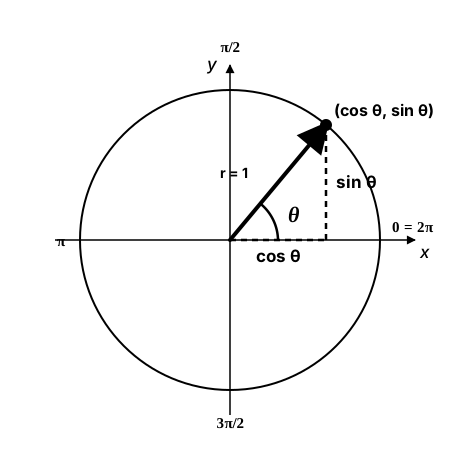
(cos θ, sin θ), and angles are measured in radians. This picture has y pointing up, so growing angles go counterclockwise. On a pygame screen y points down, so the very same formula makes growing angles turn clockwise, and π/2 points straight down.That last sentence matters so much that it is worth checking in Python. Angle 0 points right; a quarter turn (π/2) gives sin = 1, which on screen means one step down:
import math

print(math.radians(180))            # 3.141592653589793  (pi)
print(math.degrees(math.pi / 2))    # 90.0
print(math.tau)                     # 6.283185307179586  (a full turn, 2 * pi)
print(math.cos(0), math.sin(0))     # 1.0 0.0  angle 0 points right
print(round(math.cos(math.pi / 2), 3), math.sin(math.pi / 2))   # 0.0 1.0  a quarter turn points DOWN on screen
💡 Why this matters
Vectors from the last lesson answer "which way?". Angles answer "which way is it facing, and how much should it turn?". Games need both: a turret stores an angle, but its bullets fly along a vector. cos and sin turn the angle into that vector, and atan2 turns a vector back into an angle.
📐 Degrees and Radians
People measure turns in degrees (360 for a full turn). Python's math module measures them in radians, where a full turn is 2π, about 6.283, and Python names that number math.tau. One radian is about 57.3 degrees.
| Turn | Degrees | Radians |
|---|---|---|
| Quarter | 90 | math.pi / 2 ≈ 1.571 |
| Half | 180 | math.pi ≈ 3.142 |
| Full | 360 | math.tau ≈ 6.283 |
Convert with math.radians(degrees) and math.degrees(radians). The hard part is remembering who wants which:
| Uses radians | Uses degrees |
|---|---|
math.sin, math.cos, math.atan2 | pygame.transform.rotate |
Vector2.rotate, Vector2.as_polar, Vector2.angle_to |
A good habit: pick one unit for the angles you store (this lesson stores radians, because the trig functions want them) and convert only at the edge, right where you call a degrees function. If something spins about 57 times too fast or barely moves, you have mixed the units.
🪐 Circles and Orbits
Any point on a circle around a center is
x = center_x + radius * math.cos(angle)
y = center_y + radius * math.sin(angle)
Describing a point by "angle and distance from a center" instead of "x and y" is called polar coordinates, and the two lines above convert polar to ordinary screen coordinates. To make something orbit, keep its angle in a variable and grow it by an angular speed in radians per second times dt, exactly like you grow a position by a speed times dt. Use two different radii for x and y and the circle stretches into an ellipse. A negative speed orbits the other way.
import math

import pygame

pygame.init()
screen = pygame.display.set_mode((800, 600))
pygame.display.set_caption("Orbits")
clock = pygame.time.Clock()

sun = pygame.Vector2(400, 300)
planet_angle = 0.0          # radians
moon_angle = 0.0
PLANET_SPEED = 1.0          # radians per second: one lap takes 2 * pi, about 6.3 seconds
MOON_SPEED = 4.0

running = True
while running:
    dt = clock.tick(60) / 1000
    for event in pygame.event.get():
        if event.type == pygame.QUIT:
            running = False

    planet_angle += PLANET_SPEED * dt
    moon_angle += MOON_SPEED * dt
    planet = pygame.Vector2(sun.x + 180 * math.cos(planet_angle),
                            sun.y + 180 * math.sin(planet_angle))
    moon = pygame.Vector2(planet.x + 40 * math.cos(moon_angle),     # orbits the PLANET
                          planet.y + 40 * math.sin(moon_angle))
    comet = pygame.Vector2(sun.x + 320 * math.cos(-0.5 * planet_angle),   # two radii: an ellipse
                           sun.y + 120 * math.sin(-0.5 * planet_angle))   # negative: counterclockwise

    screen.fill((10, 10, 25))
    pygame.draw.circle(screen, (255, 200, 60), sun, 30)
    pygame.draw.circle(screen, (70, 130, 230), planet, 14)
    pygame.draw.circle(screen, (200, 200, 200), moon, 5)
    pygame.draw.circle(screen, (120, 230, 200), comet, 6)
    pygame.display.flip()

pygame.quit()
Watch the blue planet: its angle only grows, and it goes round clockwise. The moon's center is the planet, so it rides along while it circles. The same two lines of math place a turret's muzzle at the end of its barrel, spread coins evenly around a ring (angle = i * math.tau / count), or swing a shield around the player.
🌊 Waves: Bobbing and Pulsing
Follow only the height of a Ferris-wheel seat and you get a smooth up-and-down that never stops: a sine wave. Feed math.sin the time instead of an angle and you get gentle motion that loops forever, perfect for a hovering power-up, a breathing glow or a floating platform.
seconds += dt
bob = math.sin(seconds * math.tau * BOB_PER_SECOND) * BOB_PIXELS     # -BOB_PIXELS .. +BOB_PIXELS
coin_pos.y = coin_base_y + bob

glow = math.sin(seconds * math.tau * 0.5)                            # one pulse every 2 seconds
brightness = max(0, min(255, int(200 + 55 * glow)))                  # clamp: colors must stay 0-255
Two knobs control every wave. Multiplying the time by math.tau * frequency sets how many full cycles happen each second, and multiplying the result by an amplitude sets how far it swings. Because the time comes from dt, the bob runs at the same pace at any frame rate. Clamp any color you compute, as in the Drawing Shapes & Surfaces lesson: a channel outside 0 to 255 makes pygame raise an error.
🎯 Aiming with atan2
Orbits turn an angle into a position. Aiming runs the other way: you know where the target is and you want the angle. The gap to the target is a vector, dx across and dy down, and math.atan2(dy, dx) turns it into an angle in radians, from −π to π.
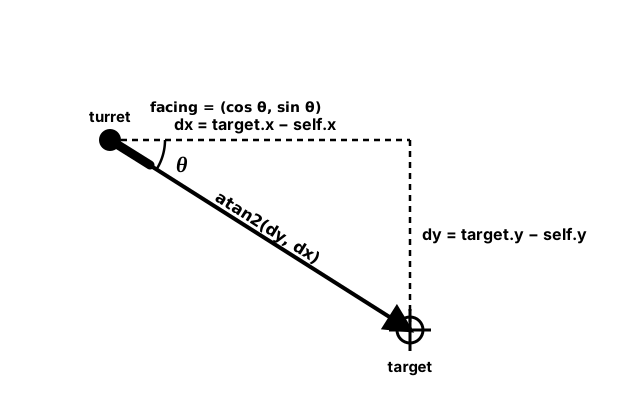
atan2(dy, dx) is the unit circle run backwards: it turns a direction into an angle, correctly in all four directions. Feed that angle back through (cos θ, sin θ) and you have a unit vector to shoot along.dx = target.x - turret.x
dy = target.y - turret.y
angle = math.atan2(dy, dx) # radians, and y comes FIRST
direction = pygame.Vector2(math.cos(angle), math.sin(angle)) # a unit vector along the aim
bullet_velocity = direction * BULLET_SPEEDWhy not the plain math.atan(dy / dx) from school? It cannot tell opposite directions apart: a target down-right (1, 1) and one up-left (-1, -1) both give 45°, and a target straight above or below divides by zero. atan2 looks at the signs of both numbers, so it gets all four quadrants right.
Move your pointer over the demo (or tap it). The readout shows the angle atan2 returns: 0 pointing right, positive angles below the turret, negative angles above it. The green planet shows the orbit formula turning clockwise.
pygame.Vector2 can do the same job in degrees, if you prefer: distance, degrees = (target - turret).as_polar() returns the length and the angle, and pygame.Vector2(1, 0).rotate(degrees) turns an angle back into a direction. Just remember the unit.
✅ Growth Mindset: Off by 90 Degrees Means You Are Almost There
If your turret aims sideways or exactly away from the mouse, that is not failure; it is a very specific clue. Aiming 90° off usually means the arguments are swapped (atan2(dx, dy)). Pointing the opposite way means you subtracted in the wrong order. Spinning wildly means radians went where degrees belong. Print the angle with math.degrees() while you move the mouse around; seeing the numbers turns guessing into checking.
🔄 Rotating a Drawn Shape
To make a ship or turret face its angle, rotate its picture with pygame.transform.rotate(surface, degrees). Three details trip everyone up:
- Degrees, counterclockwise.
rotatetakes degrees and turns counterclockwise for positive values. Your angle fromatan2is in radians and grows clockwise on screen, so pass-math.degrees(angle). - The image grows. A rotated rectangle needs a bigger box to fit its corners, so the new Surface is larger. Re-center it with
rotated.get_rect(center=position)every time, or it will wobble. - Always rotate the original. Rotate the untouched picture you drew at the start to the full angle. Rotating an already-rotated image again and again blurs it and makes it grow every frame.
Draw the picture once, pointing right (angle 0), on a transparent SRCALPHA Surface. Then each frame, rotate it to the current angle:
import math

import pygame

pygame.init()
screen = pygame.display.set_mode((800, 600))
pygame.display.set_caption("Point at the Mouse")
clock = pygame.time.Clock()

arrow = pygame.Surface((80, 40), pygame.SRCALPHA)          # drawn once, pointing RIGHT
pygame.draw.polygon(arrow, (250, 204, 21),
                    [(0, 12), (50, 12), (50, 0), (80, 20), (50, 40), (50, 28), (0, 28)])
center = pygame.Vector2(400, 300)

running = True
while running:
    clock.tick(60)
    for event in pygame.event.get():
        if event.type == pygame.QUIT:
            running = False

    mouse = pygame.Vector2(pygame.mouse.get_pos())
    angle = math.atan2(mouse.y - center.y, mouse.x - center.x)
    rotated = pygame.transform.rotate(arrow, -math.degrees(angle))   # degrees, sign flipped
    rect = rotated.get_rect(center=center)                           # re-center: it grew

    screen.fill((17, 24, 39))
    screen.blit(rotated, rect)
    pygame.draw.rect(screen, (75, 85, 99), rect, 1)                  # watch the box change size
    pygame.display.flip()

pygame.quit()
Rotating one small shape every frame like this is fine. When you have loaded images and many sprites, you will keep a small cache of rotated pictures instead, which is part of the next lesson.
🐢 Turning at a Limited Speed
Snapping a turret straight to the mouse feels robotic. Real turrets and tanks turn at a limited speed, which also gives players a chance to dodge. The idea: find the difference between where you face and where you want to face, and turn by at most TURN_SPEED * dt.
One catch: angles wrap around. Facing 170° and wanting −170° is only a 20° turn through 180°, but plain subtraction says −340°, and the turret would spin almost all the way round the long way. Wrapping the difference into the range −π to π fixes it:
def wrap_angle(angle):
    """Wrap an angle in radians into the range -pi to pi."""
    return (angle + math.pi) % math.tau - math.pi


def turn_toward(current, target, max_step):
    """Turn current toward target by at most max_step radians, the short way round."""
    difference = wrap_angle(target - current)
    if abs(difference) <= max_step:
        return target                       # close enough: arrive exactly
    if difference > 0:
        return wrap_angle(current + max_step)
    return wrap_angle(current - max_step)


angle = turn_toward(angle, aim_angle, TURN_SPEED * dt)    # TURN_SPEED in radians per second
The % (modulo) operator does the wrapping: (angle + pi) % tau always lands between 0 and 2π, and subtracting π shifts that to −π … π. wrap_angle(math.radians(350)) gives about −10° in radians: the same direction, described the short way.
🏋️ Practice Exercise: Turret Tracker
Objective: build a turret that turns toward the mouse at a limited speed, fires bullets along its barrel, and has three planets orbiting it.
Time: about 35 minutes. Starter file: turret_tracker_starter.py (your instructor has it). It runs, but the planets sit in the middle, the turret never turns and every bullet flies right. Its numbered comments match the steps below.
- In
orbit_position(), return the point on the circle withcosandsin. The planets start orbiting; check that the blue one goes clockwise. (≈ 5 min) - In
aim_angle(), returnmath.atan2(dy, dx)from the origin to the target. The HUD angle should read about −90 with the mouse above the turret. (≈ 5 min) - In
main(), rotateturret_imageby-math.degrees(angle)so the barrel points where the turret aims. (≈ 5 min) - In
Bullet.__init__, build the direction frommath.cos(angle)andmath.sin(angle). Press SPACE or click: bullets leave the muzzle along the barrel. (≈ 8 min) - In
turn_toward(), replace the instant snap with a turn of at mostmax_step, the short way round. Swing the mouse from left-up to left-down and check the turret turns through 180°, not all the way round. (≈ 10 min)
You are done when:
- the three planets orbit at different speeds, the outer one counterclockwise;
- the barrel swings smoothly toward the mouse and always takes the shorter way;
- bullets fly straight out of the muzzle at the angle the turret was facing, and disappear off screen;
- closing the window prints a line like
Fired 12 bullets. Final aim -45 degrees.
💡 Hint
If the barrel points 90° away from the mouse, check the order of the atan2 arguments: y first. If the picture turns the opposite way from the HUD angle, you forgot the minus sign in rotate. If bullets fly the right way but the barrel doesn't, your rotate call is getting radians instead of degrees. For turn_toward, test it on paper first: from 170° toward −170° the wrapped difference should be +20°.
✅ Example Solution
If your instructor hands you the lab file, you will see a few extra lines marked lab runtime near the top and and frame_budget() in the loop. They let the instructor's checker run the program automatically; when you run it yourself they do nothing.
"""Turret Tracker: Intro Lesson 6 practice exercise (solution).

A turret in the middle of the window turns toward the mouse at a limited
speed, three planets orbit it, and SPACE or a left click fires a bullet
along the barrel. Close the window to quit.
"""
import math

import pygame


WIDTH, HEIGHT = 800, 600
CENTER = pygame.Vector2(WIDTH / 2, HEIGHT / 2)
TURN_SPEED = math.radians(240)   # radians per second the turret can turn
BARREL_LENGTH = 40               # pixels from the center to the muzzle
BULLET_SPEED = 400               # pixels per second
BG_COLOR = (20, 20, 35)
TEXT_COLOR = (235, 235, 235)


def orbit_position(center, radius, angle):
    """The point on a circle around center at angle (radians).

    On screen y grows downward, so a growing angle turns CLOCKWISE.
    """
    return pygame.Vector2(center.x + radius * math.cos(angle),
                          center.y + radius * math.sin(angle))


def aim_angle(origin, target):
    """Angle in radians from origin toward target. atan2 takes y FIRST."""
    return math.atan2(target.y - origin.y, target.x - origin.x)


def wrap_angle(angle):
    """Wrap an angle in radians into the range -pi to pi."""
    return (angle + math.pi) % math.tau - math.pi


def turn_toward(current, target, max_step):
    """Turn current toward target by at most max_step radians, the short way round."""
    difference = wrap_angle(target - current)
    if abs(difference) <= max_step:
        return target
    if difference > 0:
        return wrap_angle(current + max_step)
    return wrap_angle(current - max_step)


def glow_color(seconds):
    """A color that pulses once every 2 seconds, each channel clamped to 0-255."""
    wave = math.sin(seconds * math.tau / 2)          # -1 .. 1
    red = max(0, min(255, int(180 + 75 * wave)))
    green = max(0, min(255, int(120 + 60 * wave)))
    return (red, green, 60)


class Planet:
    """A dot that orbits the center at its own radius and speed."""

    def __init__(self, radius, speed, color):
        self.radius = radius
        self.speed = speed        # radians per second
        self.color = color
        self.angle = 0.0

    def update(self, dt):
        self.angle += self.speed * dt

    def draw(self, screen):
        pygame.draw.circle(screen, (45, 45, 70), CENTER, self.radius, 1)   # the orbit path
        pygame.draw.circle(screen, self.color, orbit_position(CENTER, self.radius, self.angle), 9)


class Bullet:
    """A shot that flies in a straight line along the angle it was fired at."""

    def __init__(self, angle):
        direction = pygame.Vector2(math.cos(angle), math.sin(angle))   # a unit vector
        self.pos = CENTER + direction * BARREL_LENGTH                   # start at the muzzle
        self.vel = direction * BULLET_SPEED

    def update(self, dt):
        self.pos += self.vel * dt

    def on_screen(self):
        return 0 <= self.pos.x <= WIDTH and 0 <= self.pos.y <= HEIGHT


def make_turret_image():
    """Draw the turret once, pointing RIGHT (angle 0), on a transparent Surface."""
    size = BARREL_LENGTH * 2 + 8
    image = pygame.Surface((size, size), pygame.SRCALPHA)
    middle = size // 2
    pygame.draw.rect(image, (200, 200, 210), (middle, middle - 5, BARREL_LENGTH + 4, 10))
    pygame.draw.circle(image, (150, 160, 180), (middle, middle), 18)
    return image


def main():
    pygame.init()
    screen = pygame.display.set_mode((WIDTH, HEIGHT))
    pygame.display.set_caption("Turret Tracker")
    clock = pygame.time.Clock()
    font = pygame.font.Font(None, 26)
    turret_image = make_turret_image()

    planets = [Planet(90, 1.5, (60, 120, 230)),
               Planet(150, 0.8, (60, 200, 90)),
               Planet(220, -0.4, (230, 150, 60))]     # negative speed: counterclockwise
    bullets = []
    mouse = pygame.Vector2(pygame.mouse.get_pos())
    angle = 0.0
    seconds = 0.0
    shots = 0

    running = True
    while running:
        dt = clock.tick(60) / 1000
        seconds += dt
        for event in pygame.event.get():
            if event.type == pygame.QUIT:
                running = False
            elif event.type == pygame.MOUSEMOTION:
                mouse = pygame.Vector2(event.pos)
            elif (event.type == pygame.KEYDOWN and event.key == pygame.K_SPACE) or \
                    (event.type == pygame.MOUSEBUTTONDOWN and event.button == 1):
                bullets.append(Bullet(angle))
                shots += 1

        # Update
        angle = turn_toward(angle, aim_angle(CENTER, mouse), TURN_SPEED * dt)
        for planet in planets:
            planet.update(dt)
        for bullet in bullets:
            bullet.update(dt)
        bullets = [b for b in bullets if b.on_screen()]

        # Draw
        screen.fill(BG_COLOR)
        for planet in planets:
            planet.draw(screen)
        pygame.draw.circle(screen, glow_color(seconds), CENTER, 26, 3)
        rotated = pygame.transform.rotate(turret_image, -math.degrees(angle))  # minus: see lesson
        screen.blit(rotated, rotated.get_rect(center=CENTER))
        for bullet in bullets:
            pygame.draw.circle(screen, (255, 255, 255), bullet.pos, 3)
        hud = font.render(f"Aim: {math.degrees(angle):+6.1f} degrees   SPACE or click to fire",
                          True, TEXT_COLOR)
        screen.blit(hud, (10, 10))
        pygame.display.flip()

    pygame.quit()
    print(f"Fired {shots} bullets. Final aim {math.degrees(angle):.0f} degrees.")


if __name__ == "__main__":
    main()
📓 Learning Journal
Take five minutes to write in your learning journal (a notebook or a plain text file works). Jot down:
- Key concepts you learned today
- Techniques that clicked (and the ones that haven't, yet)
- Questions or confusion to bring to the next session
- Ideas to try in your own game
- Progress and feelings: how did this lesson go for you?
✍️ This lesson's prompts:
- Draw a quick sketch of a pygame screen and mark where angle 0, π/2, π and −π/2 point. How is it different from the math-class picture?
- List three things in games you have played that move in a circle or a wave. Which formula from this lesson would drive each one?
- Which angle bug did you hit today (swapped arguments, wrong unit, wrong sign, long way round)? How did you recognize it?
📝 Summary
Cosine and sine turn an angle into a position on a circle, so a growing angle becomes an orbit, and the sine of the time becomes a bob or a pulse. atan2(dy, dx) runs the other way, turning the gap to a target into an angle a turret can face and fire along. You kept angles in radians, converted to degrees only for pygame.transform.rotate, flipped its sign because screen angles turn clockwise, and wrapped angle differences so turning always takes the short way.
🎓 Key Takeaways
- A point on a circle is
(cx + r * cos(a), cy + r * sin(a)); on screen, growing angles turn clockwise. mathuses radians;transform.rotateandVector2's angle methods use degrees. Convert at the edge.math.atan2(dy, dx), with y first, gives the aim angle in all four directions;(cos, sin)of it is the unit vector to fire along.sin(time * tau * frequency) * amplitudemakes smooth, looping motion; clamp any color you compute.- Rotate the original picture with
-math.degrees(angle)and re-center it withget_rect(center=…). - Wrap angle differences into −π … π so turning takes the short way.
🔭 Looking Ahead
So far everything you have drawn was made from shapes in code. In the next lesson, Images & Sprite Classes, you load real pictures from files, transform them, and organize your game objects as sprites in groups.
❓ Common Questions
Why does the math module use radians at all?
Radians measure an angle by the distance traveled around a circle of radius 1, which makes the formulas behind sin and cos simpler, so most programming languages use them. You only need to convert with math.radians() and math.degrees() at the places that expect degrees.
My orbit goes counterclockwise. Did I do something wrong?
Check the sign of your angular speed and of the sin term. With y = cy + r * sin(angle) and a growing angle, the orbit is clockwise on screen. If you wrote cy - r * sin(angle) (the math-class, y-up version), it goes counterclockwise. Both are fine, as long as you know which one you chose.
Should I store angles in degrees or radians?
Either works if you are consistent. This lesson stores radians because sin, cos and atan2 use them. If you mostly use Vector2.rotate and transform.rotate, storing degrees can be simpler. Mixing them without converting is the only wrong answer.
Why does my rotated sprite wobble or drift?
Either you blit it at the old top-left position (re-center with rotated.get_rect(center=pos) every frame), or you are rotating an already-rotated image. Always rotate the original to the full current angle.
Isn't calling sin and cos every frame slow?
You may read old advice to precompute tables of sine values. In Python, math.sin is a single built-in call, and a table lookup is not free either. Write the clear version, and if a game ever feels slow, measure where the time really goes before changing anything.
🎯 Quick Quiz
Question 1: Which call gives the angle from a turret to a target correctly in all four directions?
Question 2: A planet orbits a sun at (400, 300) with radius 100. Its angle is a radians. Where is it?
Question 3: Using y = cy + r * sin(angle), which way does a point move on a pygame screen as its angle grows?
Question 4: Why does the lesson pass -math.degrees(angle) to pygame.transform.rotate?
Question 5: A coin's y is base_y + math.sin(seconds * math.tau * 2) * 10. How does it move?
🌟 Going Further
- Ring of coins: place 12 coins evenly around the turret with
angle = i * math.tau / 12, and make the whole ring rotate slowly. - Bobbing planets: give each planet's radius a small sine wave so the orbits breathe in and out.
- Field of view: tint a planet red when it is within 30° of the turret's aim. Use
abs(wrap_angle(planet_angle_from_turret - angle)) < math.radians(30). - Analog clock: draw hour, minute and second hands from the current time. Remember that 12 o'clock is straight up, which is −π/2 on screen.
- Read the docs: skim Python's math trigonometric functions and pygame-ce's transform.rotate.
- Coming up in Game Dev II: Intermediate: Interpolation & Easing gives you smooth motion curves beyond the sine wave.